

Pricing and availability
We compare 600+ stores and found this item at 10 stores. Prices updated .
Store
Reviews
Price









Average Price: $240
Standard/Professional
$100
$501+
Price Tier
Budget
Standard
High-end
Price History
Based on price data from 7 merchants for "dbx 131 Graphic Equalizer". Prices shown reflect NEW condition. Tracking began Apr 2, 2026.
* Product prices and availability are updated by Equipboard every 24hrs and are subject to change. Equipboard may receive compensation for purchases made at participating retailers linked on this site. This compensation does not affect what products or prices are displayed, or the order of prices listed. For more information, please refer to our affiliate disclosure.
Description
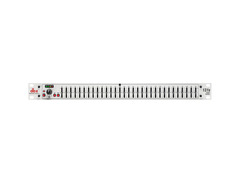
Elevate your sound to professional standards with the dbx 131 Graphic Equalizer. Renowned in the world of live sound and studio recording, this single-channel, 31-band equalizer is designed to offer precise control across a broad spectrum of frequencies. Whether you're on tour, in the studio, or setting up a permanent installation, the dbx 131 delivers unmatched reliability and sound quality that professionals have trusted for decades.
With its 1/3-octave Constant Q frequency bands, you can fine-tune your audio with the utmost precision. The intuitive design includes 20mm non-conductive sliders, allowing for easy adjustments without interference. Offering switchable boost/cut ranges of ±6dB or ±12dB, this EQ provides the flexibility needed to balance any mix. The dbx 131 is equipped with a 12dB per octave low-cut filter at 50Hz to clean up low-end rumble, and a comprehensive 4-segment LED ladder for monitoring output levels, ensuring your sound is always in check.
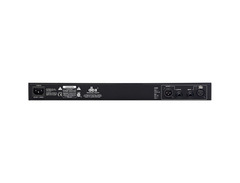
Connecting the dbx 131 to your setup is a breeze, thanks to its XLR and 1/4" TRS inputs and outputs. Built with an internal toroidal transformer, it promises a quiet operation and robust performance, making it a staple in any audio professional's toolkit. With a dynamic range of over 108dB, the dbx 131 ensures that your sound remains dynamic and clear.
Key Features:
- Single 31-band, 1/3-octave Constant Q frequency bands
- Switchable boost/cut ranges of ±6 or ±12dB
- 12dB/octave, 3dB down at 50Hz low-cut filter
- Front panel bypass switch
- ±12dB input gain range
- 4-segment LED ladders for monitoring output levels
- XLR and TRS inputs and outputs
- Internal toroidal transformer
- Frequency response of <10Hz to >50kHz
- Dynamic range of greater than 108dB
Product specs
| Number of Bands | 1 x 31-band |
| Q Type | Fixed |
| Boost/Cut Range | ±6 dB, ±12 dB (Switchable) |
| Low Cut Filter | 50Hz, 12 dB/octave |
| Faders Throw | Short-throw |
| Analog Inputs | 1 x XLR, 1 x 1/4" |
| Analog Outputs | 1 x XLR, 1 x 1/4" |
| Rack Spaces | 1U |
| Power Source | Standard IEC AC cable |
| Height | 1.75" |
| Width | 19" |
| Depth | 6" |
| Weight | 4.8 lbs. |
FAQs
-
What is the primary function of the dbx 131 Graphic Equalizer?
-
The dbx 131 Graphic Equalizer is designed to adjust the frequency response of an audio signal using its single 31-band, 1/3-octave Constant Q frequency bands, allowing precise control over specific frequency ranges.
-
How does the dbx 131s handle frequency adjustments?
-
The dbx 131s offers switchable boost/cut ranges of ±6 dB or ±12 dB, enabling users to tailor their sound with precision across its 31 bands.
-
What connectivity options are available on the dbx 131 Graphic Equalizer?
-
The dbx 131 Graphic Equalizer features XLR and 1/4" TRS inputs and outputs, providing versatile connectivity for integration into various audio setups.
-
Is the dbx 131 suitable for live sound applications?
-
Yes, the dbx 131 is suitable for live sound applications, offering features like a front panel bypass switch and 4-segment LED ladders for monitoring output levels, making it a reliable choice for live audio environments.
-
Does the dbx 131 Graphic Equalizer include a low-cut filter?
-
Yes, the dbx 131 includes a 12 dB per octave low-cut filter at 50Hz, which helps reduce unwanted low-frequency noise in your audio signal.
Videos

Alberto Martinez Del Rio Guitar
DBX 🎧 131 | Single Channel 31-band Graphic Equalizer | Test Demo Trial & Review 🎧
DBX 🎧 131 | Single Channel 31-band Graphic Equalizer | Test Demo Trial & Review 🎧
Alberto Martinez Del Rio Guitar
Reviews
PROS
-
Straightforward and easy to operate, ideal for quick setup
-
Robust and durable design, suitable for various environments
-
Excellent tone quality for its price range
-
Effectively reduces feedback in challenging acoustic settings
-
Reliable performance for live gigs
CONS
-
Lacks a power switch, inconvenient for some setups
-
Requires balanced connections to avoid signal issues
-
XLR outputs may add noticeable hiss
Owner Insights
We analyzed real musician discussions from forums and Reddit to find what players love, question, and tweak about dbx 131 Graphic Equalizer.
Features and functionality
-
The dbx 131 Graphic Equalizer is praised for its quick, on-the-fly EQ adjustments, particularly beneficial in live sound settings versus a controlled studio environment.
Source -
The dbx 2231 is valued for its Type 3 noise reduction circuit, effectively reducing hiss and noise in the signal path.
Source
Use cases and applications
-
Ideal for live theater settings to eliminate feedback, but less suited for precise home audio setups without a spectrum analyzer for accurate adjustments.
Source -
Users find the dbx 2231 useful for cutting low bass frequencies to prevent speaker damage, especially in setups where subwoofer control is limited.
Source
Comparisons
-
Users often compare 31-band graphic EQs to parametric EQs, noting that parametrics are more surgical and suitable for targeted frequency adjustments in controlled environments.
Source
Software and compatibility
-
Digital solutions like the Behringer DEQ2496 are recommended for those seeking clean digital equalization, avoiding potential noise from analog EQs.
Source
User experience
-
Some users find that using a 31-band EQ with headphones can help address specific frequency spikes, though it may not be as effective without precise measurement tools.
Source -
Owners note that the dbx 2231 allows for boosting other frequencies after cutting lows, maintaining a balanced sound even at lower volume levels.
Source
Mods and upgrades
-
Incorporating a mixing desk can help route signals more effectively, allowing for a balanced combination of processed and unprocessed audio signals for optimal sound.
Source
Based on 0 Reviews and 0 Ratings
More dbx Effects Processors
-m.webp?v=1784559423)
$320.00
in Effects Processors Rank


$238.00
in Effects Processors Rank


$60.00
in Effects Processors Rank


$161.75 - $339.00
in Effects Processors Rank


$121.25 - $280.00
in Effects Processors Rank


$239.00 - $365.00
in Effects Processors Rank


-m.webp?v=1784559409)
$70.00 - $585.00
in Effects Processors Rank


$633.00
in Effects Processors Rank


-m.webp?v=1784386757)


$1,050.00


$1,169.25


$210.81 - $380.00


Accessories & Related Items


Artist usage


Community setups


Similar


Most Popular Effects Processors
Most Popular Brands
-
Added to Equipboard on by
 equipboard
GearIQ 4934
-


