


Pricing and availability
We compare 600+ stores and found this item at 2 stores. Prices updated .
Store
Reviews
Price




* Product prices and availability are updated by Equipboard every 24hrs and are subject to change. Equipboard may receive compensation for purchases made at participating retailers linked on this site. This compensation does not affect what products or prices are displayed, or the order of prices listed. For more information, please refer to our affiliate disclosure.
Description
The Disaster Area SMARTClock Gen3 is an intelligent tap tempo and clock source for your pedalboard. Synchronize up to four separate tap-tempo pedals plus multiple MIDI-clock capable units.
The SMARTClock Gen3 is simple to use – just tap the footswitch and all your gear will synchronize to its internal clock.
Don’t feel like tapping in the time? Spin the illuminated knob to set the tempo in 1.0 or 0.5 BPM increments for more precise adjustments.
Tap the knob to view or change the subdivisions or output settings for each jack, then hold the knob to save the current settings to a preset.
Hold the footswitch down to advance to the next preset. You can even set the number of accessible presets so that you only use what you need.
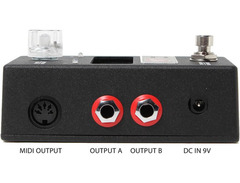
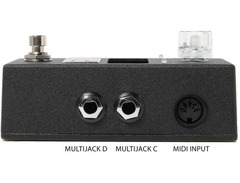
Each tempo preset allows you to specify a tempo in BPM or milliseconds, as well as subdivisions or toggle settings for each of the 4 outputs. You can also set the SMARTClock to send a MIDI Program Change to an external MIDI device.
Product specs
| Brand | Disaster Area Designs |
| Model | SMARTClock Gen3 |
| Finish | Various |
| Year | 2015 - 2025 |
| Made In | United States |
| Categories | Controller, Expression and Volume Pedals |
FAQs
-
What is the primary function of the Disaster Area Designs SMARTClock Gen3?
-
The SMARTClock Gen3 is a MIDI clock generator and controller that synchronizes tempo across multiple effects pedals and devices, ensuring precise timing and coordination in your setup.
-
Can the SMARTClock Gen3 control multiple devices simultaneously?
-
Yes, the SMARTClock Gen3 can control several devices at once by sending MIDI clock signals, making it ideal for complex pedalboards and setups requiring synchronized timing.
-
Is the Disaster Area Designs SMARTClock Gen3 compatible with all effects pedals?
-
The SMARTClock Gen3 is compatible with any effects pedal or device that accepts MIDI clock signals, allowing for broad integration with various setups.
-
How does the SMARTClock Gen3 connect to other devices?
-
The SMARTClock Gen3 connects via MIDI outputs, which can be used to link and synchronize multiple MIDI-compatible pedals and devices in your setup.
-
Does the SMARTClock Gen3 require a specific type of power supply?
-
The SMARTClock Gen3 requires a standard 9V DC power supply, similar to those used by many guitar pedals, ensuring easy integration into existing power setups.
Videos

Emily Hopkins
I synced my pedals and here’s what happened
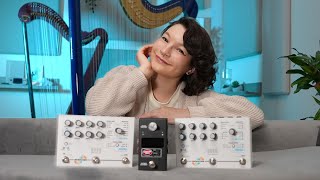
I synced my pedals and here’s what happened
Emily Hopkins
Reviews
Owner Insights
We analyzed real musician discussions from forums and Reddit to find what players love, question, and tweak about Disaster Area Designs SMARTClock Gen3.
Features and functionality
-
The SMARTClock Gen3 outputs two pulses via TRS, primarily for sending tap tempo to delay pedals rather than CV clock signals.
Source -
SmartClock settings like P CH: Ch 16, T DP: 1.0, and MCLK: ON are used successfully in some setups, contrasting with issues in others.
Source -
Mood MKII syncs delays and microloops to MIDI clock with various subdivisions, enhancing frippertronics-style looping when decay is set low.
Source
Use cases and applications
-
Some users attempt to use the SMARTClock's MIDI output to sync with a Volca, then utilize Volca's sync for other devices.
Source -
Utilizing the SMARTClock with a Retrokits RK006 MIDI splitter allows conversion of USB MIDI to TRS MIDI for better integration with other devices.
Source -
SmartClock can be used as a MIDI interface to control and automate pedal parameters via Thermae/Gen Loss MK-II and Ableton plugins.
Source -
Integrating MIDI clock with Thermae adds pitch-shifted sequences, enriching sonic textures.
Source
Software and compatibility
-
Success in sending multijack MIDI from the SMARTClock to CV input on QuNexus is inconsistent and doesn't disable the internal clock of the QuNexus.
Source -
The SmartClock Gen3 struggles to sync with Helix Rack when receiving MIDI clock, despite using known good cables and the latest firmware.
Source -
Issues persist when attempting to sync SmartClock with Helix Rack or directly from Logic via a Roland USB to 5-pin MIDI adapter.
Source
Based on 0 Reviews and 0 Ratings
Artist usage
Add artist

Genre Usage
Based on how artists on Equipboard use this gear, it is most commonly found in the following genres.
Used With
Based on how musicians on Equipboard use Disaster Area Designs SMARTClock Gen3, it is most commonly used with the following gear.




Community setups
Show yours
More Disaster Area Designs Effects Pedal Accessories


$185.96 - $219.00
in Effects Pedal Accessories Rank


$239.00 - $279.00
in Effects Pedal Accessories Rank


$128.83 - $179.99
in Effects Pedal Accessories Rank


$3.99 - $5.60
in Effects Pedal Accessories Rank

$149.00 - $169.00
in Effects Pedal Accessories Rank


$137.00 - $150.00
in Effects Pedal Accessories Rank


$190.00 - $229.99
in Effects Pedal Accessories Rank


$89.00 - $152.00
in Effects Pedal Accessories Rank


$191.47 - $220.00
in Effects Pedal Accessories Rank

.jpg?v=1784070940)


$99.00 - $105.99
in Effects Pedal Accessories Rank


$110.00 - $199.00
in Effects Pedal Accessories Rank


$279.99 - $299.99
in Effects Pedal Accessories Rank


$209.00 - $253.00
in Effects Pedal Accessories Rank


$39.42 - $49.00
in Effects Pedal Accessories Rank


$105.00 - $199.00
in Effects Pedal Accessories Rank


$145.00 - $279.00
in Effects Pedal Accessories Rank


$133.00 - $169.99
in Effects Pedal Accessories Rank


$94.00 - $169.00
in Effects Pedal Accessories Rank


$230.00 - $289.00
in Effects Pedal Accessories Rank


$42.00
in Effects Pedal Accessories Rank


$435.14 - $903.97
in Effects Pedal Accessories Rank


$30.59 - $49.99
in Effects Pedal Accessories Rank


$49.00 - $72.00
in Effects Pedal Accessories Rank


$262.87
in Effects Pedal Accessories Rank


$299.00 - $549.99
in Effects Pedal Accessories Rank
.jpg?v=1784353662)


$169.00 - $189.00
in Effects Pedal Accessories Rank


$99.99 - $111.00
in Effects Pedal Accessories Rank


$6.99 - $47.00
in Effects Pedal Accessories Rank


$119.99 - $129.99
in Effects Pedal Accessories Rank


$171.00 - $215.00
in Effects Pedal Accessories Rank

$71.00 - $92.49
in Effects Pedal Accessories Rank


$6.99 - $32.99
in Effects Pedal Accessories Rank


$26.00 - $29.00
in Effects Pedal Accessories Rank


$36.99
in Effects Pedal Accessories Rank


$69.99 - $98.00
in Effects Pedal Accessories Rank


$72.00
in Effects Pedal Accessories Rank

Similar


Gear Guides






Most Popular Effects Pedal Accessories
Most Popular Brands
-
Added to Equipboard on by
 luxiu
luxiuGearIQ 44621
-


