

Pricing and availability
We compare 600+ stores and found this item at 9 stores. Prices updated .
Store
Reviews
Price









Average Price: $102
Budget/Beginner
$200
$501+
Price Tier
Budget
Standard
High-end
Price History
Based on price data from 5 merchants for "Korg microKEY 25". Prices shown reflect NEW condition. Tracking began Apr 2, 2026.
* Product prices and availability are updated by Equipboard every 24hrs and are subject to change. Equipboard may receive compensation for purchases made at participating retailers linked on this site. This compensation does not affect what products or prices are displayed, or the order of prices listed. For more information, please refer to our affiliate disclosure.
Description
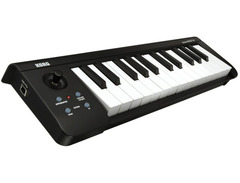
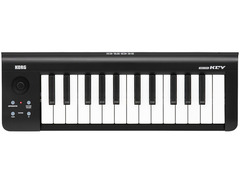
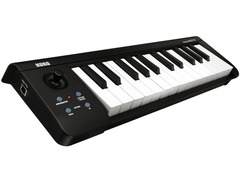
Unleash your creativity with the Korg microKEY 25, a compact and versatile MIDI Keyboard Controller designed to bring your musical ideas to life. This portable musical wizard is known for its superb playability and is sure to impress with its velocity-sensitive, Natural Touch mini keybed, providing excellent responsiveness for an expressive performance.
The microKEY 25 is your perfect travel companion, allowing you to create music on the go, no matter where inspiration strikes. It boasts an impressive Joystick feature that offers simultaneous control over multiple parameters. This feature is typically found on high-end controllers, making it a stand-out addition to this compact device.
Making music has never been easier with the Korg microKEY 25's built-in tempo-synced arpeggiator function, allowing you to experiment with unique sound patterns. The device also comes with a download code for Korg's M1Le software, giving you access to a multitude of preset sounds and waveforms.
The microKEY 25 is not only functional but also practical, as it can be powered directly from your iPad via the Camera Connection Kit, eliminating the need for an external power supply. This simple and easy-to-use controller is perfect for both beginners and seasoned musicians, offering a wide range of creative possibilities.
Key Features:
- 25 Natural Touch mini keys for comfortable playing
- Velocity-sensing keybed for natural expression
- Joystick for simultaneous control over multiple parameters
- Built-in tempo-synced arpeggiator for creative sound patterns
- USB Bus powered for portability and ease of use
- Core MIDI compatibility for plug-and-play compatibility with any computer or iPad
- Comes with Korg’s M1Le software for a wide range of sounds
- Includes USB cable and additional bundled software
Owner's manual
Korg microKEY 25 User ManualProduct specs
| Available since | September 2012 |
| Aftertouch | No |
| Pitch Bend / Modulation | Yes |
| Rotary Encoder | 0 |
| Fader (Amount) | 0 |
| Pads | 0 |
| Display | No |
| MIDI interface | No |
| Sustain Pedal Connection | No |
| USB-port | Yes |
| Mains Operation | No |
| Battery Operation | No |
| Bus-Powered | Yes |
| Width in mm | 395 mm |
| Height in mm | 53 mm |
| Depth in mm | 131 mm |
| Weight in kg | 0,7 kg |
| Special Features | Arpeggiator |
FAQs
-
Is the Korg microKEY 25 compatible with iPads and iPhones?
-
Yes, the Korg microKEY 25 can connect to iPads and iPhones using an Apple Lightning to USB Camera Adapter and a USB cable, allowing you to use apps like KORG Gadget, KORG Module, and GarageBand.
-
Does the Korg microKEY 25 have weighted keys?
-
The Korg microKEY 25 does not have weighted keys. The keys are more akin to semi-weighted, providing a responsive feel suitable for portable use.
-
How is the Korg microKEY 25 powered?
-
The Korg microKEY 25 is bus-powered via USB, meaning it draws power directly from your computer, eliminating the need for an external power supply.
-
Does the Korg microKEY 25 support aftertouch?
-
No, the Korg microKEY 25 does not support aftertouch, but it does include pitch bend and modulation controls for expressive playing.
-
Can I connect a sustain pedal to the Korg microKEY 25?
-
No, the Korg microKEY 25 does not have a connection for a sustain pedal, focusing on compactness and portability for basic MIDI control.
Videos

Reuben Chng
Korg microKEY2 Air Review - Playing music without cables

Korg microKEY2 Air Review - Playing music without cables
Reuben Chng
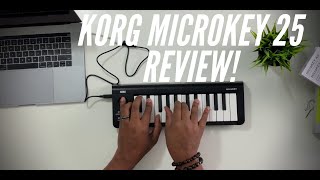
Korg Microkey 25 Review!

John Mike

Korg microKEY AIR Keyboard Controller Review — Daniel Fisher

Sweetwater
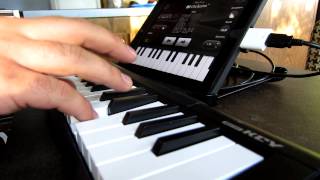
Korg MicroKey25 demo

Aras Buntinas
Korg MicroKey 25 Review

Rapi TV
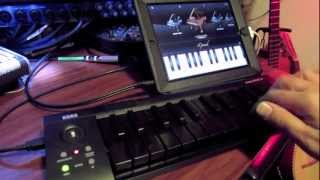
Korg MicroKey 25 demo with iPad iGrand all Black Keys
Aras Buntinas

Korg microKEY 25 USB MIDI Keyboard in 4k UHD

CraigShipp.com
![Video thumbnail for [Unboxing] Korg MicroKEY 25 MIDI Controller by BK Hong](https://img.youtube.com/vi/VNvBNIGIAUA/mqdefault.jpg)
[Unboxing] Korg MicroKEY 25 MIDI Controller

BK Hong
KORG MICROKEY 25 Honest REVIEW IN HINDI

A Music Makers
Reviews
PROS
-
Plug-and-play, no driver installation needed
-
Compact size fits well in small studio spaces
-
Touch-sensitive keys with a good feel
-
Includes a pitch bend/modulation joystick for creative control
-
Features a built-in arpeggiator with tempo-sync
-
Compatible with major DAWs and operating systems
-
USB powered for easy connectivity and mobility
-
Suitable for travel, fits easily in a backpack
-
Offers a discount on Korg legacy collection VST package upon registration
CONS
-
Velocity sensitivity can be inconsistent
-
Joystick has a small range of movement, not as precise as wheels
-
Bundled software consists of severely stripped-down versions
-
Keys may feel different to professional keyboard/piano players
Owner Insights
We analyzed real musician discussions from forums and Reddit to find what players love, question, and tweak about Korg microKEY 25.
Features and functionality
Use cases and applications
-
37 keys can be limiting for two-handed play but are adequate for portable setups and soft-synth use.
Source -
Digital pianos with USB for MIDI, like Casio Privia, allow headphone use without computer involvement, ideal for shared living spaces.
Source -
The MicroKEY is praised for its portability and is often used in Bluetooth setups, particularly the MicroKEY Air model.
Source
Comparisons
-
Smaller keys are more suited for music production and live performance setups, while full-size keys are recommended for learning music.
Source -
The Korg MicroKEY's keybed, using Natural Touch technology, is considered superior to Novation's LaunchKey mini 37, but not as robust as Yamaha's Reface or Arturia's KeyStep.
Source
Software and compatibility
-
BandLab Studio is recommended for beginners; it defaults to a grand piano sound and supports velocity sensitivity on the MicroKEY.
Source -
Salamander piano software supports velocity sensitivity and requires a VST host like VSTHost to operate, making it compatible with the MicroKEY for simple setups.
Source -
The Salamander piano's .dll file functions as a VST plugin and is recommended to be used with a host program for ease of use with the MicroKEY.
Source -
Users note the importance of USB connectivity, mentioning the MicroKEY Air's Bluetooth as a convenient alternative for mobile use.
Source
Build quality
-
Owners describe the Korg MicroKEY's key action as light with slightly mushy landings, making it less ideal for players who prefer a firmer touch.
Source
4.5 out of 5
Based on 4 Reviews and 23 Ratings

924
Best portable USB MIDI controller
ive tried tons of these rinky dink laptop controllers and Korg really did it with this one. the built in midi arpeggiator and pitch bend joystick makes this the smallest keyboard Ive ever seen with pitch bend. great for making beats on an airplane or the like and feels somewhat soild of a build quality. If you buy this new be sure to take advantage of the M1 LE software, if you register it on the Korg website they give you 100 dollars off of the Korg legacy collection vst package which is quite spectacular!


Artist usage
Add artist

He uses it in his music video for "Carry Me Away".


In Flume's Deluxe Album "Producers Disc", Harley shows his very basic setup he used for his debut album which includes a Korg MicroKEY 25 USB Keyboard which he uses for writing melodies.


Hecker can be seen using a microKEY at 0:24 in this video.


The keyboard is shown clearly on the left side of the video, from the beginning, and continuing almost all the way through the video.

.jpg)
In this Instagram pic captioned, "Preparing ourselves for the awesomes Matrix Club Tirana and Ministry Of Sound London this weekend! Can't wait, see you there!", Roul and Doors can be seen in front of their studio setup, where you can spot their Korg microKEY25 USB MIDI Keyboard.


We can see him using it throughout the video to make a boom bap beat.

.jpg)
In this picture he is making music using this keyboard



In the opening song, Suzuka Tomita plays a Korg microKEY 25 before switching to another instrument, as seen in the video uploaded by Serpentine on YouTube.


Genre Usage
Based on how artists on Equipboard use this gear, it is most commonly found in the following genres.
Used With
Based on how musicians on Equipboard use Korg microKEY 25, it is most commonly used with the following gear.


Similar
Add recommendation1 alternative for Korg microKEY 25, curated by the Equipboard community.

$6.60 - $79.00
More Korg MIDI Keyboard Controllers

$39.99 - $99.99
in MIDI Keyboard Controllers Rank


$119.00 - $199.99
in MIDI Keyboard Controllers Rank


$120.00 - $249.99


$140.63 - $239.99


$128.50 - $219.99


$93.42 - $199.99


$83.00 - $179.99


$80.90 - $169.99


$93.00 - $219.99

$120.00 - $249.99


$499.00 - $1,150.00


-m.webp?v=1784338155)


$248.00 - $279.99
in MIDI Keyboard Controllers Rank
-m.webp?v=1784819051)
$85.00 - $149.50
in MIDI Keyboard Controllers Rank


.jpeg?v=1784831401)

$174.45 - $712.00
in MIDI Keyboard Controllers Rank


$135.00 - $678.00
in MIDI Keyboard Controllers Rank


$32.72 - $59.00
in MIDI Keyboard Controllers Rank


$46.41
in MIDI Keyboard Controllers Rank


-m.webp?v=1784818827)
$406.30 - $469.00
in MIDI Keyboard Controllers Rank


$76.07 - $89.00
in MIDI Keyboard Controllers Rank


Accessories & Related Items


-s.webp?v=1784844887)


-s.webp?v=1784819425)


Community setups


Gear Guides







Most Popular MIDI Keyboard Controllers
Most Popular Brands
-
Added to Equipboard on by
juancruzguillenGearIQ 258
-


