

Pricing and availability
We compare 600+ stores and found this item at 9 stores. Prices updated .
Store
Reviews
Price









Average Price: $119
Budget/Beginner
$200
$501+
Price Tier
Budget
Standard
High-end
Price History
Based on price data from 6 merchants for "Korg microKEY Air 25-Key Bluetooth MIDI Controller". Prices shown reflect NEW condition. Tracking began Apr 2, 2026.
* Product prices and availability are updated by Equipboard every 24hrs and are subject to change. Equipboard may receive compensation for purchases made at participating retailers linked on this site. This compensation does not affect what products or prices are displayed, or the order of prices listed. For more information, please refer to our affiliate disclosure.
Description
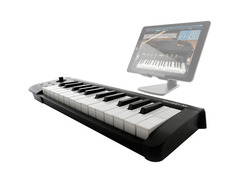
Embrace the freedom of wireless performance with the Korg microKEY Air 25-Key Bluetooth MIDI Controller. This ultra-compact, portable keyboard is designed for the musician on the move, offering unparalleled flexibility whether you're composing in a café or producing in your home studio. The microKEY Air stands out with its Bluetooth Smart connectivity, allowing you to pair it effortlessly with your iPad, iPhone, or Mac, eliminating the hassle of cables and fostering a tidy workspace. Its Natural Touch mini keyboard ensures that despite its compact size, your playing experience remains comfortable and dynamic, enabling expressive performances without sacrificing portability.
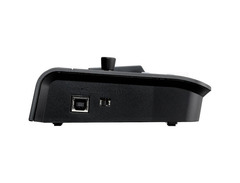
The microKEY Air is not just about wireless convenience; it's also about providing you with options. For those times when you prefer a wired connection or your device does not support Bluetooth, the microKEY Air comes equipped with a USB port for easy plug-and-play functionality on both Mac and Windows systems. This MIDI controller is designed to adapt to your creative workflow, making it a versatile companion for both live performances and studio sessions.
Battery life is a non-issue with the microKEY Air. With just two AA batteries, you can expect up to a month of operation with an average use of one hour per day. This means more time making music and less time worrying about power. The inclusion of a sustain button (25-key model) or a pedal connection (37, 49, 61-key models) further enhances your control over your performance, ensuring that every note and chord is captured exactly as intended.
Key Features:
- 25 Natural Touch mini keys provide a responsive and comfortable playing experience.
- Bluetooth Smart technology offers stable, low-latency wireless connectivity for seamless integration with music apps on iOS and Mac.
- Versatile connectivity options include USB for wired connections and battery operation for ultimate portability.
- Includes a comprehensive software bundle from Korg and other major software brands, allowing you to start creating music right out of the box.
- Compact and lightweight design makes it an ideal choice for musicians and producers on the go.
- Features such as a pitch/mod joystick, octave shift, and sustain button offer expressive control for dynamic performances.
Owner's manual
Korg microKEY Air 25-Key Bluetooth MIDI Controller User ManualProduct specs
| Type | Keyboard Controller |
| Number of Keys | 25 |
| Type of Keys | Korg Natural Touch mini-keys |
| Other Controllers | Pitch/Modulation joystick |
| MIDI I/O | USB/Bluetooth |
| USB | 1 x USB Type-B |
| Bluetooth | v4.2 LE (MIDI) |
| Software | Legacy Collection M1 Le, UVI Digital Synsations, AAS modules, Propellerhead Reason Limited |
| OS Requirements - Mac | OS X 10.10 or later, iOS 8 or later |
| OS Requirements - PC | Windows 7 SP1 or later |
| Power Supply | USB powered / 2 x AA batteries |
| Height | 2.05" |
| Width | 15.55" |
| Depth | 5.16" |
| Weight | 1.48 lbs. |
FAQs
-
How does the Korg microKEY Air 25 connect to my computer?
-
The Korg microKEY Air 25 can connect to your computer via USB or Bluetooth. It uses USB for a direct connection or Bluetooth v4.2 LE for wireless MIDI connectivity, making it versatile for different setups.
-
Is the Korg microKEY Air 25 compatible with iOS devices?
-
Yes, the Korg microKEY Air 25 is compatible with iOS devices running iOS 8 or later, allowing you to control music apps wirelessly using Bluetooth MIDI.
-
What power options are available for the Korg microKEY Air 25?
-
The Korg microKEY Air 25 can be powered via USB or with 2 AA batteries, providing flexibility for both stationary and portable use.
-
What software is included with the Korg microKEY Air 25?
-
The Korg microKEY Air 25 comes with software such as the Korg Legacy Collection M1 Le, UVI Digital Synsations, and AAS modules, enhancing your music production capabilities.
-
Are the keys on the Korg microKEY Air 25 full-size?
-
The Korg microKEY Air 25 features Korg Natural Touch mini-keys, which are smaller than full-size keys but designed to provide a comfortable playing experience.
Videos

Sound_Cubizm10 by Gisaione
Midi Keyboard (3) - KORG microKEY Air-25 FIRST IMPRESSION
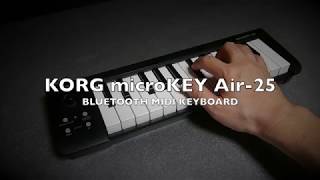
Midi Keyboard (3) - KORG microKEY Air-25 FIRST IMPRESSION
Sound_Cubizm10 by Gisaione

Korg Microkey Air 25 - Unboxing ( Best Wireless Bluetooth Midi Keyboard )

Xafee
Reviews
PROS
-
Highly portable, perfect for travel and on-the-go use
-
Bluetooth connectivity allows wireless use with devices
-
Works well with major DAWs like Pro Tools, no latency via USB
-
Includes useful buttons and a joystick for enhanced control
-
Comes with a free bundle of Korg sounds
-
Good build quality, solid and reliable for its size
-
Intuitive to use, with some setup parameters customizable via editor
-
Can be used for composing, aiding singers, and live performance flexibility
CONS
-
Some users experience Bluetooth latency, affecting real-time play
-
Mini keys may be uncomfortable for those used to standard sizes
-
Lacks a sustain pedal jack, only offers a sustain button
-
Requires additional steps to connect Bluetooth on some devices
-
Documentation for setup can be sparse and challenging
-
Black keys could be larger for better playability
-
Occasional buggy Bluetooth connection that requires reconnection
Owner Insights
We analyzed real musician discussions from forums and Reddit to find what players love, question, and tweak about Korg microKEY Air 25-Key Bluetooth MIDI Controller.
Software and compatibility
-
Owners report Bluetooth MIDI connection can be unreliable, requiring multiple attempts to connect, particularly with Logic Pro on Mac.
Source -
Specific issues noted with Logic Pro disconnecting the device, even when it works with other software like GarageBand.
Source -
Attempting to use Bluetooth headphones with the microKEY Air can cause performance issues, suggesting wired headphones for optimal use.
Source
User experience
-
Despite connection issues, once connected, the microKEY Air performs well, and users appreciate its compact size and excellent battery life for desk setups.
Source -
Users report no latency issues with the microKEY Air 49 unless the iPad buffer is set extremely high, indicating reliable real-time performance.
Source
Use cases and applications
Features and functionality
-
The Korg microKEY Air 49 offers great playable keys with extended battery life, making it highly portable without compromising on performance.
Source
3.5 out of 5
Based on 0 Reviews and 2 Ratings
Artist usage
Add artist
At 2:44 and a few other parts in this video The Making Of Drake's "Blue Tint" With Supah Mario, Supah Mario can be seen using his Korg microKEY Air MIDI keyboard in conjunction with his MacBook running FL Studio as he demonstrates how he put together the track Blue Tint for Drake.


Genre Usage
Based on how artists on Equipboard use this gear, it is most commonly found in the following genres.
Used With
Based on how musicians on Equipboard use Korg microKEY Air 25-Key Bluetooth MIDI Controller, it is most commonly used with the following gear.


More Korg MIDI Keyboard Controllers

$39.99 - $99.99
in MIDI Keyboard Controllers Rank


$119.00 - $199.99
in MIDI Keyboard Controllers Rank


$56.00 - $139.99
in MIDI Keyboard Controllers Rank


$120.00 - $249.99


$140.63 - $239.99


$128.50 - $219.99


$93.42 - $199.99


$83.00 - $179.99


$93.00 - $219.99

$120.00 - $249.99


$499.00 - $1,150.00


-m.webp?v=1784338155)


$248.00 - $279.99
in MIDI Keyboard Controllers Rank
-m.webp?v=1784893755)
$85.00 - $149.50
in MIDI Keyboard Controllers Rank


.jpeg?v=1784860561)

$174.45 - $712.00
in MIDI Keyboard Controllers Rank


$135.00 - $678.00
in MIDI Keyboard Controllers Rank


$32.72 - $59.00
in MIDI Keyboard Controllers Rank


$46.41
in MIDI Keyboard Controllers Rank


-m.webp?v=1784892004)
$398.88 - $469.00
in MIDI Keyboard Controllers Rank


$76.07 - $89.00
in MIDI Keyboard Controllers Rank


Accessories & Related Items


Community setups


Similar


Gear Guides







Most Popular MIDI Keyboard Controllers
Most Popular Brands
-
Added to Equipboard on by
.jpg?v=1784736721) gchiaren
gchiarenGearIQ 37849
-


