
Pricing and availability




* Product prices and availability are updated by Equipboard every 24hrs and are subject to change. Equipboard may receive compensation for purchases made at participating retailers linked on this site. This compensation does not affect what products or prices are displayed, or the order of prices listed. For more information, please refer to our affiliate disclosure.


Reviews
4.0 out of 5
Based on 1 Review and 1 Rating

266
From the creator...
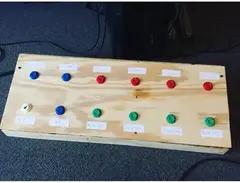
I am a bit bias towards this product, since I made it. It's nothing really special. It actually a glorified keyboard. My laptop is the brains of this looper. It runs a donation funded program called MOBIUS. Link to download for yourself: http://www.circularlabs.com/. I use it as a VST plugin in Ableton but that isn't necessary, you can run it straight through the program itself. To explain what is going on, when I play live with this set up, I use an acoustic guitar and two vocal mics (one running through the looper and one going straight to the house mixer). I have MOBIUS set up with some custom scripts for the pedals to activate. With that in mind, here's what the different pedals do. In the bottom row, we have the first button (the white arcade button) which is the Play All button. Essentially, this looper has 4 different tracks to record to and this Play All button starts all four of them at once. Then the next button in the bottom row is the Stop All button. Then the next four green buttons are the Play/Stop buttons for each individual tracks. The first track is only recording my guitar and I have it EQ'd normally. The second track is only recording my guitar but the EQ on this track is heavy on the bass tone. This second track is what I use for my percussion. The third track acts like a Boss RC-30 or RC-300 would. It records both the guitar and the vocal mic into it. The EQ on this is set to be the same as the EQ on the first track. Then the fourth track only records vocals. I have the EQ on this track set to be about the same as the EQ for the mic that is going straight into the house mixer. I also tend to throw different effects on this track depending on the song. Some songs it's reverb or chorus or even distortion. It just depends on the sound that I'm trying to achieve. The top row is a little different. The first button on the top row (the blue button to the farthest left) is the Clear All button. Basically, it clears out all of the loops/overdubs that are on each of the tracks to make room for the next song/loop. The next button (the next blue one) is an Undo button. It will undo the last overdub that has been recorded on the selected track. I find this button to be very powerful. You can press it multiple times to clear out all of the recordings on to that specific track if you want to take the song in a different direction or (if you're like me) have made a mistake and want to try again. The next four buttons (the red ones) are the record buttons for each individual track. It's how you start and complete a loop. Remember, this is just the prototype, the finished product will be better built and will use actual footswitches.
Genre Usage
Based on how artists on Equipboard use this gear, it is most commonly found in the following genres.
More Looper Effects Pedals

$119.73
in Looper Effects Pedals Rank


$438.00 - $595.18
in Looper Effects Pedals Rank


$157.19 - $205.99
in Looper Effects Pedals Rank
.jpg?v=1784480538)


$63.00 - $150.00
in Looper Effects Pedals Rank


-m.webp?v=1784645901)
$120.00 - $150.60
in Looper Effects Pedals Rank


$399.00 - $515.00
in Looper Effects Pedals Rank


-m.webp?v=1784646016)
$99.00 - $109.99
in Looper Effects Pedals Rank


$100.00 - $149.00
in Looper Effects Pedals Rank


-m.webp?v=1784646198)
$129.00 - $181.40
in Looper Effects Pedals Rank


$92.62 - $259.00
in Looper Effects Pedals Rank


$59.64 - $189.99
in Looper Effects Pedals Rank


$279.99 - $399.00
in Looper Effects Pedals Rank


$90.00
in Looper Effects Pedals Rank


$71.00 - $206.99
in Looper Effects Pedals Rank


$449.00 - $449.99
in Looper Effects Pedals Rank


-m.webp?v=1784645976)
$84.27
in Looper Effects Pedals Rank


-m.webp?v=1784646001)
$442.40 - $547.90
in Looper Effects Pedals Rank
-m.webp?v=1784646312)
$290.00 - $399.00
in Looper Effects Pedals Rank


$199.00
in Looper Effects Pedals Rank


-m.webp?v=1784646186)
$155.00 - $229.00
in Looper Effects Pedals Rank

-m.webp?v=1784646065)
$59.95
in Looper Effects Pedals Rank


$350.00
in Looper Effects Pedals Rank


.png?v=1784510866)

$183.10 - $219.99
in Looper Effects Pedals Rank


$389.00 - $429.00
in Looper Effects Pedals Rank


$389.99 - $499.00
in Looper Effects Pedals Rank


$77.23 - $125.20
in Looper Effects Pedals Rank


$89.00
in Looper Effects Pedals Rank


.png?v=1784640201)

$31.00
in Looper Effects Pedals Rank


$79.00
in Looper Effects Pedals Rank


$82.00 - $119.00
in Looper Effects Pedals Rank


$247.51 - $399.99
in Looper Effects Pedals Rank


$349.00 - $379.00
in Looper Effects Pedals Rank


-m.webp?v=1784645923)
$65.00
in Looper Effects Pedals Rank


$345.00 - $379.00
in Looper Effects Pedals Rank


$261.00 - $351.99
in Looper Effects Pedals Rank


$350.00
in Looper Effects Pedals Rank


$139.00 - $159.99
in Looper Effects Pedals Rank


-m.webp?v=1784646696)
$12.99 - $735.00
in Looper Effects Pedals Rank


-m.webp?v=1784375138)
$55.00 - $113.63
in Looper Effects Pedals Rank


$288.50 - $395.99
in Looper Effects Pedals Rank


Artist usage


Community setups


Similar


Gear Guides




.webp)

Most Popular Brands
-
Added to Equipboard on by
jacklindeyGearIQ 266
-


