

Pricing and availability
We compare 600+ stores and found this item at 3 stores. Prices updated .
Store
Reviews
Price




Price History
Based on price data from 1 merchant for "Akai Professional MPC Studio Music Production Controller". Prices shown reflect NEW condition. Tracking began Apr 2, 2026.
* Product prices and availability are updated by Equipboard every 24hrs and are subject to change. Equipboard may receive compensation for purchases made at participating retailers linked on this site. This compensation does not affect what products or prices are displayed, or the order of prices listed. For more information, please refer to our affiliate disclosure.
Description
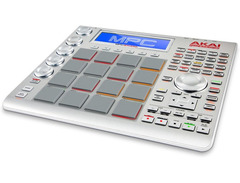
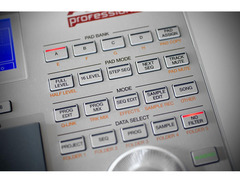
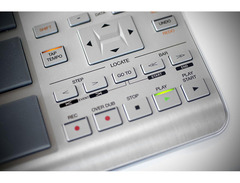
Experience the power of a legendary music production system with the Akai Professional MPC Studio Music Production Controller. This compact powerhouse combines the iconic MPC hardware feel with the robust capabilities of digital audio workstations (DAWs), offering a seamless blend of hardware and software integration. Designed for both budding and seasoned producers, the MPC Studio provides a hands-on, intuitive workflow that keeps your creativity flowing.
At its heart, the MPC Studio features 16 velocity-sensitive RGB pads that respond to your every touch, allowing for expressive beatmaking and melodic creations. With its ultra-portable design, this controller is less than an inch thick, making it perfect for on-the-go production. Whether you’re laying down beats in your studio or crafting grooves on the road, the MPC Studio ensures your music is always within reach.
The included MPC software offers a 64-track sequencer and a wide range of sampling options, supporting formats like WAV, MP3, and AIFF. It’s backward-compatible with any legacy MPC model, letting you tap into a vast library of sounds, including a massive 9GB+ of samples. The vibrant color screen provides real-time feedback, allowing you to focus on your music without being tethered to your computer screen.
With the assignable touch strip, you can shape and manipulate your sounds in innovative ways, adding unique textures and dynamics to your tracks. Plus, the Vocal Suite makes recording and perfecting vocals a breeze, offering everything from pitch correction to harmonization.
Key Features:
- 16 velocity-sensitive RGB pads for expressive performance
- Compact design, less than 1" thick, ideal for portability
- 64-track sequencer with extensive sampling options
- Supports WAV, MP3, AIFF, and more
- Assignable touch strip for creative sound manipulation
- Includes 9GB+ sound library from classic MPC models
- Vibrant color screen for quick visual feedback
- Fully compatible with Mac and PC systems
Product specs
| Brand | Akai |
| Model | MPC Studio Music Production Controller |
| Finish | Black |
| Year | 2021 - 2025 |
| Categories | Pad MIDI Controllers |
| MIDI I/O | MIDI Input, MIDI Output, USB MIDI |
| Number of Pads | 16 Pads |
FAQs
-
Does the Akai MPC Studio Music Production Controller require an external power supply?
-
No, the Akai MPC Studio is USB bus powered, meaning it draws power directly from your computer via the USB connection, eliminating the need for an external power supply.
-
Is the Akai MPC Studio compatible with major DAWs?
-
Yes, the Akai MPC Studio integrates seamlessly with major DAWs such as Ableton Live, Logic Pro, and FL Studio, allowing you to use it as a MIDI controller and leverage the included MPC2 software for enhanced functionality.
-
How many pads does the Akai MPC Studio have, and are they velocity-sensitive?
-
The Akai MPC Studio features 16 full-size velocity-sensitive RGB pads, providing dynamic control over your beats and samples with responsive touch.
-
What kind of display does the Akai MPC Studio have?
-
The Akai MPC Studio is equipped with a color LCD, offering clear visual feedback and aiding in navigation and workflow during music production sessions.
-
Does the Akai MPC Studio come with preloaded sounds?
-
Yes, the Akai MPC Studio comes with a substantial sound library, featuring over 7GB of sounds, including classic MPC3000 sounds and additional MPC Expansions for creative versatility.
Videos

Sanjay C
Akai MPC STUDIO 2 Review - CHEAPEST MPC!
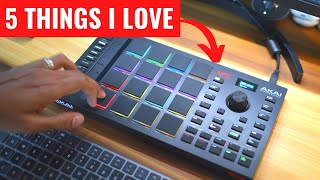
Akai MPC STUDIO 2 Review - CHEAPEST MPC!
Sanjay C

Akai MPC STUDIO 2 Sampling & Touch Slider Workflow Video

MALO BEATS
😬 MPC Studio - WATCH THIS BEFORE YOU BUY!!! (Review & Suggestions)

Pink Buddha Academy
First Day with the MPC Studio

Gabe Miller Music
Gotta Keep it Real about The MPC Studio 2 Controller 🫤

Bolo Da Producer
*NEW!* Akai MPC Studio - First Look - Why you SHOULD buy this controller!

DSoundman
Reviews
PROS
-
Overdub feature enhances creative sampling possibilities
-
Comes with a stylish red neoprene carrying case
-
Offers 128-track recording mixing capability for versatile production
-
Compact and portable design for on-the-go music production
-
Easy to use, even for beginners in beat-making
-
Regular software updates improve functionality and user-friendliness
CONS
-
Outdated screen design detracts from otherwise modern aesthetics
-
Compatibility issues with certain operating systems like OS9
-
Confusing software with steep learning curve for basic tasks
-
Lack of comprehensive instruction manual hampers initial setup
-
Difficulties integrating with Ableton for some users
Owner Insights
We analyzed real musician discussions from forums and Reddit to find what players love, question, and tweak about Akai Professional MPC Studio Music Production Controller.
Software and compatibility
-
Users mention MPC Beats software is less intuitive than other DAWs, with version 2 being clunky and lacking updates like the standalone version 3.
Source -
MPC Studio lacks VST3 support and cannot use MIDI VSTs like Scaler and Ripchord, limiting its integration with modern production tools.
Source -
Element VST can be used as a wrapper to enable VST3 compatibility, allowing integration of modern virtual instruments like Kontakt 7.
Source
User experience
-
Owners express dissatisfaction with the touchstrip responsiveness, particularly for note repeat functions, resulting in a less precise timing for certain styles like Trap.
Source -
It's noted that using the MPC Studio requires reliance on a PC, which can detract from the standalone MPC experience that many users prefer for creativity.
Source -
Users find the smaller pads on the MPC One less satisfying for finger drumming compared to the larger pads on the MPC Studio 2.
Source
Value and pricing
-
Some buyers suggest purchasing a used MPC Studio Black for under $200 due to its larger screen and better controls, minimizing the need to look at a computer.
Source -
For those with a computer already, the MPC Studio offers a cost-effective entry into the MPC ecosystem, despite its software limitations.
Source
Comparisons
-
Many buyers prefer standalone MPCs like the One or Live 2 for their all-in-one capabilities, including built-in sound cards and the ability to operate without a computer.
Source -
Owners with experience in other DAWs find the MPC software inferior, lacking comprehensive audio editing and arrangement capabilities compared to Ableton Live or FL Studio.
Source -
Users find the MPC Studio 2 less effective as a standalone experience compared to Ableton Live with Push 2, which offers superior integration with DAWs.
Source
Features and functionality
-
The controller’s integration with other DAWs is limited, making it primarily useful for tapping drums and samples within its own software environment.
Source -
The Studio's touchstrip is praised for live performance, offering a unique control method not present in the standalone models.
Source -
The MPC Studio 2 lacks physical knobs, which limits on-controller automation and sampling, requiring mouse use for these tasks.
Source
Use cases and applications
Critic Reviews
4.5 out of 5
Based on 0 Reviews and 11 Ratings
Artist usage
Add artist

In this video, he's working with musicians for his Fever project.


Genre Usage
Based on how artists on Equipboard use this gear, it is most commonly found in the following genres.
More Akai Production & Groove

$939.00 - $999.99
in Production & Groove Rank

$400.00 - $1,299.00
in Production & Groove Rank


-m.webp?v=1784905142)
$475.00
in Production & Groove Rank


$1,499.00 - $1,899.99
in Production & Groove Rank
.jpg?v=1784921365)


$399.00 - $728.00
in Production & Groove Rank


$450.00
in Production & Groove Rank


$149.00 - $285.95
in Production & Groove Rank
.jpg?v=1784891692)


$1,489.31 - $2,299.00
in Production & Groove Rank


$319.57 - $899.00
in Production & Groove Rank


$699.00 - $1,299.00
in Production & Groove Rank


$152.11
in Production & Groove Rank


$85.30 - $119.00
in Production & Groove Rank

.jpg?v=1783774944)


$952.49
in Production & Groove Rank


$225.00
in Production & Groove Rank


$3,000.00
in Production & Groove Rank


$4,170.06
in Production & Groove Rank


$642.99 - $899.00
in Production & Groove Rank


$536.15
in Production & Groove Rank


$973.41 - $1,499.00
in Production & Groove Rank


$575.00
in Production & Groove Rank


$1,159.99 - $1,499.00
in Production & Groove Rank


$3,200.00
in Production & Groove Rank


$220.00 - $428.00
in Production & Groove Rank


in Production & Groove Rank


-m.webp?v=1784899857)
$568.00 - $699.00
in Production & Groove Rank
.jpg?v=1784940345)

$707.00
in Production & Groove Rank


$149.00 - $199.00
in Production & Groove Rank

$835.00
in Production & Groove Rank


-m.webp?v=1784905927)
$550.00
in Production & Groove Rank


$110.24
in Production & Groove Rank


$199.00 - $399.00
in Production & Groove Rank
![Akai MPC 4000 [Blue]](https://images.equipboard.com/uploads/item/image/42853/akai-mpc-4000-blue-m.webp?v=1784905468)
$536.15
in Production & Groove Rank


$1,149.00 - $2,599.00
in Production & Groove Rank


$100.00
in Production & Groove Rank


$475.00
in Production & Groove Rank


Accessories & Related Items

-s.webp?v=1784932779)


Community setups


Similar


Gear Guides





Most Popular Production & Groove
Most Popular Brands
-
Added to Equipboard on by
 boom762
GearIQ 12239
-


