

Pricing and availability




* Product prices and availability are updated by Equipboard every 24hrs and are subject to change. Equipboard may receive compensation for purchases made at participating retailers linked on this site. This compensation does not affect what products or prices are displayed, or the order of prices listed. For more information, please refer to our affiliate disclosure.
Description
FUGGEDABOUTIT
He’s back, and of course he’s changed his name. He’s the guy you need to know if you want to get the job done.
Maybe you want to boost a truckload of amps? Fuggedaboutit!
Need to rough up some lowlife pedals that won’t give up the goods? Fuggedaboutit.
Maybe that single coil is trying to talk a little too cute? Fuggedaboutit…
That humbucker is wise-crackin’ too loud and you want to clean up his act? Fuggedaboutit!
Got a rig that’s trying to play it squeaky clean and you need to dirty him up a bit? Fuggedaboutit.
Need a job done by a guy that has guts made of high voltage amp parts? Fuggedaboutit!
The Fuggedaboutit pedal was designed to overdrive, condition, or boost your signal before vintage amps. other pedals, and amp simulators.
The Volume control sets the output level, any setting on this control is useable, but most will fall between 9 o clock and 1 o clock for unity gain.
The tone control sets the overall brightness and tightness, but it also increases gain a bit as it is turned up.
Most users will find 11 o clock to 3 o clock to be the sweet spot, but again, anything works here. low setting have lots of weight and keep the pedal a low gain affair.
The Gain control sets the sustain and harmonic content. Truly anything goes on the gain control, and I recommend you explore the range with your different guitars an amps. Boost an amp by setting the gain very low and the volume high can have exceptional results, while using higher gain settings and then keeping the output at unity can be the ticket with you need to control volume and have a switchable clean sound.
The left toggle chooses between stock bess content and enhanced bass. When boosting amps the stock setting with keep things tight, and when playing at unity and letting the Fuggedaboutit carry the OD sound the enhanced bass is often a good choice, it can also work miricles with that Strat Bridge pickup.
The right toggle chooses the symmetry and picking dynamics. Set to the left, you have the stock setting, this is assymmetric, many peole feel this is the tweed sound, and blends really well with cranked vintage amps. Set to the right, you get the dynamic attack setting, this is smoother and punchier, which works when you need to push smooth gain and operate at unity gain into a clean amp.
Please use a 9-30 volt DC negative tip adaptor to power the Fuggedaboutit.
Product specs
| Power | 9V, 12V, 18V |
| Bypass | true bypass |
| Analog/Digital | analog |
Videos

Barber Electronics
Barber Electronics Fuggedaboutit pedal Demo
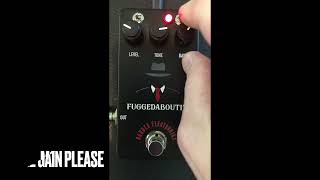
Barber Electronics Fuggedaboutit pedal Demo
Barber Electronics
Reviews
Based on 0 Reviews and 0 Ratings
Similar
Add recommendation2 alternative and related items for Barber Electronics Fuggedaboutit, curated by the Equipboard community.


More Barber Electronics Overdrive Effects Pedals


.jpeg?v=1784792382)


-m.webp?v=1784818682)
$105.00 - $399.52
in Overdrive Effects Pedals Rank


$100.75 - $120.99
in Overdrive Effects Pedals Rank


-m.webp?v=1784818688)
$733.00
in Overdrive Effects Pedals Rank


$180.00 - $217.15
in Overdrive Effects Pedals Rank


$139.00 - $999.99
in Overdrive Effects Pedals Rank


$65.00
in Overdrive Effects Pedals Rank


-m.webp?v=1784818902)
$149.00 - $169.99
in Overdrive Effects Pedals Rank


$179.00 - $229.99
in Overdrive Effects Pedals Rank


.jpg?v=1784782132)

$102.50 - $185.00
in Overdrive Effects Pedals Rank


$99.00 - $143.00
in Overdrive Effects Pedals Rank

Artist usage


Community setups


Gear Guides




.webp)



Most Popular Overdrive Effects Pedals
Most Popular Brands
-
Added to Equipboard on by
 sprucebringsteen
GearIQ 28756
-


