

Pricing and availability
We compare 600+ stores and found this item at 6 stores. Prices updated .
Store
Reviews
Price





Price History
Based on price data from 3 merchants for "Source Audio Soundblox Hub". Prices shown reflect NEW condition. Tracking began Apr 2, 2026.
* Product prices and availability are updated by Equipboard every 24hrs and are subject to change. Equipboard may receive compensation for purchases made at participating retailers linked on this site. This compensation does not affect what products or prices are displayed, or the order of prices listed. For more information, please refer to our affiliate disclosure.
Description
Elevate your pedalboard to the next level with the Source Audio Soundblox Hub. Perfectly designed for musicians seeking to streamline their setups, this full-featured MIDI hub acts as a central command center for up to five Source Audio One Series and Soundblox 2 pedals. Imagine creating a multi-pedal system where you can save and recall up to 128 presets with just one touch—no need to fuss over complicated multi-effects processors anymore.
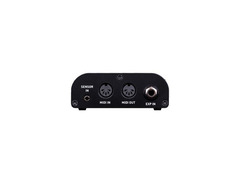
The Soundblox Hub is all about seamless integration and ease of use. Connect your pedals effortlessly through the clearly labeled 5-pin MIDI In and Out/Thru ports, and take advantage of the TRS expression pedal input to expand your control options. Whether you're using a Dual Expression Pedal, Reflex Universal Expression Pedal, or even the Hot Hand 3 Wireless Effect Controller, the possibilities are limitless.
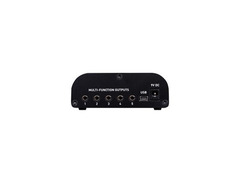
Moreover, with the scene-saving functionality, you can access, edit, and save your presets directly from your Mac or PC via the USB port. Its compact design doesn't skimp on connectivity, featuring five multi-function outputs and a 3.5 mm sensor input for hot hand control. Whether you're a studio pro or a gigging musician, the Source Audio Soundblox Hub is your ticket to a more organized and dynamic pedalboard experience.
Key Features:
- Controls up to 5 Source Audio One Series and Soundblox 2 pedals
- 128 scene-saving presets, accessible via MIDI Program Changes
- USB connectivity for preset management on Mac or PC
- Standard 5-pin MIDI In and Out/Thru ports
- 3.5 mm sensor input and multiple expression pedal options
- Mini USB port for easy access and control configuration
- Includes power supply (9V DC)
Product specs
| Type | Guitar Pedal MIDI Hub |
| Other I/O | 1 x 1/4" (expression pedal) |
| Compatibility | Source Audio / Soundblox 2 |
FAQs
-
What is the primary function of the Source Audio Soundblox Hub?
-
The Source Audio Soundblox Hub acts as a MIDI interface and preset manager, allowing you to control multiple Source Audio pedals simultaneously and switch between saved presets with ease.
-
How many Source Audio pedals can the Soundblox Hub connect to at once?
-
The Soundblox Hub can connect and control up to five Source Audio pedals, enabling synchronized preset changes across all connected devices.
-
Is the Source Audio Soundblox Hub compatible with non-Source Audio pedals?
-
The Soundblox Hub is specifically designed for Source Audio pedals. While it primarily enhances functionality with Source Audio gear, its MIDI capabilities might offer limited compatibility with other MIDI-enabled devices.
-
Can I use an expression pedal with the Source Audio Soundblox Hub?
-
Yes, the Soundblox Hub features a 1/4" input for an expression pedal, allowing you to control various parameters on connected Source Audio pedals dynamically.
-
Does the Source Audio Soundblox Hub require an external power supply?
-
Yes, the Soundblox Hub requires an external power supply to operate, typically included with the product, ensuring stable and reliable performance for your pedal setup.
Videos

ProGuitarShopDemos
Source Audio - Soundblox Hub
Source Audio - Soundblox Hub
ProGuitarShopDemos
Bass Effects: The Soundblox Hub Multi-Pedal Scene Saver

sourceaudioeffects
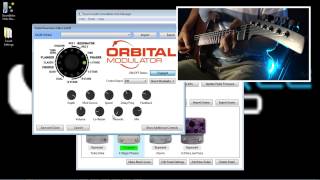
Tutorial on the Soundblox Hub Manager: A Pedal Board Scene Saver
sourceaudioeffects
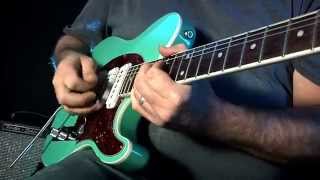
The Soundblox Hub Multi-Pedal Scene Saver with Guitar
sourceaudioeffects
Reviews
PROS
-
Seamlessly integrates up to 5 Source Audio pedals into a single MIDI-controlled scene
-
Enables 128 preset storage for comprehensive sound customization
-
Compact size fits easily under most pedalboards
-
Works harmoniously with third-party MIDI gear for versatile setups
-
Allows on-the-fly parameter adjustments via computer connection
-
Centralizes expression pedal control for multiple devices
-
Enhances live setups by simplifying complex pedal arrangements
-
Facilitates precise sound replication for cover songs through preset scenes
-
Perfect for both seasoned MIDI users and newcomers
-
Enables expansive control of Source Audio pedals, elevating overall board functionality
CONS
-
Limited to MIDI control via Neuro Editor on PC/Mac, not mobile devices
-
Requires additional TRRS cables not included in the package
-
Initial setup may be complex for those without a technical background
-
Not a USB controller; cannot transmit MIDI over USB directly
-
Can be challenging to access controls when mounted under a board
Owner Insights
We analyzed real musician discussions from forums and Reddit to find what players love, question, and tweak about Source Audio Soundblox Hub.
Features and functionality
-
The older silver Soundblox hubs are identical to the newer black Neuro hubs, offering a cheaper alternative with the same functionality.
Source -
Some users report that using Neuro Editor 2 is essential for proper recognition and functionality of the Neuro Hub, as Neuro 3 fails to do so.
Source -
There is no straightforward way to change the MIDI channel on the Collider without the app, which complicates simple MIDI clock synchronization with other effects.
Source
Setup and maintenance
-
To integrate Source Audio pedals with a controller, use 1/8 TRRS cables provided with the Neuro Hub for easy connection.
Source
Software and compatibility
-
The DMC Micro can control up to four devices, but requires each pedal to be on separate MIDI channels for effective operation.
Source -
USB hubs aren't supported for MIDI connection on the DMC Micro, limiting USB MIDI control to one device.
Source -
The Neuro 3 app is still a public beta with notable issues; users find Neuro 2 more stable and reliable for managing presets and MIDI setups.
Source -
Users have found that the desktop app autoruns at startup and lacks an exit function, necessitating manual removal from startup programs and task manager intervention.
Source -
Some users suggest trying older versions of the Neuro app when encountering persistent bugs, as newer versions may have unresolved issues.
Source
Use cases and applications
-
MIDI clock issues can arise without the Neuro Hub, affecting synchronization across multiple devices.
Source
User experience
Critic Reviews
Based on 0 Reviews and 0 Ratings
More Source Audio Effects Pedal Accessories


$185.01 - $219.00
in Effects Pedal Accessories Rank


$239.00 - $279.00
in Effects Pedal Accessories Rank


$127.94 - $179.99
in Effects Pedal Accessories Rank


$3.99 - $5.60
in Effects Pedal Accessories Rank

$137.00 - $150.00
in Effects Pedal Accessories Rank


$149.00 - $169.00
in Effects Pedal Accessories Rank


$187.41 - $229.99
in Effects Pedal Accessories Rank


$89.00 - $152.00
in Effects Pedal Accessories Rank


$190.95 - $220.00
in Effects Pedal Accessories Rank

.jpg?v=1784480538)


$99.00 - $105.99
in Effects Pedal Accessories Rank


$110.00 - $199.00
in Effects Pedal Accessories Rank


$279.99 - $299.99
in Effects Pedal Accessories Rank


$209.00 - $253.00
in Effects Pedal Accessories Rank


$39.22 - $49.00
in Effects Pedal Accessories Rank


$105.00 - $199.00
in Effects Pedal Accessories Rank


$136.00 - $279.00
in Effects Pedal Accessories Rank


$132.47 - $169.99
in Effects Pedal Accessories Rank


$92.00 - $169.00
in Effects Pedal Accessories Rank


$229.95 - $289.00
in Effects Pedal Accessories Rank


$42.00
in Effects Pedal Accessories Rank


$433.96 - $903.97
in Effects Pedal Accessories Rank


$35.99 - $49.99
in Effects Pedal Accessories Rank


$49.00 - $72.00
in Effects Pedal Accessories Rank


$263.06
in Effects Pedal Accessories Rank


$299.00 - $549.99
in Effects Pedal Accessories Rank
.jpg?v=1784637724)


$169.00 - $189.00
in Effects Pedal Accessories Rank


$99.99 - $111.00
in Effects Pedal Accessories Rank


$6.99 - $47.00
in Effects Pedal Accessories Rank


$119.99 - $129.99
in Effects Pedal Accessories Rank


$71.00 - $92.49
in Effects Pedal Accessories Rank


$171.00 - $215.00
in Effects Pedal Accessories Rank

$26.00 - $29.00
in Effects Pedal Accessories Rank


$6.99 - $32.99
in Effects Pedal Accessories Rank


$31.98
in Effects Pedal Accessories Rank


$69.99 - $98.00
in Effects Pedal Accessories Rank


Accessories & Related Items


Artist usage


Community setups


Similar


Gear Guides




.jpg)

Most Popular Effects Pedal Accessories
Most Popular Brands
-
Added to Equipboard on by
 equipboard
GearIQ 4934
-


