

Pricing and availability
We compare 600+ stores and found this item at 5 stores. Prices updated .
Store
Reviews
Price






Price History
Based on price data from 4 merchants for "Waves JJP Vocals Plugin (Vocal Processing)". Prices shown reflect NEW condition. Tracking began Apr 2, 2026.
* Product prices and availability are updated by Equipboard every 24hrs and are subject to change. Equipboard may receive compensation for purchases made at participating retailers linked on this site. This compensation does not affect what products or prices are displayed, or the order of prices listed. For more information, please refer to our affiliate disclosure.
Description
Discover the art of vocal transformation with the Waves JJP Vocals Plugin, a powerful tool designed to elevate your vocal tracks effortlessly. Crafted in collaboration with the legendary producer/engineer Jack Joseph Puig, this plugin encapsulates his signature style, offering a seamless blend of intuitive controls and high-quality processing. Whether you’re a seasoned producer or a budding musician, JJP Vocals makes it easy to enhance your tracks without getting bogged down in technicalities.
The plugin features essential dynamics processing like EQ, compression, and de-essing, alongside unique controls titled Magic, Space, Attack, Attitude, and Presence to inject character and depth into your vocals. With three distinct input modes—Male, Male 2, and Female—it's tailored to accommodate various vocal textures, ensuring your mix stands out. The plugin supports up to 24-bit/96kHz resolution, maintaining the integrity of your recordings.
Designed for both Native and SoundGrid workflows, this all-in-one vocal processing chain is compatible with popular digital audio workstations and offers mono-to-stereo and stereo components for versatile application. Whether you're working on a solo project or a full band recording, the Waves JJP Vocals Plugin is your go-to for achieving a polished, professional vocal sound.
Key Features:
- All-in-one multi-effect plugin for vocals
- Developed with Jack Joseph Puig’s expertise
- Includes EQ, compression, de-essing, and custom effects
- Three input modes: Male, Male 2, Female
- Supports up to 24-bit/96kHz resolution
- Mono-to-stereo and stereo components
- Native and SoundGrid licenses included
Owner's manual
Waves JJP Vocals Plugin (Vocal Processing) User ManualProduct specs
| Software Type | Vocal Processor |
| Platform | Mac, PC |
| Upgrade/Full | Full |
| Download/Boxed | Download |
| Bit Depth | 64-bit |
| Format | AAX Native, AudioSuite, VST, AU, SoundGrid |
| Hardware Requirements - Mac | Intel Core i7 or higher (M1 support), 8GB RAM minimum |
| Hardware Requirements - PC | Intel Core i5 / AMD Quad-core or higher (AVX required), 8GB RAM minimum |
| OS Requirements - Mac | macOS 10.15.7 or later |
| OS Requirements - PC | Windows 10 or later (21H2), 64-bit |
FAQs
-
What is the Waves JJP Vocals Plugin primarily used for?
-
The Waves JJP Vocals Plugin is designed to enhance vocal tracks by providing powerful parallel processing, dynamics effects, compression, vocal-optimized equalization, and delay, making it ideal for both male and female vocals.
-
Is the Waves JJP Vocals Plugin compatible with my DAW?
-
The Waves JJP Vocals Plugin supports AAX Native, AudioSuite, VST, AU, and SoundGrid formats, making it compatible with most major DAWs on both Mac and PC platforms.
-
What are the system requirements for running the Waves JJP Vocals Plugin on a Mac?
-
To run the Waves JJP Vocals Plugin on a Mac, you need macOS 10.15.7 or later, an Intel Core i7 processor or higher (with M1 support), and at least 8GB of RAM.
-
Can the Waves JJP Vocals Plugin be used on a Windows computer?
-
Yes, the Waves JJP Vocals Plugin is compatible with Windows 10 or later (21H2), requiring an Intel Core i5 or AMD Quad-core processor or higher with AVX support, and at least 8GB of RAM.
-
Does the Waves JJP Vocals Plugin support 64-bit processing?
-
Yes, the Waves JJP Vocals Plugin operates at a 64-bit depth, ensuring high-quality processing for your vocal tracks.
Videos

FaderPro
Vocal Processing w/ JJP Vocals
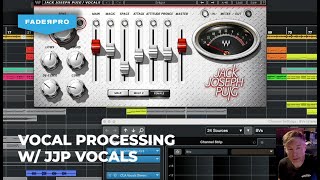
Vocal Processing w/ JJP Vocals
FaderPro
Reviews
Owner Insights
We analyzed real musician discussions from forums and Reddit to find what players love, question, and tweak about Waves JJP Vocals Plugin (Vocal Processing).
Features and functionality
-
JJP Vocals from Waves is a staple for vocal processing, often used in conjunction with other processors for comprehensive vocal chains.
Source -
Waves plugins, including JJP Vocals, are valued for their affordability and longstanding reputation, often going on sale for significant discounts.
Source -
Users integrate Ableton's stock compression and saturation with JJP Vocals, adding third-party plugins for de-essing and mouth de-noise for a comprehensive processing chain.
Source
Use cases and applications
-
Combining JJP Vocals with Slate Virtual Mix Rack and Waves Tune provides a versatile setup for vocal correction and enhancement.
Source -
Employing a reverb on a separate bus with its own EQ allows for greater control over vocal soundscapes when using JJP Vocals.
Source -
JJP Vocals is used effectively not just for vocals but also enhances synths, pianos, and guitars, highlighting its versatility beyond vocal processing.
Source -
JJP Vocals is frequently used as a starting point in vocal chains, suggesting its role as an initial processing step before further enhancements.
Source
User experience
-
Users often integrate JJP Vocals with specific EQs like FabFilter Pro-Q for detailed real-time analytics.
Source -
Owners often save JJP Vocals racks without tweaks, customizing settings for each vocal session, tailoring the plugin’s application to individual track needs.
Source -
There is a sentiment of regret from some users after purchasing JJP Vocals, indicating potential dissatisfaction with its performance or value.
Source
4.5 out of 5
Based on 0 Reviews and 6 Ratings
Artist usage
Add artist

“I have a good amount of Waves plugins, like the CLA Vocal (pictured, right) and the JJP Vocals. I think that most people use those. These are all basically one vocal engine that includes compression, EQ Boost, Delays etc."


Used for the vocals on "Intro", as stated by Kirk mix engineer Kevin "Black Pearl" McCloskey in this December 2019 Sound on Sound interview.
"Some of the hook and ad libs audio tracks have the Antares Auto-Tune EFX, because Jon wanted a small amount of tuning to lock them in. It's on the default setting of 25 with Humanize at 100 percent, so it's not very noticeable. The main vocal don't have Auto-Tune. I often use the iZotope RX7 to get rid of background noise, but in this case I used the Waves NS1 noise suppression plug-in on the spoken word sections. Also, the 'J' on the 'Libs Bus' is the Waves JJP Vocals. I'm only using the Space setting, which is like a stereo slap delay, and I really like using that when I need a slightly different vibe.
"The JJP Vocals is also on the 'All Vox' bus, which starts with the Pro‑Q3, rolling of 12dB at 80Hz. The lead and hook vocals go to this bus, while the ad libs go straight to the Mix Bus. After the JJP the 'All Vox' bus has the Plugin Alliance Dangerous Music Bax EQ, for some sweetening EQ, with a 2dB boost at 130Hz, a 2.5dB boost at 5kHz, and cutting at 18kHz. Finally, I have the Lo-fi, reducing the sample rate to 15 bits, and with 0.1 distortion and 0.1 saturation, to get the vocals to sound a little more gritty. When the beat is distorted. The vocal would sound out of place if it sounded too clean."


Album Usage
The Waves JJP Vocals Plugin (Vocal Processing) has been featured on the following albums:


Genre Usage
Based on how artists on Equipboard use this gear, it is most commonly found in the following genres.
Used With
Based on how musicians on Equipboard use Waves JJP Vocals Plugin (Vocal Processing), it is most commonly used with the following gear.


-s.webp?v=1784455242)
-s.webp?v=1784611831)
Community setups
Show yours
More Waves Vocal Processing Plugins

$32.00 - $39.99
in Vocal Processing Plugins Rank


$32.00 - $34.99
in Vocal Processing Plugins Rank
.jpeg?v=1784574735)


$35.99 - $49.99
in Vocal Processing Plugins Rank


$34.99
in Vocal Processing Plugins Rank
.png?v=1784580320)


$32.00 - $39.99
in Vocal Processing Plugins Rank


$37.00 - $49.99
in Vocal Processing Plugins Rank


$47.00 - $49.99
in Vocal Processing Plugins Rank


$29.99 - $34.99
in Vocal Processing Plugins Rank


$32.00 - $39.99
in Vocal Processing Plugins Rank

$35.99 - $39.99
in Vocal Processing Plugins Rank


$29.99 - $34.99
in Vocal Processing Plugins Rank


$29.99 - $34.99
in Vocal Processing Plugins Rank

$29.99 - $34.99
in Vocal Processing Plugins Rank


$29.99 - $39.99
in Vocal Processing Plugins Rank

$29.99 - $34.99
in Vocal Processing Plugins Rank


$29.99 - $39.99
in Vocal Processing Plugins Rank


$32.00 - $39.99
in Vocal Processing Plugins Rank

$33.00 - $34.99
in Vocal Processing Plugins Rank


$34.99
in Vocal Processing Plugins Rank

$33.00 - $34.99
in Vocal Processing Plugins Rank


-m.webp?v=1784614278)
-m.webp?v=1784612848)
$83.50 - $99.00
in Vocal Processing Plugins Rank


$33.00
in Vocal Processing Plugins Rank


$199.00 - $207.00
in Vocal Processing Plugins Rank


$250.00 - $500.00
in Vocal Processing Plugins Rank


$309.00 - $399.00
in Vocal Processing Plugins Rank


$0.00
in Vocal Processing Plugins Rank

$122.00 - $330.00
in Vocal Processing Plugins Rank


in Vocal Processing Plugins Rank


$115.00 - $230.00
in Vocal Processing Plugins Rank


$205.00 - $349.00
in Vocal Processing Plugins Rank


$70.00 - $79.00
in Vocal Processing Plugins Rank

$37.00 - $39.00
in Vocal Processing Plugins Rank


$199.00
in Vocal Processing Plugins Rank

$87.00 - $169.00
in Vocal Processing Plugins Rank


Accessories & Related Items


-s.webp?v=1784612866)


-s.webp?v=1784612694)


Similar


Most Popular Vocal Processing Plugins
Most Popular Brands
-
Added to Equipboard on by
 mattinho
GearIQ 124
-