

Pricing and availability
We compare 600+ stores and found this item at 4 stores. Prices updated .
Store
Reviews
Price


Average Price: $35
Budget/Beginner
$59
$150+
Price Tier
Budget
Standard
High-end
Price History
Based on price data from 3 merchants for "Waves L2 Ultramaximizer Plugin". Prices shown reflect NEW condition. Tracking began Apr 2, 2026.
* Product prices and availability are updated by Equipboard every 24hrs and are subject to change. Equipboard may receive compensation for purchases made at participating retailers linked on this site. This compensation does not affect what products or prices are displayed, or the order of prices listed. For more information, please refer to our affiliate disclosure.
Description
Elevate your audio projects to professional heights with the Waves L2 Ultramaximizer Plugin, a staple in the world of peak limiting and level maximization. This plugin offers look-ahead brickwall peak limiting, giving you a sophisticated tool for maintaining the integrity and impact of your sound. Whether you're mastering a chart-topping single or refining the audio for a cinematic trailer, the L2 Ultramaximizer stands as a crucial asset in your digital toolkit.
The L2's intuitive interface is designed to streamline your workflow, making dynamic control effortless. With features like Automatic Release Control (ARC), the plugin intelligently adjusts release times, ensuring your audio remains smooth and natural. Its enhanced digital resolution, supported by double-precision bit processing, guarantees pristine sound quality that meets the demands of high-resolution audio formats.
Beyond mastering, the L2 is versatile enough to add creative flair to any track. Use it to sculpt your sound and explore new sonic landscapes, all while maintaining the clarity and punch that your music deserves. With precise input, output, and attenuation meters, you can monitor your audio with exceptional accuracy, making critical adjustments with confidence.
For musicians and producers seeking a reliable and powerful limiting solution, the Waves L2 Ultramaximizer Plugin is an indispensable tool that enhances your creative potential and brings your audio to the forefront of professional sound.
Key Features:
- Look-ahead brickwall peak limiting and level maximization
- Manual and Automatic Release Control (ARC)
- Increased Digital Resolution (IDR) with double precision
- Bit re-quantization and dither with 9th-order noise-shaping filter
- Double-precision bit resolution processing
- Resolution: Up to 24-bit/192kHz
- Mono and Stereo components
Product specs
| Software Type | Limiter/Maximizer |
| Platform | Mac, PC |
| Upgrade/Full | Full |
| Download/Boxed | Download |
| Bit Depth | 64-bit |
| Format | AAX Native, AudioSuite, VST, AU, SoundGrid |
| Hardware Requirements - Mac | Intel Core i7 or higher (M1 support), 8GB RAM minimum |
| Hardware Requirements - PC | Intel Core i5 / AMD Quad-core or higher (AVX required), 8GB RAM minimum |
| OS Requirements - Mac | macOS 10.15.7 or later |
| OS Requirements - PC | Windows 10 or later (21H2), 64-bit |
FAQs
-
What is the primary function of the Waves L2 Ultramaximizer Plugin?
-
The Waves L2 Ultramaximizer Plugin is designed to be a peak limiter and level maximizer, enhancing audio tracks by increasing loudness while preventing distortion through advanced limiting and dithering technologies.
-
Is the Waves L2 Ultramaximizer Plugin compatible with my DAW?
-
The L2 Ultramaximizer is compatible with major DAWs that support AAX Native, AudioSuite, VST, AU, and SoundGrid formats, making it versatile for various production environments on both Mac and PC platforms.
-
What are the system requirements for running the Waves L2 Ultramaximizer Plugin on a Mac?
-
To run the Waves L2 Ultramaximizer on a Mac, you'll need at least macOS 10.15.7, an Intel Core i7 processor or higher (M1 supported), and a minimum of 8GB RAM.
-
Can the Waves L2 Ultramaximizer Plugin be used for mastering?
-
Yes, the Waves L2 Ultramaximizer is widely used in mastering to increase track loudness while maintaining audio clarity, thanks to its advanced peak limiting and dithering capabilities.
-
How does the Waves L2 Ultramaximizer differ from other limiter plugins?
-
The L2 Ultramaximizer stands out with its precise peak limiting and IDR (Increased Digital Resolution) technology, which minimizes audible artifacts and enhances audio quality, making it a staple in professional mastering.
Videos

Waves Audio
How to Optimize Maximum Level in Waves L2 Limiter
How to Optimize Maximum Level in Waves L2 Limiter
Waves Audio
How to use the Waves L2 Ultramaximizer for mastering – our favourite trick! | Mastering Explained

Mastering Explained
How to Use the Waves L2 Ultramaximizer To Maximize The Loudness Of Your Song

Fly Guy J Productions
Mixing With Mike Plugin of the Week: L2 Ultramaximizer

Mixing With Mike
Reviews
PROS
-
Excels as a transparent limiter with minimal artifacts
-
Ideal as a final step in mixing and mastering
-
Simple interface with easy-to-use controls
-
Compatible with various DAWs, notably Sony Sound Forge
-
Provides professional-level results for budget-conscious users
-
Effectively elevates track volume without compromising quality
-
Reliable for both live and studio recordings
-
Part of the versatile Waves Diamond Bundle
-
Offers excellent resolution for high-quality output
-
Highly recommended for use on drum busses
CONS
-
Limited control options may not satisfy advanced users
-
Risk of mix distortion if pushed too hard in loudness wars
-
Dithering feature can interfere with professional mastering efforts
Owner Insights
We analyzed real musician discussions from forums and Reddit to find what players love, question, and tweak about Waves L2 Ultramaximizer Plugin.
Comparisons
-
The UA Precision Maximizer is noted to be cleaner than the Waves L2, which can reduce dynamic range without achieving comparable loudness.
Source -
Ozone's Maximizer is recommended for in-the-box mastering, outperforming the Waves L2 in user experiences.
Source -
The Invisible Limiter, priced around $100, is favored by some for its transparency over other limiters.
Source -
LoudMax and W1 Limiter are mentioned as the closest alternatives to Waves L2 for those seeking a similar sound without using Waves.
Source
User experience
-
The Waves L2 is considered outdated by multiple users, referencing its 20-year-old coding compared to modern alternatives.
Source -
Some users still prefer the Waves L2 for its specific tone and vibe, even if they switch to modern limiters for volume control.
Source -
Owners note the L2 can overly compress tracks if there's not enough headroom, especially in styles needing dynamic breathing room.
Source
Value and pricing
-
A 75% sale on Sonnox Inflator and Limiter non-UAD plugins is highlighted, offering a potentially cost-effective alternative.
Source
Features and functionality
-
The Waves L2 offers a unique transient softening and midrange focus that some users find difficult to replicate with other limiters.
Source -
The L2 Ultramaximizer should have its ceiling set to -0.3 to prevent overpeaking, as it's not a True Peak Limiter.
Source -
Adjusting the L2's gain reduction to between 4-6 dB can result in significant loudness, but caution is advised to avoid over-compression.
Source
Use cases and applications
Critic Reviews
4.5 out of 5
Based on 4 Reviews and 45 Ratings

204
one trick pony that's really good at that one trick as long as you don't overdo it and keep dithering OFF
DANGER: Do not go crazy and try to win the loudness wars with this or your mix will suffer. If you already have a nice blend of plugins handling other types of compression at the track and busses, then this can be the last bit of push to get you to a decent mix. People with tons of high end gear and/or plugins will use it for reference mix dailies and never on the final mix, so if you're that perfectionist, skip it or relegate it to this position. If you are a musician or producer on a budget, then this can stand in for much more expensive bits of kit, and as long as you don't push it too hard, you will like the results better.
My suggestion is to never try to go for more than 6db of boost unless your material somehow magically doesn't get messed up when you push it further. If you plan to send your final mix to a real mastering house, then either skip it or use it in very subtle ways with the Dithering option turned OFF! If you dither prior to sending it to a mastering engineer, you've sabotaged their efforts before they even get a chance. If however mastering is not in the equation and you need to make do, this will get you over the hump of what's required to get decent sound into an online streaming format. It is a useful and affordable tool, if you don't abuse it.


41029
https://cdn.meme.am/instances/46982947.jpg
66
XDXDXD https://www.youtube.com/watch?v=tHZUY1VJHZk XDXDXD
Artist usage
Add artist

Keef's engineer CBMix commented on a Reddit post saying he uses the L2 limiter.


In this video at 54:51 we can see Waves L2 on master channel


In this Twitch stream, we can see Sega Bodega opening the Waves L2 Ultramaximizer on the effect chain in Logic Pro X.


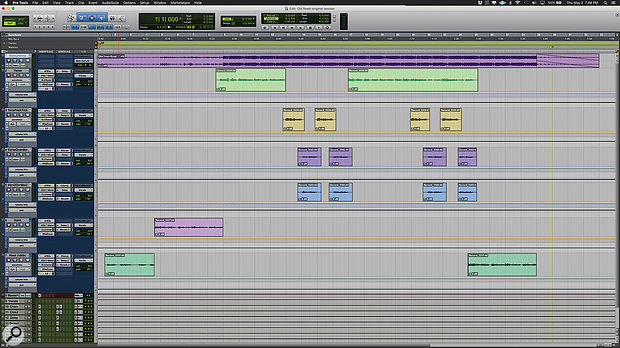
Used for the vocals on "Old Town Road (Remix)", as stated by mix engineer Andrew "VoxGod" Bolooki in this August 2019 Sound on Sound interview. An image of the settings can be found here.
Bolooki's 'Old Town Road' session also has an incredibly [sic] amount of plug-ins. Most tracks have plug-ins on the inserts, in some cases up to six, and many tracks also have sends to the aux tracks. A complete analysis of exactly what they all do would take up several pages, so Bolooki selected some of the most important processors, starting with Nas X's tracks.
"I did not really mess much with what they sent me. If you listen to the original, there were some Auto‑Tune anomalies, because the plug-in had some notes out of scale. The key of the song is a little weird, so I had to do automation on Nas' Auto‑Tune EFX instances to bypass certain notes in certain passages, to make sure the AT did not warp notes in the wrong way. I also did a lot of vocal riding, nudging the volume of each phrase, so that every single word was crystal-clear, and I did some panning automation in the stacked parts. They wanted Billy and Nas to sing at the same time in the pre-choruses, and I wanted to prevent Billy's harmonies from overwhelming Nas' lead vocals, so I used panning to give them each their own space.
"All Nas X's vocal tracks have an insert effect chain that consists of Antares Auto‑Tune EFX, Avid EQ3 7-band, Waves SSL Channel, Waves Renaissance De-Esser and Waves L2. I made some basic changes, also to some of the delay and reverb sends, but nothing crazy. There's a lazy half-note delay in the intro of the song, that becomes part of the flow of the song, and I did not want to mess with that. The aux track with the AIR Phaser added some modulation in the pre-chorus, and the Waves RVox and UAD Precision K-Stereo made Nas' lead vocal stand out a bit more.
"Also, the original engineer who recorded Nas' vocals did something that I would not normally do, but that made a big difference. I picked it up as a trick. It's having the L2 hit really hard at the end of the effects chain for every single vocal track. Initially I thought: that is pretty extreme to put that on every single vocal track, and it breaks all the rules for gain-staging, so I took it off, but then I realised he had put it there for a saturation effect, and it greatly helped the tone of his vocal. It was part of Nas' sound."


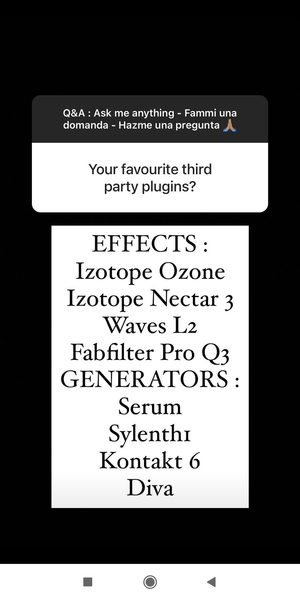
In this QnA on Angemi's Instagram story, he lists Waves l2 as one of his favourite third party plugins.


During the video: "John Christian's Studio Sessions: Chapter 11 | Mastering Part II" at the minute 1:06 we can see L2 Ultramaximizer Plugin from Waves


I have the Pro–Q 2 and Waves L2 on the 808, and nothing on the other bass tracks.

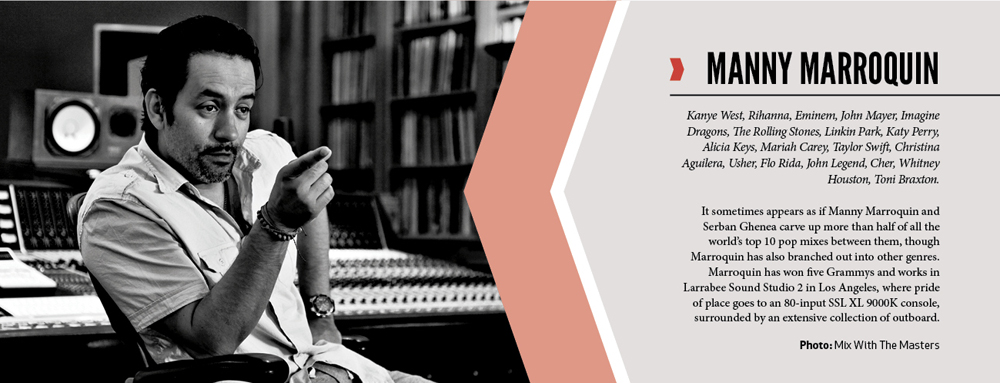
In an article by Paul Tingen for AudioTechnology, audio engineer Manny Marroquin states, "As for specific new toys that really inspire me, the Waves L2 has changed the way we do and listen to music. It’s not just a matter of things being louder, it also has a sound."



Album Usage
The Waves L2 Ultramaximizer Plugin has been featured on the following albums:






Genre Usage
Based on how artists on Equipboard use this gear, it is most commonly found in the following genres.
Used With
Based on how musicians on Equipboard use Waves L2 Ultramaximizer Plugin, it is most commonly used with the following gear.

-s.webp?v=1783260109)




-s.webp?v=1783260045)
More Waves Limiter Plugins
-m.webp?v=1783260126)
$33.00 - $35.99
in Limiter Plugins Rank


$34.00 - $39.99
in Limiter Plugins Rank


$33.00 - $39.99
in Limiter Plugins Rank


-m.webp?v=1770452516)


$179.00 - $199.00
in Limiter Plugins Rank


$38.00 - $399.00
in Limiter Plugins Rank
.jpg?v=1783082401)


$64.00 - $234.00
in Limiter Plugins Rank


$43.00 - $199.00
in Limiter Plugins Rank


$44.00
in Limiter Plugins Rank


-m.webp?v=1783238750)
$83.50 - $99.00
in Limiter Plugins Rank


$59.00
in Limiter Plugins Rank

$49.00
in Limiter Plugins Rank
.jpeg?v=1783244343)


$25.00 - $99.00
in Limiter Plugins Rank


$193.00 - $199.00
in Limiter Plugins Rank


$49.99
in Limiter Plugins Rank


$9.99 - $89.00
in Limiter Plugins Rank

$47.00 - $60.00
in Limiter Plugins Rank


$29.00 - $40.00
in Limiter Plugins Rank

$34.00
in Limiter Plugins Rank


$193.00 - $199.00
in Limiter Plugins Rank


$79.00 - $149.00
in Limiter Plugins Rank

$99.99 - $124.99
in Limiter Plugins Rank

$19.99 - $23.90
in Limiter Plugins Rank


$299.00
in Limiter Plugins Rank


$69.00 - $109.00
in Limiter Plugins Rank


$7.96 - $23.07
in Limiter Plugins Rank

$49.00
in Limiter Plugins Rank

$19.00
in Limiter Plugins Rank


Accessories & Related Items


-s.webp?v=1783260164)

-s.webp?v=1783260147)


-s.webp?v=1783260059)

-s.webp?v=1783260153)


Community setups


Similar


Most Popular Limiter Plugins
Most Popular Brands
-
Added to Equipboard on by
 equipboard
Gear IQ 4934
-