

Pricing and availability
We compare 600+ stores and found this item at 7 stores. Prices updated .
Store
Reviews
Price







Price History
Based on price data from 6 merchants for "FabFilter Pro-DS De-Esser Plugin". Prices shown reflect NEW condition. Tracking began Apr 2, 2026.
* Product prices and availability are updated by Equipboard every 24hrs and are subject to change. Equipboard may receive compensation for purchases made at participating retailers linked on this site. This compensation does not affect what products or prices are displayed, or the order of prices listed. For more information, please refer to our affiliate disclosure.
Description
Achieve pristine vocal clarity with the FabFilter Pro-DS De-Esser Plugin, your go-to tool for taming unwanted sibilance in your recordings. Whether you're working with pristine studio vocals or raw live performances, this plugin's sophisticated algorithms detect and reduce sibilance with surgical precision, ensuring your vocal tracks shine without harshness.
FabFilter Pro-DS is powered by its intelligent 'Single Vocal' detection mode, which identifies sibilance with remarkable accuracy. For broader applications, switch to 'Allround' mode and effortlessly control high frequencies on other audio materials like drums or full mixes. The user-friendly interface makes complex processing intuitive, offering a suite of options from wide band to linear-phase split band processing. With up to 15 ms of optional look-ahead and adjustable stereo linking, you can customize your de-essing to fit any project.
Moreover, the Pro-DS is packed with the signature FabFilter touches: real-time de-essing display, a side-chain input meter, and a robust spectrum analyzer that offers visual insight into your adjustments. Its high-quality 64-bit internal processing and GPU-powered graphics acceleration ensure smooth and efficient performance, making it a favorite among professionals.
Key Features:
- Highly intelligent 'Single Vocal' and classic 'Allround' detection modes
- Transparent program-dependent compression/limiting
- Wide Band or linear-phase Split Band processing
- Optional look-ahead time up to 15 ms
- Adjustable stereo linking with mid-only or side-only processing
- Up to four times linear-phase oversampling
- Real-time spectrum analyzer built into the HP/LP filter controller
- High-quality 64-bit internal processing with GPU-powered graphics acceleration
- Extensive help file with interactive help hints
Compatible with both Mac and Windows, and available in VST, VST3, AU, AAX Native, and AudioSuite formats, FabFilter Pro-DS seamlessly integrates into any digital audio workstation environment.
Owner's manual
FabFilter Pro-DS De-Esser Plugin User ManualProduct specs
| Software Type | De-esser |
| Platform | Mac, PC |
| Upgrade/Full | Full |
| Download/Boxed | Download |
| Bit Depth | 64-bit |
| Format | AAX Native, VST, VST3, AU, AudioSuite, CLAP |
| Hardware Requirements - Mac | Intel Core 2 Duo or higher, 4GB RAM minimum |
| Hardware Requirements - PC | Intel Core 2 Duo / AMD Athlon 64 X2 or higher, 4GB RAM minimum |
| OS Requirements - Mac | macOS 10.13 or later |
| OS Requirements - PC | Windows 7 SP1 or later |
FAQs
-
Is the FabFilter Pro-DS De-Esser compatible with my DAW?
-
The FabFilter Pro-DS is compatible with most major DAWs as it supports AAX Native, VST, VST3, AU, AudioSuite, and CLAP formats.
-
What operating systems are supported by the FabFilter Pro-DS?
-
The FabFilter Pro-DS supports macOS 10.13 or later and Windows 7 SP1 or later, making it versatile for both Mac and PC users.
-
What are the key features of the FabFilter Pro-DS De-Esser?
-
The FabFilter Pro-DS features intelligent sibilance detection, wideband and split-band processing, and a real-time spectrum analyzer for precise de-essing.
-
What are the hardware requirements for running FabFilter Pro-DS?
-
The minimum hardware requirements are an Intel Core 2 Duo or AMD Athlon 64 X2 processor and 4GB of RAM for both Mac and PC.
-
How does the FabFilter Pro-DS improve vocal recordings?
-
The FabFilter Pro-DS effectively reduces sibilance in vocal recordings, providing a smoother and more balanced sound without affecting the overall vocal quality.
Videos

FabFilter
Introduction to FabFilter Pro-DS intelligent de-esser
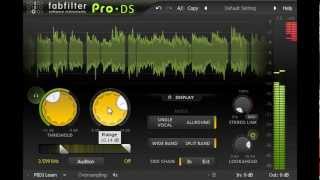
Introduction to FabFilter Pro-DS intelligent de-esser
FabFilter
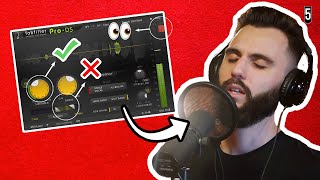
How To Use a De-Esser on Vocals (with FabFilter Pro DS)

5piece
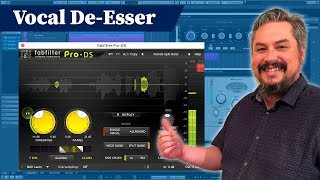
Fabfilter Pro-DS Plugin - Vocal De-esser Plugin

KdW Mixing & Mastering

Klein aber Fein! Der DE-ESSER von Fabfilter | Pro DS Erklärt DEUTSCH

Mix dich zum Master
Why Fabfilter Pro DS is So Popular

Warrior Sound - Unders
De-Esser aber wer ist besser? FabFilter Pro-DS De-Esser Plug-In

musotalk
Reviews
PROS
-
Effectively reduces sibilance without tone gouging
-
Simple licensing with multi-computer support for non-commercial use
-
Excellent presets for quick and effective de-essing
-
Versatile on vocals, instruments, and full mixes
-
Easy to use with minimal tweaks needed
-
Consistently delivers clear and natural vocals
-
Demo available to test before purchasing
CONS
Owner Insights
We analyzed real musician discussions from forums and Reddit to find what players love, question, and tweak about FabFilter Pro-DS De-Esser Plugin.
Features and functionality
-
Pro-DS is praised for its intuitive UI, allowing quick adjustments without over-processing. It's particularly effective on single vocal tracks.
Source -
Some users find that FabFilter Pro-DS dulls highs without effectively taming harshness, suggesting Pro-MB or Pro-Q3 as alternatives for better results.
Source -
Users appreciate the visual feedback in FabFilter Pro-DS, which allows for precise control by showing a graphic of the effect, aiding in avoiding over-processing.
Source
Comparisons
-
Users note a preference for Pro-DS over Waves for its cleaner sound, avoiding the "fizzy" effect that Waves can produce.
Source -
The Weiss De-Esser is praised for its natural attenuation, often preferred over FabFilter Pro-DS for its ability to control high-end outliers musically.
Source -
Lindell 902 is compared favorably to the hardware DBX 902, noted for its similarity and effectiveness in de-essing.
Source -
Some users find Soothe 2 overpriced for its features, suggesting DSEQ3 as a more affordable alternative that offers similar dynamic EQ capabilities.
Source -
FabFilter Pro-DS is often favored over Waves RDeesser for its graphic interface and ease of use, making it a preferred choice for users who want straightforward operation.
Source
Use cases and applications
-
While effective on vocals, it's less favored for drum overheads or mastering due to its unique sidechain filter behavior.
Source -
Pro-DS may work better before applying heavy compression, where its smart detector can enhance performance compared to frequency-dependent detectors.
Source -
FabFilter Pro-DS is noted for its ease of use, with some describing it as feeling like "cheating" due to its effective performance with minimal adjustments.
Source
Value and pricing
User experience
-
Minimal tweaking is required to achieve desired results, making it highly efficient for those who have tried various de-essers.
Source -
Some users prefer using Melodyne for sibilance reduction, citing its natural output over FabFilter Pro-DS, especially when manually adjusting sibilance during editing.
Source
Critic Reviews
5.0 out of 5
Based on 2 Reviews and 25 Ratings

238
One of the best De-essers
Great for catching sibilance of any kind, on any instrument. I treat snares and hats with this to remove harshness all the time.

Artist usage
Add artist

Used for BTS' vocals on "Fake Love", as stated by producer James Reynolds in this August 2018 Sound on Sound interview.
‘All Vocals’ bus: Overloud Tapedesk, DMG Audio EQuilibrium & Kazrog KClip.
“This is pretty much my standard chain. I have the Tapedesk as my first plug-in. I love mixing into this, because I love the saturation that it gives to vocals. This is followed by the EQuilibrium, which notches out some high end. The Eiosis Air EQ Premium is next and does something slightly more interesting, because I am automating it with the green automation line. I use the automation to turn the Strength slider fully up for the pre-choruses and the choruses, which adds real excitement to all the vocals in these areas. Then there’s the Pro-DS de-esser set to a pretty high threshold, because I have already de-essed on the individual tracks. It’s just to catch anything else that I may have missed. Finally the KClip is just catching any remaining peaks.”

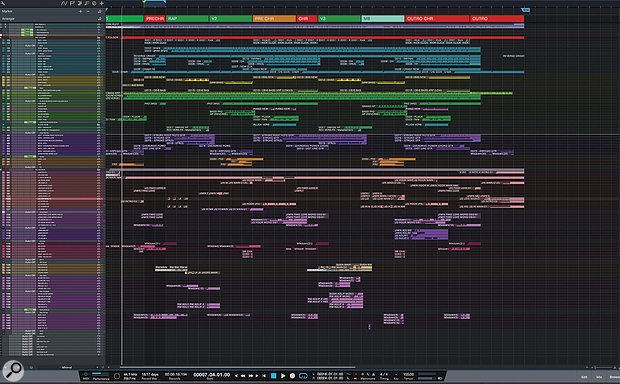
Used for BTS' vocals on "Fake Love", as stated by producer James Reynolds in this August 2018 Sound on Sound interview.
‘All Vocals’ bus: Overloud Tapedesk, DMG Audio EQuilibrium & Kazrog KClip.
“This is pretty much my standard chain. I have the Tapedesk as my first plug-in. I love mixing into this, because I love the saturation that it gives to vocals. This is followed by the EQuilibrium, which notches out some high end. The Eiosis Air EQ Premium is next and does something slightly more interesting, because I am automating it with the green automation line. I use the automation to turn the Strength slider fully up for the pre-choruses and the choruses, which adds real excitement to all the vocals in these areas. Then there’s the Pro-DS de-esser set to a pretty high threshold, because I have already de-essed on the individual tracks. It’s just to catch anything else that I may have missed. Finally the KClip is just catching any remaining peaks.”

.jpg)
In this photo from Chocolate Puma's Instagram, one can see the Pro-DS in the second slot from the bottom, on the left-most fully-visible track/channel strip.


In this YouTube video of Slushii making DESU at 1:09, you can see in the plug-in list Fabfilter Pro-DS.

Used for Jimin's lead vocals and the rest of BTS' vocals on "Fake Love", as stated by producer James Reynolds in this August 2018 Sound on Sound interview. An image of the settings can be found here.
Jimin chorus lead vocal: iZotope Neutron, FabFilter Pro-MB, Empirical Labs Arousor, iZotope Trash 2 & FabFilter Pro-DS, plus sends to Slate VerbSuite Classics, FabFilter Pro-R, Soundtoys EchoBoy, Waves Factory Trackspacer & FabFilter Pro-DS.
“Welcome to my vocal world! BTS like bright, punchy vocals. There is not a lot of room in the mix because there is a lot of stuff going on, so I am not boosting low end on the vocals, because you are not going to hear that. Instead I’m trying to give the vocals more presence. The first thing I have in the chain is Neutron, which is a great EQ, and I love its dynamic mode. I boost high end with the Neutron, and band three is set to 4-6000 Hz, with the dynamic mode pulling down any loud ‘ess’ sounds or anything else too sharp. The Neutron is also tidying up the bottom end. After that is the Pro-MB multiband compressor just reining in a couple of frequencies to control the vocal.
“Next is the Arousor, adding some distortion so the vocal is very spitty and present, with lots of attack. After that there’s another instance of Trash 2 set to multiband, which I am using to give the vocal drive and really making it sit solidly in the mix. You have to know how to use Trash 2, otherwise vocals can get too harsh, but in general it is a very good way of saturating and really thickening a vocal and giving it presence. It does depend on the song, I am not always so full on with a vocal! At the end I have the Pro-DS de-esser just controlling the sibilance. Sometimes I used two instances of it, one at the beginning and one at the end, but the Neutron is already kind of doing a de-essing job.
“There also are many sends on that lead vocal. The first send is going to one of my favourites, the Slate VerbSuite Classics. It’s set to a hall-type reverb with 1.75s decay, and because I set quite high pre-delays it is almost like a slap on the vocal, which puts the vocal in a nice space. The next send is to the Pro-R for a longer, bigger reverb, which works for a chorus. I have cut low end and high end as you don’t want that floating around. The Pro-R is really good for controlling those things. Next is an EchoBoy quarter-note delay, saturated by setting it to ‘Splattered’ under ‘Style’ and that send then goes into the Trackspacer. I have a send from the lead vocal going to Trackspacer, so that whenever the lead vocal is singing the Trackspacer ducks the quarter-note delay out of the way. The Trackspacer is frequency-dependent, so it will duck whatever frequencies are dominant in the vocal, which makes it great for moving stuff out of the way. Then there’s another half-time EchoBoy delay setting, which is being automated for delay shots, and finally another Pro-DS.”
‘All Vocals’ bus: Overloud Tapedesk, DMG Audio EQuilibrium & Kazrog KClip.
“This is pretty much my standard chain. I have the Tapedesk as my first plug-in. I love mixing into this, because I love the saturation that it gives to vocals. This is followed by the EQuilibrium, which notches out some high end. The Eiosis Air EQ Premium is next and does something slightly more interesting, because I am automating it with the green automation line. I use the automation to turn the Strength slider fully up for the pre-choruses and the choruses, which adds real excitement to all the vocals in these areas. Then there’s the Pro-DS de-esser set to a pretty high threshold, because I have already de-essed on the individual tracks. It’s just to catch anything else that I may have missed. Finally the KClip is just catching any remaining peaks.”

In this video at 59:53 we can see FabFilter Pro-DS De-Esser Plugin

at 14:38 you can see his list of fabfilter plugins.


Used for the background vocals' reverb on "Say So", as stated by mix engineer Clint Gibbs in this July 2020 Sound on Sound interview.
"All vocal audio tracks have the same signal path: Metric Halo Channel Strip 3, Avid Bomb Factory BF-76, Avid Dyn-3 De-Esser and in the case of the lead vocals, the FabFilter Pro‑Q 3, all on the inserts, plus sends to the quarter- and eighth–note delays and reverb. These are all part of the recording template, and came from Kalani. I am familiar with the settings, because I worked on them, so I didn't change them. The Metric Halo is doing a high-pass, the BF-76 has all buttons in to give it that pop vocal sound. I added the Q 3, cutting 1dB at 279Hz and at 740Hz. I like to do tons of minimal EQ cuts with many plug‑ins.
"The lead vocal audio tracks also have a send called Voc SC, which goes to the side-chain input of the Waves F6 on the Keys bus. It helps make a little extra pocket for the vocal. It creates dynamic dips in the 900Hz and 2kHz range when she is singing. I also have this F6 on the 808 bus of the remix, doing the same thing. All lead vocal audio tracks go to the LD Vocal aux, which has another instance of the Q 3, taking out quite a bit of low end to make space for the bass, and the McDSP AE600 dynamic EQ, taking out problem areas only when they occur. I do a lot of vocal riding on the lead vocal bus, pushing up specific syllables.
"There's also a track called Echo FX Clean. When I have to mute a word, I will take the word before it and will delay it with some reverb to fill the empty space. The additional plug‑in by Vengeance, the VPS philta XL filter, is doing a high and a low cut to give it more of that radio sound. The other vocal tracks are treated in similar ways as the lead vocals, though the BG2 bus has the Valhalla Vintage Verb, with a 2.4s reverb, Mix at 18 percent. I think that came from Kalani, but I added the FabFilter Pro‑DS, because I wanted to take the 's' frequency out of the reverb. All vocals go to the Vocals bus, which has the UAD 1176, switched off, and the JSTClip for some level boosting. The Vocal Rear track is the parallel, with -20dB compression on the 1176. This is where I get my vocal loudness from.


Selena Gomez uses the FabFilter Pro-DS De-Esser Plugin as confirmed by her engineer, who stated: "Nolan favours the Massey, so I inserted the Pro‑DS. The CLA‑2A also comes from Nolan. I prefer the UAD LA‑2A, but the CLA‑2A worked, so I edited it. The Pro‑Q2 at the end pushes a little at 600Hz and 8kHz, plus there's a high shelf at 10kHz." (Source: Sound On Sound, "Inside Track: Selena Gomez 'Rare'").

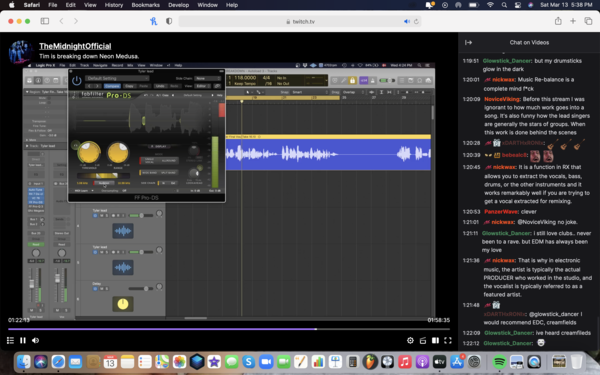
From The Midnight's March 3rd, 2021 Twitch.tv Stream ''Tim is breaking down Neon Medusa'' Tim shows how he is using Fabfilter's Pro-DS Plugin on Tyler Lyle's vocals for Neon Medusa to make it sound more smooth.


Used on "A Lot", as mentioned by producer Maddmix in this March 2019 Sound on Sound interview and as visible in a downloadable photo of the "A Lot" Pro Tools session (available in this .zip file).
Although there are relatively few plug-ins on the drums and hardly any on the music, Maddox uses dozens on the vocals. 21 Savage's five vocal aux tracks, for example, all pass through a signal chain comprising Antares Auto-Tune, UAD 1176LN E, Waves Renaissance Vox, FabFilter Pro-DS, Waves C6, another Pro-DS, FabFilter Pro-Q2 and another C6, with only the latter one or two plug-ins dropping out on a couple of tracks.
All these tracks go the '21 Lead' aux (42), which has nine plug-ins, including compressors, de-essers, and four(!) more instances of Pro-Q2, as well as four sends. Both 21 Savage and J Cole's aux group vocal tracks then go to a vocal aux called 'MadVoxComp', and from there to the 'All Vocals' aux, each of which hosts two plug-ins; so in total, every 21 Savage vocal track passes through 19 to 21 insert plug-ins, as well as being sent to up to seven auxes. The situation with J Cole is even more elaborate, though complicated by the fact that some of the sends came with the vocal session that Maddox received from Cole's engineer.
"I guess my thought process behind my mixing is kind of messy!" laughs Maddox. "The thing is that I will start with adding compression and EQ on a vocal, and then if I hear something else that needs correcting, I will just add another compressor or EQ. I never go back and take plug-ins off or reset them, because I don't want to go back on what I already have, because I might mess it up. So I just keep going forward and adding plug-ins until I get the sound I want. That works for me. Some people like mixing with very few plug-ins, but I will mix with whatever I need to get what I want.
"The plug-ins I have on these inserts I use frequently. I guess you could call them my clean-up plug-ins. The 1176LN worked on 21's vocals in this session. I may also use the UAD Tube-Tech CL 1B or the Waves RCompressor. In this session the 1176 made 21's vocals really full and in your face. Next is the RVox, which is also is a good plug-in for bringing the vocals up front and making them really full. It is very subtle, but it makes a big difference. If I feel like the vocal does not sit up front enough I put that on, compress it a little bit, and it usually fixes the problem for me. The 1176 has a similar function, but I use it more for actual compression and the RVox more for tone and to make it sound bigger.
"Next is the Pro-DS, which as a de-esser obviously helps with the sibilance. Some vocals have more sibilance than others, and sometimes I use just one, but in this case I felt I needed two. I love using multiband compressors, and the C6 is here for some general compression, but there always are some frequencies that need adjusting, but that I don't want to take out with an EQ, because you need those frequencies. When I use a multiband, I find the frequency that bugs me, and set a threshold, so the frequency is only dipped when it needs to be dipped. If you look at my C6 plug-ins, they often address harsh frequencies that a de-esser can't take out. I'll have a really tight notch on the C6, and then just compress that frequency a couple of dB."
Of the '21 Lead' aux, Maddox says: "There are four instances of the Pro-Q2 on the signal chain, which is again an example of me working cumulatively. I now use the Pro-Q3 a lot, which is a dynamic EQ, which can do pretty much the same thing as the C6. Then insert 4 is the McDSP MC404 multiband compressor, which I use pretty often, and then I have the Eiosis Air EQ, the C6, the Kush Clariphonic EQ and the SSL G EQ. I use different EQs for different purposes. The Q2 has unlimited bands, so I use that to search and dip frequencies I don't like. I really like the high end on the Air, which opens up the vocal and makes it sound really good. I also often do some scooping in the lower mid-range with the Air, because it does a really good job of that. I use the Clariphonic mainly for the Clarity knob, which widens the vocal just by having that on. I really like that on vocals and use that in almost every session.
"The sends go to several aux effect tracks with delays and reverbs, but for this project they told me that they wanted the keep the vocals pretty dry, so I didn't use much reverb. Mostly just a small room reverb really subtly in the background to give it some space. The main reverbs that I have in my template are the Slate Digital VerbSuite Classics. They have great emulations of popular reverbs like the Bricasti and so on, that sound really good. I also use the UAD Lexicon 480 a lot. Those are my go-to reverbs. I occasionally use the Waves RVerb and TrueVerb. My main delays are the Soundtoys EchoBoy and the Waves H-Delay. For distortion I use the Soundtoys Decapitator and Devil-Loc, sometimes the Dada Life Sausage Fattener, which is fun, and the distortion pedal in the Waves GTR3 Stomps plug-in.
(...) Finally, both '21 Leads' and 'Leads' go to the 'Lead All' [40] and parallel 'MadVoxComp' [41] tracks, and the latter has the Waves CLA-76 and L1, both for more presence and volume."


Used for vocals on "Sum 2 Prove", as stated by mix engineer Tillie in this June 2020 Sound on Sound interview.
"All Lil Baby's vocals go through an aux track," says Tillie, "on which I have the Waves DeEsser, Avid EQ3 7-band, Waves SSL Channel and Compressor, Waves RCompressor, UAD J37 and the FabFilter Pro‑DS de-esser. There are two sends to reverb aux tracks and one to a half–note delay. The Waves DeEsser is there because I felt the vocal was too bright. The EQ3 has a pretty involved curve, with a low cut at 69.8Hz, notches at 184.7Hz and 425.2Hz, and me adding at 2kHz and high end at 5.37kHz, because I wanted some more presence. The SSL Compressor is not doing much, it's just there for vibe. I do the actual compression with the RCompressor.
"The J37 adds analogue vibe — it's one of my favourite plug–ins on vocals. It really brings them to life. I did all the heavy lifting with the first de-esser, and the Pro‑DS is just to catch anything that's the result of the EQ curve that I added. There's also a Vocal Parallel aux with the Softube Tube‑Tech CL‑1B to add more body and a bit of beef. I think that compressor just makes everything sound better. It gives you a different tonal character.
"The first send goes to the Verb aux track, which has the DVerb, set to a Large Hall, and an EQ3 7-band, taking out low end below 100Hz. The second send goes to the Verb 2 aux, with the Waves RVerb, the Waves REQ, again rolling off low end, and the Waves S1 Stereo Imager. I use the Imager on my reverbs probably 75 percent of the time. My style of mixing is very wide, so I tend to spread out my instruments and my effects, and I place things in different places in the stereo mix. I always like to add width and depth, so you can feel things and they are not necessarily right up in your face. But I leave the vocals to be the centre point of the mix."
Album Usage
The FabFilter Pro-DS De-Esser Plugin has been featured on the following albums:
BREAK MY SOUL
Beyoncé (2022)
Neon Medusa
The Midnight (2021)

Sum 2 Prove
Lil Baby (2020)
Ex Machina
Metrik (2020)

Rare
Selena Gomez (2020)

Old Town Road (Remix)
Billy Ray Cyrus & Lil Nas X & Mason Ramsey (2019)

Gravity
Metrik (2019)

FAKE LOVE/Airplane pt.2
BTS (2018)

Ain't No Love
Kove (2017)

Bodak Yellow (feat. Kodak Black)
Cardi B & Kodak Black (2017)

Issa Album
21 Savage (2017)

Hymn for the Weekend (Seeb Remix)
Coldplay & seeB (2016)

A Head Full of Dreams
Coldplay (2015)

Purpose (Deluxe)
Justin Bieber (2015)

Can You Hear Me
Denis Kenzo (2015)
Genre Usage
Based on how artists on Equipboard use this gear, it is most commonly found in the following genres.
Used With
Based on how musicians on Equipboard use FabFilter Pro-DS De-Esser Plugin, it is most commonly used with the following gear.


-s.webp?v=1783260085)
-s.webp?v=1783260059)


-s.webp?v=1770452516)


More FabFilter De-Esser Plugins

$29.99 - $34.99
in De-Esser Plugins Rank


$33.00 - $34.99
in De-Esser Plugins Rank


$57.00 - $216.00
in De-Esser Plugins Rank


$29.99 - $34.99
in De-Esser Plugins Rank


$14.99 - $149.00
in De-Esser Plugins Rank

$23.90 - $40.00
in De-Esser Plugins Rank


$99.00
in De-Esser Plugins Rank


$18.30 - $89.00
in De-Esser Plugins Rank

$96.00 - $99.00
in De-Esser Plugins Rank

$79.00
in De-Esser Plugins Rank


$59.00 - $129.00
in De-Esser Plugins Rank


in De-Esser Plugins Rank

$47.00 - $100.00
in De-Esser Plugins Rank

$0.00
in De-Esser Plugins Rank


$49.00 - $89.99
in De-Esser Plugins Rank


$199.00
in De-Esser Plugins Rank


Accessories & Related Items


-s.webp?v=1783260109)
Community setups


Similar


Most Popular De-Esser Plugins
Most Popular Brands
-
Added to Equipboard on by
 equipboard
Gear IQ 4934
-


