

Pricing and availability
We compare 600+ stores and found this item at 5 stores. Prices updated .
Store
Reviews
Price








Average Price: $135
Budget/Beginner
$200
$501+
Price Tier
Budget
Standard
High-end
Price History
Based on price data from 3 merchants for "Muse Kinetics K-Board-C Smart Sensor USB MPE MIDI Keyboard Controller". Prices shown reflect NEW condition. Tracking began Apr 2, 2026.
* Product prices and availability are updated by Equipboard every 24hrs and are subject to change. Equipboard may receive compensation for purchases made at participating retailers linked on this site. This compensation does not affect what products or prices are displayed, or the order of prices listed. For more information, please refer to our affiliate disclosure.
Description
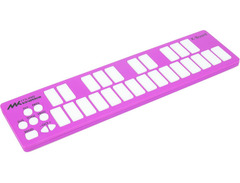
Unleash your creativity with the Muse Kinetics K-Board-C Smart Sensor USB MPE MIDI Keyboard Controller, a game-changer for musicians and producers seeking unparalleled expressivity in a compact form. Engineered with 25 touch-sensitive keys, the K-Board-C offers a rich palette of performance possibilities through its multidimensional MIDI Polyphonic Expression (MPE) capabilities. Each key recognizes pressure, tilt, and velocity, allowing for seamless real-time modulation and nuanced performance, making it an essential tool for both studio and live settings.
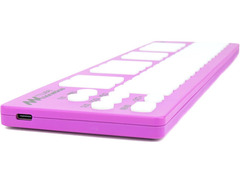
Thanks to its plug-and-play compatibility, this class-compliant USB MIDI controller works effortlessly with macOS, Windows, iOS, Android, and other MIDI-capable systems. Simply connect using the included USB-C cable, and you're set to explore its expressive range without the need for additional drivers. The K-Board-C's polyphonic aftertouch, sustain, and toggle modes further expand your creative toolkit, while the LED-backlit keys offer immediate visual feedback, enhancing your performance.
The included K-Board Editor software unlocks extensive customization options, enabling you to fine-tune sensitivity settings, remap MIDI CCs, and tailor the unit's output to suit your unique style. Its bus-powered design ensures easy portability and quick setup, making it ideal for on-the-go creators.
Key Features:
- 25 touch-sensitive keys with MPE capabilities for pressure, tilt, and velocity recognition
- Compatible with macOS, Windows, iOS, Android, and more
- Plug-and-play via USB-C; no drivers required
- LED-backlit keys for real-time visual feedback
- Includes K-Board Editor software for extensive customization
- Polyphonic aftertouch, sustain, and toggle modes
- Durable polycarbonate ABS chassis for reliable performance
- Bus-powered design for ultimate portability
Product specs
| Type | Smart Sensor Controller |
| Number of Keys | 25 |
| Type of Keys | Pressure/Tilt Sensitive, LED Backlit |
| Velocity Sensitive | Yes |
| MIDI I/O | USB |
| USB | 1 x USB-C |
| Software | K-Board-C Editor |
| Hardware Requirements - Mac | Intel/M1 Processor, 100MB Free Disk Space |
| OS Requirements - Mac | macOS 10.12 to 12 Monterey |
| OS Requirements - PC | Windows 10, 11 |
| Power Supply | USB Powered (cable Included) |
| Height | 0.43" |
| Width | 12.79" |
| Depth | 3.3" |
| Weight | 12.16 oz |
FAQs
-
Is the Muse Kinetics K-Board-C compatible with Mac and Windows systems?
-
Yes, the Muse Kinetics K-Board-C is compatible with macOS 10.12 to 12 Monterey and Windows 10, 11, making it versatile for both Mac and PC users.
-
What makes the Muse Kinetics K-Board-C's keys unique?
-
The keys on the Muse Kinetics K-Board-C are pressure and tilt sensitive, allowing for expressive playing. They are also LED backlit, enhancing visual feedback during performances.
-
Does the Muse Kinetics K-Board-C support MPE?
-
Yes, the Muse Kinetics K-Board-C supports MPE (MIDI Polyphonic Expression), enabling nuanced control over multiple instrument parameters simultaneously for enhanced musical expression.
-
How is the Muse Kinetics K-Board-C powered?
-
The Muse Kinetics K-Board-C is USB powered, and it includes a USB-C cable for convenient connectivity and power supply.
-
Can I customize the settings on the Muse Kinetics K-Board-C?
-
Yes, you can use the K-Board-C Editor software to customize settings, allowing you to tailor the controller's response and features to your preferences.
Videos

Muse Kinetics
K-Board C MPE Keyboard Controller
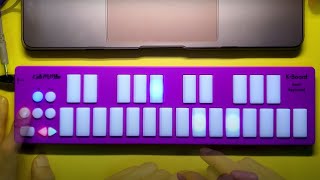
K-Board C MPE Keyboard Controller
Muse Kinetics
Reviews
Owner Insights
We analyzed real musician discussions from forums and Reddit to find what players love, question, and tweak about Muse Kinetics K-Board-C Smart Sensor USB MPE MIDI Keyboard Controller.
Features and functionality
Software and compatibility
User experience
Value and pricing
-
While some owners found it on sale for $70, they still express disappointment in its reliability and overall value.
Source
Use cases and applications
-
The K-Board-C's MPE feature demands tinkering, making it more of a niche tool for those familiar with complex MIDI setups.
Source -
The K-Board-C is noted for effectively adding vibrato to saxophone lines by finger movement, enhancing expressiveness in performance.
Source -
The K-Board-C is recommended for travel with an iPad Pro, as it pairs well with portable setups and withstands rough handling in backpacks.
Source
Comparisons
-
While the K-Board-C is praised for adding vibrato easily, its small rectangles are less favored compared to piano key layouts for repeated accuracy.
Source
Based on 0 Reviews and 0 Ratings
More Muse Kinetics MIDI Keyboard Controllers

-m.webp?v=1783238748)
$85.00 - $149.50
in MIDI Keyboard Controllers Rank


$165.00 - $712.00
in MIDI Keyboard Controllers Rank


$166.00 - $199.00
in MIDI Keyboard Controllers Rank


$185.90 - $678.00
in MIDI Keyboard Controllers Rank


$32.84 - $59.00
in MIDI Keyboard Controllers Rank


$46.57
in MIDI Keyboard Controllers Rank


-m.webp?v=1783177167)
$403.95 - $469.00
in MIDI Keyboard Controllers Rank


$76.07 - $89.00
in MIDI Keyboard Controllers Rank


$277.00 - $440.00
in MIDI Keyboard Controllers Rank


$39.99 - $99.99
in MIDI Keyboard Controllers Rank


$676.87 - $1,301.63
in MIDI Keyboard Controllers Rank


$435.00 - $1,637.00
in MIDI Keyboard Controllers Rank


$80.00 - $119.99
in MIDI Keyboard Controllers Rank


$214.99
in MIDI Keyboard Controllers Rank


$119.00 - $199.99
in MIDI Keyboard Controllers Rank


$20.00 - $599.99
in MIDI Keyboard Controllers Rank


$260.80 - $780.99
in MIDI Keyboard Controllers Rank
.jpeg?v=1783110732)


-m.webp?v=1783091407)
$35.00 - $79.00
in MIDI Keyboard Controllers Rank


$99.99 - $149.99
in MIDI Keyboard Controllers Rank


$185.09 - $469.00
in MIDI Keyboard Controllers Rank


$134.99 - $269.00
in MIDI Keyboard Controllers Rank


$99.00 - $99.99
in MIDI Keyboard Controllers Rank


$88.09
in MIDI Keyboard Controllers Rank


$299.99
in MIDI Keyboard Controllers Rank


$58.00 - $131.04
in MIDI Keyboard Controllers Rank


$85.00 - $144.49
in MIDI Keyboard Controllers Rank


$207.99 - $641.59
in MIDI Keyboard Controllers Rank


$174.23 - $299.00
in MIDI Keyboard Controllers Rank
.jpg?v=1783050947)


$359.00 - $699.00
in MIDI Keyboard Controllers Rank

$163.00 - $279.99
in MIDI Keyboard Controllers Rank


$211.00 - $300.00
in MIDI Keyboard Controllers Rank


$256.74 - $365.00
in MIDI Keyboard Controllers Rank


$289.00 - $499.00
in MIDI Keyboard Controllers Rank


$160.00 - $371.99
in MIDI Keyboard Controllers Rank


$107.47
in MIDI Keyboard Controllers Rank


$114.90 - $129.00
in MIDI Keyboard Controllers Rank


$150.00 - $179.00
in MIDI Keyboard Controllers Rank


$58.70 - $139.99
in MIDI Keyboard Controllers Rank


Accessories & Related Items


-s.webp?v=1783177800)


Artist usage


Community setups


Similar


Gear Guides








Most Popular MIDI Keyboard Controllers
Most Popular Brands
-
Added to Equipboard on by
 equipboard
Gear IQ 4934
-


