

Pricing and availability
We compare 600+ stores and found this item at 5 stores. Prices updated .
Store
Reviews
Price




Price History
Based on price data from 3 merchants for "Avid pro tools dock". Prices shown reflect NEW condition. Tracking began Apr 2, 2026.
* Product prices and availability are updated by Equipboard every 24hrs and are subject to change. Equipboard may receive compensation for purchases made at participating retailers linked on this site. This compensation does not affect what products or prices are displayed, or the order of prices listed. For more information, please refer to our affiliate disclosure.
Description
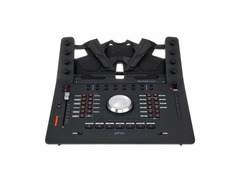
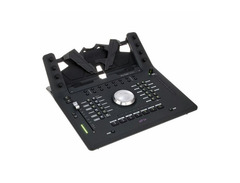
Elevate your music production experience with the Avid Pro Tools Dock, a dynamic DAW controller that seamlessly integrates with your iPad, transforming it into a powerful studio centerpiece. This innovative tool combines the tactile control of hardware with the flexibility of a touchscreen, allowing you to mix with your ears, not your eyes. The Pro Tools Dock enhances your workflow with its intuitive design, featuring transport controls, a jog wheel, and dedicated automation controls, all within reach.
Designed for compatibility with EUCON-enabled DAWs, this versatile controller supports not only Avid Pro Tools but also Apple Logic Pro X, Steinberg Cubase, and more. Its touch-sensitive motorized fader provides precise control over your mix, while the eight endless encoders and 16 soft keys offer customizable options to suit your creative process. Whether you're editing inserts, sends, or pans, the Pro Tools Dock gives you the hands-on control you need for a professional-grade mix.
Perfect for musicians and producers seeking efficiency without compromising on quality, the Avid Pro Tools Dock is your gateway to a streamlined and immersive audio production experience.
Key Features:
- Integrates with the free "Avid Control" tablet app
- Compatible with EUCON protocol-supported DAWs
- Touch-sensitive motorized fader for enhanced precision
- 8 touch-sensitive endless encoders
- Jog wheel and transport section for intuitive operation
- 10-segment level meter with pre- and post-fader options
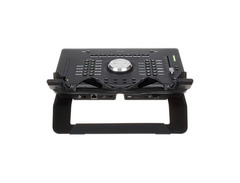
- 6.3 mm jack connection for footswitch
- USB 2.0 port for tablet power supply
- Ethernet port for stable connectivity
- Supports Avid Pro Tools 12.5+, Logic Pro X, Cubase 8.5+, and more
Product specs
| Type | Pro Tools / Control iOS app controller |
| Screen | Dock for iPad Air 2 attachment |
| Faders | Single attention channel fader |
| Transport Controls | Yes |
| Encoders/Pots | 8 x Touch-sensitive, push-top soft knobs |
| Pads | 2 x programmable touch strips |
| Computer Connectivity | Ethernet |
| USB | 1 x Type A (charging iPad) |
| Data I/O | Eucon Ethernet (compatible with Avid S3 and Artist Mix controllers) |
| Other I/O | 1 x 1/4" (footswitch) |
| Compatibility | Avid Pro Tools 12.5 or higher, Pro Tools HD 12.5 or higher, Apple Logic Pro X, Cubase 8.5 or higher, Nuendo 7 or higher |
| Hardware Requirements - Mac | 1GHz Processor or higher, 2GB RAM minimum, 10/100 Base-T Ethernet port |
| Hardware Requirements - PC | 1GHz Processor or higher, 2GB RAM minimum, 10/100 Base-T Ethernet port |
| OS Requirements - Mac | OS X 10.10.5 or later, iOS 9.3.1 or later |
| OS Requirements - PC | Windows 8 or later |
| Power | 12V DC power supply included |
FAQs
-
Is the Avid Pro Tools Dock compatible with other DAWs besides Pro Tools?
-
Yes, the Avid Pro Tools Dock is compatible with Apple Logic Pro X, Cubase 8.5 or higher, and Nuendo 7 or higher, in addition to Pro Tools 12.5 or higher.
-
What type of connectivity does the Avid Pro Tools Dock offer?
-
The Avid Pro Tools Dock connects via Ethernet and includes a USB Type A port for charging your iPad. It also features a 1/4" footswitch jack for additional control options.
-
Can the Avid Pro Tools Dock be used with an iPad?
-
Yes, the Avid Pro Tools Dock is designed with a dock for an iPad Air 2, allowing for enhanced touchscreen control and integration with the Pro Tools Control app.
-
What are the hardware requirements for using the Avid Pro Tools Dock on a Mac?
-
To use the Avid Pro Tools Dock on a Mac, you'll need a 1GHz processor or higher, a minimum of 2GB RAM, and a 10/100 Base-T Ethernet port. It requires OS X 10.10.5 or later.
-
Does the Avid Pro Tools Dock support automation?
-
Yes, the Avid Pro Tools Dock allows for easy track automation, providing hands-on control over your Pro Tools sessions with its touch-sensitive fader and programmable touch strips.
Videos

Sweetwater
Avid Pro Tools Dock Review by Sweetwater
Avid Pro Tools Dock Review by Sweetwater
Sweetwater
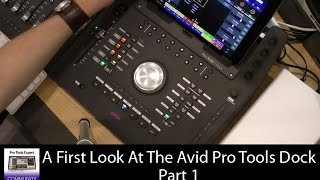
First Look - Avid Pro Tools Dock - Part 1

Production Expert

Avid Pro Tools Dock Overview Part 1 | WestlakePro.com

Westlake Pro
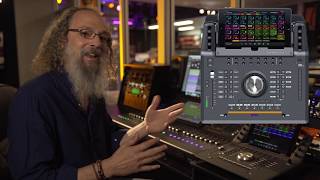
Andrew Scheps on the ProTools Dock

Brisbane Sound Group
![Video thumbnail for [AES] Avid Pro Tools Dock by Audiofanzine in English](https://img.youtube.com/vi/nUtgime6X0Q/mqdefault.jpg)
[AES] Avid Pro Tools Dock

Audiofanzine in English
![Video thumbnail for Avid Pro Tools Dock Review [Extended Version] by Consordini](https://img.youtube.com/vi/6aFkYUynFXk/mqdefault.jpg)
Avid Pro Tools Dock Review [Extended Version]

Consordini
Reviews
PROS
-
Perfect controller for Pro Tools users
-
Integrates well with the Avid S1 for enhanced control
-
Organizes work efficiently, putting all controls in front
-
Utilizes the powerful Eucon protocol for superior control over HUI/Mackie protocols
-
High-quality jog wheel and fader
CONS
-
High price point might not justify the value for some users
-
Limited pre-mapped controls for Cubase, requiring extensive manual configuration
-
Software for editing softkeys is unintuitive and buggy
-
Lack of user-friendly software adjustments for non-Pro Tools DAWs
-
Inconsistent implementation of scrolling and jog sensitivity with Cubase
-
Essential functions like Metronome control relegated to softkeys
-
Customization of controls can lead to confusion due to mismatched labeling
-
Some hardware components feel less durable, with wobbly buttons and heavy potentiometers
-
Buttons produce an annoying clicking noise
Owner Insights
We analyzed real musician discussions from forums and Reddit to find what players love, question, and tweak about Avid pro tools dock.
Features and functionality
-
The Avid Dock offers Eucon integration, providing less latency than MIDI protocols and extensive DAW control functionalities.
Source -
The Avid Dock can be paired with multiple S1 units through a network switch for enhanced control capabilities.
Source -
The Avid Dock lacks a flip function for its fader, limiting its use for aux send automation directly.
Source
Software and compatibility
-
In Pro Tools, the SSL UC1 uses HUI, limiting its display and DAW control features, making it less compatible compared to Eucon-based systems.
Source -
The Avid Artist Mix, despite being discontinued, still functions well with the latest Pro Tools versions due to EuCon support.
Source -
The S3's IO side is incompatible with tower Mac Pros, necessitating an additional interface like an Audient.
Source
User experience
-
Owners with repetitive strain injuries appreciate the physical knobs on the Avid Dock for reducing reliance on mouse/keyboard, enhancing ergonomic workflow.
Source -
Some owners report frequent connectivity issues with the Avid S1, requiring resets by unplugging the unit.
Source -
Some users find the Avid S3 more efficient than the S6 M10 due to customizable buttons and layouts, despite less advanced faders.
Source
Value and pricing
-
Older Euphonix-branded Artist Control units can be found for $160-$300 on eBay, though they may require maintenance for sticky surfaces and fader issues.
Source -
Older Avid Artist series controllers, while no longer manufactured, are considered a cost-effective alternative to newer models due to their EuCon compatibility.
Source
Comparisons
-
The SSL UC1 excels in plugin control but lacks Pro Tools integration compared to the Avid Dock's broader Eucon functionality, which includes faster response times and deeper DAW control.
Source
Use cases and applications
Critic Reviews
5.0 out of 5
Based on 0 Reviews and 2 Ratings
More Avid DAW Controllers

$1,295.00 - $1,495.00
in DAW Controllers Rank


$995.00 - $1,195.00
in DAW Controllers Rank


$1,191.76
in DAW Controllers Rank


$1,191.76
in DAW Controllers Rank




$133.00 - $240.00
in DAW Controllers Rank


$182.00 - $277.00
in DAW Controllers Rank


$52.00 - $119.99
in DAW Controllers Rank


$249.00 - $499.00
in DAW Controllers Rank


$80.00
in DAW Controllers Rank


$34.09 - $209.99
in DAW Controllers Rank


$285.00 - $419.00
in DAW Controllers Rank


$182.89 - $599.99
in DAW Controllers Rank


$1,045.00 - $1,399.99
in DAW Controllers Rank


$76.40 - $109.00
in DAW Controllers Rank


$57.00 - $1,299.99
in DAW Controllers Rank


in DAW Controllers Rank


$74.00
in DAW Controllers Rank


$99.00 - $229.00
in DAW Controllers Rank


$699.99 - $839.99
in DAW Controllers Rank


$169.00 - $209.99
in DAW Controllers Rank


$229.53 - $524.99
in DAW Controllers Rank


$79.95 - $109.00
in DAW Controllers Rank


$122.00 - $189.00
in DAW Controllers Rank


$582.73 - $799.99
in DAW Controllers Rank

$161.49 - $349.99
in DAW Controllers Rank

$184.96
in DAW Controllers Rank


$110.00
in DAW Controllers Rank


$48.00 - $70.90
in DAW Controllers Rank


$635.00 - $999.99
in DAW Controllers Rank


$333.00 - $399.99
in DAW Controllers Rank

$129.00 - $169.99
in DAW Controllers Rank
Accessories & Related Items


Artist usage


Community setups


Similar


Most Popular DAW Controllers
Most Popular Brands
-
Added to Equipboard on by
 rondada2002
GearIQ 84
-


