
Pricing and availability
We compare 600+ stores and found this item at 9 stores. Prices updated .
Store
Reviews
Price









Price History
Based on price data from 6 merchants for "Behringer X-Touch". Prices shown reflect NEW condition. Tracking began Apr 2, 2026.
* Product prices and availability are updated by Equipboard every 24hrs and are subject to change. Equipboard may receive compensation for purchases made at participating retailers linked on this site. This compensation does not affect what products or prices are displayed, or the order of prices listed. For more information, please refer to our affiliate disclosure.
Description
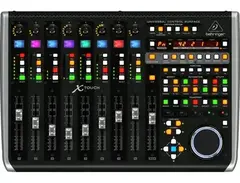
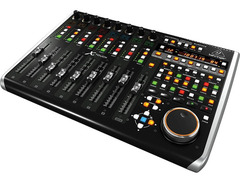
Harness the power of your studio or stage with the Behringer X-Touch, a universal control surface that transforms your music production experience. Designed for seamless integration with major DAWs, the X-Touch supports both Mackie Control and HUI protocols, ensuring compatibility across a wide spectrum of audio software. Whether you're mixing tracks in your studio or controlling your X32 digital mixer from afar, this device is your gateway to efficient and dynamic music creation.
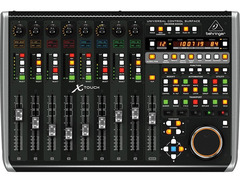
The X-Touch shines with its nine touch-sensitive, 100mm motorized faders that bring your DAW to life. These faders provide real-time feedback, moving in sync with your on-screen automation for precise and intuitive control. Complemented by eight bright LCD scribble strips, the X-Touch gives you an at-a-glance view of track names and parameters, keeping you focused and in the creative zone.
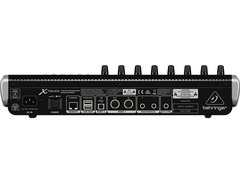
Navigate effortlessly through your sessions with 92 illuminated buttons and eight rotary controls, each with LED collars. These tactile elements not only streamline your workflow but also enhance your interaction with your music. The built-in Ethernet interface and USB connectivity expand your setup options, while dual footswitch connectors offer even more control possibilities.
Whether you're a seasoned producer or a live sound engineer, the Behringer X-Touch offers a tactile, customizable interface that brings your musical ideas to fruition with speed and accuracy.
Key Features:
- Universal DAW remote control with Mackie Control and HUI protocol support
- 9 touch-sensitive, 100mm motorized faders for dynamic control
- 8 LCD scribble strips for quick track identification
- 92 dedicated illuminated buttons for direct function access
- Rotary controls with LED collars for real-time parameter adjustments
- Ethernet interface for RTP MIDI and X32 series remote control
- USB and 5-pin MIDI interface for versatile connectivity
- Dual footswitch connectors and foot controller input for remote control
- 2-port USB hub for additional device connections
Product specs
| Type | DAW remote controller |
| Faders | 9 x 100mm (Motorized) |
| Transport Controls | Yes |
| Encoders/Pots | 8 x Rotary with LEDs |
| Soft Keys | 92 key function illuminated buttons |
| Analog Inputs | 2 x 1/4" (footswitch), 1 x 1/4" (external controller) |
| Computer Connectivity | 2 x USB Type A, 1 x USB Type B |
| MIDI I/O | In/Out/USB |
| Data I/O | 1 x Ethernet remote jack |
| OS Requirements - Mac | OS X 10.7 or later |
| OS Requirements - PC | Windows 7 or later |
| Height | 3.9" |
| Width | 17.8" |
| Depth | 11.9" |
FAQs
-
Is the Behringer X-Touch compatible with major DAWs like Ableton Live and Pro Tools?
-
Yes, the Behringer X-Touch is compatible with major DAWs such as Ableton Live and Pro Tools. It supports HUI and Mackie Control protocols, allowing seamless integration with various digital audio workstations.
-
How many motorized faders does the Behringer X-Touch have?
-
The Behringer X-Touch features 9 motorized 100mm faders, which provide precise control over your DAW's mixer channels and automation.
-
Does the Behringer X-Touch offer transport controls for DAW operation?
-
Yes, the Behringer X-Touch includes transport controls, enabling you to easily manage playback, recording, and navigation within your DAW.
-
What connectivity options are available on the Behringer X-Touch?
-
The Behringer X-Touch offers multiple connectivity options, including USB, MIDI I/O, and Ethernet, allowing flexible integration with computers and other devices.
-
Can the Behringer X-Touch be used with both Mac and Windows operating systems?
-
Yes, the Behringer X-Touch is compatible with both Mac (OS X 10.7 or later) and Windows (Windows 7 or later) operating systems.
Videos

Nyroh (SOUND ROCKET STUDIOS)
REVIEW: BEHRINGER X TOUCH | A great control surface at a small price!
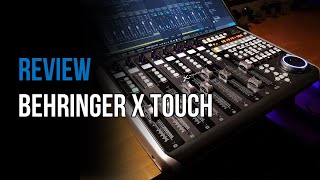
REVIEW: BEHRINGER X TOUCH | A great control surface at a small price!
Nyroh (SOUND ROCKET STUDIOS)
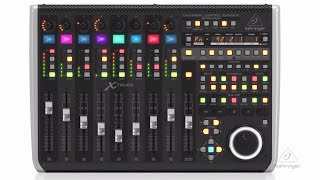
BEHRINGER X-TOUCH

Behringer
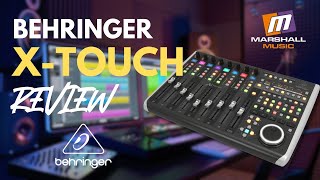
Behringer X-Touch - Review

Marshall Music SA
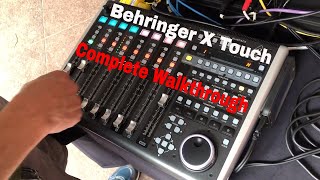
Behringer X Touch Control Surface | Complete walkthrough

Pickus Productions
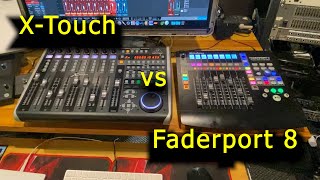
Presonus Faderport 8 vs Behringer X-Touch(Faders noise and size).

Skyborn Waves
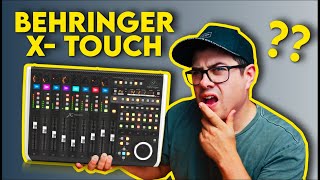
Behringer X Touch - Do You Really NEED A Control Surface??

Spinlight Studio
Reviews
PROS
-
Full control of Logic Pro X, enhancing workflow
-
Excellent value with 100mm motorised faders
-
Solid build quality, suited for studio use
-
8 motorized faders with assignable encoder knobs enhance mixing precision
-
Built-in transport controls with a large knob for easy playhead navigation
-
Scribble strip for easy track identification
-
Shortcut buttons for efficient session navigation
CONS
-
Not compatible with Apple's Mainstage 3
Owner Insights
We analyzed real musician discussions from forums and Reddit to find what players love, question, and tweak about Behringer X-Touch.
Software and compatibility
-
CSI offers extensive customization but can be overwhelming; a major update is expected to improve ease of use, potentially altering configuration file syntax.
Source -
X-Touch users are advised to wait for CSI's update before extensive configuration, as changes may affect existing setups.
Source -
Firmware version 1.04 on the X-Touch works seamlessly; newer versions may cause functionality issues, requiring a rollback.
Source -
Both the CSI and DrivenByMoss extensions are compatible with the X-Touch One for enhanced functionality in Reaper.
Source
Features and functionality
-
The default MCU setup for the X-Touch may lack comprehensive functionality, prompting users to supplement with software like Klinke or DBM4R for better button support.
Source
User experience
-
Some owners recommend starting with Klinke for a straightforward setup, noting it works well without requiring further attention once configured.
Source -
Initial setup using default MCU integration can be quick, with customization through Reaper's action list to map shortcuts, needing less than an hour.
Source -
Some users experience motor faders resetting to -10dB when hitting play, linked to MIDI reset settings.
Source
Use cases and applications
Setup and maintenance
4.5 out of 5
Based on 4 Reviews and 22 Ratings

78
Best quality-price
Lot of pros and a little bit of cons. The main wheel is not the best, the faders turn crazy when you do a lot of automations (sick electronic basses) so you have to deactivate that stem in particular. In logic daw the colors of the pads doesn't work.

Amazing bit of kit for the price.
I use Logic Pro X on a Mac almost daily and this gives full control of Logic Pro X. Amazing bit of kit for the price especially when you consider it has 100mm motorised faders. Solidly built but it's always studio based, therefore not likely to be knocked around.

Awesome Controller, But missing a few features
First Off, this is an awesome controller. It has 8 motorized faders with encoder knobs above them. The encoder knobs can be assigned to different functions using the "Encoder Assign" section. This controller also has built in transport controls, with a large knob for moving the playhead. The only thing I don't like about this controller is the fact that it is not recognized by Apple's Mainstage 3, So i am unable to use it for mixing my livestreams.

924
they know what theyre doing
another great controller from behringer. I believe midi controllers are behringers absolute strong point and the xtouch builds on that in a great way. the scribble strip enhances my ability to mix without a mouse from within my daw greatly and the shortcut buttons are great quickly jumping through sessions
Artist usage
Add artist

Suga was given the Behringer X-Touch Universal Control Surface by fans for his 24th birthday.


Double U utilizes the Behringer X-Touch, a universal control surface featuring 9 touch-sensitive motor faders, LCD scribble strips, and Ethernet/USB/MIDI interface, as highlighted in the Music-group source.


Included in equipment list

Jarod Fedele can be seen using a Behringer X-Touch in the background at 0:07 in the video and throughout


Genre Usage
Based on how artists on Equipboard use this gear, it is most commonly found in the following genres.
Used With
Based on how musicians on Equipboard use Behringer X-Touch, it is most commonly used with the following gear.



-s.webp?v=1784300484)



Similar
Add recommendation1 alternative for Behringer X-Touch, curated by the Equipboard community.

$229.78 - $524.99
I didn't try the presonus but will be the perfect alternative in case I want to change the x-touch if he dies.
More Behringer DAW Controllers

in DAW Controllers Rank


$122.00 - $189.00
in DAW Controllers Rank


$110.00
in DAW Controllers Rank


$48.00 - $70.90
in DAW Controllers Rank


$199.00 - $409.00
in DAW Controllers Rank

$249.00 - $469.90
in DAW Controllers Rank



$133.00 - $240.00
in DAW Controllers Rank


$182.00 - $277.00
in DAW Controllers Rank


$52.00 - $119.99
in DAW Controllers Rank


$249.00 - $499.00
in DAW Controllers Rank


$80.00
in DAW Controllers Rank


$34.07 - $209.99
in DAW Controllers Rank


$183.15 - $599.99
in DAW Controllers Rank


$1,045.00 - $1,399.99
in DAW Controllers Rank


$76.40 - $109.00
in DAW Controllers Rank


$57.00 - $1,299.99
in DAW Controllers Rank


$74.00
in DAW Controllers Rank


$99.00 - $229.00
in DAW Controllers Rank


$699.99 - $839.99
in DAW Controllers Rank


$169.00 - $209.99
in DAW Controllers Rank


$229.78 - $524.99
in DAW Controllers Rank


$1,295.00 - $1,495.00
in DAW Controllers Rank


$995.00 - $1,195.00
in DAW Controllers Rank


$79.95 - $109.00
in DAW Controllers Rank


$582.22 - $799.99
in DAW Controllers Rank

$161.41 - $349.99
in DAW Controllers Rank

$185.16
in DAW Controllers Rank


$1,191.76
in DAW Controllers Rank


$635.00 - $999.99
in DAW Controllers Rank


$333.00 - $399.99
in DAW Controllers Rank

$129.00 - $169.99
in DAW Controllers Rank

$995.00 - $1,195.00
in DAW Controllers Rank

$544.00 - $699.99
in DAW Controllers Rank

$140.00
in DAW Controllers Rank


$1,191.76
in DAW Controllers Rank


Accessories & Related Items


Community setups


Most Popular DAW Controllers
Most Popular Brands
-
Added to Equipboard on by
 wouterbruijninckx
GearIQ 956
-


