

Pricing and availability
We compare 600+ stores and found this item at 8 stores. Prices updated .
Store
Reviews
Price









Price History
Based on price data from 6 merchants for "Behringer X-Touch One". Prices shown reflect NEW condition. Tracking began Apr 2, 2026.
* Product prices and availability are updated by Equipboard every 24hrs and are subject to change. Equipboard may receive compensation for purchases made at participating retailers linked on this site. This compensation does not affect what products or prices are displayed, or the order of prices listed. For more information, please refer to our affiliate disclosure.
Description
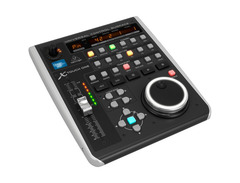
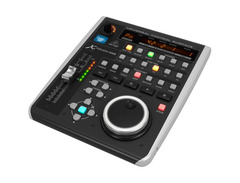
Dive into an enriched music production experience with the Behringer X-Touch One, a versatile DAW controller designed to elevate your creative process. This compact yet powerful control surface seamlessly integrates with your digital audio workstation, offering a tactile and intuitive interface that goes beyond the mouse and keyboard. Its standout feature, a touch-sensitive, 100mm motorized fader, ensures precise control over your mix, bringing your automation to life with real-time, hands-on adjustments.
Whether you're tweaking volumes, panning, or applying effects, the X-Touch One's tactile controls, including a rotary encoder and 34 backlit buttons, provide immediate access to essential functions. The LCD scribble strip and LED meter offer a clear overview of your project, ensuring you always know which tracks are soloed, muted, or peaking. Compatibility is a breeze with support for HUI and Mackie Control protocols, making it a perfect fit for nearly any DAW on the market.
Navigating your project is effortless with the large jog wheel and transport controls, reminiscent of classic tape machines. Plus, the built-in 2-port USB hub allows for easy connection of additional gear, streamlining your setup. Whether you're recording, mixing, or performing, the X-Touch One is designed to enhance your workflow, making it an invaluable asset for any music producer or engineer.
Key Features:
- Comprehensive DAW control surface for seamless integration with various music production software
- Touch-sensitive, 100mm motorized fader for dynamic and precise control
- Supports Mackie Control and HUI protocols for universal compatibility
- Rotary control with LED-collar and illuminated buttons for immediate parameter adjustments
- Jog wheel and transport controls for easy navigation and session control
- Color-coded LCD scribble strip for instant track identification
- Pre-configured controls for plug-and-play setup
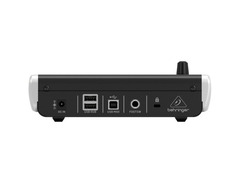
- 2-port powered USB hub for connecting additional devices
- Footswitch connector for external remote control
Product specs
| Type | DAW Remote Control Surface |
| Screen | LED Scribble Strip, Time Code Display |
| Faders | 1 x 100mm motorized fader |
| Transport Controls | Yes |
| Encoders/Pots | Jog wheel |
| Soft Keys | 6 x Function keys, Transport functions, Navigation buttons |
| Computer Connectivity | USB |
| MIDI I/O | USB |
| USB | 2 x Type A, 1 x Type B |
| Other I/O | 1 x 1/4" (footswitch) |
| Software | Tracktion Production Software (includes download code) |
| Compatibility | Mackie Control, HUI |
| Power | 9V DC 1700mA power supply |
| Height | 2" |
| Width | 7.4" |
| Depth | 9.2" |
FAQs
-
Is the Behringer X-Touch One compatible with my DAW?
-
The Behringer X-Touch One is compatible with most major DAWs, including Ableton Live, Pro Tools, and Logic Pro, using Mackie Control and HUI protocols.
-
Does the Behringer X-Touch One require an external power supply?
-
Yes, the Behringer X-Touch One requires a 9V DC 1700mA power supply, which is included with the unit.
-
What kind of connectivity does the Behringer X-Touch One offer?
-
The Behringer X-Touch One offers USB connectivity for seamless integration with your computer and DAW, along with a 1/4" footswitch input for additional control options.
-
Can the Behringer X-Touch One be used for live performances?
-
Yes, the Behringer X-Touch One can be used for live performances, offering tactile control over your DAW's functions, making it ideal for both studio and live environments.
-
What is the function of the motorized fader on the Behringer X-Touch One?
-
The motorized fader on the Behringer X-Touch One allows for precise control and automation of track levels, providing real-time feedback and adjustments during mixing and recording sessions.
Videos

Behringer
Introducing the X-Touch One DAW Controller
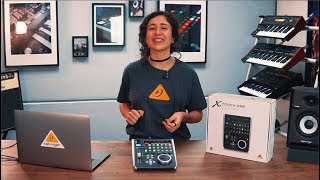
Introducing the X-Touch One DAW Controller
Behringer
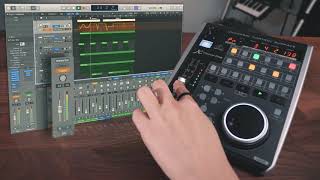
X-Touch One Logic Pro - Part 2: Features
Behringer
X-Touch One With Logic Pro - Part 1
Behringer
Behringer X Touch One vs Presonus Faderport V2 - Part 2

Creative Space studios
DAW Controller Xtouch One Unboxing and Setup with Pro Tools

MixbusTv
Behringer X-Touch One Causes Nuclear Meltdown | Can An IDIOT Set It Up In Logic?!

PresentDayProduction
X-Touch One - Set up with Cubase

Behringer Knowledge Base
X-Touch One - Set up with Studio One
Behringer Knowledge Base
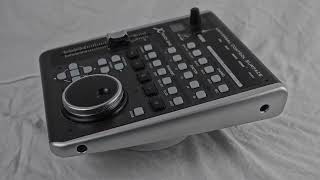
An Honest Review of the Behringer X Touch One

JCNP
Reviews
PROS
-
Works well with Logic and Luna, enhancing workflow
-
Includes DAW templates for universal control
-
Motorized fader and one-touch functionality for ease of use
-
Compact design saves desk space
-
Swappable frames adapt to various DAWs, improving versatility
-
Added hotkeys and jog wheel boost workflow efficiency
-
Solid build quality with a 2-year guarantee from Sweetwater
CONS
-
Setup can be challenging and firmware updates may be needed
-
May exhibit compatibility issues with certain DAWs like Reaper and Studio One
-
Limited functionality with Pro Tools; scrubber knob ineffective
-
Only one fader, which may be limiting for some production workflows
-
Reason Studios users may find mappings disappointing
Owner Insights
We analyzed real musician discussions from forums and Reddit to find what players love, question, and tweak about Behringer X-Touch One.
Software and compatibility
-
Firmware version 1.04 is preferred by some users due to issues with newer updates causing functionality problems with Reaper.
Source -
The Behringer X-Touch One requires additional extensions like CSI or DrivenByMoss for optimal performance with Reaper.
Source -
Using the DrivenByMoss4Reaper extension can enhance the X-Touch One's functionality, enabling features that are unmapped by default in Reaper.
Source -
The MCU protocol allows track selection with immediate mixer updates when using the jog wheel arrows on the X-Touch One.
Source
Setup and maintenance
-
Disabling the “MIDI Device Reset on Stop/Start” option resolves issues with faders resetting to -10dB on playback.
Source
Features and functionality
User experience
-
Some users find the pre-mapped Reaper configuration satisfactory for basic recording controls, particularly when used in a solo musician setup.
Source
5.0 out of 5
Based on 0 Reviews and 2 Ratings
Artist usage
Add artist
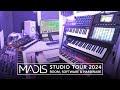
In the YouTube video titled "Madis Studio Tour 2024 - My Workplace, Hardware and Software," Madis confirms the use of the Behringer X-Touch One as part of his studio setup at the 2:34 mark.


Genre Usage
Based on how artists on Equipboard use this gear, it is most commonly found in the following genres.
Used With
Based on how musicians on Equipboard use Behringer X-Touch One, it is most commonly used with the following gear.


-s.webp?v=1784439559)


-s.webp?v=1784458888)
Community setups
Show yours

More Behringer DAW Controllers

$285.00 - $419.00
in DAW Controllers Rank


in DAW Controllers Rank


$125.00
in DAW Controllers Rank


$48.00 - $70.90
in DAW Controllers Rank


$199.00 - $409.00
in DAW Controllers Rank

$249.00 - $469.90
in DAW Controllers Rank



$133.00 - $240.00
in DAW Controllers Rank


$182.00 - $277.00
in DAW Controllers Rank


$53.00 - $119.99
in DAW Controllers Rank


$249.00 - $499.00
in DAW Controllers Rank


$80.00
in DAW Controllers Rank


$34.00 - $209.99
in DAW Controllers Rank


$182.55 - $599.99
in DAW Controllers Rank


$1,045.00 - $1,399.99
in DAW Controllers Rank


$76.40 - $109.00
in DAW Controllers Rank


$57.00 - $1,299.99
in DAW Controllers Rank


$74.00
in DAW Controllers Rank


$99.00 - $229.00
in DAW Controllers Rank


$699.99 - $839.99
in DAW Controllers Rank


$169.00 - $209.99
in DAW Controllers Rank


$229.86 - $524.99
in DAW Controllers Rank


$1,295.00 - $1,495.00
in DAW Controllers Rank


$995.00 - $1,195.00
in DAW Controllers Rank


$79.95 - $109.00
in DAW Controllers Rank


$579.73 - $799.99
in DAW Controllers Rank

$161.07 - $349.99
in DAW Controllers Rank

$185.23
in DAW Controllers Rank


$1,191.76
in DAW Controllers Rank


$635.00 - $999.99
in DAW Controllers Rank


$333.00 - $399.99
in DAW Controllers Rank

$129.00 - $169.99
in DAW Controllers Rank

$995.00 - $1,195.00
in DAW Controllers Rank

$544.00 - $699.99
in DAW Controllers Rank

$140.00
in DAW Controllers Rank


$1,191.76
in DAW Controllers Rank


Accessories & Related Items


Similar


Most Popular DAW Controllers
Most Popular Brands
-
Added to Equipboard on by
 sundews
GearIQ 282
-


