

Pricing and availability
We compare 600+ stores and found this item at 8 stores. Prices updated .
Store
Reviews
Price








Price History
Based on price data from 6 merchants for "Avid Dock". Prices shown reflect NEW condition. Tracking began Apr 2, 2026.
* Product prices and availability are updated by Equipboard every 24hrs and are subject to change. Equipboard may receive compensation for purchases made at participating retailers linked on this site. This compensation does not affect what products or prices are displayed, or the order of prices listed. For more information, please refer to our affiliate disclosure.
Description
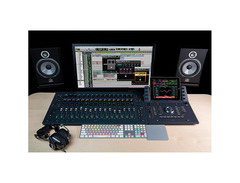
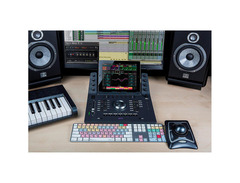
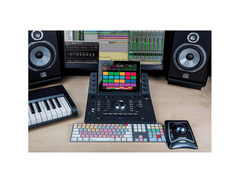
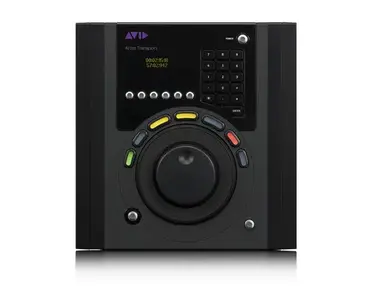
Introducing the Avid Dock, a revolutionary DAW controller that transforms your music production and mixing experience. Merging the intuitive touch capabilities of the acclaimed Pro Tools | S6 with the versatile command features of the Artist | Control, the Avid Dock provides an unparalleled studio control experience in a compact and budget-friendly package. Designed to seamlessly integrate with your iPad via the free Pro Tools | Control iOS app, this ergonomic surface allows for intelligent and speedy navigation through your sessions, ensuring your creative workflow remains uninterrupted. Whether you're crafting the next chart-topping hit or mixing sound for film, the Avid Dock elevates your project to professional standards effortlessly.
Key Features:
- EUCON Technology: Offers seamless integration with EUCON-enabled DAWs, enabling swift transitions across multiple audio and video software without disrupting your creative flow.
- Touchscreen and Tactile Control: Combines the speed of touchscreen operations with the precision of tactile controls, including eight touch-sensitive Soft Knobs and a motorized fader for hands-on mixing.
- Customizable Workflows: Features 16 Soft Keys for assigning frequently used functions, alongside dedicated automation switches to streamline your production process.
- Advanced Integration with Pro Tools: When paired with Pro Tools, the Dock provides deep software integration, allowing access to a wide range of commands, shortcuts, and software functions directly from the surface.
- Versatile Connectivity: Connects to your iPad and interfaces with the Pro Tools | Control app, offering visual feedback and control over your sessions with the Universe Scroller and color-coded tracks view.
- Enhanced Precision: Incorporates a touch-sensitive, motorized fader and push-top Soft Knobs for precise adjustments, ensuring you can mix with your ears, not just your eyes.
The Avid Dock doesn't just facilitate your music and post-production projects; it redefines the way you interact with your creative tools, providing an effortlessly fluid and customizable control surface that adapts to your unique workflow.
Product specs
| Type | Pro Tools / Control iOS app controller |
| Screen | Dock for iPad Air 2 attachment |
| Faders | Single attention channel fader |
| Transport Controls | Yes |
| Encoders/Pots | 8 x Touch-sensitive, push-top soft knobs |
| Pads | 2 x programmable touch strips |
| Computer Connectivity | Ethernet |
| USB | 1 x Type A (charging iPad) |
| Data I/O | Eucon Ethernet (compatible with Avid S3 and Artist Mix controllers) |
| Other I/O | 1 x 1/4" (footswitch) |
| Compatibility | Avid Pro Tools 12.5 or higher, Pro Tools HD 12.5 or higher, Apple Logic Pro X, Cubase 8.5 or higher, Nuendo 7 or higher |
| Hardware Requirements - Mac | 1GHz Processor or higher, 2GB RAM minimum, 10/100 Base-T Ethernet port |
| Hardware Requirements - PC | 1GHz Processor or higher, 2GB RAM minimum, 10/100 Base-T Ethernet port |
| OS Requirements - Mac | OS X 10.10.5 or later, iOS 9.3.1 or later |
| OS Requirements - PC | Windows 8 or later |
| Power | 12V DC power supply included |
FAQs
-
How does the Avid Dock integrate with Pro Tools?
-
The Avid Dock integrates seamlessly with Pro Tools using EUCON technology, allowing for precise control over mixing, editing, and automation tasks directly from the hardware.
-
Can the Avid Dock be used with DAWs other than Pro Tools?
-
Yes, the Avid Dock is compatible with other DAWs such as Apple Logic Pro X, Cubase 8.5 or higher, and Nuendo 7 or higher, offering flexible control across multiple platforms.
-
What are the key features of the Avid Dock's control surface?
-
The Avid Dock features a single attention channel fader, 8 touch-sensitive encoders, programmable touch strips, and transport controls, providing comprehensive control in a compact form.
-
Does the Avid Dock require an iPad to function?
-
Yes, the Avid Dock is designed to work with an iPad Air 2, which serves as its touchscreen interface, enhancing control and workflow efficiency.
-
What connectivity options does the Avid Dock offer?
-
The Avid Dock connects via Ethernet for data I/O and includes a USB port for charging an iPad, ensuring reliable and versatile connectivity in studio setups.
Videos

Sweetwater
Avid Pro Tools Dock Review by Sweetwater
Avid Pro Tools Dock Review by Sweetwater
Sweetwater
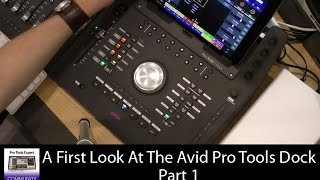
First Look - Avid Pro Tools Dock - Part 1

Production Expert
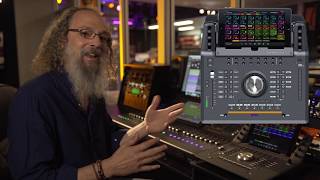
Andrew Scheps on the ProTools Dock

Brisbane Sound Group
![Video thumbnail for Avid Pro Tools Dock Review [Extended Version] by Consordini](https://img.youtube.com/vi/6aFkYUynFXk/mqdefault.jpg)
Avid Pro Tools Dock Review [Extended Version]

Consordini
Reviews
PROS
-
Reprogrammable buttons offer customizable control
-
Supports both iPad and affordable tablets for versatile setup options
-
Enhances workflow significantly, allowing mixing by ear
-
Dedicated transport controls and quick access buttons streamline operations
-
High-quality, solid build feels durable
-
Compatible with Eucon control platform, providing extensive software control
-
Improves efficiency in track editing and sample pocketing
-
User assignable soft keys for quick operations
-
Seamless integration with ProTools for professional use
-
Can be used without an S3, offering standalone functionality
CONS
-
Lack of continuity with Artist Mix in banking operations
-
Requires time to program and adjust settings for optimal use
-
Touch strip sensitivity may require adjustment to avoid unintended track navigation
-
Additional cost for a tablet if not already owned
Owner Insights
We analyzed real musician discussions from forums and Reddit to find what players love, question, and tweak about Avid Dock.
Features and functionality
-
The Dock's jog wheel is noted for taking up significant space, which may be unnecessary for some users, especially if they already use a stream deck with SoundFlow.
Source -
The Dock excels in programmable Eucon commands, allowing users to efficiently perform complex tasks like copying automation or writing to selection with muscle memory.
Source -
The Avid Dock lacks a fader flip function, which limits its usability for aux send automation, requiring workarounds that may double track counts.
Source -
The S1 can array plugin parameters like Attack, Release, and Threshold across its 8 tracks, enhancing plugin control efficiency.
Source -
Owners appreciate the S1’s color-coded tracks that sync with DAW settings, aiding in workflow organization and visual clarity.
Source
Use cases and applications
-
Users focused on post-mixing value the Dock's physical buttons for essential Eucon commands not available via keyboard shortcuts, enhancing their workflow efficiency.
Source -
The S1’s real faders are highlighted for making mix adjustments intuitive, especially beneficial for those transitioning from mouse-based workflows.
Source
Comparisons
-
Some users find the S1 more practical as it provides necessary faders without the underutilized features of the Dock, making it more suited for mixing-heavy workflows.
Source -
An S3 is often preferred over the S6 M10 for home use due to its efficiency and customizable buttons, despite the S6's superior fader quality.
Source -
The S6 M40 supports meter bridge displays and offers more configuration options than the M10, which is limited in size and features.
Source
Software and compatibility
-
The Avid Control app is praised for its functionality, with users successfully integrating it alongside tools like StreamDeck, highlighting its versatility in various setups.
Source
Setup and maintenance
-
Owners report setup issues with the S3, necessitating multiple EuControl reinstalls for recognition, and note its I/O side is incompatible with the tower Mac Pro.
Source -
S1 units require a small 4-port 1GB network switch for seamless operation when using multiple units, ensuring reliable connectivity.
Source
Critic Reviews
5.0 out of 5
Based on 0 Reviews and 1 Rating
Artist usage
Add artist

Saw the Avid S1 and Dock together at Anthony’s studio. Looks beautiful!


Neeraj Khajanchi utilizes the Avid Dock, a versatile DAW controller, in his music production process. This is evident from his Twitter post, where he shares insights from his work on a Dolby Atmos jazz album. The Avid Dock, known for its seamless integration with Pro Tools and other DAWs via EUCON technology, enhances his workflow by providing tactile and touchscreen controls. This setup allows Neeraj to efficiently navigate and mix projects across multiple platforms, including Logic Pro X and Cubase.


In the video titled "Spatial Moon Studios | My ultimate 2025 studio tour" by NIVIRO, at the 1:32 mark, an Avid Dock is clearly visible on NIVIRO’s workdesk.


Genre Usage
Based on how artists on Equipboard use this gear, it is most commonly found in the following genres.
Used With
Based on how musicians on Equipboard use Avid Dock, it is most commonly used with the following gear.


-s.webp?v=1784300229)




Community setups
Show yours


More Avid DAW Controllers

$1,295.00 - $1,495.00
in DAW Controllers Rank


$1,191.76
in DAW Controllers Rank


$995.00 - $1,195.00
in DAW Controllers Rank

$1,191.76
in DAW Controllers Rank




$133.00 - $240.00
in DAW Controllers Rank


$182.00 - $277.00
in DAW Controllers Rank


$52.00 - $119.99
in DAW Controllers Rank


$249.00 - $499.00
in DAW Controllers Rank


$80.00
in DAW Controllers Rank


$34.07 - $209.99
in DAW Controllers Rank


$285.00 - $419.00
in DAW Controllers Rank


$183.15 - $599.99
in DAW Controllers Rank


$1,045.00 - $1,399.99
in DAW Controllers Rank


$76.40 - $109.00
in DAW Controllers Rank


$57.00 - $1,299.99
in DAW Controllers Rank


in DAW Controllers Rank


$74.00
in DAW Controllers Rank


$99.00 - $229.00
in DAW Controllers Rank


$699.99 - $839.99
in DAW Controllers Rank


$169.00 - $209.99
in DAW Controllers Rank


$229.78 - $524.99
in DAW Controllers Rank


$79.95 - $109.00
in DAW Controllers Rank


$122.00 - $189.00
in DAW Controllers Rank


$582.22 - $799.99
in DAW Controllers Rank

$161.41 - $349.99
in DAW Controllers Rank

$185.16
in DAW Controllers Rank


$110.00
in DAW Controllers Rank


$48.00 - $70.90
in DAW Controllers Rank


$635.00 - $999.99
in DAW Controllers Rank


$333.00 - $399.99
in DAW Controllers Rank

$129.00 - $169.99
in DAW Controllers Rank
Accessories & Related Items


Similar


Most Popular DAW Controllers
Most Popular Brands
-
Added to Equipboard on by
 jayskye
GearIQ 2667
-


