


Pricing and availability
We compare 600+ stores and found this item at 3 stores. Prices updated .
Store
Reviews
Price




Price History
Based on price data from 2 merchants for "Contour Design ShuttlePro V2". Prices shown reflect NEW condition. Tracking began Apr 2, 2026.
* Product prices and availability are updated by Equipboard every 24hrs and are subject to change. Equipboard may receive compensation for purchases made at participating retailers linked on this site. This compensation does not affect what products or prices are displayed, or the order of prices listed. For more information, please refer to our affiliate disclosure.
Description
Discover the power of precise control with the Contour Design ShuttlePro V2, a highly adaptable multimedia controller tailored for musicians and audio professionals. Perfectly suited for Digital Audio Workstations (DAWs), this intuitive controller seamlessly integrates into your workflow, enhancing productivity and creative output. Its sleek design houses 15 fully programmable buttons, allowing you to customize your setup with your most frequently used commands, ensuring that every session is efficient and fluid.
At the heart of the ShuttlePro V2 lies its dynamic jog/shuttle knob. This alloy jog wheel offers 360-degree rotation for meticulous frame-by-frame control, while the rubberized, spring-loaded shuttle ring allows for variable-speed fast forward and rewind. Whether you're crafting intricate soundscapes or editing tracks, this controller translates your creative visions into reality with precision.
Designed with versatility in mind, the ShuttlePro V2 is pre-configured to support a wide array of NLE software, making it an invaluable tool for both audio and video editing applications. Its cross-platform compatibility ensures seamless operation on both Mac and PC, providing flexibility no matter your preferred operating system.
With the ShuttlePro V2, elevate your music production and editing capabilities, transforming how you interact with your software, and bringing a tactile, responsive element to your digital setup.
Key Features:
- 15 fully programmable buttons for customization
- Alloy jog wheel for 360-degree frame-by-frame control
- Rubberized, spring-loaded shuttle ring for variable-speed navigation
- Pre-configured for a variety of NLE software
- Cross-platform compatibility with Mac and PC systems
Owner's manual
Contour Design ShuttlePro V2 User ManualVideos

EposVox
EDIT FASTER & BETTER // Contour Design ShuttlePro V2 Review & ShuttleXpress Review
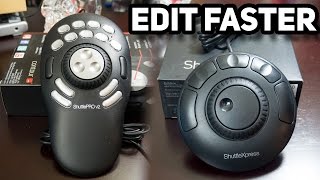
EDIT FASTER & BETTER // Contour Design ShuttlePro V2 Review & ShuttleXpress Review
EposVox
Contour Shuttle Pro V2 Set-up and Review

Make and Remake
Contour Design ShuttlePro V2 Review

Nathan Woodgate
Contour Design Shuttle Pro V2

Chris Watkins Media
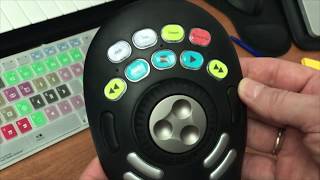
Contour Design Shuttle PRO v2 — unpacking

Андрей Шабаев-Маркин (Андрей Шабаев)

Contour ShuttlePRO v2 Design Controller

Martins Family Reviews
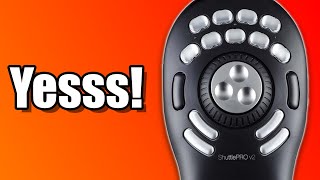
Contour Shuttle Pro V2 Review & Unboxing ( 100% Worth Price Tag )

MustBeWill
Reviews
PROS
-
Highly customizable with 15 programmable buttons for personalized workflows
-
Ergonomic design with easy-to-reach buttons and low profile for comfort
-
Jog and shuttle wheels enhance precision in video editing
-
Reduces reliance on keyboard, increasing editing efficiency
-
Compatible with a wide range of applications beyond video editing
-
Presets available for popular software packages
-
Offers frame-by-frame control ideal for detailed editing tasks
-
Durable and well-made product exceeding user expectations
-
Enhances productivity by minimizing mouse movement
-
Works seamlessly with multiple software applications including DAWs
CONS
-
Incompatible with certain macOS versions, causing functionality issues
-
Lacks support for simultaneous button presses, limiting command options
-
Some users report difficulty with software installation and updates
-
Limited labeling options for bottom row buttons
-
Customer service issues reported regarding driver updates for macOS
Owner Insights
We analyzed real musician discussions from forums and Reddit to find what players love, question, and tweak about Contour Design ShuttlePro V2.
Software and compatibility
-
Users struggle with driver issues, especially on Mac. Version 4 works on Mac OS 15.5, but newer drivers often fail.
Source
Comparisons
-
The Tourbox Elite is favored for its superior software, haptic feedback, Bluetooth, and button mapping, despite looking gimmicky compared to the ShuttlePro V2.
Source -
The Contour ShuttlePro V2 is preferred for its clicky jog wheel, which offers better frame-by-frame control than the Speed Editor's smoother dial.
Source
Features and functionality
-
Some owners highlight the ShuttlePro V2's macro keys above the wheel as crucial for their workflow, which they find lacking in alternatives like the Tourbox.
Source
Setup and maintenance
-
Rolling back to older driver versions can resolve compatibility issues. Users suggest removing the app and reinstalling older drivers like v3.0.39 for better stability.
Source
User experience
-
The ShuttlePro V2's jog/shuttle wheel and assignable buttons are praised for use in AVID, enhancing workflow efficiency and reducing reliance on a keyboard.
Source -
Owners note the ShuttlePro V2's versatility across different applications, making it valuable beyond just video editing in Resolve.
Source -
Users report that the ShuttlePro V2 integrates well into setups with other tools like trackballs, enhancing overall workflow efficiency without needing to frequently reposition hands.
Source
Use cases and applications
-
The ShuttlePro V2 is effectively used in tandem with trackballs to reduce RSI, with custom macro setups for tasks like trimming interviews in AVID.
Source -
The ShuttlePro V2 is favored for complex editing tasks involving multiple tracks and compositions, unlike the Speed Editor, which is better suited for quick edits on the Cut page.
Source
5.0 out of 5
Based on 2 Reviews and 4 Ratings

185
Ultimate Keystrokes Controller
The DAW controller market is crowded with fancy colourful led illuminated devices that have some form of software driven control system. The shuttlepro is nothing like that and that's actually relief because it is simply awesome. Rarely have I seen such a handy tool which can not only control your DAW but any application you run on your mac of pc. This device can send keystrokes or key combinations to any application that has the operating systems focus. The software that comes with the shuttle let's you program those keystrokes to specific applications. It is also possible to repeat keystrokes or let the device hold them for a period of time. So how does this translate to your DAW workflow? An example, you can map the inner shuttle ring to zoom in or out in your arrangement depending on left or right movement. The outer ring could be set to scrub forward or backward through your timeline. The buttons can be programmed to functions like "alt" "ctrl" and "shift" or combinations. You could program your most used commands to the shuttlepro so you don't have to remember all those keyboard shortcuts or make impossible movements on your regular keyboard. The top 9 buttons can be labeled to make it more easy to remember your programmed functions. The only negative point I could find about this device is the software. It could be a little easier to program. Other then that it has improved my workflow tremendously and could ergonomically improve your working environment too. Definitely worth checking out if you are looking for something to improve your workflow.

206
Shuttle Pro2 dedicated for left hand of A/V producer instead of keyboard.
Spin or click to run macros, marker moving, strips moving, scrubbing audio and video and much more. bizzyworks gives a better describe.
Artist usage
Add artist



Genre Usage
Based on how artists on Equipboard use this gear, it is most commonly found in the following genres.
Used With
Based on how musicians on Equipboard use Contour Design ShuttlePro V2, it is most commonly used with the following gear.



More Contour Design DAW Controllers

$64.00
in DAW Controllers Rank


$133.00 - $240.00
in DAW Controllers Rank


$182.00 - $277.00
in DAW Controllers Rank


$53.00 - $119.99
in DAW Controllers Rank


$249.00 - $499.00
in DAW Controllers Rank


$80.00
in DAW Controllers Rank


$34.00 - $209.99
in DAW Controllers Rank


$285.00 - $419.00
in DAW Controllers Rank


$182.55 - $599.99
in DAW Controllers Rank


$1,045.00 - $1,399.99
in DAW Controllers Rank


$76.40 - $109.00
in DAW Controllers Rank


$57.00 - $1,299.99
in DAW Controllers Rank


in DAW Controllers Rank


$74.00
in DAW Controllers Rank


$99.00 - $229.00
in DAW Controllers Rank


$699.99 - $839.99
in DAW Controllers Rank


$169.00 - $209.99
in DAW Controllers Rank


$229.86 - $524.99
in DAW Controllers Rank


$1,295.00 - $1,495.00
in DAW Controllers Rank


$995.00 - $1,195.00
in DAW Controllers Rank


$122.00 - $189.00
in DAW Controllers Rank


$579.73 - $799.99
in DAW Controllers Rank

$161.07 - $349.99
in DAW Controllers Rank

$185.23
in DAW Controllers Rank


$125.00
in DAW Controllers Rank


$48.00 - $70.90
in DAW Controllers Rank


$1,191.76
in DAW Controllers Rank


$635.00 - $999.99
in DAW Controllers Rank


$333.00 - $399.99
in DAW Controllers Rank

$129.00 - $169.99
in DAW Controllers Rank

$995.00 - $1,195.00
in DAW Controllers Rank

$544.00 - $699.99
in DAW Controllers Rank

$140.00
in DAW Controllers Rank


$1,191.76
in DAW Controllers Rank


$199.00 - $409.00
in DAW Controllers Rank

$379.38 - $699.00
in DAW Controllers Rank


$249.00 - $469.90
in DAW Controllers Rank


$249.00 - $1,399.99
in DAW Controllers Rank


$123.00 - $219.99
in DAW Controllers Rank
Accessories & Related Items


Community setups


Similar


Most Popular DAW Controllers
Most Popular Brands
-
Added to Equipboard on by
bizzyworksGearIQ 185
-



