This page about Avid Pro Tools | S3 is a stub. You can help improve it:


Pricing and availability




* Product prices and availability are updated by Equipboard every 24hrs and are subject to change. Equipboard may receive compensation for purchases made at participating retailers linked on this site. This compensation does not affect what products or prices are displayed, or the order of prices listed. For more information, please refer to our affiliate disclosure.
Description
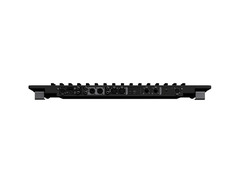
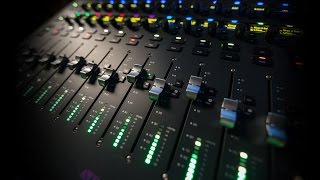
Unlock the full potential of your studio with the Avid Pro Tools | S3, a compact and ergonomic EUCON-enabled control surface designed for modern audio professionals. Drawing inspiration from the award-winning S6, the S3 provides comprehensive control over Pro Tools and other DAWs, bridging the gap between power and portability. Its intuitive layout lets you manage tracks, edit plug-ins, and automate mixes with ease, transforming how you handle your productions. The built-in 4 x 6 AVB audio interface allows you to record and monitor directly from the control surface, eliminating the need for additional equipment.
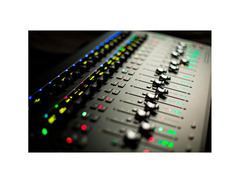
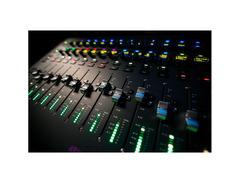
Designed for flexibility, the S3 lets you create up to 12 custom mixer layouts, ensuring that all your essential functions are always just a touch away. Whether you’re in a bustling studio or a compact project space, the S3 fits seamlessly, providing a streamlined workflow for faster and more efficient results. Its premium components—borrowed from the flagship S6 console—offer a tactile experience, combining high-resolution faders and OLED displays for precise control and feedback.
Perfect for both up-and-coming producers and seasoned veterans, the Pro Tools | S3 offers a dynamic solution that adapts to your evolving needs. Whether you're mixing a complex session or capturing a live performance, this versatile control surface ensures you have the tools to create, innovate, and excel.
Key Features:
- EUCON-enabled control surface for seamless DAW integration
- Built-in 4 x 6 AVB audio interface for direct recording and monitoring
- Compact and ergonomic design suitable for any studio environment
- Customizable mixer layouts with instant recall functionality
- High-quality components for a premium tactile experience
- Compatible with Pro Tools, Cubase, Logic Pro, and more
- Streamlined workflow for enhanced productivity and creativity
FAQs
-
How many channels does the Avid Pro Tools | S3 control surface support?
-
The Avid Pro Tools | S3 features 16 channel strips, each equipped with a touch-sensitive, motorized fader and a 10-segment signal level meter.
-
What types of displays are included on the Avid Pro Tools | S3?
-
The Avid Pro Tools | S3 includes 32 high-resolution OLED displays that provide detailed information such as track names, metering data, parameter values, and automation modes.
-
Can the Avid Pro Tools | S3 be used as an audio interface?
-
Yes, the Avid Pro Tools | S3 has a built-in 4x6 AVB Core Audio interface, which includes 2 mic/line inputs, 2 line inputs, 4 line outputs, and a stereo headphone output.
-
Does the Avid Pro Tools | S3 offer transport controls?
-
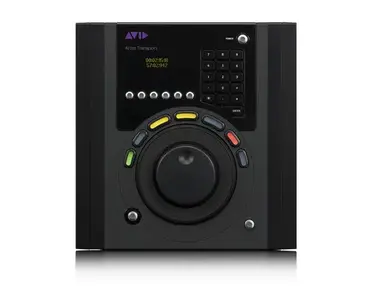
The Avid Pro Tools | S3 includes a touch strip for easy access to transport controls and can be used alongside the Artist Transport for full jog/shuttle wheel functionality.
-
What kind of encoders does the Avid Pro Tools | S3 have?
-
The Avid Pro Tools | S3 features 32 touch-sensitive, push-button rotary encoders with tricolor LED function indicators for controlling panning, gain, plug-in parameters, and more.
Videos

Sweetwater
Avid Pro Tools S3 Control Surface Review - Sweetwater's SoundCheck Vol. 1
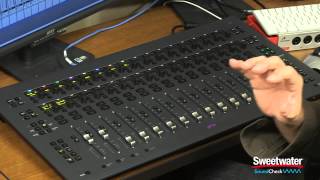
Avid Pro Tools S3 Control Surface Review - Sweetwater's SoundCheck Vol. 1
Sweetwater
Introducing Pro Tools | S3

Avid
Reviews
Owner Insights
We analyzed real musician discussions from forums and Reddit to find what players love, question, and tweak about Avid Pro Tools | S3.
Software and compatibility
-
An Avid-certified Sonnet Ethernet to Thunderbolt adapter is needed for AVB compatibility with MacBook Pro and Avid S3.
Source
Features and functionality
-
The Avid S3 functions as a small audio interface with 4 inputs and 6 outputs, including monitoring capabilities.
Source -
The Avid S3 supports EuCon protocol, offering advanced integration with Pro Tools, unlike HUI devices which have limited support for features like auto-banking and plugin parameter flipping.
Source
Setup and maintenance
Use cases and applications
-
Avid S3's AVB capabilities can be leveraged to connect additional hardware, expanding its utility in complex setups.
Source
User experience
-
Some users report that the Avid S3 does not consistently appear in EuControl, requiring a power cycle to reset, which can be inconvenient during sessions.
Source -
Owners highlight that while physical controllers like the Avid S3 offer tactile benefits, many professionals still prefer using a mouse for plugin control due to ease and speed.
Source
Comparisons
-
Compared to the SSL UF8, the Avid S3 offers more advanced functionality but can be glitchy, whereas the UF8 is noted for its intuitive operation without needing SSL plugins on each channel.
Source -
The Avid Artist series, though discontinued, still functions well with Pro Tools and provides EuCon integration, offering a more affordable alternative to newer Avid controllers.
Source
Critic Reviews
5.0 out of 5
Based on 0 Reviews and 3 Ratings
Artist usage
Add artist

In the third episode of ''Being Like Mike'', the items he use can be seen at (2:34), (7:51) and (8:20).


In this youtube video of Trevor's studio, the S3 can be seen at 2:13


Genre Usage
Based on how artists on Equipboard use this gear, it is most commonly found in the following genres.
Used With
Based on how musicians on Equipboard use Avid Pro Tools | S3, it is most commonly used with the following gear.

-s.webp?v=1784128111)




More Avid DAW Controllers

$1,295.00 - $1,495.00
in DAW Controllers Rank


$995.00 - $1,195.00
in DAW Controllers Rank


$1,191.76
in DAW Controllers Rank


$995.00 - $1,195.00
in DAW Controllers Rank

$1,191.76
in DAW Controllers Rank




$133.00 - $240.00
in DAW Controllers Rank


$180.00 - $277.00
in DAW Controllers Rank


$52.00 - $119.99
in DAW Controllers Rank


$249.00 - $499.00
in DAW Controllers Rank


$72.00
in DAW Controllers Rank


$34.03 - $209.99
in DAW Controllers Rank


$285.00 - $419.00
in DAW Controllers Rank


$182.16 - $599.99
in DAW Controllers Rank


$1,045.00 - $1,399.99
in DAW Controllers Rank


$76.40 - $109.00
in DAW Controllers Rank


$57.00 - $1,299.99
in DAW Controllers Rank


$215.53
in DAW Controllers Rank


$74.00
in DAW Controllers Rank


$99.00 - $229.00
in DAW Controllers Rank


$699.99 - $839.99
in DAW Controllers Rank


$169.00 - $209.99
in DAW Controllers Rank


$229.16 - $524.99
in DAW Controllers Rank


$79.95 - $109.00
in DAW Controllers Rank


$122.00 - $189.00
in DAW Controllers Rank


$577.79 - $799.99
in DAW Controllers Rank

$161.20 - $349.99
in DAW Controllers Rank

$184.66
in DAW Controllers Rank


$110.00
in DAW Controllers Rank


$48.00 - $70.90
in DAW Controllers Rank


$635.00 - $999.99
in DAW Controllers Rank


$333.00 - $399.99
in DAW Controllers Rank

$129.00 - $169.99
in DAW Controllers Rank
Accessories & Related Items





-s.webp?v=1784127438)


Community setups


Similar


Most Popular DAW Controllers
Most Popular Brands
-
Added to Equipboard on by
 gldbtz
GearIQ 241
-


