


Pricing and availability
We compare 600+ stores and found this item at 7 stores. Prices updated .
Store
Reviews
Price








Average Price: $180
Standard/Professional
$150
$501+
Price Tier
Budget
Standard
High-end
Price History
Based on price data from 4 merchants for "Roland Rubix22". Prices shown reflect NEW condition. Tracking began Apr 2, 2026.
* Product prices and availability are updated by Equipboard every 24hrs and are subject to change. Equipboard may receive compensation for purchases made at participating retailers linked on this site. This compensation does not affect what products or prices are displayed, or the order of prices listed. For more information, please refer to our affiliate disclosure.
Description
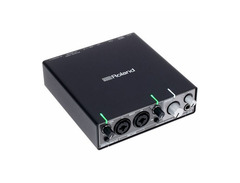
The Roland Rubix22 is your versatile companion for both studio and on-the-go recording, offering seamless integration with your PC, Mac, or iPad. This 2-channel USB audio interface is engineered with precision, ensuring high-fidelity audio capture up to 24-bit/192kHz. With its robust metal chassis, the Rubix22 is built to withstand the rigors of travel, making it a reliable partner for musicians who need to record in various environments.
Equipped with two low-noise mic preamps, the Rubix22 supports mic, line, and instrument-level inputs, ensuring you can capture the nuances of every performance. The thoughtful design includes a universal ground-lift switch to combat unwanted electrical hum, and MIDI I/O for easy connection with keyboards and controllers. The selectable monitoring setup offers flexibility, catering to different recording scenarios, while the class-compliant USB ensures low-latency operation across all platforms.
The Rubix22 also includes a 6-month membership to Roland Cloud Pro, granting access to a plethora of creative tools and sounds to further enhance your music production experience. Whether you're laying down tracks in the studio or capturing inspiration on the road, the Roland Rubix22 is the ideal choice for musicians seeking quality and convenience in one sleek package.
Key Features:
- 2-channel USB audio interface for versatile recording
- Supports up to 24-bit/192kHz high-resolution audio
- Two low-noise mic preamps with XLR/jack combo connectors
- Hi-Z input for guitars and high-impedance sources
- Robust metal chassis with excellent shielding
- MIDI I/O for connecting MIDI-equipped gear
- Class-compliant USB for Mac, Windows, and iOS compatibility
- Includes 6-month membership to Roland Cloud Pro
- Universal ground-lift switch to eliminate electrical hum
Owner's manual
Roland Rubix22 User ManualProduct specs
| Computer Connectivity | USB 2.0 |
| Form Factor | Desktop |
| Simultaneous I/O | 2 x 2 |
| A/D Resolution | Up to 24-bit/192kHz |
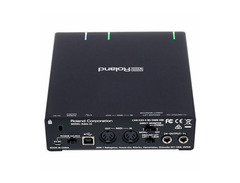
| Analog Inputs | 1 x XLR-1/4" combo (mic/line/Hi-Z), 1 x XLR-1/4" combo (mic/line) |
| Analog Outputs | 2 x 1/4" |
| Headphones | 1 x 1/4" |
| MIDI I/O | In/Out |
| USB | 1 x Type B, 1 x Type Micro-B |
| Software | Ableton Live Lite (included) |
| OS Requirements - Mac | OS X 10.10 or later, iOS 9 or later |
| OS Requirements - PC | Windows 7 or later |
| Power Supply | USB Bus powered |
| Height | 1.8" |
| Width | 5.75" |
| Depth | 6.5" |
| Weight | 2 lbs. 4 oz. |
FAQs
-
What are the main connectivity options for the Roland Rubix22?
-
The Roland Rubix22 offers USB 2.0 connectivity and features MIDI In/Out ports, making it versatile for connecting to both computers and MIDI devices.
-
Is the Roland Rubix22 compatible with popular DAWs like Ableton Live and Pro Tools?
-
Yes, the Roland Rubix22 is compatible with major DAWs, including Ableton Live (Lite version included) and Pro Tools, providing seamless integration for recording and production.
-
What sample rates does the Roland Rubix22 support?
-
The Roland Rubix22 supports sample rates of up to 192kHz, allowing for high-resolution audio recording and playback.
-
Does the Roland Rubix22 require an external power supply?
-
No, the Roland Rubix22 is USB bus-powered, meaning it draws power directly from the connected computer, eliminating the need for an external power supply.
-
Can the Roland Rubix22 be used with both Mac and Windows operating systems?
-
Yes, the Roland Rubix22 is compatible with Mac OS X 10.10 or later and Windows 7 or later, providing flexibility for different computer setups.
Videos

PopMusicRu
ROLAND RUBIX22, RUBIX24, RUBIX44 - подробный обзор новых звуковых карт ROLAND
ROLAND RUBIX22, RUBIX24, RUBIX44 - подробный обзор новых звуковых карт ROLAND
PopMusicRu
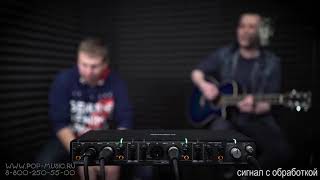
ROLAND RUBIX22, RUBIX24, RUBIX44 - демонстрация звучания

PopMusicPlay
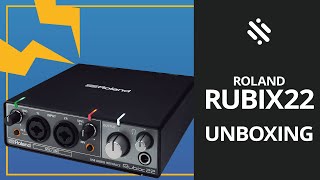
Unboxing: Roland Rubix 22 - Interfaz de audio

Blupoint Music
Reviews
PROS
-
Exceptional low latency, perfect for drummers and live monitoring
-
Separate power input offers flexibility with iPad and other devices
-
Unbiased, clean sound quality ideal for monitoring
-
Stable performance on both Windows 10 and macOS Catalina
-
High-quality headphone amplifier with notable bass response
-
Plug and play functionality; easy installation with no driver issues
-
Supports a range of sample rates (44.1kHz, 48kHz, 96kHz, 192kHz)
-
Minimal noise, avoiding typical audio interface issues
-
Durable build quality, ensuring long-term reliability
-
Compatible with a variety of recording software and platforms
CONS
-
MIDI device may require restarts for recognition
-
Limited buffer settings, not always ideal for specific setups
-
Does not support 88.2kHz and 176.4kHz sample rates
-
Lacks auto shutdown feature
-
Outputs are "impedance balanced" not fully symmetrical
Owner Insights
We analyzed real musician discussions from forums and Reddit to find what players love, question, and tweak about Roland Rubix22.
Setup and maintenance
-
Ensure the Rubix22 sample rate matches in both playback and recording settings in the Sound Control Panel for stable performance.
Source
Features and functionality
-
The Rubix22 can be powered via USB or dedicated power source; using the latter may resolve intermittent sound issues.
Source
4.5 out of 5
Based on 0 Reviews and 6 Ratings
Artist usage
Add artist

Genre Usage
Based on how artists on Equipboard use this gear, it is most commonly found in the following genres.
More Roland Audio Interfaces

$69.00 - $159.99
in Audio Interfaces Rank


$300.00 - $1,199.00
in Audio Interfaces Rank


$518.00 - $987.00


$83.52 - $88.88


$71.99 - $222.00


$159.99 - $224.99
in Audio Interfaces Rank


-m.webp?v=1784559388)
$749.99
in Audio Interfaces Rank


$59.66 - $239.00
in Audio Interfaces Rank


$79.00 - $299.99
in Audio Interfaces Rank


$385.00 - $799.00
in Audio Interfaces Rank


$371.20 - $495.00
in Audio Interfaces Rank


$84.00
in Audio Interfaces Rank


$45.00 - $149.99
in Audio Interfaces Rank
.jpg?v=1783787053)


$749.00 - $999.00
in Audio Interfaces Rank

.png?v=1784580320)


$799.00 - $1,299.00
in Audio Interfaces Rank


$1,000.00
in Audio Interfaces Rank


$371.20 - $799.00
in Audio Interfaces Rank


$85.00 - $391.13
in Audio Interfaces Rank


$118.00 - $189.99
in Audio Interfaces Rank


$210.00 - $872.49
in Audio Interfaces Rank


$689.00 - $899.00
in Audio Interfaces Rank


$400.00
in Audio Interfaces Rank

.jpg?v=1784510867)


$224.99
in Audio Interfaces Rank


$187.92 - $299.99
in Audio Interfaces Rank


$1,468.00 - $1,999.00
in Audio Interfaces Rank

.jpeg?v=1784574735)

$866.00 - $1,199.00
in Audio Interfaces Rank

.jpg?v=1784480765)
-m.webp?v=1784331838)
$70.00
in Audio Interfaces Rank


$70.27 - $159.99
in Audio Interfaces Rank


Accessories & Related Items



Community setups


Similar


Gear Guides







Most Popular Audio Interfaces
Most Popular Brands
-
Added to Equipboard on by
 yerojero
GearIQ 170
-


