


Pricing and availability
We compare 600+ stores and found this item at 1 store. Prices updated .
Store
Reviews
Price




Average Price: $134
Budget/Beginner
$200
$501+
Price Tier
Budget
Standard
High-end
* Product prices and availability are updated by Equipboard every 24hrs and are subject to change. Equipboard may receive compensation for purchases made at participating retailers linked on this site. This compensation does not affect what products or prices are displayed, or the order of prices listed. For more information, please refer to our affiliate disclosure.
Description
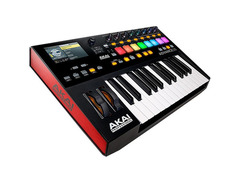
Step into a new realm of musical creativity with the Akai Pro Advance 25, a MIDI keyboard controller that bridges the gap between your imagination and your music production software. This compact powerhouse is designed for musicians who demand versatility and precision. Equipped with a 4.3" high-resolution color display, it offers seamless control over your virtual instruments, giving you the power to manipulate parameters with ease and clarity. The Akai Pro Advance 25 is more than just a keyboard; it’s a comprehensive solution for integrating your favorite plugins and enhancing your workflow.
The Advance 25 comes with 25 velocity-sensitive keys that provide a responsive and expressive playing experience, perfect for both studio sessions and live performances. The controller also includes eight large, fully-assignable, illuminated MPC pads, complete with RGB feedback for intuitive beat-making and programming. In addition, a total of eight endless rotary encoders are available, offering precise control over your DAW or plugin parameters.
Key Features:
- 25 velocity-sensitive keys for expressive performance
- 4.3" high-resolution color display for intuitive control of virtual instruments
- Eight fully-assignable, illuminated MPC pads with RGB feedback
- Eight endless rotary encoders for seamless parameter adjustment
- Seamless integration with major DAWs and music software
- Includes VIP3.0 software for enhanced plugin control and mapping
- USB-powered for easy setup and portability
Unleash your potential with the Akai Pro Advance 25, and transform the way you create music.
Product specs
| Brand | Akai |
| Model | Advance 25 Keyboard Controller |
| Finish | Black |
| Year | 2010s |
| Categories | Keyboard MIDI Controllers, Pad MIDI Controllers |
| Key Size | Full Size |
| Keyboard Action | Semi-Weighted |
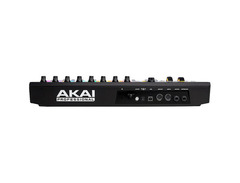
| MIDI I/O | MIDI Input, MIDI Output, USB MIDI |
| Number of Keys | 25 Keys |
| Number of Pads | 8 Pads |
FAQs
-
Is the Akai Pro Advance 25 compatible with popular DAWs like Ableton Live and Logic Pro?
-
Yes, the Akai Pro Advance 25 is compatible with most major DAWs, including Ableton Live and Logic Pro, thanks to its comprehensive MIDI and USB connectivity.
-
What are the standout features of the Akai Pro Advance 25's keyboard?
-
The Akai Pro Advance 25 features a semi-weighted keyboard with 25 full-sized keys, providing a responsive and expressive playing experience suitable for both studio and live performance.
-
How does the Akai Pro Advance 25 integrate with virtual instruments?
-
The Akai Pro Advance 25 integrates seamlessly with virtual instruments through its VIP software, allowing users to control and browse their entire VST library directly from the controller.
-
Does the Akai Pro Advance 25 have velocity-sensitive pads?
-
Yes, the Akai Pro Advance 25 includes 8 velocity-sensitive pads that are ideal for triggering samples, loops, and beats with dynamic expression.
-
What connectivity options are available on the Akai Pro Advance 25?
-
The Akai Pro Advance 25 offers MIDI input/output and USB MIDI connectivity, enabling versatile integration with computers and other MIDI devices.
Videos

Ask.Audio
Akai Pro Advance - the smart controller for all your plug-in needs

Akai Pro Advance - the smart controller for all your plug-in needs
Ask.Audio

AKAI ADVANCE 25 - новейшая миди клавиатура с интерактивным ЖК дисплеем

PopMusicRu

Akai ADVANCE 25, Tom CAT, Timbre WOLF - COOL

Press4music

AKAI ADVANCE 25 ( NON BIAS REVIEW ) & FIRST IMPRESSIONS Part 1/2

TheBizzyBScience
![Video thumbnail for [Musikmesse 2015] Akai Pro Advance 25 & 61 Keyboards by Digital DJ Tips](https://img.youtube.com/vi/ujbsYmxXPNk/mqdefault.jpg)
[Musikmesse 2015] Akai Pro Advance 25 & 61 Keyboards

Digital DJ Tips
Reviews
PROS
-
Competitive pricing with features comparable to higher-priced models
-
Solid hardware build with semi-weighted keys and customizable LED pads
-
Bright LCD screen aids in controlling keyboard functions
-
Pre-mapped controls for popular DAWs enhances user experience
-
Integrated arpeggiator and scale utilities offer creative flexibility
-
Unique multi-functionality to layer VSTs and sounds
-
Extensive mapping options for knobs, buttons, and pads
-
Regular software updates signal ongoing support and improvements
-
Flexibility to use VIP software across multiple DAWs
CONS
-
Occasional software stability issues with VIP
-
VIP's limited profile support requires time-consuming custom mapping
-
Supported pedals not well-documented, complicating setup
-
iLok licensing requirements can be cumbersome for users
-
Base sound library may feel limited for certain genres
Owner Insights
We analyzed real musician discussions from forums and Reddit to find what players love, question, and tweak about Akai Pro Advance 25.
Software and compatibility
-
VIP software lacks extensive templates, lagging behind Native Instruments' NKS, requiring manual mapping for unsupported plugins.
Source -
VIP only supports Arturia up to version 4, despite version 6 being available.
Source -
Serum now has an official VIP plug-in map, though the program remains clunky and slow compared to mouse use.
Source -
Users may need to manually set Reaper's VST paths and enable MIDI devices in preferences for the Akai Pro Advance 25 to function properly.
Source
Features and functionality
-
The Advance line does not independently play samples; it's integrated with a DAW.
Source -
The built-in screen displays pad velocity and note information but does not show these details for the keybed.
Source -
Knobs are endless encoders stuck in absolute mode, leading to frustrating parameter jumps in DAWs like Ableton.
Source -
The Akai Pro Advance 25 can operate as a standalone device, allowing VST instrument management directly from the keyboard.
Source
Build quality
Setup and maintenance
-
Inquiry on using arpeggiator via MIDI with only a power adapter, excluding USB connection, highlights practical connectivity concerns.
Source
User experience
-
The "full level" button allows pads to consistently output at 127 velocity, useful if sensitivity is too low.
Source -
Blue backlighting on pitch and mod wheels adds aesthetic appeal, enhancing visual feedback.
Source -
Customer support is reliable once a ticket is set up, providing ongoing assistance through direct communication.
Source -
Owners find the initial setup process with Reaper complicated but manageable with the right video tutorials.
Source
Critic Reviews
4.5 out of 5
Based on 0 Reviews and 3 Ratings
Artist usage
Add artist
.jpg)
Genre Usage
Based on how artists on Equipboard use this gear, it is most commonly found in the following genres.
Used With
Based on how musicians on Equipboard use Akai Pro Advance 25, it is most commonly used with the following gear.

More Akai MIDI Keyboard Controllers

$32.72 - $59.00
in MIDI Keyboard Controllers Rank


-m.webp?v=1784892004)
$398.88 - $469.00
in MIDI Keyboard Controllers Rank


$76.07 - $89.00
in MIDI Keyboard Controllers Rank


$134.99 - $269.00
in MIDI Keyboard Controllers Rank


$99.00 - $99.99
in MIDI Keyboard Controllers Rank


$289.00 - $499.00
in MIDI Keyboard Controllers Rank


$107.09
in MIDI Keyboard Controllers Rank


$214.18 - $399.99
in MIDI Keyboard Controllers Rank


-m.webp?v=1784897101)
$75.40 - $145.00
in MIDI Keyboard Controllers Rank


$219.22 - $399.00
in MIDI Keyboard Controllers Rank


$70.00 - $399.70
in MIDI Keyboard Controllers Rank


$110.29
in MIDI Keyboard Controllers Rank


$199.00
in MIDI Keyboard Controllers Rank


$79.99 - $99.00
in MIDI Keyboard Controllers Rank


$89.00
in MIDI Keyboard Controllers Rank


$129.00 - $169.00
in MIDI Keyboard Controllers Rank


$19.45 - $139.00
in MIDI Keyboard Controllers Rank


$27.99 - $189.00
in MIDI Keyboard Controllers Rank
.JPG?v=1784328037)


$85.83 - $89.00


$149.99 - $682.00


$79.00 - $99.00


$129.00 - $169.00


$76.07 - $107.09

$406.30 - $469.00


$98.94 - $269.00


Accessories & Related Items


Community setups


Similar


Gear Guides







Most Popular MIDI Keyboard Controllers
Most Popular Brands
-
Added to Equipboard on by
 aussa
aussaGearIQ 179
-


