

Pricing and availability
We compare 600+ stores and found this item at 4 stores. Prices updated .
Store
Reviews
Price




Average Price: $819
High-end/Boutique
$150
$501+
Price Tier
Budget
Standard
High-end
Price History
Based on price data from 2 merchants for "Arturia Audiofuse Audio Interface". Prices shown reflect NEW condition. Tracking began Apr 2, 2026.
* Product prices and availability are updated by Equipboard every 24hrs and are subject to change. Equipboard may receive compensation for purchases made at participating retailers linked on this site. This compensation does not affect what products or prices are displayed, or the order of prices listed. For more information, please refer to our affiliate disclosure.
Description
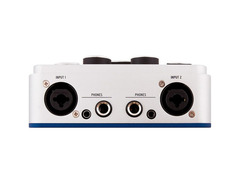
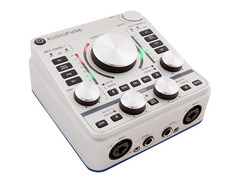
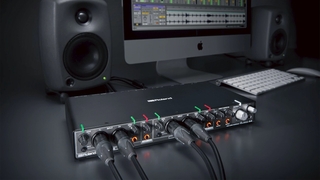
Step into the future of audio recording with the Arturia AudioFuse Audio Interface, a powerhouse designed to be the heart of your studio setup. This 18-in/20-out USB-C interface offers the perfect blend of connectivity, sound quality, and creative workflow features, catering to both stationary and mobile recording needs. Equipped with four Discrete Pro mic preamps, each offering +71dB of gain, this interface ensures pristine sound capture and clarity, whether you're using a delicate ribbon mic or a robust condenser.
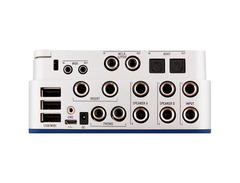
The AudioFuse isn't just about input; it's about versatility. With its comprehensive connectivity options including ADAT optical, MIDI, and Word Clock, it's ready to integrate seamlessly into any studio environment. Its audio-grade Bluetooth receiver allows you to stream directly into your sessions, while onboard features like speaker A/B switching and a dedicated re-amping output enhance your mixing and recording capabilities. Ideal for musicians on the move, this interface's robust build and streamlined design make it a reliable companion for any audio project.
Bundled with Arturia's Creative Suite, the AudioFuse doesn't just stop at recording. It opens doors to a world of legendary effects and synth sounds, letting you infuse your music with character and warmth. Whether in a professional studio or a home setup, the AudioFuse Audio Interface is your key to high-quality, efficient, and inspired music production.
Key Features:
- 18-in/20-out USB-C desktop audio interface
- 4 Discrete Pro mic preamps with +71dB of gain
- 24-bit AD/DA converters at up to 192kHz
- Audio-grade onboard Bluetooth receiver
- ADAT optical for up to 8 additional channels
- Includes Arturia's AudioFuse Creative Suite software pack
- Class-leading conversion and clocking
- Dedicated re-amping output and speaker A/B switching options
Product specs
| Brand | Arturia |
| Model | AudioFuse USB Audio Interface |
| Finish | Black, Gray, Silver |
| Year | 2010s |
| Categories | Audio Interfaces |
| Bit Depth | 24-bit |
| Bus-Powered | Yes |
| Compatibility | Windows, macOS |
| Computer Connectivity | USB |
| Digital Input Format | ADAT/Optical |
| Digital Output Format | ADAT/Optical |
| Electronics | Analog, Digital, Solid State |
| Format | Desktop Standalone |
| Number of Analog Inputs | 6 |
| Number of Analog Outputs | 4 |
| Number of Channels | 30 |
| Number of Digital Inputs | 10 |
| Number of Digital Outputs | 10 |
| Number of Headphone Outputs | 2 |
| Number of MIDI Inputs | 1 |
| Number of MIDI Outputs | 1 |
| Number of Mic Preamps | 2 |
| Sample Rate | 96 khz |
| Simultaneous I/O | 16 x 14 |
FAQs
-
What are the main connectivity options for the Arturia AudioFuse audio interface?
-
The Arturia AudioFuse offers USB connectivity, with 8 digital ADAT inputs/outputs, S/PDIF, and Word clock connections. It includes 6 analog inputs, 4 analog outputs, MIDI I/O, and 2 headphone outputs, making it versatile for various studio setups.
-
Is the Arturia AudioFuse compatible with both Windows and macOS?
-
Yes, the Arturia AudioFuse is compatible with both Windows and macOS, ensuring seamless integration with most computer-based recording setups.
-
Does the Arturia AudioFuse support direct monitoring for low-latency recording?
-
Yes, the AudioFuse features direct monitoring with ultra-low latency internal mixers, allowing for real-time monitoring of your recordings without delay.
-
What is the maximum sample rate supported by the Arturia AudioFuse?
-
The Arturia AudioFuse supports a maximum sample rate of up to 192 kHz, providing high-resolution audio for professional recording and mixing.
-
How many mic preamps does the Arturia AudioFuse have, and what technology do they use?
-
The Arturia AudioFuse includes 4 mic/instrument/line preamps featuring DiscretePRO technology, offering high-quality audio capture with exceptional clarity and detail.
-
Can the Arturia AudioFuse be used as a standalone device?
-
Yes, the Arturia AudioFuse is a desktop standalone unit, allowing it to be used independently of a computer for certain applications such as direct monitoring or audio playback.
Videos

loopop
Buyer's guide: Arturia Audiofuse Studio vs. 8PRE vs. Audiofuse // Audio interface checklist
Buyer's guide: Arturia Audiofuse Studio vs. 8PRE vs. Audiofuse // Audio interface checklist
loopop
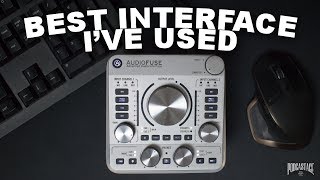
Arturia AudioFuse Interface Review / Test / Explained

Podcastage
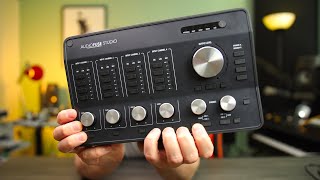
9 Reasons to Check Out Arturia AudioFuse Studio

BoBeats
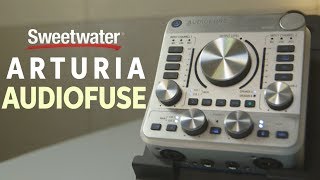
Arturia AudioFuse Audio Interface Review

Sweetwater
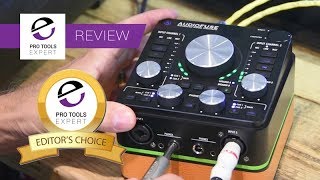
Review - Arturia AudioFuse Audio And MIDI Interface

Production Expert
Reviews
PROS
-
Compact design with extensive I/O options and functionality
-
Solid build quality with durable knobs and controls
-
Exceptional sound quality with high-grade converters and preamps
-
Versatile connectivity including individual +48v control and re-amp output
-
Zero latency monitoring with direct signal mix option
-
Convenient features like built-in Talk Back mic and dual headphone outs
-
USB power capability with included dual USB cable for portability
-
Intuitive software interface for easy control and setup
-
Ideal for both studio recording and live performance setups
-
Excellent value for money considering its feature set
CONS
-
Tends to run hot, potentially uncomfortable to touch
-
Micro-USB connection prone to disconnection and feels flimsy
-
Dim LED indicators make visibility difficult in well-lit environments
-
Issues with clocking above 48kHz with ADAT devices
-
Cue mixes only functional when connected to a DAW
Owner Insights
We analyzed real musician discussions from forums and Reddit to find what players love, question, and tweak about Arturia Audiofuse Audio Interface.
Features and functionality
-
The Arturia Audiofuse 16 Rig includes a 3.5mm stereo input, ideal for connecting pocket operators and 3.5mm gear with flawless autoswitching.
Source -
The internal mixer allows MIDI control with a separate MIDI control surface, although there's a noted difficulty in muting/unmuting channels easily when using it standalone.
Source
User experience
-
An owner praised the Reamp output feature for its ability to easily integrate guitar pedals, providing excellent audio quality and signal-to-noise ratio.
Source -
Some owners experience a volume control bug after prolonged use, but overall reliability is praised, especially compared to Apollo X4 and Apogee Symphony Desktop.
Source
Comparisons
-
Compared to MOTU and Audient, the Arturia 16 Rig is praised for being a single unit solution with competitive latency performance for its price.
Source
Software and compatibility
Use cases and applications
-
The Arturia 16 Rig is considered a valuable choice for users needing to manage multiple synths, with one user managing up to nine synths effectively.
Source -
Owners report successful integration with multiple MOTU 8Pre units, although only 8 channels are accessible through a single optical input.
Source
Critic Reviews
5.0 out of 5
Based on 0 Reviews and 11 Ratings
Artist usage
Add artist

On this article, on the Arturia website, Jean Michel Jarre claimed to use Audiofuse.

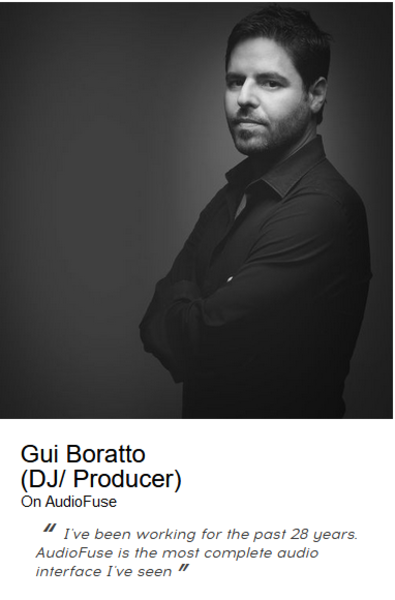
Gui Boratto uses the Arturia Audiofuse Audio Interface, as shown in a user-uploaded photo on the Arturia website.


In a user-uploaded photo on the Arturia website, Bob Wenston is shown using the Arturia Audiofuse Audio Interface.


In a user-uploaded photo on the Arturia website, Marc Romboy is shown using the Arturia Audiofuse Audio Interface.


Genre Usage
Based on how artists on Equipboard use this gear, it is most commonly found in the following genres.
Used With
Based on how musicians on Equipboard use Arturia Audiofuse Audio Interface, it is most commonly used with the following gear.


Community setups
Show yours
More Arturia Audio Interfaces

$759.00 - $999.00


$116.92 - $199.00


$84.10 - $119.00

$111.92 - $199.00

$83.00 - $119.00


$104.14 - $249.00

$1,099.00 - $1,849.00


$279.00 - $349.00


$159.99 - $224.99
in Audio Interfaces Rank


-m.webp?v=1784559388)
$749.99
in Audio Interfaces Rank


$59.66 - $239.00
in Audio Interfaces Rank


$79.00 - $299.99
in Audio Interfaces Rank


$385.00 - $799.00
in Audio Interfaces Rank


$371.20 - $495.00
in Audio Interfaces Rank


$84.00
in Audio Interfaces Rank


$45.00 - $149.99
in Audio Interfaces Rank
.jpg?v=1783787053)


$749.00 - $999.00
in Audio Interfaces Rank

.png?v=1784293637)


$799.00 - $1,299.00
in Audio Interfaces Rank


$1,000.00
in Audio Interfaces Rank


$371.20 - $799.00
in Audio Interfaces Rank


$85.00 - $391.13
in Audio Interfaces Rank


$118.00 - $189.99
in Audio Interfaces Rank


$210.00 - $872.49
in Audio Interfaces Rank


$689.00 - $899.00
in Audio Interfaces Rank


$400.00
in Audio Interfaces Rank

.jpg?v=1784510867)


$224.99
in Audio Interfaces Rank


$187.92 - $299.99
in Audio Interfaces Rank


$1,468.00 - $1,999.00
in Audio Interfaces Rank

.jpeg?v=1784574735)

$866.00 - $1,199.00
in Audio Interfaces Rank

.jpg?v=1784480765)
-m.webp?v=1784331838)
$70.00
in Audio Interfaces Rank


$70.27 - $159.99
in Audio Interfaces Rank


in Audio Interfaces Rank


$23.80 - $1,899.00
in Audio Interfaces Rank


Accessories & Related Items


-s.webp?v=1784556107)


Similar


Gear Guides







Most Popular Audio Interfaces
Most Popular Brands
-
Added to Equipboard on by
DdancingteethGearIQ 159
-


