

Pricing and availability
We compare 600+ stores and found this item at 2 stores. Prices updated .
Store
Reviews
Price




Average Price: $201
Standard/Professional
$150
$501+
Price Tier
Budget
Standard
High-end
* Product prices and availability are updated by Equipboard every 24hrs and are subject to change. Equipboard may receive compensation for purchases made at participating retailers linked on this site. This compensation does not affect what products or prices are displayed, or the order of prices listed. For more information, please refer to our affiliate disclosure.
Description
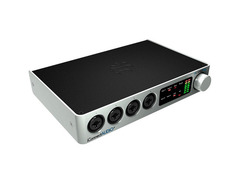
The one-stop hub for your computer.
With iConnectAUDIO4+ you can plug just about anything into one single interface including your computers and iOS devices, high-res audio, MIDI, USB, 5-pin MIDI, mics, instruments, speakers, headphones, and more. One of the first audio and MIDI interfaces to support multiple iOS/PC/Mac computers at the same time, iConnectAUDIO4+ can turn your iPad into a touch-controlled plug-in in your DAW, send dozens of MIDI and digital audio channels between computers, or run and record your entire studio from your iOS/PC/Mac by itself creating one integrated music machine.
Product specs
| Brand | iConnectivity |
| Model | iConnectAUDIO4+ USB Audio Interface |
| Finish | Silver |
| Year | 2010s |
| Categories | Audio Interfaces |
| Bit Depth | 24-bit |
| Bus-Powered | Yes |
| Compatibility | Windows, iOS, macOS |
| Computer Connectivity | USB |
| Electronics | Analog, Digital, Solid State |
| Format | Desktop Standalone |
| Number of Analog Inputs | 4 |
| Number of Analog Outputs | 4 |
| Number of Channels | 8 |
| Number of Digital Inputs | 0 |
| Number of Digital Outputs | 0 |
| Number of Headphone Outputs | 1 |
| Number of MIDI Inputs | 1 |
| Number of MIDI Outputs | 1 |
| Number of Mic Preamps | 4 |
| Sample Rate | 96 khz |
FAQs
-
What devices are compatible with the iConnectAUDIO4+ audio interface?
-
The iConnectAUDIO4+ is compatible with Windows, iOS, and macOS devices, providing flexibility for various recording setups.
-
How many microphone preamps does the iConnectAUDIO4+ have?
-
The iConnectAUDIO4+ features four microphone preamps, allowing you to connect multiple microphones for recording sessions.
-
Can the iConnectAUDIO4+ be powered via USB?
-
Yes, the iConnectAUDIO4+ is bus-powered, meaning it can be powered directly through a USB connection without needing an external power supply.
-
What is the sample rate and bit depth of the iConnectAUDIO4+?
-
The iConnectAUDIO4+ supports a sample rate of up to 96 kHz and a bit depth of 24-bit, ensuring high-quality audio recordings.
-
Does the iConnectAUDIO4+ support MIDI connectivity?
-
Yes, the iConnectAUDIO4+ includes one MIDI input and one MIDI output, enabling integration with MIDI-compatible devices.
Videos

Riffs, Beards & Gear
iConnectivity iConnectAudio4+ - Review
iConnectivity iConnectAudio4+ - Review
Riffs, Beards & Gear
iConnectivity iConnectAUDIO4+ Audio/MIDI Interface Review by Sweetwater

Sweetwater
iConnectivity PlayAUDIO12 Dual-USB Audio and MIDI Interface Demo
Sweetwater
iConnectAUDIO4+ Tutorial - Feature Overview

iConnectivity
iConnectAUDIO4+ How Do uConnect?
iConnectivity
iConnectAUDIO4+ Tutorial - Recording to an iPad
iConnectivity
![Video thumbnail for [NAMM] iConnectivity iConnectAUDIO4+ by Audiofanzine in English](https://img.youtube.com/vi/avAZZSSATTg/mqdefault.jpg)
[NAMM] iConnectivity iConnectAUDIO4+

Audiofanzine in English
Reviews
PROS
-
Solid build quality and sound
-
Compatible with iPad for versatile uses
-
Easy setup and good interaction with iPad apps
-
Functions as both audio and MIDI I/O
-
Facilitates communication between instruments, mics, computers, and iOS devices
-
Acts as a standalone submixer with a small footprint
-
Allows submixing of multiple inputs for live settings
-
Can output different mixes to front of house and stage monitor/amp
-
Keeps iPad fully charged during use
CONS
-
Compatibility issues with certain iPads
-
Requires correct power supply for full functionality
-
Patching may reset to default due to power issues
Owner Insights
We analyzed real musician discussions from forums and Reddit to find what players love, question, and tweak about iConnectivity iConnectAUDIO4+.
Features and functionality
Software and compatibility
-
MIDI routing must be configured through iConfig's MIDI Routing tab, allowing multiple destinations for MIDI sources.
Source -
Fugue Machine's playheads output to HST 1, 2, 3, and 4, which are recognized in iConfig but require clarification for setup.
Source -
The iConnectAUDIO4+ can route audio over USB through front ports only; manual oversight in explaining checkbox for enabling/disabling audio routing.
Source
Use cases and applications
Critic Reviews
5.0 out of 5
Based on 2 Reviews and 3 Ratings

156
I LOVE THIS
I love this interface. I can use it both as an audio I/O and a MIDI I/O. It communicates effortlessly between all of my instruments and microphones, my computers, and iOS devices. Slick and powerful. Great interface for layered MIDI setups that need audio input, such as vocorders.

260
Versatile, Live Mixer and Interface
Others have attempted to be an all-in-one PC/Mac + iOS Audio/MIDI interface, but have had limitations. This thing even acts as a standalone submixer and has a smaller footprint than an iPad Air (although one can fit on top of this unit nicely). I love that I can submix 2-3 keyboards along with sounds from multiple iPad apps in a live setting, and output different mixes to the front of house and my stage monitor/amp (if desired). All while keeping my iPad fully charged... pretty versatile way to simplify your live rig. And it sounds great!
Artist usage
Add artist

Genre Usage
Based on how artists on Equipboard use this gear, it is most commonly found in the following genres.
Used With
Based on how musicians on Equipboard use iConnectivity iConnectAUDIO4+, it is most commonly used with the following gear.



More iConnectivity Audio Interfaces

$2,499.99 - $2,555.00


$159.99 - $224.99
in Audio Interfaces Rank


-m.webp?v=1784559388)
$749.99
in Audio Interfaces Rank


$59.66 - $239.00
in Audio Interfaces Rank


$79.00 - $299.99
in Audio Interfaces Rank


$385.00 - $799.00
in Audio Interfaces Rank


$371.20 - $495.00
in Audio Interfaces Rank


$84.00
in Audio Interfaces Rank


$45.00 - $149.99
in Audio Interfaces Rank
.jpg?v=1783787053)


$749.00 - $999.00
in Audio Interfaces Rank

.png?v=1784293637)


$799.00 - $1,299.00
in Audio Interfaces Rank


$1,000.00
in Audio Interfaces Rank


$371.20 - $799.00
in Audio Interfaces Rank


$85.00 - $391.13
in Audio Interfaces Rank


$118.00 - $189.99
in Audio Interfaces Rank


$210.00 - $872.49
in Audio Interfaces Rank


$689.00 - $899.00
in Audio Interfaces Rank


$400.00
in Audio Interfaces Rank

.jpg?v=1784510867)


$224.99
in Audio Interfaces Rank


$187.92 - $299.99
in Audio Interfaces Rank


$1,468.00 - $1,999.00
in Audio Interfaces Rank

.jpeg?v=1784574735)

$866.00 - $1,199.00
in Audio Interfaces Rank

.jpg?v=1784480765)
-m.webp?v=1784331838)
$70.00
in Audio Interfaces Rank


$70.27 - $159.99
in Audio Interfaces Rank


in Audio Interfaces Rank


$23.80 - $1,899.00
in Audio Interfaces Rank


$262.48
in Audio Interfaces Rank


$350.00
in Audio Interfaces Rank


$1,000.00
in Audio Interfaces Rank


$199.99 - $361.48
in Audio Interfaces Rank


$144.74 - $279.00
in Audio Interfaces Rank


$20.00
in Audio Interfaces Rank


$1,990.00 - $2,799.00
in Audio Interfaces Rank


$2,190.00 - $3,399.00
in Audio Interfaces Rank


$249.95 - $599.00
in Audio Interfaces Rank


$118.12 - $499.99
in Audio Interfaces Rank


.jpg?v=1783787053)

$325.00
in Audio Interfaces Rank


$130.00 - $819.00
in Audio Interfaces Rank


Community setups


Similar


Gear Guides







Most Popular Audio Interfaces
Most Popular Brands
-
Added to Equipboard on by
rtuckrGearIQ 260
-


