

Pricing and availability
We compare 600+ stores and found this item at 9 stores. Prices updated .
Store
Reviews
Price









Average Price: $273
Standard/Professional
$200
$501+
Price Tier
Budget
Standard
High-end
Price History
Based on price data from 6 merchants for "Novation FLkey 61 Keyboard Controller for FL Studio". Prices shown reflect NEW condition. Tracking began Apr 2, 2026.
* Product prices and availability are updated by Equipboard every 24hrs and are subject to change. Equipboard may receive compensation for purchases made at participating retailers linked on this site. This compensation does not affect what products or prices are displayed, or the order of prices listed. For more information, please refer to our affiliate disclosure.
Description
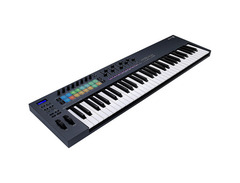
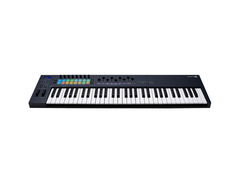
Unleash your creativity with the Novation FLkey 61 Keyboard Controller—your perfect companion for FL Studio. Designed to offer seamless integration with FL Studio’s powerful DAW, this MIDI controller opens up a world of hands-on music production. With 61 velocity-sensitive keys, explore a range of musical possibilities, capturing every nuance of your performance. The 16 RGB-backlit pads are equally sensitive, allowing you to tap out rhythm tracks and perform directly into the Channel Rack with precision and flair.
The FLkey 61 brings music production into your hands with its eight assignable knobs and nine customizable faders, providing intuitive control for mixing and automation. Whether you’re adjusting volume and pan or programming drums with the step sequencer, these features ensure that your workflow is fluid and efficient. Additionally, the Scale Mode and Chord Mode simplify music creation, enabling even those less versed in music theory to craft complex harmonies and melodies effortlessly.
For those who love to tweak and fine-tune, the FLkey 61 allows for direct plug-in browsing, eliminating the need for constant screen navigation. This controller isn't just limited to software; it also features a 5-pin MIDI DIN connection, allowing you to integrate external hardware seamlessly into your setup.
Key Features:
- Seamless integration with FL Studio
- 61 velocity-sensitive keys for expressive playing
- 16 RGB-backlit, velocity-sensitive pads
- 8 assignable knobs and 9 customizable faders
- Scale Mode and Chord Mode for enhanced creativity
- Direct plug-in browsing from the controller
- 5-pin MIDI DIN connection for external gear integration
- Bundled with software including FL Studio Producer Edition (6-month trial)
Product specs
| Type | Keyboard Controller |
| Number of Keys | 61 |
| Type of Keys | Synth Action |
| Velocity Sensitive | Yes |
| Pads | 16 x Velocity Sensitive RGB Pads |
| Other Controllers | Pitchbend, Mod Wheel |
| Encoders/Pots | 8 x Pots |
| Faders | 9 x Faders |
| Dedicated Transport Control | Yes, Integration with FL Studio 21.0.3 or later |
| Pedal Inputs | 1 x 1/4" (sustain) |
| MIDI I/O | Out |
| USB | 1 x Type B |
| Computer Connectivity | USB |
| Software | FL Studio (trial), GForce Bass Station, XLN Addictive Keys Studio Grand, AAS Session Bundle, Klevgrand R0Verb |
| Format | NKS |
| OS Requirements - Mac | macOS 10.15 or Later |
| OS Requirements - PC | Windows 8.1 or later |
| Power Supply | USB bus powered |
| Height | 3.03" |
| Width | 37.48" |
| Depth | 10.16" |
| Weight | 7.5 lbs. |
FAQs
-
Is the Novation FLkey 61 compatible with other DAWs besides FL Studio?
-
While the Novation FLkey 61 is optimized for FL Studio, it can also function as a MIDI controller with other DAWs, although some features may not be fully supported.
-
Does the Novation FLkey 61 have semi-weighted keys?
-
Yes, the Novation FLkey 61 features 61 semi-weighted keys, providing a responsive and expressive playing experience.
-
What are the main features of the Novation FLkey 61 for FL Studio users?
-
The Novation FLkey 61 offers seamless integration with FL Studio, including 16 velocity-sensitive RGB pads, 9 faders, 8 pots, and dedicated transport controls for efficient music production.
-
Can the Novation FLkey 61 be powered via USB?
-
Yes, the Novation FLkey 61 is USB bus powered, allowing for easy connectivity and power without the need for an external power supply.
-
What software comes bundled with the Novation FLkey 61?
-
The Novation FLkey 61 includes a trial version of FL Studio, GForce Bass Station, XLN Addictive Keys Studio Grand, AAS Session Bundle, and Klevgrand R0Verb, providing a comprehensive suite of tools for music production.
Videos

Guitar Center
Novation FLkey 61 MIDI Keyboard Controller for FL Studio | Demo and Overview with Bonnie McIntosh

Novation FLkey 61 MIDI Keyboard Controller for FL Studio | Demo and Overview with Bonnie McIntosh
Guitar Center
The BEST Midi Keyboard for FL Studio! Novation FLkey 61 Review

FireWalk
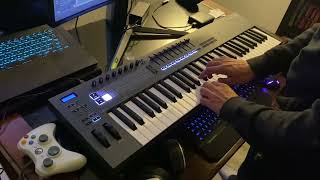
Novation FLkey 61 MIDI Keyboard (for FL Studio)

Matthew Doucette (Xonatron)
Reviews
PROS
-
Specifically designed for FL Studio, enhancing functionality
-
Allows control of FL Studio without using a mouse
-
Quality of keys, pads, knobs, and faders is very good
-
Comes with additional standalone software, like XLN audio Addictive Keys
-
Good for beginners and experienced users alike
-
Keys offer good resistance and respond well to touch
-
Anschlagdynamik (velocity sensitivity) allows for expressive playing
CONS
-
Lacks an on/off switch; must unplug USB to turn off
-
Faders may feel cheap and produce a plastic-on-plastic noise
Owner Insights
We analyzed real musician discussions from forums and Reddit to find what players love, question, and tweak about Novation FLkey 61 Keyboard Controller for FL Studio.
Features and functionality
-
The FLkey 61 is noted for its direct compatibility with FL Studio, offering seamless integration with software parameters.
Source -
The FLkey 61 lacks aftertouch on the keybed, a feature some users miss after using controllers like the Arturia KeyStep.
Source -
The FLkey 61's MIDI out can effectively clock sync with external gear like MPCs and looper pedals, enhancing studio setups.
Source -
The FLkey 61 allows playing in any key signature via scale and chord modes, simplifying complex compositions without extensive music theory knowledge.
Source -
The screen on the FLkey 61 is smaller and positioned on the left, which may be less convenient than the centered, slightly larger screen on the Launchkey MK4.
Source
Comparisons
-
The M-Audio Keystation range is frequently recommended as a budget-friendly alternative for those primarily seeking piano keys without additional DAW-specific functions.
Source -
Owners compare the FLkey 61 unfavorably to Novation's Impulse series, citing the superior keybed quality of the latter.
Source -
Some users prefer the FLkey 61 over Novation MK3 due to seamless integration with FL Studio, despite similar price range and build quality.
Source
Software and compatibility
-
Users highlight that while FLkey 61 provides FL Studio integration, other MIDI controllers like Oxygen Pro 61 offer versatile mappable knobs and pads for broader DAW use.
Source -
Users report the pads have aftertouch, but the keybed does not, which limits expressive playing in FL Studio.
Source -
Some users find the FLkey's integration with third-party plugins requires manual mapping, unlike the seamless experience with stock FL Studio plugins.
Source -
A script from the Image-Line forums can improve integration with third-party plugins, addressing limits in the FLkey 61's default functionality.
Source
Value and pricing
-
The inclusion of a 6-month FL Studio Producer Edition trial is considered less significant by some, given it's brief relative to the software's learning curve.
Source
User experience
-
Users report that programming velocity variations manually in FL Studio can be cumbersome, making real-time key velocity control on the FLkey 61 beneficial.
Source -
After transitioning from weighted keys, the Arturia Keylab Essential's keybed can feel insubstantial, making FLkey 61 a preferable, more tactile option.
Source
Critic Reviews
5.0 out of 5
Based on 0 Reviews and 1 Rating
Genre Usage
Based on how artists on Equipboard use this gear, it is most commonly found in the following genres.
More Novation MIDI Keyboard Controllers

$248.00 - $279.99
in MIDI Keyboard Controllers Rank

$135.00 - $678.00
in MIDI Keyboard Controllers Rank


$277.00 - $440.00
in MIDI Keyboard Controllers Rank


$214.99
in MIDI Keyboard Controllers Rank


$99.99 - $149.99
in MIDI Keyboard Controllers Rank


$211.00 - $300.00
in MIDI Keyboard Controllers Rank


$60.00 - $362.00
in MIDI Keyboard Controllers Rank


$517.00 - $649.99
in MIDI Keyboard Controllers Rank


$116.29 - $149.99
in MIDI Keyboard Controllers Rank


$69.76 - $129.99
in MIDI Keyboard Controllers Rank


$279.99 - $329.99
in MIDI Keyboard Controllers Rank


$39.99 - $98.00
in MIDI Keyboard Controllers Rank


$256.00 - $329.99
in MIDI Keyboard Controllers Rank


$139.55
in MIDI Keyboard Controllers Rank


.jpg?v=1784891692)


$211.00 - $300.00


$149.00 - $199.99


$574.00 - $749.99


$85.00 - $119.99


$135.00 - $279.99


$99.99 - $189.79


$151.17 - $219.99


$277.00 - $329.99


$149.00 - $199.99


Accessories & Related Items



Artist usage


Community setups


Similar


Gear Guides







Most Popular MIDI Keyboard Controllers
Most Popular Brands
-
Added to Equipboard on by
 galaxyjames
GearIQ 170
-


