

Pricing and availability
We compare 600+ stores and found this item at 5 stores. Prices updated .
Store
Reviews
Price


Price History
Based on price data from 4 merchants for "Waves Renaissance Equalizer". Prices shown reflect NEW condition. Tracking began Apr 2, 2026.
* Product prices and availability are updated by Equipboard every 24hrs and are subject to change. Equipboard may receive compensation for purchases made at participating retailers linked on this site. This compensation does not affect what products or prices are displayed, or the order of prices listed. For more information, please refer to our affiliate disclosure.
Description
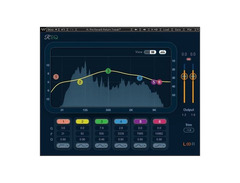
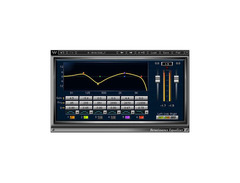
Elevate your audio production with the Waves Renaissance Equalizer, a quintessential tool for musicians and producers seeking timeless, polished sound. This EQ plugin is renowned for its vintage character, providing warmth and richness that enhances any mix. Whether you're refining a vocal track or giving your percussion section that extra punch, its versatile design allows for two, four, or six-band equalization to suit any need.
What sets the Renaissance Equalizer apart is its intuitive graphical user interface, making it easy for both novices and seasoned audio engineers to achieve precise tonal control. The clean, user-friendly design ensures you spend less time fiddling with controls and more time crafting the perfect sound. Ideal for a wide range of genres, from rock and jazz to electronic and classical, this plugin adapts to your creative vision flawlessly.
Key Features:
- Two, four, or six-band EQ with vintage character
- Intuitive graphical user interface
- Warm, rich sound suitable for various music styles
- Easy to use for both beginners and professionals
- Compatible with major DAWs for seamless integration
Product specs
| Available since | October 2016 |
| Los artikel / bundelartikel | Los artikel |
| Delay | No |
| Dynamics | No |
| Effect Filter | No |
| Encoder/Decoder | No |
| Equalizer | Yes |
| Guitar amps/-effects | No |
| Channel Strip | No |
| Metering / Analysis / Correction | No |
| Modulation Effects | No |
| Multieffect / Plugin-Host | No |
| Overdrive/Distortion | No |
| Preamp / Saturation | No |
| Psychoacoustic tool / Enhancer / Exciter | No |
| Restauration | No |
| Reverb | No |
| Special FX | No |
| Summer / Mixing Consoles | No |
| Tape Simulation | No |
| Pitch Shifter / Harmonizer / Timestretching | No |
| Transient Processing | No |
| Vocoder / Vocal effect | No |
| Mastering Tools | No |
| Hardware Controller | No |
| Download | 1 |
FAQs
-
What makes the Waves Renaissance Equalizer different from other EQ plugins?
-
The Waves Renaissance Equalizer is known for its warm, analog-style sound and vintage-modeled filter curves, making it ideal for achieving a classic EQ tone in modern productions.
-
Is the Waves Renaissance Equalizer compatible with all major DAWs?
-
Yes, the Waves Renaissance Equalizer is compatible with most major DAWs, including Ableton Live, Pro Tools, and Logic Pro, making it a versatile choice for any studio setup.
-
Does the Waves Renaissance Equalizer offer real-time EQ graphing?
-
Yes, the Waves Renaissance Equalizer features real-time EQ graphing, allowing users to visualize changes as they adjust frequencies, which enhances precision in mixing.
-
Can the Waves Renaissance Equalizer be used for mastering?
-
While the Waves Renaissance Equalizer can be used in mastering for its analog-style warmth, it is primarily designed for mixing applications due to its paragraphic EQ capabilities.
-
Does the Waves Renaissance Equalizer support both Mac and Windows operating systems?
-
Yes, the Waves Renaissance Equalizer is compatible with both Mac and Windows operating systems, ensuring wide accessibility for users on different platforms.
Videos

Patrick Istefanidis
Plug In To Review EP6: Waves Renaissance EQ
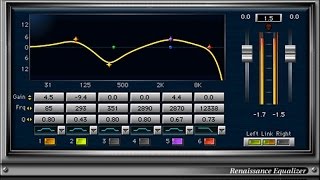
Plug In To Review EP6: Waves Renaissance EQ
Patrick Istefanidis
Renaissance Equalizer from Waves || Tuesday Review Day

Topmop Productions
Reviews
PROS
-
Smooth top and bottom end for a musical sound
-
Excellent for finding and dialing in specific frequencies
-
Essential tool for getting tracks to sit well in the mix
-
Simple and easy-to-use graphical user interface
-
Consistently reliable across various applications
CONS
-
GUI could be larger for easier usability
-
May sound slightly metallic to some users
Owner Insights
We analyzed real musician discussions from forums and Reddit to find what players love, question, and tweak about Waves Renaissance Equalizer.
Software and compatibility
-
Renaissance EQ still works on older Windows setups without updates; Mac users face compatibility issues with OS updates.
Source
Features and functionality
Value and pricing
-
Discounted update plans can significantly reduce long-term costs, especially if purchased during sales through resellers.
Source
User experience
Use cases and applications
-
Renaissance EQ is still utilized in major albums, demonstrating its lasting relevance and utility.
Source
4.5 out of 5
Based on 2 Reviews and 9 Ratings
Artist usage
Add artist
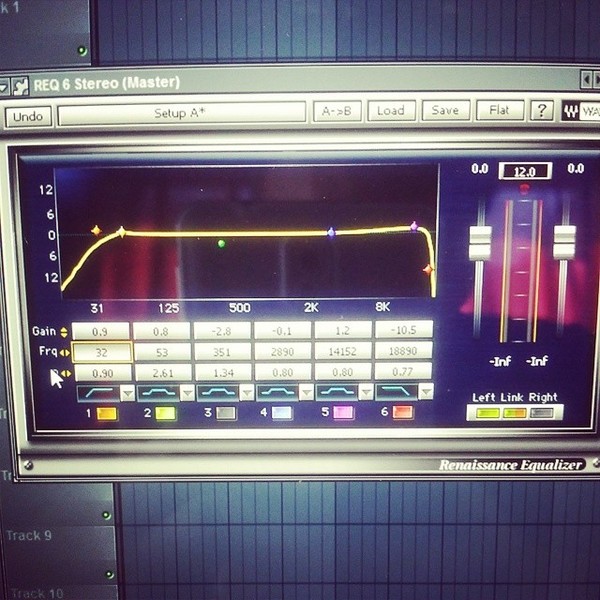
In a FlstudioFriday tutorial on Instagram, Paris Blohm discusses mastering techniques and mentions using the Waves Renaissance Equalizer to cut off frequencies at 32 Hz and 19 kHz, enhancing headroom by eliminating inaudible frequencies.

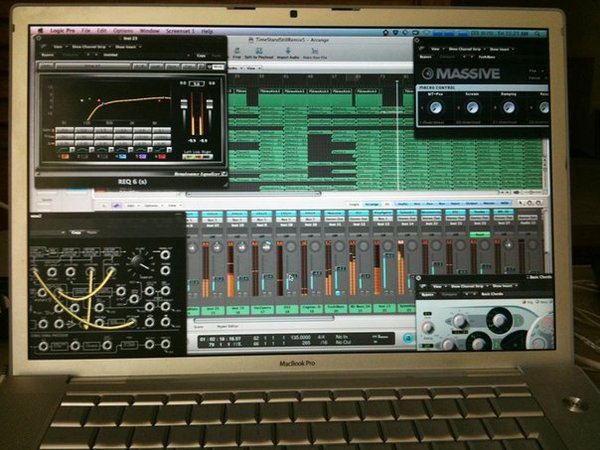
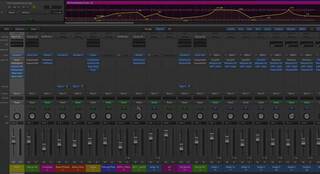
in the top left corner you can see the Waves Renaissance Equalizer 6 plugin


Tim uses it throughout the course of this series.

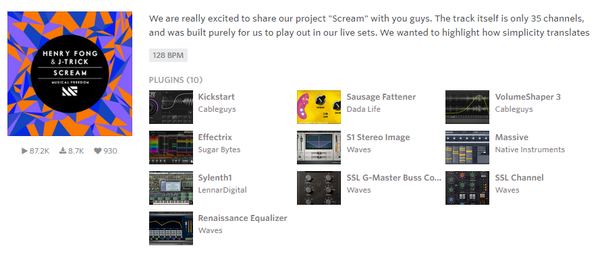
Henry Fong is seen using the Waves Renaissance Equalizer Plugin on Splice.


In this video at 9:55 René from Black Sun Empire uses this plugin to "add some more EQ" in the process of designing a reese bass.


This plugin can be seen at 15:12 in Future Magazine´s interview with Jonas Blue


Used for vocals on "Sum 2 Prove", as stated by mix engineer Tillie in this June 2020 Sound on Sound interview.
"All Lil Baby's vocals go through an aux track," says Tillie, "on which I have the Waves DeEsser, Avid EQ3 7-band, Waves SSL Channel and Compressor, Waves RCompressor, UAD J37 and the FabFilter Pro‑DS de-esser. There are two sends to reverb aux tracks and one to a half–note delay. The Waves DeEsser is there because I felt the vocal was too bright. The EQ3 has a pretty involved curve, with a low cut at 69.8Hz, notches at 184.7Hz and 425.2Hz, and me adding at 2kHz and high end at 5.37kHz, because I wanted some more presence. The SSL Compressor is not doing much, it's just there for vibe. I do the actual compression with the RCompressor.
"The J37 adds analogue vibe — it's one of my favourite plug–ins on vocals. It really brings them to life. I did all the heavy lifting with the first de-esser, and the Pro‑DS is just to catch anything that's the result of the EQ curve that I added. There's also a Vocal Parallel aux with the Softube Tube‑Tech CL‑1B to add more body and a bit of beef. I think that compressor just makes everything sound better. It gives you a different tonal character.
"The first send goes to the Verb aux track, which has the DVerb, set to a Large Hall, and an EQ3 7-band, taking out low end below 100Hz. The second send goes to the Verb 2 aux, with the Waves RVerb, the Waves REQ, again rolling off low end, and the Waves S1 Stereo Imager. I use the Imager on my reverbs probably 75 percent of the time. My style of mixing is very wide, so I tend to spread out my instruments and my effects, and I place things in different places in the stereo mix. I always like to add width and depth, so you can feel things and they are not necessarily right up in your face. But I leave the vocals to be the centre point of the mix."


Used on Flo Rida and T-Pain's vocals for "Low", as stated by mixer Fabian Marasciullo in this Sound on Sound interview.
"There were lots of vocals and I chose not to bounce them down, because I prefer to process every individual bit separately. It uses more DSP on the computer, but you have more flexibility in the way you can treat sections, and hence more depth in the overall vocal sounds this way. The 'Lead' and 'Dbl' tracks are the main verse vocals by Flo Rida, he's doubling himself like many vocalists will do. Flo has a keen melodic sense when he's rapping. The A, B and C auxes separate the three different parts of the verse. The 'Whine 1, 2, 3' backing vocals only occur in the third verse. Underneath 'Aux 4' are T–Pain's backing vocals. 'Main Hk1,2,3,4' are all T–Pain doing a unison of one note.
"As is usual for me, I began the mix with the vocals, set against the rough music bed. You can see the latter in the left pane track window in the Edit Window, where it's called 'T_Pain_5 LO'. Of course I later muted that track. After having cleaned up and EQ'd the vocals I worked on the drums, and then the synths. I then brought the vocals back in to get their levels in relation to the music and do some automation.
"I used the Waves Renaissance Channel on the A, B and C auxes. I use the RChannel on all my vocals. It's basically a combination of the RCompressor, the REQ, and the RVox, all in one, and it's great. For this record I used a pretty cool preset called 'CloseWarmVox', and I tweaked from there. You can see that it rolls off at the bottom and it has a little touch at the top. I almost used it as a filter on this particular song to get clarity in the bottom, add some high and have a bit of compression. I also used it on T–Pain's vocals.

Used for the vocals on "Save Room", as stated by mix engineer Tony Maserati in this March 2007 Sound on Sound interview. Images of the settings can be found here and here.
Vocals: McDSP Filter Bank E6, Waves Renaissance Compressor, Renaissance EQ, L1 Ultramaximiser
"The song has two lead vocal comps, on tracks 48 and 49. You can see that I'm using a lot of plug-ins on those: I'm doing a lot of drastic stuff. They were probably recorded on two different occasions with two different engineers who didn't take the time to match the performances by using the same microphone and signal chains. I get really pissed at this lack of effort on the part of recordists — there are standards in engineering. John Legend is a phenomenal vocalist and before he comes into your room to record, you should reach out to other engineers who have recorded with him to find out what they used — especially, of course, the guy who recorded the song that you're going to be overdubbing onto! That's what I did, the first time I recorded John.
"We liked the lead vocal, it had an energy that we did not want to give up, but it's not recorded consistently. You can even see on the screen that the levels are all over the place. So I spent a lot of time and energy pushing and pulling all over the place to compensate for frequency anomalies and to make the two takes sound the same, as well as to force all the energy out of the vocals that is in there. On track 48 I have a Filter Bank EQ that's pushing a ton of bottom and taking off some top. The Renaissance Compressor is trying to make sense of that, levelling things out a bit with a really slow attack.
"I don't normally use the L1 Ultramaximiser on a lead voice, but it was probably already there, and I'm using it to get some intelligibility and energy from the vocal. The Renaissance is boosting above 9k and the McDSP is cutting around there as well. I think it's because I'm compensating for the L1, which is doing something I'm not entirely happy with. A lot of what I'm doing is simply compensating for a poor recording.
"Lastly I throw on the R4 Renaissance EQ, probably because after mixing for a couple of days, I felt that it needed a little bit more top, and I did not want to change my settings on the outboard, which was probably my GML 8200. I'm also EQ-ing on the board. So I'm being heavy-handed, also with the effects on track 49, in trying to match these two tracks. I was really fighting until we got something out of it, and I think we accomplished that. The end result sounds pretty good."


Used for Quavo and Offest's features on Beyoncé and Jay-Z's "Apeshit", as stated by producer Stuart White in this September 2018 Sound on Sound interview.
The first four aux tracks feature SoundToys effects, namely Little Microshift, two EchoBoy delays, and a delay from the Little PrimalTap. Next are a Hall Reverb aux and a Church Reverb aux, both using Waves’ RVerb, an EMT plate from Audio Ease’s Altiverb, four aux tracks with the Waves H-Delay and various other plug-ins on them as well, and four more reverb auxes with the Avid Revibe II, two Avid D-Verbs and another RVerb.
White: “I use the Little Microshift in pretty much every mix, with the left-right micro pitch-shift effect that’s similar to the classic effect in the Eventide H3000 shift where you pitch one side down six cents and one side up six cents to create width. It’s a good way to get your vocals wider without them being out of phase. It thickens up vocals, and is kind of like a doubler. I do quite a lot of filtering on some of the EchoBoy delays, for example with the Waves REQ, and I am adding colour with the SoundToys Devil-Loc, which is great if you want to colour the delay so it is separate from the main vocal, and compress it with the UAD LA3A and mix that in to taste.”
(...) “The Migos vocals came in as seven audio tracks, with the Avid D-Verb on each of them. Putting a D-Verb on a track before EQ is not something I normally do, but it sounded great. So I adjusted them a bit, but otherwise left them as they were. The tracks also came in with the Aux track above, and the EQ3, with a high pass at 60Hz and notches at 430Hz and 1.41kHz and a high boost, the Waves API 2500 compressor, the RComp, the Waves Q10 EQ, following a slightly similar curve to the EQ3, the Waves De-esser, the Waves Aphex Aural Exciter, and the Avid Dyn3 expander/gate. I added the EQ3, with another high-pass filter at 144Hz, and the RComp, with a ratio of 10:1.”


Used on Jean's vocals for Shakira's "Hips Don't Lie".


Album Usage
The Waves Renaissance Equalizer has been featured on the following albums:
Low
Flo Rida (2022)

Only Us (From The “Dear Evan Hansen” Original Motion Picture Soundtrack)
Carrie Underwood & Dan + Shay (2021)
Sum 2 Prove
Lil Baby (2020)

Eloah
Sun Diego (2018)

Scream
Henry Fong & J-Trick (2014)

Headlines
Drake (2011)

There Is Love in You (Expanded Edition)
Four Tet (2010)
Low (feat. T-Pain)
Flo Rida (2008)
Genre Usage
Based on how artists on Equipboard use this gear, it is most commonly found in the following genres.
Used With
Based on how musicians on Equipboard use Waves Renaissance Equalizer, it is most commonly used with the following gear.


-s.webp?v=1783173681)


More Waves EQ Plugins
-m.webp?v=1783173737)
$34.99 - $38.00
in EQ Plugins Rank


$33.00 - $49.99
in EQ Plugins Rank


$33.00 - $34.99
in EQ Plugins Rank


$33.00 - $35.99
in EQ Plugins Rank

.jpg?v=1782886998)


$34.99 - $47.00
in EQ Plugins Rank


$33.00 - $34.99
in EQ Plugins Rank


$33.00 - $35.99
in EQ Plugins Rank


$33.00 - $34.99
in EQ Plugins Rank


$33.00 - $34.99
in EQ Plugins Rank


$29.99 - $34.99
in EQ Plugins Rank


$38.00
in EQ Plugins Rank


$33.00 - $249.00
in EQ Plugins Rank

$29.00 - $29.99
in EQ Plugins Rank


$33.00 - $34.99
in EQ Plugins Rank


$33.00 - $34.99
in EQ Plugins Rank


$34.99
in EQ Plugins Rank


$169.00 - $199.00
in EQ Plugins Rank


$1,015.75 - $1,195.00
in EQ Plugins Rank


$64.00 - $240.00
in EQ Plugins Rank


$39.00
in EQ Plugins Rank


$39.00 - $49.00
in EQ Plugins Rank
.jpeg?v=1783065967)


$0.00
in EQ Plugins Rank


$22.00 - $99.00
in EQ Plugins Rank

$80.00 - $99.00
in EQ Plugins Rank


Accessories & Related Items

-s.webp?v=1783173736)
-s.webp?v=1783173639)
-s.webp?v=1783173726)


-s.webp?v=1783173737)


Community setups


Similar


Gear Guides







Most Popular EQ Plugins
Most Popular Brands
-
Added to Equipboard on by
 equipboard
Gear IQ 4934
-