

Pricing and availability
We compare 600+ stores and found this item at 2 stores. Prices updated .
Store
Reviews
Price




Average Price: $305
Standard/Professional
$200
$501+
Price Tier
Budget
Standard
High-end
* Product prices and availability are updated by Equipboard every 24hrs and are subject to change. Equipboard may receive compensation for purchases made at participating retailers linked on this site. This compensation does not affect what products or prices are displayed, or the order of prices listed. For more information, please refer to our affiliate disclosure.
Description
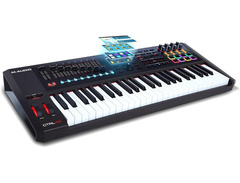
Meet the M-Audio CTRL49, your new gateway to an immersive music production experience. Designed for musicians who crave precision and intuitive control, this MIDI keyboard controller is more than just a set of keys—it's your all-in-one command center. With its 49 synth-action keys, enjoy a tactile response that makes every performance feel natural and expressive.
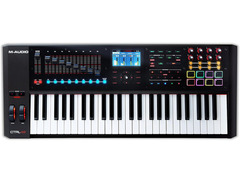
The CTRL49 is engineered for seamless integration with your DAW and virtual instruments. Say goodbye to endless clicking and dragging, and hello to effortless creativity with full transport controls, touch-sensitive pads, faders, and assignable buttons that allow you to navigate your sessions with ease. The high-resolution, full-color display is your visual gateway to streamlined workflow, providing real-time feedback and a user-friendly interface that invites exploration.
At the heart of this beast is the "VIP" Virtual Instrument Player software, which gives you unrivaled control over your plugins and software instruments. Instantly access and tweak all parameters, layer your VST plugins, and dive deep into your sonic arsenal with custom preset management. Whether you're on stage or in the studio, the M-Audio CTRL49 empowers you to craft your sound with precision and flair.
Key Features:
- 49 synth-action keys for expressive playability
- Seamless DAW and virtual instrument integration
- Full transport controls, touch-sensitive pads, faders, and assignable buttons
- High-resolution, full-color display for intuitive navigation
- "VIP" Virtual Instrument Player software for deep control over plugins and instruments
Product specs
| Brand | M-Audio |
| Model | CTRL49 MIDI Keyboard Controller |
| Finish | Black |
| Year | 2010s |
| Categories | Keyboard MIDI Controllers |
| Analog / Digital | Digital |
| Key Size | Full Size |
| Keyboard Action | Semi-Weighted |
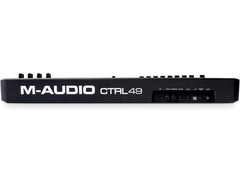
| MIDI I/O | MIDI Input, MIDI Output, USB MIDI |
| Number of Keys | 49 Keys |
| Number of Pads | 8 Pads |
FAQs
-
Does the M-Audio CTRL49 come with semi-weighted keys?
-
Yes, the M-Audio CTRL49 features 49 full-sized, semi-weighted keys, providing a responsive and expressive playing experience.
-
What DAWs are compatible with the M-Audio CTRL49?
-
The M-Audio CTRL49 is designed to integrate seamlessly with most major DAWs, including Ableton Live, Logic Pro, and Pro Tools, thanks to its comprehensive MIDI control and mapping capabilities.
-
How many pads does the M-Audio CTRL49 have?
-
The M-Audio CTRL49 is equipped with 8 velocity-sensitive pads, which can be used for triggering samples, loops, and other MIDI functions.
-
Does the M-Audio CTRL49 support Aftertouch?
-
Yes, the M-Audio CTRL49 supports Channel Aftertouch, allowing for added expression and control over your virtual instruments by responding to pressure applied after the initial key press.
-
What are the main connectivity options for the M-Audio CTRL49?
-
The M-Audio CTRL49 offers MIDI Input, MIDI Output, and USB MIDI connectivity, making it versatile for both hardware and software integration.
Videos

M-Audio
M-Audio || CTRL49 w/ VIP Integration

M-Audio || CTRL49 w/ VIP Integration
M-Audio
M-Audio CTRL49 - Unboxing

noterepeat
M-Audio || CTRL49 || Artist: Gareth Thomas
M-Audio
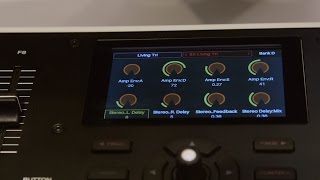
M-Audio CTRL49 - NAMM 2016

Sound On Sound magazine

M-Audio || CTRL49 // Control / MIDI Mode (4 of 5)
M-Audio

M-Audio || CTRL49 // Working w/ VIP Music Software (5 of 5)
M-Audio
Reviews
PROS
-
High-quality semi-weighted keybed enhances tactile experience
-
VIP software provides excellent VST organization and control
-
Integrates seamlessly with Mackie HUI controls for DAW
-
Responsive drum pads and assignable knobs/sliders
-
4.3-inch color display aids in intuitive navigation
-
Allows for up to 48 unique drum pad configurations
-
Excellent build quality with substantial heft
-
Supports complex sound layering with Multis in VIP
CONS
-
VIP software installation process is cumbersome and time-consuming
-
Documentation and setup guidance are insufficient and confusing
-
Frequent software authentication and compatibility issues
-
Requires significant manual exploration for full utilization
-
Mac installation issues with software and ILOK copy protection
Owner Insights
We analyzed real musician discussions from forums and Reddit to find what players love, question, and tweak about M-Audio CTRL49.
Software and compatibility
Features and functionality
-
For live performances, users can manually map buttons on the CTRL49, bypassing the current integration limitations with specific DAWs like Reason.
Source -
The CTRL49 includes a detailed LCD screen, providing a superior display experience compared to other controllers with basic 16x2 character displays.
Source
Comparisons
-
The M-Audio CTRL49 is noted for its faders, distinguishing it from similar models like the Alesis VX49.
Source -
The M-Audio CTRL49 is noted for its VIP software suite, similar to the Akai Advance, offering significant configurability options, especially since the Advance has been discontinued.
Source -
Unlike the MPK 249, the CTRL49's keybed is more configurable, allowing users to adjust sensitivity and velocity curves for a customized playing experience.
Source
User experience
Value and pricing
Critic Reviews
4.5 out of 5
Based on 1 Review and 5 Ratings

417
Good "smart" MIDI keyboard and well rounded controller
I purchased my M-audio CTRL49 to replace my ageing Yamaha Tyros Keyboard, seeing as this came with specialist software to file my extensive libraries of VST sound banks and be able to create multi layered sounds using multiple VST's I decided to get this model. I also looked at the offerings from Alesis and Akai and got the M-audio as it has eight faders onboard for controlling Mackie HUI controls within the DAW (mine being Cubase's Mixer and Transport controls). It can also integrate with track mutes, solos and track record and select, very much like some of the larger Mackie DAW Controllers.
I found the included software very hard to install, coming up with a 1935 error which pointed to errors within my own systems windows registry and .NET framework mainly because the software uses the older package from 2005, which hasn't been a problem until now. This means I have to reinstall windows, as well as my DAW's and VST's to install the included VST's and FX packages. Our major problem came from trying to install PACE which handles the iLOC package for security, again we had problems installing this due to missing files, which took half an afternoon to find on the net.
I thought I would add this as I don't know if the problem is due to my error or poor programing and is something which has appeared on the M-Audio support forums multiple times, as well as the next problem I had with Mackie HUI integration. This other problem was everytime I used a fader it changed the pitch and was resolved only when we found something in a FAQ found in a dark corner of their website. Why it wasn't in the manual I don't know.
I have now got the Software VIP installed and all I can say it is easy to use, but is somewhat unpredictable and can be quite unstable. I've been mainly using this at the moment as a nice MIDI controller which has the onboard transport controls conveniently placed above the keys. The key bed and weighted keys are a joy to use, and the HUI integration and arpeggiator functions, as well as tap tempo are nice additions, to some VST's like Z3ta, Hydra and Junglist which don't have built in arpeggiators. Tap tempo works better than the tap tempo on my MPC Studio Black, and has subsequently made sampling easier.
The pads feel quite nice and since the controller has taken prime spot on my desk in front of my PC, my MPC has now been relegated to the unused equipment shelf. It won't replace it, but my new keyboard in part with the Akai software, kind of makes the Studio black redundant.
The keyboard finally has a bank of knobs for changing CC values on set via a lovely colour screen, I've currently set it up to do cut off and resonance in Nexus and Vanguard.
Genre Usage
Based on how artists on Equipboard use this gear, it is most commonly found in the following genres.
More M-Audio MIDI Keyboard Controllers

$260.51 - $780.99
in MIDI Keyboard Controllers Rank
.jpeg?v=1784510865)


$299.99
in MIDI Keyboard Controllers Rank


$161.00 - $279.99
in MIDI Keyboard Controllers Rank


$40.00 - $119.00
in MIDI Keyboard Controllers Rank


$170.37 - $299.00
in MIDI Keyboard Controllers Rank


$124.00 - $249.99
in MIDI Keyboard Controllers Rank


$79.70 - $129.00
in MIDI Keyboard Controllers Rank


$59.04
in MIDI Keyboard Controllers Rank


$111.75 - $229.00
in MIDI Keyboard Controllers Rank


$79.70 - $129.00
in MIDI Keyboard Controllers Rank


$40.00
in MIDI Keyboard Controllers Rank


$119.99
in MIDI Keyboard Controllers Rank


$368.00 - $549.00


-m.webp?v=1784646710)
$174.50 - $299.00


![M-Audio Axiom 61 Advanced Semi-Weighted USB MIDI Controller [1st Gen]](https://images.equipboard.com/uploads/item/image/2297/m-audio-axiom-61-advanced-semi-weighted-usb-midi-controller-1st-gen-m.webp?v=1784331602)


$82.00 - $129.00


$169.00 - $299.00


$97.77 - $249.99


$40.40 - $59.00


$122.00 - $199.00


$199.00 - $349.00


.jpg?v=1784574736)


Accessories & Related Items


-s.webp?v=1784646710)


Artist usage


Community setups


Similar


Gear Guides






.jpg)
Most Popular MIDI Keyboard Controllers
Most Popular Brands
-
Added to Equipboard on by
 delta_music
GearIQ 126
-


