

Pricing and availability
We compare 600+ stores and found this item at 1 store. Prices updated .
Store
Reviews
Price




Average Price: $19
Budget/Beginner
$150
$501+
Price Tier
Budget
Standard
High-end
* Product prices and availability are updated by Equipboard every 24hrs and are subject to change. Equipboard may receive compensation for purchases made at participating retailers linked on this site. This compensation does not affect what products or prices are displayed, or the order of prices listed. For more information, please refer to our affiliate disclosure.
Description
Transform your home or project studio into a professional recording environment with the M-Audio Fast Track Guitar / Mic Recording Interface. This versatile audio interface is designed for musicians, vocalists, and podcasters who require high-quality audio capture without the complexity. Its USB bus-powered design ensures easy setup and portability, allowing you to record on-the-go or in intimate studio spaces.
The Fast Track interface excels in both guitar and vocal recording, featuring a dedicated guitar input alongside a professional-grade XLR microphone input with phantom power. This flexibility makes it a go-to tool for capturing everything from acoustic performances to electric guitar solos and dynamic vocal takes. With a simple plug-and-play setup, it easily integrates with your preferred DAW software, providing seamless functionality for both beginners and seasoned producers.
Key Features:
- USB bus-powered for convenient portability and setup
- Dedicated guitar input and professional-grade XLR microphone input
- Phantom power for condenser microphones
- Compatible with a wide range of DAW software
- High-quality sound capture for vocals and instruments
- Simple plug-and-play operation for easy use
Product specs
| Brand | M-Audio |
| Model | Fast Track Guitar / Mic Recording Interface |
| Year | 2000 |
| Made In | China |
| Categories | Audio Interfaces |
| Bit Depth | 24-bit |
| Bus-Powered | Yes |
| Compatibility | Windows, macOS |
| Computer Connectivity | USB |
| Electronics | Analog, Digital, Solid State |
| Format | Third Rackmount |
| Number of Analog Inputs | 1 |
| Number of Analog Outputs | 2 |
| Number of Channels | 3 |
| Number of Digital Inputs | 0 |
| Number of Digital Outputs | 0 |
| Number of Headphone Outputs | 1 |
| Number of MIDI Inputs | 0 |
| Number of MIDI Outputs | 0 |
| Number of Mic Preamps | 1 |
| Sample Rate | 48 khz |
| Simultaneous I/O | 1 x 2 |
FAQs
-
Is the M-Audio Fast Track Guitar / Mic Recording Interface compatible with both Windows and macOS?
-
Yes, the M-Audio Fast Track Guitar / Mic Recording Interface is compatible with both Windows and macOS operating systems, making it versatile for different computer setups.
-
Does the M-Audio Fast Track support phantom power for condenser microphones?
-
No, the M-Audio Fast Track Guitar / Mic Recording Interface does not provide phantom power, so it is not suitable for condenser microphones that require it.
-
What type of connectivity does the M-Audio Fast Track use to connect to a computer?
-
The M-Audio Fast Track Guitar / Mic Recording Interface connects to a computer via USB, ensuring easy setup and use with most modern systems.
-
How many inputs and outputs does the M-Audio Fast Track have?
-
The M-Audio Fast Track features one analog input, two analog outputs, and a single headphone output, making it suitable for basic recording setups.
-
Is the M-Audio Fast Track bus-powered, or does it require an external power supply?
-
The M-Audio Fast Track is bus-powered, meaning it draws power directly from the connected computer via USB, eliminating the need for an external power supply.
Videos

Rockstar Music Store
fasttrack ||maudio||m audio fast track
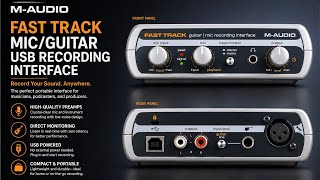
fasttrack ||maudio||m audio fast track
Rockstar Music Store
Reviews
Owner Insights
We analyzed real musician discussions from forums and Reddit to find what players love, question, and tweak about M-Audio Fast Track Guitar / Mic Recording Interface.
Features and functionality
-
The M-Audio Fast Track Pro has front inputs that are more suitable for direct guitar recording than the rear insert jacks.
Source
Software and compatibility
-
Drivers for the M-Audio Fast Track Pro have been unsupported for years, leading to compatibility issues with newer computers.
Source -
Fast Track Pro has issues with USB 3.0 ports; users recommend using USB 2.0 for optimal performance.
Source -
Installing ASIO4ALL drivers is frequently recommended due to compatibility issues with default M-Audio drivers.
Source -
Running Guitar Rig 5 standalone can block Audacity from accessing audio ports; use it as a plugin within Audacity instead.
Source -
Windows 10 users report that using the generic Microsoft USB audio driver can sometimes yield better results than the official M-Audio drivers.
Source -
Installing the 6.1.10 driver in Windows 8 compatibility mode can resolve issues for some users experiencing problems with the 6.1.12 driver on Windows 10.
Source -
The Asio4All driver is preferred by some users because it allows combining inputs and outputs from multiple devices into one ASIO device, unlike the official driver.
Source -
Using the Wayback Machine can help locate legacy drivers no longer available on the official website, providing access to older versions necessary for proper functionality.
Source
Use cases and applications
-
Using a direct box is recommended for connecting a guitar directly to the M-Audio Fast Track Pro for better signal clarity.
Source
User experience
-
Users report that plugging into rear insert jacks may inadvertently record through the computer's microphone, leading to fuzzy and clipped signals.
Source -
Users find Reaper more compatible with Fast Track Pro compared to Audacity, despite its generous 60-day trial.
Source -
Some users experience regular computer crashes when the Fast Track is connected, particularly during remote sessions or video calls.
Source -
Fast Track users have reported issues with BSODs and general instability in Windows 10, suggesting the interface may contribute to system crashes.
Source
Based on 0 Reviews and 0 Ratings
More M-Audio Audio Interfaces

$147.39 - $238.29
in Audio Interfaces Rank


$26.00
in Audio Interfaces Rank


$226.37 - $265.99
in Audio Interfaces Rank


$47.10 - $69.00


$15.90 - $39.99


Artist usage


Community setups


Similar


Gear Guides







.webp)
Most Popular Audio Interfaces
Most Popular Brands
-
Added to Equipboard on by
 equipboard
GearIQ 4934
-


