



Pricing and availability
We compare 600+ stores and found this item at 5 stores. Prices updated .
Store
Reviews
Price








Average Price: $100
Budget/Beginner
$300
$801+
Price Tier
Budget
Standard
High-end
Price History
Based on price data from 4 merchants for "Mackie CR Series Monitors". Prices shown reflect NEW condition. Tracking began Apr 2, 2026.
* Product prices and availability are updated by Equipboard every 24hrs and are subject to change. Equipboard may receive compensation for purchases made at participating retailers linked on this site. This compensation does not affect what products or prices are displayed, or the order of prices listed. For more information, please refer to our affiliate disclosure.
Description
Unlock the full potential of your studio setup with the Mackie CR Series Monitors, a harmonious blend of precision engineering and user-friendly design. These versatile studio monitors are crafted for musicians who demand nothing less than professional-quality sound. The Class D power amplifier delivers a robust 50W peak output, ensuring your mixes are vibrant and clear, whether you're in a dedicated studio or a cozy home setup.
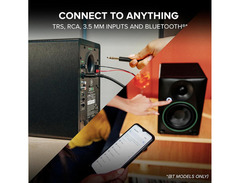
With a wide frequency range of 70Hz to 20kHz, these monitors provide an authentic and detailed soundscape, perfect for both critical listening and casual playback. The onboard tone control knob allows you to tailor the sound to your liking, effortlessly switching from a flat studio reference to a more colorful listening experience. The CR Series Monitors are equipped with multiple input options, including TRS, RCA, and 3.5mm, making them adaptable to any audio setup you might have.
These monitors not only promise superior sound but also offer intuitive features like switchable orientation modes, ensuring optimal performance no matter where you place them. Plus, the included cables mean you can start enjoying the Mackie CR Series Monitors right out of the box.
Key Features:
- Class D power amplifier with 50W peak output
- Frequency range of 70Hz to 20kHz for crystal-clear audio
- Adjustable tone control knob for customizable sound
- Multiple input options: TRS, RCA, and 3.5mm
- Switchable orientation modes for versatile placement
- Includes speaker wires, power cable, and 1/8-inch cables for immediate setup
Product specs
| Powered | Yes |
| Quantity | Pair |
| LF Driver Size | 3.5" Woofer |
| Total Power | 50W Class D |
| Frequency Range | 70Hz-20kHz (-3dB) |
| Maximum Peak SPL | 97dB SPL |
| Input Types | 2 x 1/4" TRS, 1 x Dual RCA Stereo, 1 x Bare Wire Terminal, 1 x 1/8" |
| Output Types | 1 x Bare Wire Terminal, 1 x 1/4" (headphone) |
| Bluetooth | v5.0 |
| Power Source | IEC C7 power cable |
| Height | 8.1" |
| Width | 7.1" |
| Depth | 5.5" |
| Weight | 7.8 lbs. (each) |
FAQs
-
Are the Mackie CR3.5 studio monitors suitable for home studio mixing?
-
Yes, the Mackie CR3.5 studio monitors are ideal for home studio mixing, offering a balanced frequency response of 70Hz-20kHz and a 50W Class D amplifier for clear, articulate sound.
-
Can I connect the Mackie CR3.5 monitors to my computer via Bluetooth?
-
Yes, the Mackie CR3.5 monitors support Bluetooth v5.0, allowing you to wirelessly connect them to your computer or other Bluetooth-enabled devices.
-
What are the input options available on the Mackie CR3.5 monitors?
-
The Mackie CR3.5 monitors offer multiple input options, including 2 x 1/4" TRS, 1 x Dual RCA Stereo, 1 x Bare Wire Terminal, and 1 x 1/8" input for versatile connectivity.
-
Can I use the Mackie CR3.5 monitors for gaming and multimedia purposes?
-
Absolutely, the Mackie CR3.5 monitors are designed for versatile use, including gaming and multimedia, with features like tone control and a headphone output for immersive audio experiences.
-
How does the tone control feature on the Mackie CR3.5 monitors work?
-
The tone control on the Mackie CR3.5 monitors allows you to shape the sound by gradually boosting bass and adding high-end sparkle, making them adaptable for different listening environments and preferences.
Videos

MackieTV
Mackie CR Series Monitors - Basic setup

Mackie CR Series Monitors - Basic setup
MackieTV
Reviews
Owner Insights
We analyzed real musician discussions from forums and Reddit to find what players love, question, and tweak about Mackie CR Series Monitors.
Comparisons
-
The Mackie CR3-X is considered boomy and unclear, especially with guitar frequencies, compared to other monitors in the same price range.
Source -
Compared to M-Audio BX3, Mackie CR3-X has a reputation for breaking frequently, influencing some to perceive M-Audio as higher quality.
Source -
The Edifier R1280DB is considered a better-sounding alternative to the Mackie CR4BT, with a less flat sound profile, making it more suited for general listening.
Source
User experience
-
Owners report that the Mackie CR3-X is not suitable for monitoring purposes as Mackie themselves describe them as just speakers, not true monitors.
Source -
Users suggest waiting for sales like Prime Day to find better deals on models like the Edifier R1280DB, highlighting price sensitivity and value-seeking behavior.
Source -
The CR5-X pair is reported to match well with the Mackie CR8S subwoofer, providing a cohesive audio experience for both casual listening and music production.
Source
Value and pricing
-
Some owners suggest saving for higher-end monitors like the Kali LP6, which provide a better frequency response and clarity than the budget CR3-X.
Source
Use cases and applications
Features and functionality
-
Mackie CR4BT offers Bluetooth capabilities, appealing to users seeking wireless connectivity for music and gaming applications on desktops and laptops.
Source -
The Mackie CR5-X monitors produce a barely audible high-frequency hiss, noticeable during quiet hours, which persists despite using high-quality TRS cables.
Source -
The CR5-X includes isolation pads, which can enhance sound clarity and accuracy, particularly useful in hobby music-making settings.
Source
Critic Reviews
4.0 out of 5
Based on 0 Reviews and 3 Ratings
Genre Usage
Based on how artists on Equipboard use this gear, it is most commonly found in the following genres.
More Mackie Active & Passive Monitors

$849.99 - $1,699.98
in Active & Passive Monitors Rank


$299.00
in Active & Passive Monitors Rank


$116.00 - $414.99
in Active & Passive Monitors Rank


$125.01 - $189.99
in Active & Passive Monitors Rank


$149.00
in Active & Passive Monitors Rank


$234.00 - $299.99
in Active & Passive Monitors Rank

$179.99 - $209.99
in Active & Passive Monitors Rank

$449.99 - $649.99


$117.95 - $149.95


$139.99 - $229.99


Accessories & Related Items


Artist usage


Community setups


Similar


Gear Guides





Most Popular Active & Passive Monitors
Most Popular Brands
-
Added to Equipboard on by
 mat_d_705
GearIQ 55
-


