

Pricing and availability
We compare 600+ stores and found this item at 6 stores. Prices updated .
Store
Reviews
Price








Average Price: $100
Budget/Beginner
$300
$801+
Price Tier
Budget
Standard
High-end
Price History
Based on price data from 4 merchants for "Mackie CR3.5 3.5-inch Powered Studio Monitors". Prices shown reflect NEW condition. Tracking began Apr 2, 2026.
* Product prices and availability are updated by Equipboard every 24hrs and are subject to change. Equipboard may receive compensation for purchases made at participating retailers linked on this site. This compensation does not affect what products or prices are displayed, or the order of prices listed. For more information, please refer to our affiliate disclosure.
Description
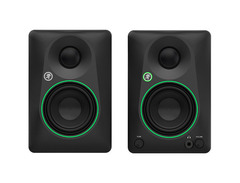
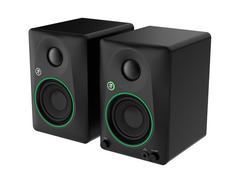
Unleash the power of sound with the Mackie CR3.5 3.5-inch Powered Studio Monitors, a perfect blend of professional quality and user-friendly versatility. These monitors are designed for creators who demand precision, offering a tone control knob that allows you to fine-tune your listening experience. Start with a flat studio reference and gradually introduce rich bass and high-end brilliance for casual listening. The adaptable nature of the CR3.5 is further highlighted by its location switch, which optimizes the sound whether you're in a studio environment or relaxing at home.
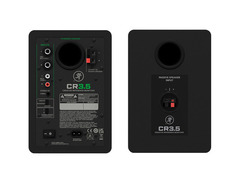
With an array of inputs including TRS, RCA, and 3.5mm, these monitors are as flexible as your audio setup demands. Whether you're connecting audio interfaces, gaming consoles, or simply enjoying your favorite tunes, the CR3.5 offers seamless integration. A built-in headphone output ensures private listening sessions when needed. The 3.5" woven woofer combined with a silk dome tweeter ensures that every note is delivered with clarity and depth. The Mackie CR3.5 is your all-in-one solution for studio work, gaming, or casual enjoyment, making it an indispensable part of any audio setup.
Key Features:
- Tone control knob for tailored sound adjustment
- Location switch for desktop and bookshelf modes
- TRS, RCA, and 3.5mm inputs for versatile connectivity
- Built-in headphone output for private listening
- 3.5" woven woofer and silk dome tweeter for clear, articulate sound
- Includes speaker wires, power cable, and 1/8-inch cables for immediate use
Product specs
| Powered | Yes |
| Quantity | Pair |
| LF Driver Size | 3.5" Woofer |
| Total Power | 50W Class D |
| Frequency Range | 70Hz-20kHz (-3dB) |
| Maximum Peak SPL | 97dB SPL |
| Input Types | 2 x 1/4" TRS, 1 x Dual RCA Stereo, 1 x Bare Wire Terminal, 1 x 1/8" |
| Output Types | 1 x Bare Wire Terminal, 1 x 1/4" (headphone) |
| Bluetooth | v5.0 |
| Power Source | IEC C7 power cable |
| Height | 8.1" |
| Width | 7.1" |
| Depth | 5.5" |
| Weight | 7.8 lbs. (each) |
FAQs
-
Are Mackie CR3.5 studio monitors suitable for mixing and mastering in a small home studio?
-
Yes, the Mackie CR3.5 studio monitors are ideal for small home studios due to their compact size and clear sound quality, though they may lack deep bass response for precise mastering tasks.
-
What connectivity options do the Mackie CR3.5 monitors offer?
-
The Mackie CR3.5 monitors feature multiple connectivity options, including 2 x 1/4" TRS, 1 x Dual RCA Stereo, 1 x Bare Wire Terminal, and 1 x 1/8" input, as well as a 1/4" headphone output.
-
Do the Mackie CR3.5 monitors support Bluetooth connectivity?
-
Yes, the Mackie CR3.5 monitors support Bluetooth v5.0, allowing for wireless audio streaming from compatible devices.
-
How much power do the Mackie CR3.5 studio monitors deliver?
-
The Mackie CR3.5 studio monitors deliver a total power output of 50 watts, utilizing Class D amplification for efficient performance.
-
What is the frequency range of the Mackie CR3.5 monitors?
-
The Mackie CR3.5 monitors have a frequency range of 70Hz to 20kHz, providing a balanced sound suitable for general listening and light mixing tasks.


Reviews
Owner Insights
We analyzed real musician discussions from forums and Reddit to find what players love, question, and tweak about Mackie CR3.5 3.5-inch Powered Studio Monitors.
Features and functionality
-
The CR3s have reflex ports on the back, which can affect bass response, but using rolled-up socks in the ports can tighten and control the bass frequencies.
Source -
Some users find the Mackie CR3s more suitable for bookshelf speaker use rather than for mixing, due to their limited accuracy in representing sound.
Source -
The CR3-X offers front-facing power/volume/aux controls and multiple connectivity options, aligning with user expectations for its price range.
Source
Setup and maintenance
-
Users report humming issues that can be mitigated by using balanced TRS cables instead of AUX/RCA, improving audio quality.
Source
Use cases and applications
-
Owners frequently use these monitors for general listening, podcast editing, and production, but not for professional mixing due to sound accuracy limitations.
Source -
Users find the CR3-X convenient for practicing with VST keyboards and guitar amp simulations due to its seamless connectivity with devices like the Scarlett interface.
Source
Comparisons
-
Users moving from CR3s to JBL LSR 305s note a significant improvement in low-end clarity and definition, eliminating booming issues found in the CR3s.
Source -
Owners suggest that the Mackie CR3s are less clear compared to the JBL LSR305s, with one user noting boominess, especially with guitar frequencies.
Source -
M-Audio BX3s are noted to have scoped mids, suggesting they might not be ideal for users needing a flat response for reference purposes.
Source -
The Mackie CR3-X is considered a better option than the PreSonus E3.5 in a budget monitor showdown, though both are criticized for poor performance.
Source
Value and pricing
-
Consider using price tracking websites like camelcamelcamel.com to monitor and purchase these monitors when prices drop, as they fluctuate significantly.
Source
User experience
-
Feedback indicates the Mackie CR3s are often not considered true studio monitors by the company itself, as noted by a user who contacted Mackie for EQ correction details.
Source -
Despite the criticisms, the CR3-X is appreciated for its practical features like easy connectivity and front-facing controls, especially for casual use.
Source
Based on 0 Reviews and 0 Ratings
Genre Usage
Based on how artists on Equipboard use this gear, it is most commonly found in the following genres.
More Mackie Active & Passive Monitors

$849.99 - $1,699.98
in Active & Passive Monitors Rank


$299.00
in Active & Passive Monitors Rank


$116.00 - $414.99
in Active & Passive Monitors Rank


$124.61 - $189.99
in Active & Passive Monitors Rank


$149.00
in Active & Passive Monitors Rank


$234.00 - $299.99
in Active & Passive Monitors Rank

$179.99 - $209.99
in Active & Passive Monitors Rank

$449.99 - $649.99


$117.58 - $149.95


$139.99 - $229.99


Accessories & Related Items


Artist usage


Community setups


Similar


Gear Guides





Most Popular Active & Passive Monitors
Most Popular Brands
-
Added to Equipboard on by
 equipboard
GearIQ 4934
-


