

Pricing and availability
We compare 600+ stores and found this item at 2 stores. Prices updated .
Store
Reviews
Price




Average Price: $98
Budget/Beginner
$300
$801+
Price Tier
Budget
Standard
High-end
* Product prices and availability are updated by Equipboard every 24hrs and are subject to change. Equipboard may receive compensation for purchases made at participating retailers linked on this site. This compensation does not affect what products or prices are displayed, or the order of prices listed. For more information, please refer to our affiliate disclosure.
Description
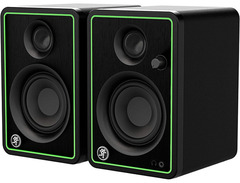
Step into a world of professional sound with the Mackie CR3-XBT 3" Active Studio Monitors with Bluetooth Connectivity. Designed to deliver pristine audio clarity, these monitors are the perfect match for home studios, multimedia creation, and casual listening alike. Whether you're mixing tracks, producing podcasts, or simply enjoying your favorite tunes, the CR3-XBT offers a versatile listening experience.
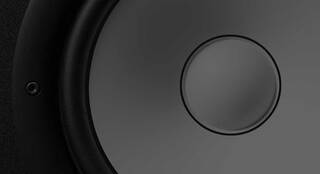
These 3-inch woofers are paired with 0.75-inch silk dome tweeters to produce a balanced sound across all frequencies. With a power output of 50 watts, you’ll find these monitors pack enough punch for any small to medium-sized room. The built-in Bluetooth connectivity sets these monitors apart, allowing for seamless streaming from any compatible device. This feature makes them not just a tool for your studio but also a convenient option for everyday use.
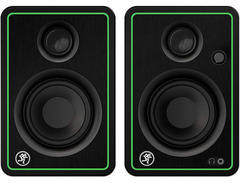
A front-panel volume knob offers easy adjustment, while the headphone output provides a private listening option without disconnecting your monitors. The classic black wood cabinet adds a sleek touch, ensuring these monitors look as good as they sound. Perfect for both beginners and seasoned audiophiles, the Mackie CR3-XBT is a reliable choice for anyone looking to elevate their audio setup.
Key Features:
- 3" polypropylene-coated woofers and 0.75" silk dome tweeters
- Bluetooth connectivity for wireless streaming
- 50 watts of clean, articulate stereo sound
- Front-panel volume control and headphone output
- Sleek black wood cabinet design
- Includes isolation pads to minimize vibrations
Product specs
| Brand | Mackie |
| Model | CR3-XBT 3" Active Studio Monitors with Bluetooth Connectivity (Pair) |
| Year | 2020 - 2025 |
| Made In | China |
| Categories | Studio Monitors |
| Amplification | Active |
| Electronics | Analog, Solid State |
FAQs
-
Do the Mackie CR3-XBT studio monitors have Bluetooth connectivity?
-
Yes, the Mackie CR3-XBT studio monitors feature Bluetooth connectivity, allowing you to wirelessly stream music from your devices.
-
Are the Mackie CR3-XBT studio monitors suitable for mixing and mastering?
-
While the Mackie CR3-XBT monitors offer good sound quality for general use, they are more suited for casual listening and beginner-level mixing rather than professional mastering.
-
What is the size of the woofer in the Mackie CR3-XBT monitors?
-
The Mackie CR3-XBT monitors are equipped with a 3-inch woofer, providing a compact design suitable for smaller spaces.
-
Do the Mackie CR3-XBT monitors require an external amplifier?
-
No, the Mackie CR3-XBT monitors are active, meaning they have built-in amplification and do not need an external amplifier.
-
Can I use the Mackie CR3-XBT monitors with a computer or audio interface?
-
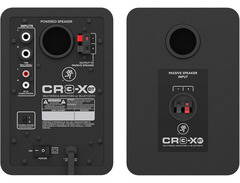
Yes, the Mackie CR3-XBT monitors can be connected to a computer or audio interface via standard RCA or 1/4" inputs.
Videos

Edward Smith
BEST BUDGET STUDIO MONITORS? - Mackie CR3-XBT Monitors (Unboxing) | Best Studio Monitors Under $100

BEST BUDGET STUDIO MONITORS? - Mackie CR3-XBT Monitors (Unboxing) | Best Studio Monitors Under $100
Edward Smith

These Studio Monitors Look BOMB!! | Mackie CR3-XBT White LIMITED EDITION 2021 (Unboxing & Review)
Edward Smith
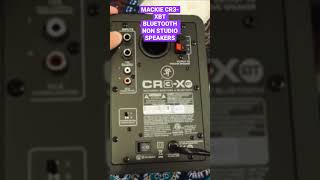
MACKIE CR3-XBT BLUETOOTH NON STUDIO SPEAKERS #studio #headphone #akg #gaming #speaker #shorts

DoseReviews
Reviews
Owner Insights
We analyzed real musician discussions from forums and Reddit to find what players love, question, and tweak about Mackie CR3-XBT 3" Active Studio Monitors with Bluetooth Connectivity (Pair).
Comparisons
-
Mackie CR3s are criticized for being overly boomy, especially with guitar frequencies, while M-Audio BX3s have scoped mids. Neither is considered accurate for monitoring.
Source -
Users find PreSonus Eris E3.5 monitors to have no hissing issues, unlike the Mackie CR3-XBT, making them a preferable choice for noise-sensitive environments.
Source
Features and functionality
-
Mackie CR3s are not true studio monitors; they're reportedly more akin to regular speakers, making them less suitable for accurate mixing tasks.
Source -
The Mackie CR3-XBT monitors produce noticeable hissing noise, audible even when no input is connected, starting from the moment they are powered on.
Source -
The setup involving a Mackie CR8S subwoofer and CR3-XBTs can introduce noise, especially through wired connections, which might not occur using Bluetooth connectivity.
Source
User experience
-
Owners of Mackie CR3s report dissatisfaction with their clarity and frequency response, specifically noting issues with boominess and lack of precision.
Source -
Owners report that the white noise from Mackie CR3-XBT monitors is present from the lowest to highest volume, indicating a consistent issue regardless of volume setting.
Source -
Users encountering static noise around 30-40% volume suggest grounding issues or a ground loop, recommending all devices be plugged into the same power strip to mitigate this problem.
Source
Value and pricing
-
It's suggested to consider higher-quality used monitors like JBL LSR305 or Mackie MR524 for better accuracy and longevity over budget models like the CR3-XBT.
Source
Setup and maintenance
-
Placing the Mackie CR3-XBT monitors further from power sources can reduce, but not eliminate, the hissing noise, suggesting sensitivity to electromagnetic interference.
Source -
Connecting the Mackie CR3-XBT via SPDIF might reduce interference compared to RCA, potentially minimizing static noise issues experienced at higher volumes.
Source
Based on 0 Reviews and 0 Ratings
More Mackie Active & Passive Monitors

$849.99 - $1,699.98
in Active & Passive Monitors Rank


$299.00
in Active & Passive Monitors Rank


$116.00 - $414.99
in Active & Passive Monitors Rank


$124.61 - $189.99
in Active & Passive Monitors Rank


$149.00
in Active & Passive Monitors Rank


$234.00 - $299.99
in Active & Passive Monitors Rank

$179.99 - $209.99
in Active & Passive Monitors Rank

$449.99 - $649.99


$117.58 - $149.95


$139.99 - $229.99


Artist usage


Community setups


Similar


Gear Guides





Most Popular Active & Passive Monitors
Most Popular Brands
-
Added to Equipboard on by
 equipboard
GearIQ 4934
-


