

Pricing and availability
We compare 600+ stores and found this item at 8 stores. Prices updated .
Store
Reviews
Price








Average Price: $59
Budget/Beginner
$150
$501+
Price Tier
Budget
Standard
High-end
Price History
Based on price data from 6 merchants for "Focusrite Vocaster One USB Audio Interface". Prices shown reflect NEW condition. Tracking began Apr 2, 2026.
* Product prices and availability are updated by Equipboard every 24hrs and are subject to change. Equipboard may receive compensation for purchases made at participating retailers linked on this site. This compensation does not affect what products or prices are displayed, or the order of prices listed. For more information, please refer to our affiliate disclosure.
Description
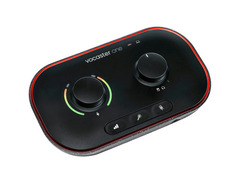
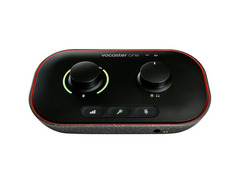
The Focusrite Vocaster One USB Audio Interface is your gateway to broadcast-quality sound, tailor-made for podcasters and solo content creators. Designed with simplicity and efficiency in mind, this compact interface offers more than just plug-and-play convenience. With a staggering 70dB of gain, it's compatible with a wide range of microphones, ensuring you won't need additional boosters. The Auto Gain function makes setting levels a breeze—just click and speak, and you're ready to go.
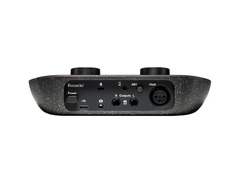
The Vocaster One doesn't stop there; its Enhance feature offers three podcaster-focused presets designed to bring out the best in your voice, making every word count. Whether you're hosting a solo show or inviting guests, the TRRS connectivity allows you to easily bring in phone audio, adding depth to your conversations. The versatile interface also supports direct camera connection via TRS, providing high-quality audio for your vlogs without the hassle of syncing in post-production.
The interface is bus-powered and class-compliant, making it a perfect fit for USB-C iPads and most Mac/Windows computers. Furthermore, its Stereo Loopback function lets you stream computer audio, like intros and outros, directly into your recording. With an included software bundle featuring Hindenburg Lite and Acast Influencer, you have everything you need to start producing content that stands out.
Key Features:
- Over 70dB of gain, no booster needed
- Auto Gain and Enhance functions for easy level setting and audio enhancement
- TRRS connectivity for phone calls and device audio
- TRS input for direct camera audio integration
- Stereo Loopback for computer audio streaming
- Includes Hindenburg Lite, Acast Influencer, and Ampify Studio software trials
- Bus-powered, compatible with USB-C iPads and Mac/Windows computers
Product specs
| Computer Connectivity | USB 3.0 |
| Form Factor | Desktop, Portable |
| Simultaneous I/O | 1 x 2 |
| Number of Preamps | 1 |
| Phantom Power | Yes |
| A/D Resolution | 24-bit/48kHz |
| Analog Inputs | 1 x XLR, 1 x 1/8" TRRS (phone) |
| Analog Outputs | 2 x 1/4" TRS, 1 x 1/8" TRS (camera out) |
| Headphones | 1 x 1/4" |
| USB | 1 x Type C |
| Software | Vocaster Hub, Hindenberg Lite, 3rd Party Bundled Software (trial) |
| OS Requirements - Mac | MacOS 11.6 or later, iPadOS 14 or later (USB-C required) |
| OS Requirements - PC | Windows 10 or later |
| Bus Powered | Yes |
| Power Supply | USB bus powered (USB-C to USB-A cable included) |
| Height | 1.99" |
| Width | 7.66" |
| Depth | 4.45" |
| Weight | 12.27 oz |
FAQs
-
Is the Focusrite Vocaster One suitable for podcasting with a single microphone?
-
Yes, the Focusrite Vocaster One is designed specifically for solo podcast creators, featuring one high-quality mic preamp and an XLR input for single-microphone setups.
-
Can the Focusrite Vocaster One be used with both Windows and Mac computers?
-
Yes, the Focusrite Vocaster One is compatible with Windows 10 or later and MacOS 11.6 or later, making it versatile for different operating systems.
-
Does the Focusrite Vocaster One require an external power source?
-
No, the Focusrite Vocaster One is USB bus-powered, meaning it draws power directly from your computer, eliminating the need for an external power supply.
-
What software comes bundled with the Focusrite Vocaster One?
-
The Focusrite Vocaster One includes Vocaster Hub, Hindenburg Lite, and a trial for third-party software, providing a comprehensive suite for podcast production.
-
How does the Auto Gain feature on the Focusrite Vocaster One work?
-
The Auto Gain feature automatically sets the optimal recording level for your microphone within seconds, ensuring consistent audio quality without manual adjustments.
Videos

Audio Hotline
Focusrite Vocaster One Audio Interface Review (Great Interface for Podcasters and Content Creators!)
Focusrite Vocaster One Audio Interface Review (Great Interface for Podcasters and Content Creators!)
Audio Hotline
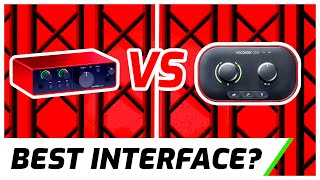
Focusrite Scarlett Solo vs Vocaster One Audio Interface | Which is BEST for you?

Kettner Creative
Explore Vocaster One connectivity options // Focusrite

Focusrite
Reviews
PROS
-
Simple plug-and-play setup ideal for beginners
-
High-quality sound with excellent pre-amps and auto-gain
-
Bus-powered, eliminating the need for an extra power cable
-
Allows direct connection of XLR mic audio to a camera
-
Robust build quality with a smooth, responsive gain knob
-
Useful enhance feature for quick audio processing
-
Includes phantom power, suitable for dynamic and condenser mics
-
Mute button with visual indicator for added control
-
Compact and portable design for on-the-go recording
-
Real-time voice alteration with customizable presets
CONS
-
No control knob for headphone level adjustment
-
Direct monitoring cannot be disabled, always on
-
Does not support iPhones, limiting mobile use
-
Some users report interference if cables are not well managed
-
Bluetooth feature may have static issues
Owner Insights
We analyzed real musician discussions from forums and Reddit to find what players love, question, and tweak about Focusrite Vocaster One USB Audio Interface.
Features and functionality
-
The Vocaster One's auto gain feature effectively sets mic levels within seconds, offering hassle-free setup for streaming and voice work.
Source -
The Vocaster One supports direct use as a mic input for cameras, providing versatility beyond computer connections.
Source -
It's noted that the preamps in entry-level interfaces like the Vocaster One aim for clean transparency, with character differences becoming noticeable only in high-end models.
Source -
The kit includes software like Hindenburg for editing, simplifying the podcast production process without needing extensive post-production work.
Source -
The included headphones may not be high-end, but they are adequate for monitoring podcast sessions and hearing co-hosts clearly.
Source
Software and compatibility
-
The Vocaster hub software is only required for initial setup and firmware updates; changes are stored on the device, eliminating the need for constant software use.
Source -
Linux compatibility requires specific ALSA configuration adjustments, but once set, it supports multiple input/output configurations effectively.
Source
Use cases and applications
-
The Vocaster One excels in gaming and online calls, supporting separate channel routing for mic inputs and PC sounds, offering clear audio separation.
Source -
Users seeking vibrant and natural vocal recordings may benefit more from condenser mics as dynamics like the Samsung Q2U might sound too "podcasty."
Source -
The kit's microphone and interface setup are effective for remote podcast recording, maintaining consistent sound quality even when hosts aren't in the same location.
Source
User experience
Comparisons
-
Users transitioning from Blue Yeti to the Vocaster One report more consistent and clear audio without frequent adjustments or audio inconsistencies.
Source -
The Samsung Q2U microphone, a dynamic type, may require more post-processing to achieve natural sound compared to large diaphragm condensers like the AKG c414 xlii.
Source
Critic Reviews
Based on 0 Reviews and 0 Ratings
More Focusrite Audio Interfaces

$159.99 - $224.99
in Audio Interfaces Rank


-m.webp?v=1782831462)
$749.99
in Audio Interfaces Rank


.jpg?v=1781483737)

$79.00 - $299.99
in Audio Interfaces Rank


$52.00 - $149.99
in Audio Interfaces Rank


$118.00 - $189.99
in Audio Interfaces Rank


$85.00 - $391.13
in Audio Interfaces Rank


$440.00
in Audio Interfaces Rank

.jpg?v=1782828443)


$224.99
in Audio Interfaces Rank


$99.99 - $299.99
in Audio Interfaces Rank


-m.webp?v=1782831476)
$110.55
in Audio Interfaces Rank


$69.09 - $149.99
in Audio Interfaces Rank


$261.98
in Audio Interfaces Rank


$325.00
in Audio Interfaces Rank


$88.00 - $499.99
in Audio Interfaces Rank


$27.64 - $349.99
in Audio Interfaces Rank


$129.00 - $480.00
in Audio Interfaces Rank


$40.00 - $149.99
in Audio Interfaces Rank


$385.00 - $749.99
in Audio Interfaces Rank


-m.webp?v=1782831505)
$172.67
in Audio Interfaces Rank


$193.00 - $299.99
in Audio Interfaces Rank


$85.00 - $480.00
in Audio Interfaces Rank


$229.00
in Audio Interfaces Rank


$1,948.00 - $2,299.99
in Audio Interfaces Rank

$339.99
in Audio Interfaces Rank


$283.00 - $449.99
in Audio Interfaces Rank


$158.00 - $269.99
in Audio Interfaces Rank

.jpg?v=1782680301)


$548.00 - $749.99
in Audio Interfaces Rank


$540.63
in Audio Interfaces Rank


$283.00 - $599.00
in Audio Interfaces Rank


$169.00 - $299.99


$253.97 - $279.99


$119.00 - $169.99


$69.00 - $149.99


$10.99 - $39.00


$241.27 - $329.99


$152.16 - $1,824.00


$269.99 - $272.00


Accessories & Related Items


-s.webp?v=1782859925)
Artist usage


Community setups


Similar


Gear Guides







Most Popular Audio Interfaces
Most Popular Brands
-
Added to Equipboard on by
 equipboard
Gear IQ 4934
-


