

Pricing and availability
We compare 600+ stores and found this item at 8 stores. Prices updated .
Store
Reviews
Price








Average Price: $213
Standard/Professional
$150
$501+
Price Tier
Budget
Standard
High-end
Price History
Based on price data from 6 merchants for "Focusrite Vocaster Two USB Audio Interface". Prices shown reflect NEW condition. Tracking began Apr 2, 2026.
* Product prices and availability are updated by Equipboard every 24hrs and are subject to change. Equipboard may receive compensation for purchases made at participating retailers linked on this site. This compensation does not affect what products or prices are displayed, or the order of prices listed. For more information, please refer to our affiliate disclosure.
Description
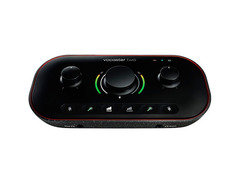
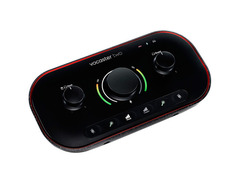
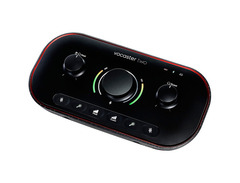
Transform your podcasting dreams into reality with the Focusrite Vocaster Two USB Audio Interface. Designed with podcasters in mind, this interface effortlessly captures broadcast-quality sound, turning your home studio into a professional recording space. Seventy decibels of gain ensure your microphone, regardless of make, delivers clear and powerful audio without the need for external boosters. The game-changing Auto Gain function takes the guesswork out of setup, automatically adjusting levels for each XLR input with just the press of a button.
The Vocaster Two is more than just an audio interface; it's your personal sound engineer. Its Enhance feature offers three curated presets to refine and highlight the unique qualities of your voice, ensuring every word you record sounds polished and professional. Connectivity is a breeze, with options to plug in your phone via Bluetooth or TRRS, allowing easy integration of remote interviews or music tracks into your podcast seamlessly.
Expand your creative horizons with the Vocaster Two's versatile connectivity options. Record directly to your camera using the TRS output or loop in audio from your computer for intros and outros with the Stereo Loopback function. Plus, the included software bundle with Hindenburg Lite, aCast, and Ampify Studio empowers you to edit and distribute your content with ease. Portable and bus-powered, this interface is ready to go wherever your story takes you.
Key Features:
- Over 70 dB of gain, no booster needed
- Auto Gain for instant level setting
- Enhance with three podcaster-approved presets
- Mute button to eliminate unwanted noise
- Bluetooth and TRRS connectivity for phone integration
- TRS output for direct camera connection
- Stereo Loopback for computer audio integration
- Bus-powered via USB-C
- Includes Hindenburg Lite, aCast, and Ampify Studio software bundle
Product specs
| Computer Connectivity | USB 3.0 |
| Form Factor | Desktop, Portable |
| Simultaneous I/O | 2 x 2 |
| Number of Preamps | 2 |
| Phantom Power | Yes |
| A/D Resolution | 24-bit/48kHz |
| Analog Inputs | 2 x XLR, 1 x 1/8" TRRS (phone) |
| Analog Outputs | 2 x 1/4" TRS, 1 x 1/8" TRS (camera out) |
| Headphones | 2 x 1/4" |
| USB | 1 x USB-C |
| Bluetooth | v5.0 |
| Software | Vocaster Hub, Hindenberg Lite, 3rd Party Bundled Software (trial) |
| OS Requirements - Mac | MacOS 11.6 or later, iPadOS 14 or later (USB-C required) |
| OS Requirements - PC | Windows 10 or later |
| Bus Powered | Yes |
| Power Supply | USB bus powered (USB-C to USB-A cable included) |
| Height | 1.99" |
| Width | 8.84" |
| Depth | 4.45" |
| Weight | 15.52 oz |
FAQs
-
What are the main connectivity options for the Focusrite Vocaster Two?
-
The Focusrite Vocaster Two offers USB-C connectivity for computer connection, two XLR inputs for microphones, a 1/8" TRRS input for phones, and two 1/4" TRS outputs for speakers. It also features Bluetooth v5.0 for wireless connections.
-
Is the Focusrite Vocaster Two compatible with both Mac and PC?
-
Yes, the Focusrite Vocaster Two is compatible with both Mac (macOS 11.6 or later) and PC (Windows 10 or later) systems. It requires a USB-C connection for use.
-
Does the Focusrite Vocaster Two require an external power supply?
-
No, the Focusrite Vocaster Two is USB bus-powered, meaning it draws power directly from your computer via the included USB-C to USB-A cable.
-
What software is included with the Focusrite Vocaster Two?
-
The Focusrite Vocaster Two comes with Vocaster Hub software, Hindenburg Lite, and a six-month Acast Influencer subscription, along with trials of other third-party software.
-
Can the Focusrite Vocaster Two enhance vocal recordings for podcasts?
-
Yes, the Focusrite Vocaster Two features an "Enhance" function with three podcaster-approved presets designed to improve vocal quality and clarity in recordings.
Videos

Podcastage
Focusrite Vocaster Two Interface Review / Explained
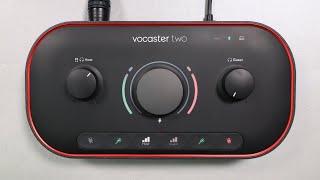
Focusrite Vocaster Two Interface Review / Explained
Podcastage
The Easiest Podcast Interface: Vocaster Two Review!

Tom Buck
Focusrite Vocaster Two – USB Audio Interface Review (with audio samples)

Julian Krause
Reviews
PROS
-
Excellent auto-gain feature for adjusting levels automatically
-
Bluetooth connectivity for remote interviews and phone-ins
-
Direct XLR-to-camera connection simplifies content creation
-
Compact and portable design ideal for on-the-go recording
-
Dual mic and headphone outputs for host and guest accommodations
-
Smooth, accurate gain knobs enhance user control
-
Professional-grade audio with user-friendly functionality
-
Good build quality with visually appealing design
-
Easy setup process, even for beginners
-
Versatile use for podcasters, streamers, and content creators
CONS
-
DIM LEDs are nearly useless in bright environments
-
Low headphone volume can be underwhelming
-
Occasional PC connection issues requiring frequent reboots
-
Static noise reported in Bluetooth transmission
-
Some units may develop a hum over time, affecting recordings
Owner Insights
We analyzed real musician discussions from forums and Reddit to find what players love, question, and tweak about Focusrite Vocaster Two USB Audio Interface.
Features and functionality
-
The Enhance filter's compressors can significantly reduce microphone gain, and users report improved performance when these are deactivated.
Source -
The Vocaster Two doesn't retain settings after being unplugged and reconnected, requiring users to manually reactivate phantom power.
Source -
Users desire a high pass filter to reduce voice boominess, indicating a gap in the current onboard EQ and compressor features.
Source -
Owners express dissatisfaction with the auto gain function, citing it as less effective compared to manual adjustments.
Source
Setup and maintenance
-
Users experiencing low microphone audio suggest setting the gain knob to approximately 90% and adjusting headphone and output volumes for better balance.
Source
Software and compatibility
-
Application freezes may occur when connected to certain USB ports, resolved by switching to different ports or trying alternative USB cables.
Source -
The Vocaster Hub software frequently crashes, especially on desktops, leading to unreliable performance for digital meetings.
Source -
The interface appears as a Thunderbolt device in device manager, suggesting potential compatibility issues with non-Thunderbolt USB ports.
Source
Use cases and applications
-
Users leverage the interface's TRRS connectivity to use high-quality headphones and mics with consoles like Xbox, bypassing brand-specific hardware restrictions.
Source -
Stand-alone mode allows for processed mic signals to be routed to a camera's line input, suitable for content creators without needing a computer.
Source
Comparisons
-
Users find the Universal Audio Volt offers cleaner gain and requires minimal post-processing, making it a strong alternative to the Vocaster Two.
Source
Critic Reviews
Based on 0 Reviews and 0 Ratings
More Focusrite Audio Interfaces

$159.99 - $224.99
in Audio Interfaces Rank


-m.webp?v=1784804580)
$749.99
in Audio Interfaces Rank


$79.00 - $299.99
in Audio Interfaces Rank


$49.00 - $149.99
in Audio Interfaces Rank
.jpg?v=1784763257)


$85.00 - $391.13
in Audio Interfaces Rank


$118.00 - $189.99
in Audio Interfaces Rank


$224.99
in Audio Interfaces Rank


$83.73 - $299.99
in Audio Interfaces Rank


-m.webp?v=1784331838)
$70.00
in Audio Interfaces Rank


$69.78 - $159.99
in Audio Interfaces Rank


$400.00
in Audio Interfaces Rank


$440.00
in Audio Interfaces Rank

.jpg?v=1784640202)


$325.00
in Audio Interfaces Rank


$117.95 - $499.99
in Audio Interfaces Rank


.jpg?v=1783787053)

$23.00 - $349.99
in Audio Interfaces Rank


$75.00 - $480.00
in Audio Interfaces Rank


$40.00 - $149.99
in Audio Interfaces Rank


$385.00 - $749.99
in Audio Interfaces Rank


-m.webp?v=1784905147)
$172.76
in Audio Interfaces Rank


$89.00 - $480.00
in Audio Interfaces Rank


$444.68
in Audio Interfaces Rank


$279.99
in Audio Interfaces Rank


$279.99 - $449.99
in Audio Interfaces Rank


$158.00 - $269.99
in Audio Interfaces Rank

.jpg?v=1784763257)


$193.00 - $299.99
in Audio Interfaces Rank


$498.00 - $749.99
in Audio Interfaces Rank


$540.92
in Audio Interfaces Rank


$279.99 - $599.00
in Audio Interfaces Rank


$169.00 - $299.99
in Audio Interfaces Rank


$244.24 - $279.99


$115.00 - $199.99


$69.00 - $149.99


$10.99 - $55.81


$259.99 - $329.99


$166.00 - $1,859.00


$272.00 - $279.99


$173.75 - $299.99


Accessories & Related Items



-s.webp?v=1784905087)




Artist usage


Community setups


Similar


Gear Guides







.webp)
Most Popular Audio Interfaces
Most Popular Brands
-
Added to Equipboard on by
 equipboard
GearIQ 4934
-


