
Pricing and availability
We compare 600+ stores and found this item at 10 stores. Prices updated .
Store
Reviews
Price









Average Price: $177
Budget/Beginner
$200
$501+
Price Tier
Budget
Standard
High-end
Price History
Based on price data from 7 merchants for "Novation Impulse 25". Prices shown reflect NEW condition. Tracking began Apr 2, 2026.
* Product prices and availability are updated by Equipboard every 24hrs and are subject to change. Equipboard may receive compensation for purchases made at participating retailers linked on this site. This compensation does not affect what products or prices are displayed, or the order of prices listed. For more information, please refer to our affiliate disclosure.
Description
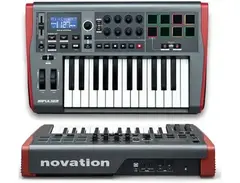
Introducing the Novation Impulse 25, a professional USB/MIDI controller that sets a new bar for expressive and precision control of your favorite DAW and plug-ins. The heart of the Impulse 25 is its semi-weighted keyboard with assignable aftertouch, designed to feel more like an instrument than a mere computer peripheral. With a high scan-rate, this keyboard translates your playing style with impeccable accuracy, capturing even the subtlest nuances in dynamics.
The Impulse 25 also features 8 backlit drum pads that not only allow you to sketch beats and trigger samples but also step through arpeggiator sequences in real-time. You can warp and change the rhythm of the arpeggio, create a beat roll, or even trigger clips in Ableton Live. With multi-coloured LEDs, these drum pads provide visual feedback that enhances your performance.
The Impulse 25 also comes with a full control surface, including 1 fader, 8 rotary controls, and transport controls. Enhanced with Novation's award-winning Automap control software, it provides instant hands-on control of your mixer, transport controls, and plug-in instruments and effects.
Key Features:
- Precision semi-weighted keyboard with assignable aftertouch
- 8 backlit drum pads for beat creation and clip launching in Ableton Live
- Full DAW and plug-in control surface with 1 fader, 8 rotary controls, and transport controls
- Automap 4 control software for instant hands-on access to your DAW and plug-ins
- Built-in arpeggiator and beat roll functions
- Compatible with all major DAWs and plug-in instruments and effects
- Comes with Ableton Live Lite, Novation's Bass Station synth, and a 4GB Loopmasters sample pack
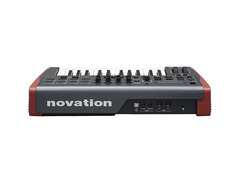
- USB powered with expression and sustain pedal inputs, as well as MIDI in and out ports for connecting external MIDI instruments
Product specs
| Type | Keyboard Controller |
| Number of Keys | 25 |
| Type of Keys | Semi-weighted |
| Velocity Sensitive | Yes |
| Aftertouch | Channel Aftertouch |
| Pads | 8 Backlit |
| Other Controllers | Pitchbend, Mod Wheel |
| Encoders/Pots | 8 |
| Faders | 1 |
| Dedicated Transport Control | Yes |
| Zones | 4 |
| Pedal Inputs | 1 x 1/4" (sustain), 1 x 1/4" (expression) |
| MIDI I/O | In/Out/USB |
| USB | 1 x Type B |
| Computer Connectivity | USB |
| Software | Ableton Live Lite |
| Hardware Requirements - Mac | Dual Core processor or higher, 4GB RAM minimum |
| Hardware Requirements - PC | Dual Core processor or higher, 4GB RAM minimum |
| OS Requirements - Mac | OS X 10.7 or later |
| OS Requirements - PC | Windows 7 or later |
| Power Supply | USB bus power, AC-DC USB Adapter (sold separately) |
| Height | 3.94" |
| Width | 20.67" |
| Depth | 13.07" |
| Weight | 7.7 lbs. |
FAQs
-
Is the Novation Impulse 25 suitable for live performances?
-
Yes, the Novation Impulse 25 is suitable for live performances. Its semi-weighted keys and channel aftertouch offer expressive control, and its 8 backlit pads, pitchbend, and modulation wheels enhance live playability.
-
How easily does the Novation Impulse 25 integrate with popular DAWs?
-
The Novation Impulse 25 integrates seamlessly with popular DAWs, particularly with Ableton Live Lite, which is included. It also features dedicated transport controls to streamline your workflow in various software environments.
-
What are the standout features of the Novation Impulse 25's control capabilities?
-
The Novation Impulse 25 offers 8 encoders, a fader, and 8 backlit pads for comprehensive control. It also includes pitchbend and modulation wheels, and supports 4 zones, allowing for versatile performance setups.
-
Does the Novation Impulse 25 require an external power supply?
-
The Novation Impulse 25 is powered via USB bus power, eliminating the need for an external power supply. However, an AC-DC USB adapter can be purchased separately if needed.
-
Can the Novation Impulse 25 be used with both Mac and PC systems?
-
Yes, the Novation Impulse 25 is compatible with both Mac (OS X 10.7 or later) and PC (Windows 7 or later) systems, requiring a dual-core processor and at least 4GB of RAM.
Videos

Loopcloud
Novation Impulse MIDI Controller - Features Overview and Review
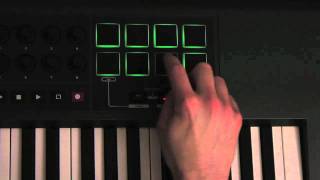
Novation Impulse MIDI Controller - Features Overview and Review
Loopcloud
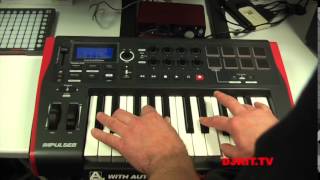
NOVATION IMPULSE KEYBOARDS

djkit®
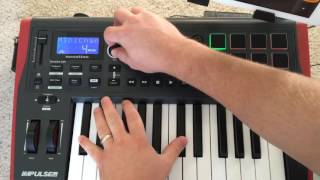
Novation Impulse 25 Demo with iPad

TheAudioDabbler
9PM (Till I Come) - ATB (Remix - Cover) Novation Impulse Performance

MarkovMusic
Ipad 2 Demo Connecting Novation Impulse 25

Synth Universe
Novation Impulse 25 Demo

Robot 303
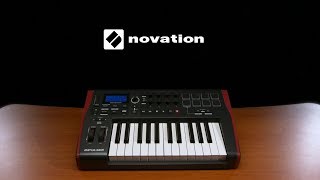
Novation Impulse 25 Key USB MIDI Controller Keyboard | Gear4music

Gear4music Guitars
Reviews
PROS
-
Rugged and durable design, with rubber sides for protection
-
Keys offer more resistance than typical synth keys
-
Full-size keys with aftertouch, a rare feature in lower-cost units
-
Plug 'n play compatibility, easy setup with certain DAWs
-
Versatile for both studio and live performance use
-
Good integration with Ableton Live and other software
-
Features like arpeggiator, drum pads, and mod/pitch wheels add value
-
Bus-powered for convenience and portability
-
Solid construction with responsive controls and pads
CONS
-
Feels cheap to some users, impacting perceived quality
-
Setup and software compliance can be challenging, especially with certain DAWs
-
Limited by having only one fader due to size
-
Knobs and drum pads quality not up to expectations for some
-
Keys not weighted, which might not suit all playing styles
-
Size and weight larger than expected, affecting portability
-
Some users experienced difficulties getting it to work
-
Customer support slow to respond to issues
Owner Insights
We analyzed real musician discussions from forums and Reddit to find what players love, question, and tweak about Novation Impulse 25.
Build quality
Features and functionality
-
Arpeggiator offers extensive creative potential, enhancing music composition.
Source -
Beat pads default to sending C1 and up, aligning with basic drum patch samples, though note changes might be possible via software or hardware adjustments.
Source -
Impulse controllers support a dawless setup by allowing live tweaking of synth parameters via rotors and faders.
Source
Software and compatibility
-
Automap software functions well, but there's uncertainty about compatibility with Windows 11.
Source -
GarageBand can be used to play sounds with the keys and pads, though more advanced software may offer enhanced programming capabilities.
Source -
Users report that the Impulse range lacks direct integration with Logic, requiring HUI configuration for functional use.
Source
User experience
Setup and maintenance
-
A USB B to USB C cable is recommended for recent MacBooks to ensure seamless connectivity and power supply.
Source
4.0 out of 5
Based on 7 Reviews and 28 Ratings
53
Great For Starters
As a musician who really wants to start sonething really small, i found something rare that did caught me with my eye... Its the Novation Impulse 25 key. It hads its grwat use, Drum Pads are meh though... But it has an Mod and Pitch Switchs unlike any other 25 key...
I really recommend this for a good 25 keyboard use for its good features and its more easier for more things to create and experiment!

340
Great customisable MIDI capabilities
This is a great controller, very well built, great feel to the keys (weighted). I sold it because i wanted a simpler unit, with more keys but without pads, transport, knobs etc. Replaced it with a full sized Roland HP400 from 1983!


68
Great for bass, lacks in lead sound
Best Midi keyboard for bass sound.But this keyboard very bad for lead sound.But I like this keyboard

510
Seth's preferred alternative to the Launchkey
Another midi usb keyboard, mostly Seth's preference to the Novation Lauchkey.
Artist usage
Add artist

Genre Usage
Based on how artists on Equipboard use this gear, it is most commonly found in the following genres.
More Novation MIDI Keyboard Controllers

$135.00 - $678.00
in MIDI Keyboard Controllers Rank


$277.00 - $440.00
in MIDI Keyboard Controllers Rank


$214.99
in MIDI Keyboard Controllers Rank


$99.99 - $149.99
in MIDI Keyboard Controllers Rank


$211.00 - $300.00
in MIDI Keyboard Controllers Rank


$362.00 - $498.99
in MIDI Keyboard Controllers Rank


$517.00 - $649.99
in MIDI Keyboard Controllers Rank


$116.72 - $149.99
in MIDI Keyboard Controllers Rank


$69.99 - $129.99
in MIDI Keyboard Controllers Rank


$279.99 - $329.99
in MIDI Keyboard Controllers Rank


$39.99 - $98.00
in MIDI Keyboard Controllers Rank


$256.00 - $329.99
in MIDI Keyboard Controllers Rank


$140.07
in MIDI Keyboard Controllers Rank


.jpg?v=1784097220)


$211.00 - $300.00


$580.00 - $749.99


$85.00 - $119.99


$135.00 - $279.99


$99.99 - $187.88


$151.74 - $219.99


$279.00 - $329.99

$221.77 - $299.99


$149.00 - $199.99


Accessories & Related Items


-s.webp?v=1784128379)


Community setups


Similar


Gear Guides








Most Popular MIDI Keyboard Controllers
Most Popular Brands


