

Pricing and availability




* Product prices and availability are updated by Equipboard every 24hrs and are subject to change. Equipboard may receive compensation for purchases made at participating retailers linked on this site. This compensation does not affect what products or prices are displayed, or the order of prices listed. For more information, please refer to our affiliate disclosure.
Description
Unleash your creativity with the Novation Remote 25 Le, a versatile MIDI controller that packs a punch in a compact design. Perfect for musicians on the go, this controller is light in weight but heavy on features. The 25 semi-weighted keys provide a satisfying synth-action feel with eight customizable velocity curves, allowing you to express your musical ideas with precision and style.
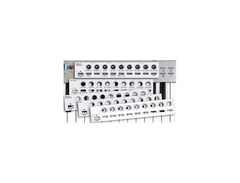
Navigate your sounds with ease using the innovative 4-way pitch/mod joystick and the assignable X/Y touchpad, both designed to give you intuitive control over your music. The Novation Remote 25 Le is equipped with a blue backlit LCD, making it easy to see your settings even in low-light environments. The nine assignable knobs and buttons, alongside a Group A/B switch, provide extensive control options, while built-in transport controls keep your workflow seamless.
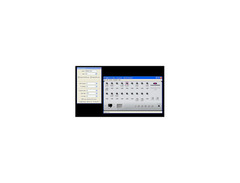
With 12 onboard templates ready to work with popular software like Ableton Live, Steinberg Cubase, and Apple Logic 7, this MIDI controller is as plug-and-play as it gets. Plus, it comes with a full version of the Novation Bass Station software synthesizer, ensuring you're equipped with everything you need to start creating right out of the box.
Join a community of musicians who appreciate quality and innovation. Whether you're triggering samples, laying down basslines, or controlling your sequencer, the Novation Remote 25 Le delivers the tools you need to elevate your music production.
Key Features:
- 25 semi-weighted synth-action keys with 8 velocity curves
- Assignable X/Y touchpad and 4-way pitch/mod joystick
- Blue backlit LCD for clear parameter display
- 9 assignable knobs and 9 assignable buttons with Group A/B switch
- Built-in transport controls: Rewind, Fast Forward, Stop, Start, Record, Loop
- 12 onboard templates with more available online
- Includes Novation Bass Station software synthesizer
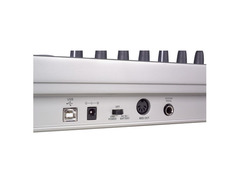
- USB MIDI and external MIDI Out
- Powered by USB or 9V DC external power supply
- Lightweight and portable design
FAQs
-
Is the Novation Remote 25 Le compatible with DAWs like Ableton Live and Logic Pro?
-
Yes, the Novation Remote 25 Le comes with pre-installed templates for DAWs including Ableton Live and Apple Logic 7, making it easy to integrate and control these software environments.
-
What type of keys does the Novation Remote 25 Le have?
-
The Novation Remote 25 Le features 25 semi-weighted keys, providing a more expressive playing experience compared to non-weighted keys.
-
Can the Novation Remote 25 Le be powered by batteries?
-
Yes, the Novation Remote 25 Le can operate on 4 AA batteries, offering flexibility for portable use without needing a power outlet.
-
Does the Novation Remote 25 Le have assignable controls?
-
The Novation Remote 25 Le includes 9 assignable knobs and 9 assignable buttons, allowing for extensive customization and control over your music production setup.
-
What connectivity options are available on the Novation Remote 25 Le?
-
The Novation Remote 25 Le offers USB MIDI connectivity and a MIDI Out port, ensuring compatibility with a wide range of MIDI devices and software.


Reviews
Owner Insights
We analyzed real musician discussions from forums and Reddit to find what players love, question, and tweak about Novation Remote 25 Le.
Features and functionality
-
Dual LCD screens are highly valued for providing clear navigation and parameter control during use.
Source -
Pads are described as hard and unresponsive, with erratic velocity curves when used with the Deluge.
Source -
Pads automatically map velocity to drum tracks, allowing access to full velocity range, which can significantly impact the sound dynamics.
Source -
Ideal for mapping ADSR and levels for synth kits without the need to navigate menus extensively.
Source
Software and compatibility
-
Automap integration can be cumbersome, particularly with Logic, as it requires version 9.0.2 or higher for improved functionality.
Source
User experience
-
Automap may double plugin listings, which can clutter the plugin menu and complicate workflow for some users.
Source -
Owners mention the need to remap controls for each project unless using a saved template, highlighting the potential complexity in mapping.
Source -
Owners note that mapping per track is required when sounds change, complicating workflow for those using multiple drum kits.
Source
Use cases and applications
4.0 out of 5
Based on 0 Reviews and 1 Rating
More Novation MIDI Keyboard Controllers

$135.00 - $678.00
in MIDI Keyboard Controllers Rank


$277.00 - $440.00
in MIDI Keyboard Controllers Rank


$214.99
in MIDI Keyboard Controllers Rank


$99.99 - $149.99
in MIDI Keyboard Controllers Rank


$211.00 - $300.00
in MIDI Keyboard Controllers Rank


$362.00 - $497.95
in MIDI Keyboard Controllers Rank


$517.00 - $649.99
in MIDI Keyboard Controllers Rank


$115.27 - $149.99
in MIDI Keyboard Controllers Rank


$69.15 - $129.99
in MIDI Keyboard Controllers Rank


$279.99 - $329.99
in MIDI Keyboard Controllers Rank


$39.99 - $98.00
in MIDI Keyboard Controllers Rank


$256.00 - $329.99
in MIDI Keyboard Controllers Rank


$70.00
in MIDI Keyboard Controllers Rank


.jpg?v=1782978863)


$211.00 - $300.00


$149.00 - $199.99


$580.00 - $749.99


$85.00 - $119.99


$135.00 - $279.99


$99.99 - $169.99


$161.38 - $219.99


$283.00 - $329.99

$230.54 - $299.99


$151.00 - $199.99


Accessories & Related Items


Artist usage


Community setups


Similar


Gear Guides








Most Popular MIDI Keyboard Controllers
Most Popular Brands


