


Pricing and availability
We compare 600+ stores and found this item at 3 stores. Prices updated .
Store
Reviews
Price




Average Price: $120
Budget/Beginner
$150
$501+
Price Tier
Budget
Standard
High-end
Price History
Based on price data from 1 merchant for "Elgato XLR Dock for Stream Deck +". Prices shown reflect NEW condition. Tracking began Apr 2, 2026.
* Product prices and availability are updated by Equipboard every 24hrs and are subject to change. Equipboard may receive compensation for purchases made at participating retailers linked on this site. This compensation does not affect what products or prices are displayed, or the order of prices listed. For more information, please refer to our affiliate disclosure.
Description
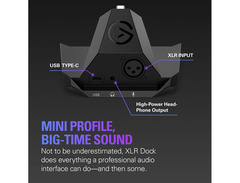
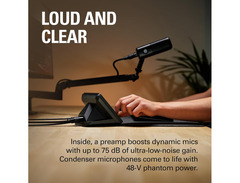
Enhance your streaming experience with the Elgato XLR Dock for Stream Deck +, a compact yet powerful tool designed to integrate seamlessly into your audio setup. Whether you're a seasoned podcaster or an emerging content creator, this dock offers an efficient way to connect your professional XLR microphone directly to your Stream Deck +. Simply attach it behind your Stream Deck for a clean, organized workspace, while the streamlined design ensures easy access without clutter.
The XLR Dock is more than just an interface; it's a complete audio solution. It comes equipped with Elgato Clipguard technology, providing 75 dB of gain to deliver robust audio without distortion. Customize your audio mixing using the Stream Deck+'s intuitive buttons and knobs, ensuring your sound is always crisp and clear. With built-in 48V phantom power, it supports condenser mics, empowering you to achieve studio-quality sound at home.
Installation is straightforward, requiring just a Phillips-head screwdriver. The dock connects via USB-C, ensuring a stable and high-speed connection, freeing up valuable desk space and simplifying your setup. Embrace the future of streaming with the Elgato XLR Dock, where professional audio meets convenience.
Key Features:
- Seamless integration with Stream Deck +
- Provides 75 dB of gain with Elgato Clipguard technology
- 48V phantom power for condenser microphones
- USB-C connectivity for high-speed data transfer
- Space-saving design mounts neatly behind Stream Deck +
- Easy installation with minimal tools needed
Product specs
| Computer Connectivity | USB-C |
| Form Factor | Desktop |
| Number of Preamps | 1 x Mic |
| Phantom Power | Yes |
| A/D Resolution | 24-bit/48kHz |
| Analog Inputs | 1 x XLR |
| Headphones | 1 x 1/8" |
| Compatibility | Elgato Stream Deck+ |
| Power Supply | Bus Powered |
| Height | 2.99" |
| Width | 4.53" |
| Depth | 5.39" |
| Weight | 0.37 lbs. |
FAQs
-
What is the primary function of the Elgato XLR Dock for Stream Deck +?
-
The Elgato XLR Dock for Stream Deck + acts as an XLR-to-USB microphone interface, allowing users to connect an XLR microphone to their computer via USB-C, enhancing audio input capabilities for streaming and recording.
-
Does the Elgato XLR Dock provide phantom power for condenser microphones?
-
Yes, the Elgato XLR Dock provides phantom power, making it compatible with condenser microphones that require this power source for operation.
-
Is the Elgato XLR Dock compatible with all versions of the Stream Deck?
-
The Elgato XLR Dock is specifically designed to be compatible with the Elgato Stream Deck +, integrating seamlessly with this model for enhanced audio control.
-
What kind of audio resolution does the Elgato XLR Dock support?
-
The Elgato XLR Dock supports a 24-bit/48kHz audio resolution, ensuring high-quality audio capture for professional streaming and recording applications.
-
Can I use the Elgato XLR Dock with both Mac and PC?
-
Yes, the Elgato XLR Dock is compatible with both Mac and PC, providing versatile connectivity for different operating systems.
Videos

Senpai Gaming
Top 3 XLR Interfaces for Gamers/Streamers of 2024

Top 3 XLR Interfaces for Gamers/Streamers of 2024
Senpai Gaming
Elgato Just Made Streaming Even Easier! - Stream Deck XLR Dock & USB Hub

Nightow1

Elgato's Streamdeck + Got a MAJOR Upgrade - My XLR Dock Impressions

Danfinity

⚡ Elgato USB Hub & XLR Dock Unboxing + Review | Stream Deck + Addons

TroubleChute
PERFECT Audio with the Streamdeck+ XLR Dock!! No GO/WAVE XLR?! No Problem!!

Don Mowatt
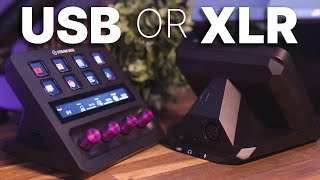
Stream Deck + is the new all in one device! - Elgato Stream Deck + XLR Dock & USB Hub

8bit Elliott
Reviews
PROS
-
Seamless integration with multiple audio devices for hassle-free setup
-
Eliminates buzzing sounds common in other audio interfaces
-
Completes audio setup effectively with Stream Deck and Wavelink software
-
Easy installation process without technical difficulties
CONS
-
Connection between dock and Stream Deck + is often loose
-
Requires frequent reconfiguration after PC reboots
-
Wavelink plugin frequently loses connection, disrupting audio control
-
Unreliable audio performance, causing interruptions during use
Owner Insights
We analyzed real musician discussions from forums and Reddit to find what players love, question, and tweak about Elgato XLR Dock for Stream Deck +.
Features and functionality
User experience
Software and compatibility
Comparisons
-
Some users prefer the capacitive mute button on the Wave XLR over the Stream Deck+ knob configuration for quick and clear muting feedback.
Source
Other
-
The device can be used as a standalone USB audio interface without the Stream Deck+, but the clean desk setup is a major advantage when paired.
Source
Use cases and applications
-
Owners mention difficulty using the XLR Dock's headphone jack with high-end, power-hungry headphones due to insufficient amplification.
Source -
The combination of Stream Deck+ and XLR Dock is ideal for users with limited desk space, providing a compact and organized setup once positioned correctly.
Source -
Users highlight that the Stream Deck+ can control headphones and speakers through Elgato Wave or similar software, improving workflow for video editors needing low latency.
Source
Build quality
-
Some users have experienced connection instability between the Stream Deck+ and the XLR Dock, suggesting a possible fitting issue during assembly.
Source
Based on 0 Reviews and 0 Ratings
More Elgato Audio Interfaces


$159.99 - $224.99
in Audio Interfaces Rank


-m.webp?v=1784804580)
$749.99
in Audio Interfaces Rank


$59.57 - $239.00
in Audio Interfaces Rank


$79.00 - $299.99
in Audio Interfaces Rank


$360.00 - $799.00
in Audio Interfaces Rank


$239.00 - $495.00
in Audio Interfaces Rank


$84.00
in Audio Interfaces Rank


$49.00 - $149.99
in Audio Interfaces Rank
.jpg?v=1784763257)


$749.00 - $999.00
in Audio Interfaces Rank

.png?v=1784891692)


$799.00 - $1,299.00
in Audio Interfaces Rank


$1,000.00
in Audio Interfaces Rank


$239.00 - $799.00
in Audio Interfaces Rank


$85.00 - $391.13
in Audio Interfaces Rank


$118.00 - $189.99
in Audio Interfaces Rank


$190.00 - $872.49
in Audio Interfaces Rank


$689.00 - $899.00
in Audio Interfaces Rank


$224.99
in Audio Interfaces Rank


$1,468.00 - $1,999.00
in Audio Interfaces Rank

.jpeg?v=1784891088)

$83.73 - $299.99
in Audio Interfaces Rank


$866.00 - $1,199.00
in Audio Interfaces Rank

.png?v=1784921366)
.jpg?v=1784480765)
-m.webp?v=1784331838)
$70.00
in Audio Interfaces Rank


$69.78 - $159.99
in Audio Interfaces Rank


in Audio Interfaces Rank


$699.00 - $1,899.00
in Audio Interfaces Rank


$400.00
in Audio Interfaces Rank


$350.00
in Audio Interfaces Rank


$1,000.00
in Audio Interfaces Rank


$199.99 - $363.99
in Audio Interfaces Rank


$440.00
in Audio Interfaces Rank

.jpg?v=1784893209)


$144.53 - $279.00
in Audio Interfaces Rank


$20.00
in Audio Interfaces Rank


$1,990.00 - $2,799.00
in Audio Interfaces Rank


$325.00
in Audio Interfaces Rank


$2,190.00 - $3,399.00
in Audio Interfaces Rank


$115.00 - $599.00
in Audio Interfaces Rank


$117.95 - $499.99
in Audio Interfaces Rank


.jpg?v=1783787053)

$130.00 - $819.00
in Audio Interfaces Rank


Accessories & Related Items




Artist usage


Community setups


Similar


Gear Guides







.webp)
Most Popular Audio Interfaces
Most Popular Brands
-
Added to Equipboard on by
 equipboard
GearIQ 4934
-



