

Pricing and availability
We compare 600+ stores and found this item at 8 stores. Prices updated .
Store
Reviews
Price









Price History
Based on price data from 4 merchants for "Behringer X-Touch Extender". Prices shown reflect NEW condition. Tracking began Apr 2, 2026.
* Product prices and availability are updated by Equipboard every 24hrs and are subject to change. Equipboard may receive compensation for purchases made at participating retailers linked on this site. This compensation does not affect what products or prices are displayed, or the order of prices listed. For more information, please refer to our affiliate disclosure.
Description
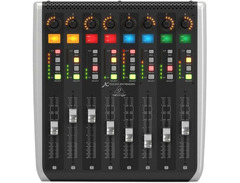
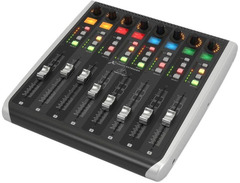
Elevate your studio workflow with the Behringer X-Touch Extender, the perfect addition to expand your existing control surface setup. This versatile device is designed for musicians and producers who crave more tactile control over their digital audio workstations (DAWs) without breaking the bank. Equipped with eight motorized, touch-sensitive faders, the X-Touch Extender allows you to write and view automation in real-time, ensuring your mix is always spot-on. Each fader is complemented by an 8-segment LED meter for precise level monitoring.
The X-Touch Extender offers unparalleled visual feedback with its dynamic LCD scribble strips, letting you see track names and parameters at a glance. Say goodbye to messy tape labels and hello to a streamlined workflow. The 32 illuminated buttons make navigating your setup a breeze, providing quick access to essential functions like track arming, solo, and mute.
Integration couldn't be easier. The X-Touch Extender supports both HUI and Mackie Control protocols, ensuring seamless compatibility with nearly every DAW on the market. Whether you're using USB or leveraging the built-in Ethernet interface for RTP-MIDI support, setup is straightforward so you can focus on what matters—creating music.
Key Features:
- 8 fully automated, touch-sensitive 100mm motorized faders
- 8 rotary encoders with LED-collars for intuitive parameter control
- 32 illuminated buttons for quick function access
- 8 dynamic LCD scribble strips for easy track identification
- 8-segment LED meters for precise level monitoring
- Compatible with HUI and Mackie Control protocols
- Built-in Ethernet interface for RTP-MIDI support
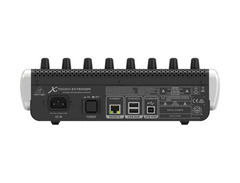
- 2-port powered USB hub for additional connectivity
- Standalone controller capability for versatile use
Product specs
| Type | Add-on X-Touch Mixer |
| Faders | 8 x motorized 100mm |
| Encoders/Pots | 8 x rotary knobs |
| Computer Connectivity | USB |
| MIDI I/O | USB |
| USB | 1 x Type B, 2 x Type A |
| Data I/O | 1 x Ethernet (RTP MIDI remote control) |
| Compatibility | X-Touch Controllers, additional X-Touch Extender units, Standalone (DAW supports RTP) |
| Power | Standard IEC AC cable |
| Height | 3.8" |
| Width | 11.4" |
| Depth | 11.9" |
FAQs
-
How does the Behringer X-Touch Extender connect to my computer?
-
The Behringer X-Touch Extender connects to your computer via USB, allowing seamless integration with your DAW for expanded control capabilities.
-
Is the Behringer X-Touch Extender compatible with all DAWs?
-
The X-Touch Extender is compatible with DAWs that support RTP MIDI remote control, making it versatile for various software setups.
-
Can I use the Behringer X-Touch Extender as a standalone unit?
-
Yes, the Behringer X-Touch Extender can function as a standalone unit if your DAW supports RTP MIDI, providing flexibility in your setup.
-
What are the main features of the Behringer X-Touch Extender?
-
The main features include 8 motorized 100mm faders, 8 rotary knobs, and USB connectivity, designed to enhance your control surface experience.
-
Does the Behringer X-Touch Extender require an external power supply?
-
The Behringer X-Touch Extender is powered using a standard IEC AC cable, eliminating the need for an additional power supply.
Videos

DMSTRE
Behringer X touch extenders as one unit
Behringer X touch extenders as one unit
DMSTRE
Reviews
PROS
-
Seamless integration with various DAWs including Studio One and Logic Pro
-
Plug and play setup with minimal configuration required
-
Enhances workflow by providing up to 24 track views simultaneously
-
Fully customizable functions using CSI for Reaper and OSIMIDI for specific workflows
-
Durable build, capable of withstanding rough handling
-
Affordable option for expanding DAW control surface
-
Motorized faders with display and encoder for each track
-
Can be used without the main X-Touch unit for a streamlined setup
CONS
-
Faders can be noisy and occasionally unpredictable
-
Requires some effort to assign multiple units in a DAW
-
Displays have poor viewing angles, not legible unless viewed directly from above
-
RGB colours not supported with Reaper and the MCU protocol
-
Faders may squeal when following automation, which can be irritating in quiet environments
Owner Insights
We analyzed real musician discussions from forums and Reddit to find what players love, question, and tweak about Behringer X-Touch Extender.
Software and compatibility
-
The X-Touch Extender requires external software like OSI Midi Stage for use with the X32, as it lacks the built-in XCTRL protocol.
Source -
The X-Touch Extender requires a device running Mixing Station for functionality, as it lacks direct mixer control capabilities.
Source -
The X-Air editor does not support control with a Mackie Control device, unlike the X32 editor, limiting the extender's functionality with the XR18.
Source
Features and functionality
-
The extender connects via USB to a computer running X32 Edit, needing manual setup to avoid controlling the same faders as the X-Touch.
Source -
Only the full-size X-Touch includes the X AIR protocol for direct mixer control without a computer, unlike the Extender.
Source -
The X-Touch Extender can be set to MC USB mode to interface with the Mackie Control section over USB, but lacks colored scribble strips and transport control.
Source
Use cases and applications
-
Combining the X-Touch Extender with Mixing Station offers control over multiple brands of mixers while maintaining a consistent workflow.
Source -
The X-Touch Extender cannot independently control the XR16 without a computer or additional control surface.
Source -
Users seeking simple fader and mute control for live sound setups prefer the X-Touch Extender due to its minimalistic design and fewer buttons, making it less confusing for volunteers.
Source
User experience
-
Users find managing multiple extenders without direct console support more cumbersome than using a dedicated console.
Source
4.0 out of 5
Based on 0 Reviews and 1 Rating
Artist usage
Add artist

Genre Usage
Based on how artists on Equipboard use this gear, it is most commonly found in the following genres.
Used With
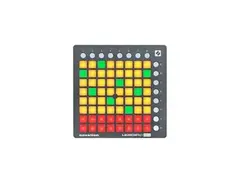
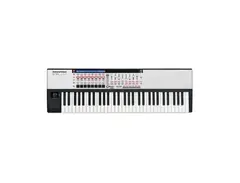
Based on how musicians on Equipboard use Behringer X-Touch Extender, it is most commonly used with the following gear.






Community setups
Show yours
Similar
Add recommendation1 alternative for Behringer X-Touch Extender, curated by the Equipboard community.
More Behringer DAW Controllers

$285.00 - $419.00
in DAW Controllers Rank


$215.30
in DAW Controllers Rank


$122.00 - $189.00
in DAW Controllers Rank


$125.00
in DAW Controllers Rank


$48.00 - $70.90
in DAW Controllers Rank


$199.00 - $409.00
in DAW Controllers Rank

$215.30
in DAW Controllers Rank



$133.00 - $240.00
in DAW Controllers Rank


$180.00 - $277.00
in DAW Controllers Rank


$52.00 - $119.99
in DAW Controllers Rank


$249.00 - $499.00
in DAW Controllers Rank


$72.00
in DAW Controllers Rank


$33.99 - $209.99
in DAW Controllers Rank


$180.96 - $599.99
in DAW Controllers Rank


$1,045.00 - $1,399.99
in DAW Controllers Rank


$76.40 - $109.00
in DAW Controllers Rank


$57.00 - $1,299.99
in DAW Controllers Rank


$74.00
in DAW Controllers Rank


$99.00 - $229.00
in DAW Controllers Rank


$699.99 - $839.99
in DAW Controllers Rank


$169.00 - $209.99
in DAW Controllers Rank


$227.46 - $524.99
in DAW Controllers Rank


$1,333.00 - $1,495.00
in DAW Controllers Rank


$995.00 - $1,195.00
in DAW Controllers Rank


$79.95 - $109.00
in DAW Controllers Rank


$577.19 - $799.99
in DAW Controllers Rank

$232.50 - $349.99
in DAW Controllers Rank

$183.29
in DAW Controllers Rank


$1,191.76
in DAW Controllers Rank


$635.00 - $999.99
in DAW Controllers Rank


$125.00 - $169.99
in DAW Controllers Rank

$333.00 - $399.99
in DAW Controllers Rank

$995.00 - $1,195.00
in DAW Controllers Rank

$544.00 - $699.99
in DAW Controllers Rank

$150.00
in DAW Controllers Rank


$1,191.76
in DAW Controllers Rank


Accessories & Related Items


Most Popular DAW Controllers
Most Popular Brands
-
Added to Equipboard on by
 568j84f
Gear IQ 153
-


