-s.webp?v=1783777389)
-xl.webp?v=1783777389)
Pricing and availability
We compare 600+ stores and found this item at 1 store. Prices updated .




* Product prices and availability are updated by Equipboard every 24hrs and are subject to change. Equipboard may receive compensation for purchases made at participating retailers linked on this site. This compensation does not affect what products or prices are displayed, or the order of prices listed. For more information, please refer to our affiliate disclosure.
Description
Make control. Take control.
Making it's debut way back in 2008, TouchOSC is the original touchscreen MIDI and OSC control app.
Today TouchOSC continues to provide utility in studios, live-shows, clubs, workshops and galleries around the globe. Combined with our free tools TouchOSC Editor and TouchOSC Bridge, TouchOSC is relied upon by thousands of creators & makers on a daily basis.
A fully modular control surface that runs on all iOS and Android devices. Send and receive Open Sound Control or MIDI messages over Wi-Fi to control all compatible software and hardware.
Videos

fromstudiotostage
Using TouchOSC with Ableton Live
Using TouchOSC with Ableton Live
fromstudiotostage
Setting up TouchOSC & Integrating with Reaper (Ultimate Guide to TouchOSC)

Tim Corpus
Sixteen knobs and a screen // MIDI controller vs. TouchOSC

Surkid
TouchOSC 101 - Back to Basics! (Ultimate Guide to TouchOSC)
Tim Corpus
Using Touch OSC with Onyx

Learn Stage Lighting by Above AVL
BitBurner: TouchOSC & Abelton Live How-to

B̤̿it̺̕B͓̚ur͍̒neȑ🔥
Solving MIDI Connection Errors (Ultimate Guide to TouchOSC)
Tim Corpus
Articulation Keyswitch Selector Design with Hexler TouchOSC: Generic Template and Examples

Frans Absil Music
Reviews
Owner Insights
We analyzed real musician discussions from forums and Reddit to find what players love, question, and tweak about Hexler TouchOSC.
Features and functionality
-
TouchOSC allows creating custom control interfaces, sending/receiving OSC and MIDI messages, but setup requires thorough planning and understanding of MIDI fundamentals.
Source -
Desktop TouchOSC can autostart in fullscreen and run mode using command line flags; flags are not stored in config files.
Source
Software and compatibility
-
The latest TouchOSC version offers improved functionality over v1 and should be used for compatibility with current tutorials and resources.
Source -
Using "untitled.tosc" as the file name can default the IP address to 127.0.0.1, solving connectivity issues with Resolume.
Source -
On Linux, replace "TouchOSC" with "/opt/touchosc/TouchOSC" for proper terminal execution with flags.
Source
Use cases and applications
-
TouchOSC can be utilized to control DAWs like Logic, but understanding OSC message syntax is crucial for effective integration.
Source
Setup and maintenance
-
Owners recommend using a MIDI monitor app to ensure proper communication between TouchOSC and DAWs during setup.
Source -
Tosc layout files should be saved in the documents folder, not the application folder, for optimal performance.
Source -
On Windows, setup involves adding command line parameters to shortcuts and placing them in the startup folder to enable auto-launch.
Source
Critic Reviews
5.0 out of 5
Based on 3 Reviews and 15 Ratings


Artist usage
Add artist

In a YouTube video titled "Deadmau5 @ Home Set - April 07, 2016," Deadmau5 is seen using the Hexler TouchOSC during a livestream from his Twitch channel.


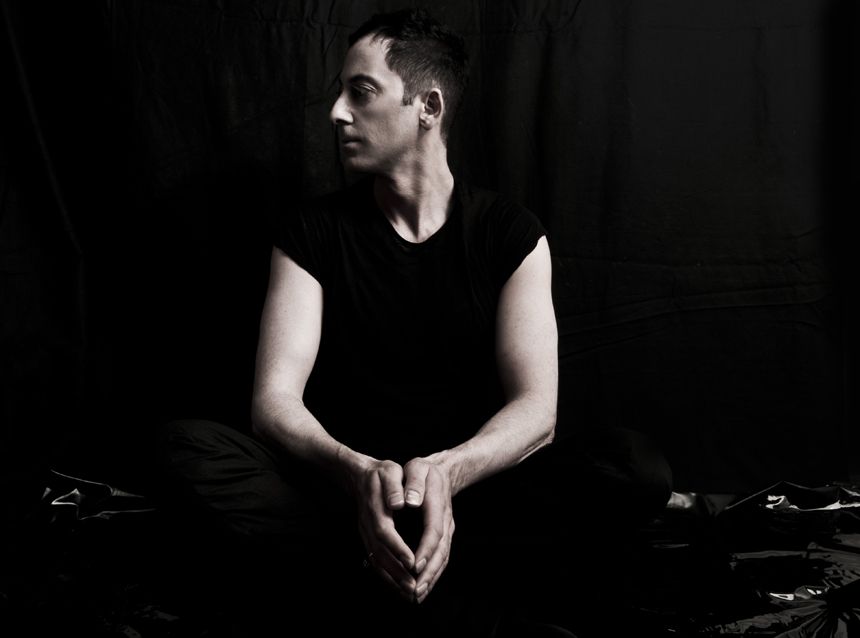
In this interview Dubfire says: "I run Ableton Live and Maschine on a separate 13" MacBook and I use a TouchOSC template to control both."


At 1:05 into the video, Paper Diamonds explains how he uses TouchOSC on his iPad to play live. He says, “On stage I’m controlling Ableton via an iPad, TouchOSC. It's a simple program but I just got super nerded out on it and made it intricate.
I have a few pages, like the first page is like all BPM jumps. So I can take any track and make it jump to 900 BPM all the way down to 30. I put everything on pro or complex, so you can play it at any BPM pretty much and it won’t sound too weird. And then I have a wheel so I can speed it up or slow it down. What I’ll do is I’ll speed it up until it’s about where I want to be and then I’ll hit 75 and it’ll be at 75, or 110, or 90.
The second page is like a launch page. It's kinda like having an MPD. I basically use it so track 1 and 3 are my A tables, like if you think about having DJ tables. And my 2nd and 4th track are like having my B tables. And basically these four buttons will trigger an unlimited amount of clips, so I can like scroll up and down and improvise every night.
My third page is all sound effects and then drum effects and parameters. And then I have a bunch of audio racks that I’ve built like filter sweeps that have a redux on it, or build up like a delay build up that I can then have a sweep with as well so it cuts off the low end while it’s building up so I can make people get excited.
Stutters, reverbs, Effectrix, artillery type stuff where you can hold down and have it sound like a vynil pull-back or all kinds of stuff like that.”


"For Live I use Ableton Live and an iPad with touchOSC and Osculator (mac) or Pure Data with dsmidiwifi / midiyoke (Windows)."


Genre Usage
Based on how artists on Equipboard use this gear, it is most commonly found in the following genres.
Used With
Based on how musicians on Equipboard use Hexler TouchOSC, it is most commonly used with the following gear.


-s.webp?v=1784213825)


More DAW Controllers

$133.00 - $240.00
in DAW Controllers Rank


$182.00 - $277.00
in DAW Controllers Rank


$52.00 - $119.99
in DAW Controllers Rank


$249.00 - $499.00
in DAW Controllers Rank


$80.00
in DAW Controllers Rank


$34.09 - $209.99
in DAW Controllers Rank


$285.00 - $419.00
in DAW Controllers Rank


$182.89 - $599.99
in DAW Controllers Rank


$1,045.00 - $1,399.99
in DAW Controllers Rank


$76.40 - $109.00
in DAW Controllers Rank


$57.00 - $1,299.99
in DAW Controllers Rank


in DAW Controllers Rank


$74.00
in DAW Controllers Rank


$99.00 - $229.00
in DAW Controllers Rank


$699.99 - $839.99
in DAW Controllers Rank


$169.00 - $209.99
in DAW Controllers Rank


$229.53 - $524.99
in DAW Controllers Rank


$1,295.00 - $1,495.00
in DAW Controllers Rank


$995.00 - $1,195.00
in DAW Controllers Rank


$79.95 - $109.00
in DAW Controllers Rank


$122.00 - $189.00
in DAW Controllers Rank


$582.73 - $799.99
in DAW Controllers Rank

$161.49 - $349.99
in DAW Controllers Rank

$184.96
in DAW Controllers Rank


$110.00
in DAW Controllers Rank


$48.00 - $70.90
in DAW Controllers Rank


$1,191.76
in DAW Controllers Rank


$635.00 - $999.99
in DAW Controllers Rank


$333.00 - $399.99
in DAW Controllers Rank

$129.00 - $169.99
in DAW Controllers Rank

$995.00 - $1,195.00
in DAW Controllers Rank

$140.00
in DAW Controllers Rank


$544.00 - $699.99
in DAW Controllers Rank

$1,191.76
in DAW Controllers Rank


$199.00 - $409.00
in DAW Controllers Rank

$378.84 - $699.00
in DAW Controllers Rank

$249.00 - $469.90
in DAW Controllers Rank


$214.99 - $1,399.99
in DAW Controllers Rank


$123.00 - $219.99
in DAW Controllers Rank
Community setups


Similar


Most Popular Brands
-
Added to Equipboard on by
 umcaruje
GearIQ 137
-

