
Pricing and availability




* Product prices and availability are updated by Equipboard every 24hrs and are subject to change. Equipboard may receive compensation for purchases made at participating retailers linked on this site. This compensation does not affect what products or prices are displayed, or the order of prices listed. For more information, please refer to our affiliate disclosure.
Description
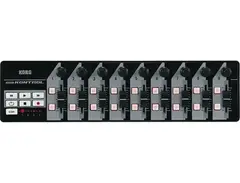
The KORG nanoKONTROL effortlessly combines portability with a comprehensive range of controls, making it a must-have for any musician or producer on the go. Designed to fit seamlessly into any workspace, this ultra-compact USB-powered MIDI controller is perfect for those who need versatile control over their DAW, virtual instruments, effects, or DJ software without sacrificing space. Its sleek design allows you to place it anywhere—be it on your desk, next to your laptop, or even on a recording console.
Despite its size, the nanoKONTROL is packed with professional features. It boasts 9 faders, 9 knobs, and 18 switches, offering intuitive control over your sound. The full transport section makes navigating your projects a breeze, and the note input mode is an excellent tool for sketching out your next hit. For newcomers to MIDI control, the nanoKONTROL provides a reassuringly straightforward setup process, ensuring you're connected and ready to create in no time.
Adding to its appeal, the nanoKONTROL includes a discount coupon for Ableton Live LE software, allowing you to dive into music production immediately. With the free downloadable Editor/Librarian, you can customize setups to fit your specific needs, making this controller not just a tool, but an extension of your creative process.
Key Features:
- Ultra-compact and USB-powered for ultimate portability
- 9 faders, 9 knobs, and 18 switches for comprehensive control
- Full transport section for easy navigation
- Note input mode for quick music creation
- Includes discount coupon for Ableton Live LE software
- Free downloadable Editor/Librarian for custom setups
Product specs
| Supported OS | Microsoft Windows XP SP2 or later, or Microsoft Windows Vista SP1 |
| Supported Computer | Computer with USB port, satisfying the operating requirements of Windows XP/ Vista (Intel USB chipset recommended) |
FAQs
-
What are the main features of the KORG nanoKONTROL?
-
The KORG nanoKONTROL features 9 knobs, 9 sliders, 18 buttons, transport controls, and 4 scene memories. It connects via mini-USB and is USB bus powered, making it a versatile controller for DAWs.
-
Is the KORG nanoKONTROL compatible with Windows operating systems?
-
Yes, the KORG nanoKONTROL is compatible with Microsoft Windows XP SP2 or later, and Windows Vista SP1, requiring a computer with a USB port.
-
Can the KORG nanoKONTROL be used for wireless control?
-
The KORG nanoKONTROL does not natively support wireless connectivity; it connects via a mini-USB cable for control.
-
How does the scene memory feature work on the KORG nanoKONTROL?
-
The KORG nanoKONTROL offers 4 user scene memories, allowing you to save and recall different control setups easily, enhancing workflow efficiency in a DAW environment.
-
Does the KORG nanoKONTROL come with any software for customization?
-
Yes, the KORG nanoKONTROL includes a free downloadable Editor/Librarian software to help customize and control your MIDI needs effectively.
Videos

John Mike
The Best Control Surface Ever? |Korg NanoKontrol 2 Review|
The Best Control Surface Ever? |Korg NanoKontrol 2 Review|
John Mike
BEST MIDI CONTROLLER UNDER $100 - Korg NanoKontrol 2 Review

Sunday Sounds
Korg NanoKontrol2 - Affordable Midi DAW Controller

Audio Tech TV
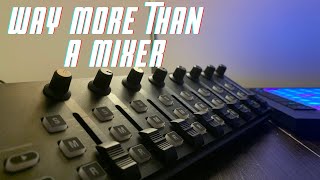
Korg nanoKONTROL 2 Jam: How to Write a Whole Song on this Affordable MIDI Controller

AudioHaze
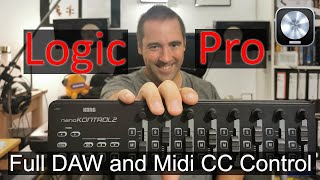
Unboxing and how to setup the Korg NanoKontrol 2 in Logic Pro for full DAW and Midi CC Control

Martin Heidenreich Music
Reviews
PROS
-
Slimline design fits well on computer keyboards and piano-type controllers
-
Useful mute buttons for quick sound control
-
Versatile compatibility with laptops, Korg Kronos, and iOS devices
-
Allows real-time mixing with knobs for virtual machines or MIDI devices
-
Can reflash device software for customized control
-
Durable and withstands a ton of abuse
-
Small and portable, enhancing mobility for musicians
CONS
-
USB operation limits direct MIDI hardware control
-
Requires additional software or hardware for MIDI translation
-
Faders are clunky and not meant for precise studio-level mixing
-
Knobs prone to collecting dirt, difficult to clean
-
USB jack durability concerns, prone to breaking
Owner Insights
We analyzed real musician discussions from forums and Reddit to find what players love, question, and tweak about KORG nanoKONTROL.
Build quality
Features and functionality
Software and compatibility
-
Korg's USB Mini port is less sturdy compared to Novation's USB B, which is preferred for stage use due to its robustness.
Source -
On Windows 11, advanced Bluetooth settings are needed to detect the Korg nanoKONTROL Studio; registry modifications may be required for functionality.
Source -
Korg nanoKONTROL Studio requires switching to "Pro Tools" mode for compatibility with Logic on M2 Macs; hold "Scene" and "Rewind" buttons when powering on.
Source -
Running Logic using Rosetta can resolve issues with Korg nanoKONTROL Studio, indicating a workaround for compatibility problems on M2 Macs.
Source -
A Control Surface Plug-In installation may be necessary for full functionality on newer macOS versions, enhancing the device's performance in Logic.
Source
User experience
-
Users report that the nanoKONTROL2's buttons consistently light up and perform reliably, even in complex setups with multiple units.
Source -
Some owners experience issues with Novation Launch Control XL's preset switching during performances, requiring potential MIDI routing adjustments.
Source -
Owners find the device's responsiveness superior to Reaper's web remote, making it a preferred choice for real-time recording and playback adjustments.
Source
4.0 out of 5
Based on 8 Reviews and 40 Ratings

620
Unbeatable value, that comes at a price
It's a very, very useful tool for anyone either getting into production, looking for a cheap way to control any virtual mixer, DAW, or plugins. It's very well built for its price, the only thing I was worried about was the fader knobs which I thought would just get lost but their design makes it so that they stay in place.
Its slimline design sits very well on top of a computer keyboard and it's small enough to fit on top of some piano-type keyboard controllers with free estate on their surface: I used double faced velcro tape to stick it to my Yamaha KX-61. Mute buttons are very useful too.
I guess its shortcomings are easily pinpointed: USB operation makes it harder to control MIDI hardware, you either need a computer with BOME MIDI translator software or something like the BOME box that will act as a relay. Faders are clunky, but nobody expects studio-level mixing experience on this, and it's meant for setting up a level and leave it there. But that's about it, the nanoKONTROL is exactly what you would expect from a product priced such at this one.
Preferred Settings + Usage:
USB is on side. Buy angled micro-USB adapter or cable so the cable faces backwards the unit and not lying on the side for 5-6".

812
Not bad!
Pretty much does what it says and is useful with a laptop setup and also works with a Korg Kronos and can get working with iOS too if you need to which I haven't hehe.

140
Wonderful Little Controller
This controller is great, stands up to a ton of abuse, and is awesome for on-the-fly sessions. The knobs get dirty easily though, and it's difficult to clean.

206
Little Helper
Basic controller, basic made, but it gives great opportunity to mix in any changes assigned to his knobs from any virtual machine or MIDI device and all in realtime. Also available, to reflash device softwarely to change behavior of used switches. All Ya have to get is an miniUSB. And it's cheap, so its great!

108
cheap and cheerful
simple, cheap and reliable midi controller, i use it for cubase 5, but not on a everyday basis.
213
Korg NanoKontrol
Korg NanoKontrol I use this to control my computer when i'm recording vocal far from my desk
Artist usage
Add artist

Next to the nanoKey is a nanoKontrol Studio

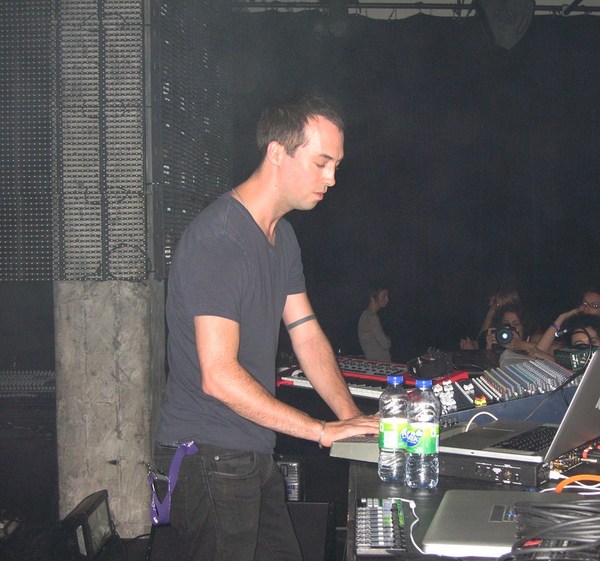
Among Tim Hecker's gear in this picture is a Korg nanokontrol and a Nord Modular G2.

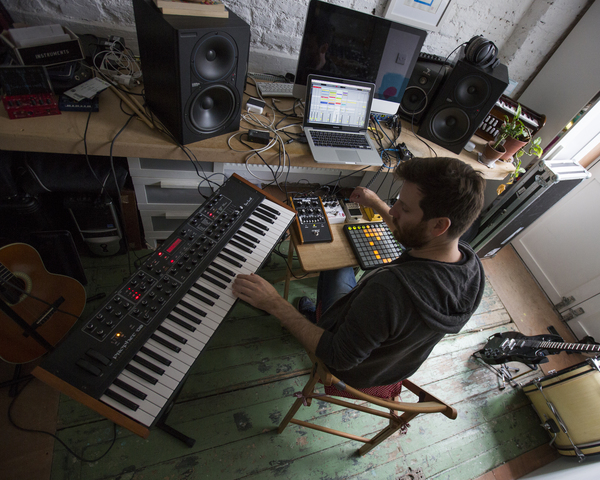
In a studio photo featured on Xlr8r, Rival Consoles' setup includes a KORG nanoKONTROL, visible next to the right Focal monitor.


Shlohmo can be seen with the nanokontrol in his setup in this image.


In this photo from his Sydney Opera House performance with Tim Hecker, Frost can be seen using a nanoKONTROL. Photos can be found here: https://musicfeeds.com.au/gig/ben-frost-tim-hecker-sydney-opera-house-110115/?slideshow=1874#/slide/2


His is the blue and light grey skin model, but it can be seen in this live video


On page 8... "These are not particularly robust but they’re very light, which is quite important these days when you’re travelling around due to the ridiculous luggage restrictions. They’re pretty quick and easy to program up too."

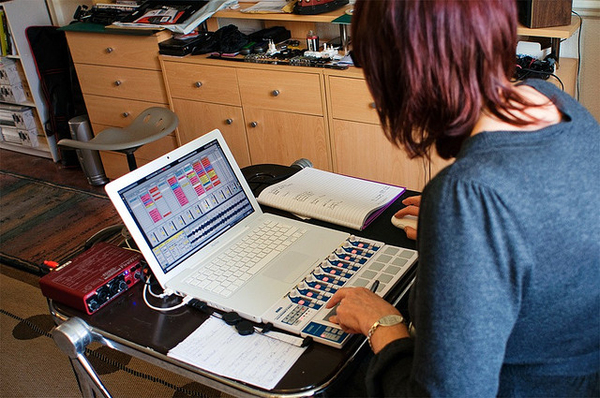
Cosey has Ableton Live running on a MacBook, along with a Korg NanoPad and a NanoKontrol, in this picture.


Emancipator is shown using the KORG nanoKONTROL in photos from the Envision Festival on Facebook.

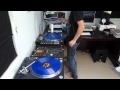
The Korg NanoKONTROL can be seen under the MacBook throughout the video


The studio photos at the end of the Mixmag article show close-ups of some gear, including his nanoKONTROL on the desk.



Genre Usage
Based on how artists on Equipboard use this gear, it is most commonly found in the following genres.
Used With
Based on how musicians on Equipboard use KORG nanoKONTROL, it is most commonly used with the following gear.


More Korg DAW Controllers

$53.00 - $119.99
in DAW Controllers Rank


$123.00 - $219.99
in DAW Controllers Rank


$133.00 - $240.00
in DAW Controllers Rank


$182.00 - $277.00
in DAW Controllers Rank


$249.00 - $499.00
in DAW Controllers Rank


$80.00
in DAW Controllers Rank


$34.00 - $209.99
in DAW Controllers Rank


$285.00 - $419.00
in DAW Controllers Rank


$182.55 - $599.99
in DAW Controllers Rank


$1,045.00 - $1,399.99
in DAW Controllers Rank


$76.40 - $109.00
in DAW Controllers Rank


$57.00 - $1,299.99
in DAW Controllers Rank


in DAW Controllers Rank


$74.00
in DAW Controllers Rank


$99.00 - $229.00
in DAW Controllers Rank


$699.99 - $839.99
in DAW Controllers Rank


$169.00 - $209.99
in DAW Controllers Rank


$229.86 - $524.99
in DAW Controllers Rank


$1,295.00 - $1,495.00
in DAW Controllers Rank


$995.00 - $1,195.00
in DAW Controllers Rank


$79.95 - $109.00
in DAW Controllers Rank


$122.00 - $189.00
in DAW Controllers Rank


$579.73 - $799.99
in DAW Controllers Rank

$161.07 - $349.99
in DAW Controllers Rank

$185.23
in DAW Controllers Rank


$125.00
in DAW Controllers Rank


$48.00 - $70.90
in DAW Controllers Rank


$1,191.76
in DAW Controllers Rank


$635.00 - $999.99
in DAW Controllers Rank


$333.00 - $399.99
in DAW Controllers Rank

$129.00 - $169.99
in DAW Controllers Rank

$995.00 - $1,195.00
in DAW Controllers Rank

$544.00 - $699.99
in DAW Controllers Rank

$140.00
in DAW Controllers Rank


$1,191.76
in DAW Controllers Rank


$199.00 - $409.00
in DAW Controllers Rank

$379.38 - $699.00
in DAW Controllers Rank

$249.00 - $469.90
in DAW Controllers Rank
Community setups


Similar


Most Popular DAW Controllers
Most Popular Brands


