


Pricing and availability
We compare 600+ stores and found this item at 2 stores. Prices updated .
Store
Reviews
Price




* Product prices and availability are updated by Equipboard every 24hrs and are subject to change. Equipboard may receive compensation for purchases made at participating retailers linked on this site. This compensation does not affect what products or prices are displayed, or the order of prices listed. For more information, please refer to our affiliate disclosure.
Description
Dive into seamless audio production with the M-Audio Projectmix I/O Control Surface, a versatile tool designed to elevate your music creation process. This integrated control surface is engineered to work efficiently with your favorite DAW, providing tactile control over your mixing and recording. With motorized faders and dedicated transport controls, it brings hands-on command to your digital workspace, allowing you to focus more on your creativity and less on navigating complex software menus.
The Projectmix I/O is equipped with eight assignable rotary encoders and faders, offering real-time adjustment of your track levels, pan positions, and more, giving you the precision you need for professional-quality productions. Its comprehensive connectivity options, including MIDI I/O, ensure seamless integration with other studio equipment, making it a central hub for your music production setup.
Whether you're mixing a full band or laying down a single track, the M-Audio Projectmix I/O streamlines your workflow, so you can produce with efficiency and ease. Its intuitive interface and robust construction make it a reliable choice for both home studios and professional environments.
Key Features:
- Integrated control surface for comprehensive DAW control
- Eight motorized faders and assignable rotary encoders
- Dedicated transport controls for efficient navigation
- MIDI I/O for extensive connectivity
- Compatible with major DAWs for versatile use
- Sturdy build for long-lasting durability
Product specs
| Brand | M-Audio |
| Model | Project Mix I/O Interface |
| Finish | Gray |
| Year | 2000s |
| Categories | Audio Interfaces |
FAQs
-
What are the main connectivity options for the M-Audio Projectmix I/O Control Surface?
-
The M-Audio Projectmix I/O offers FireWire connectivity for seamless integration with your computer, along with MIDI input/output for connecting external MIDI devices.
-
Is the M-Audio Projectmix I/O compatible with popular DAWs like Ableton Live and Pro Tools?
-
Yes, the M-Audio Projectmix I/O is designed to be compatible with major DAWs, including Ableton Live and Pro Tools, providing hands-on control for enhanced workflow.
-
Does the M-Audio Projectmix I/O offer motorized faders?
-
Yes, the M-Audio Projectmix I/O features motorized faders, allowing for precise control and automation of your mixes directly from the control surface.
-
Can the M-Audio Projectmix I/O be used as an audio interface?
-
Yes, the M-Audio Projectmix I/O functions as both a control surface and an audio interface, offering multiple inputs and outputs for recording and monitoring audio.
-
What are the standout features of the M-Audio Projectmix I/O's control surface?
-
The M-Audio Projectmix I/O boasts features such as motorized faders, dedicated transport controls, and a jog wheel, enhancing your ability to control and navigate your DAW efficiently.
Videos

gearwire
Slip-Sliding Away: M-Audio ProjectMix I/O
Slip-Sliding Away: M-Audio ProjectMix I/O
gearwire
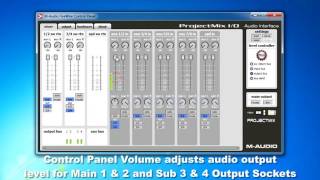
M-Audio ProjectMix I/O: Driver Settings Control Panel - Part 2

RecordingStudio9.com
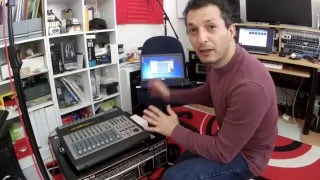
M-Audio ProjectMix I/O: Unboxing & Introduction - Part 1
RecordingStudio9.com

Unique Perspective: M-Audio ProjectMix I:O | UniqueSquared.com

UniqueSquared
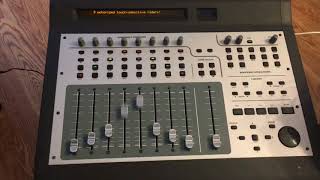
M Audio ProjectMix IO demo

Si Ca
Reviews
PROS
-
Decent recordings with high-quality microphones
-
Works well as both a controller and interface
-
Durable build quality
-
Motorized faders provide precise control
-
Firewire connectivity for reliable data transfer
CONS
-
Prone to hardware issues like fried circuits and LCD malfunctions
-
Lack of driver updates for Mac OS, limiting usability
-
Preamps may clip easily, requiring careful handling
-
Unit becomes obsolete without software support
Owner Insights
We analyzed real musician discussions from forums and Reddit to find what players love, question, and tweak about M-Audio Projectmix I/O Control Surface.
Software and compatibility
-
Users face challenges connecting the ProjectMix I/O to modern systems, often requiring specific FireWire to Thunderbolt to USB-C converters, which may cause system crashes.
Source -
Compatibility with Pro Tools 10 and Logic Pro 10 is possible, but driver support is a growing concern for future functionality.
Source
Setup and maintenance
-
A FireWire PCIe card is a potential solution for Windows users, although it limits functionality to DAW control without audio capabilities.
Source
Build quality
-
The FireWire chip is prone to damage if the cable is inserted incorrectly, especially as the ports age, leading to complete unit failure.
Source
User experience
Comparisons
-
Users suggest the Mackie HUI as a more reliable alternative, highlighting dissatisfaction with the ProjectMix's motorized faders.
Source
Critic Reviews
5.0 out of 5
Based on 3 Reviews and 7 Ratings

346
My experience with the M-Audio ProjectMix.
I haven't used this audio interface much because I busted one of the preamps and it always clipped. I had it serviced and have been using it more often lately. It can produce quite decent recordings provided you use good quality microphones. Lately I've been recording drums so I needed to use it. M-Audio never updated the Mac drivers which didn't allow me to use it on OSX so I switched to Windows 10 on a custom PC. I'm glad I did, because this setup is more powerful than my previous Mac setup. Update as of Dec 23, 2015: My ProjectMix is fried. The LCD screen won't show anything but squares and no letters. None of the faders or buttons work. I can't reset it or get it into test mode. The fact that this unit has been forgotten by M-Audio with no driver updates for years proves its unreliability. I will send it to have it serviced and fingers crossed, they might be able to fix it. If that doesn't happen, I will have to buy a new audio interface with 8 mic pres.
346
Upate as of July 27 2016. My ProjectMix I/O is working again. I sent it to an independent repair shop and the engineer was able to replace the mainboard with a spare one he had from another machine that was broken and beyond repair. My ProjectMix works perfectly now. :)
346
Update as of October 10 2016. There are various discussions regarding the ProjectMix preamps being way too hot when recording drums. Since the unit has a phantom power button that applies to all channels, it's fine for condenser mics for overheads or vocals but in a drumkit recording situation, the signal of the dynamic mics gets boosted too high, resulting in signals from kick and snare that are way too hot even with minimal gain at the preamps. There are no attenuation pads on the unit, making it more frustrating. This is a design problem from M-Audio's part. Fortunately it can be solved by buying in-line attenuators such as the Audio Technica AT8202. The attenuators go between the mic and the cable and have a 3 position switch: -30db, -20db and -10db. This allows for the signal to be tamed and get to the console without clipping, allowing to dial the gain setting on the preamps to taste. :)

296
Shame They Don't Make Equipment Like These Anymore
It's a legacy product from M-Audio, but it's definitely a product that they should continue updating and supporting because this thing is a beast. It's built great, the sliders have the right amount of resistance to it and along with that it is also an audio interface that connects via Firewire. I still use this control surface up till this day, and it works well especially with the motorized faders.

Artist usage
Add artist
.jpg)
On his Instagram page, Dines announced that he is going to give this surface away, just like the rest of the gear visible in this photo.


At 1:26, Daniel shows his hardware mixer, the Projectmix I/O.

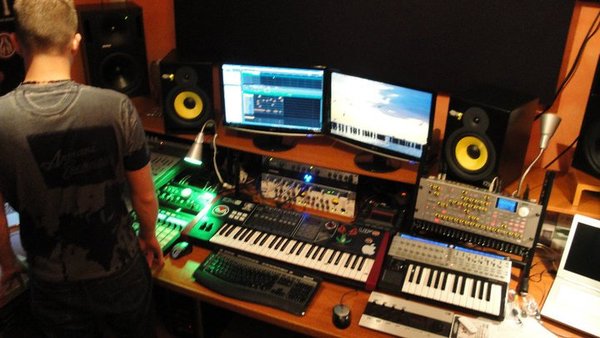
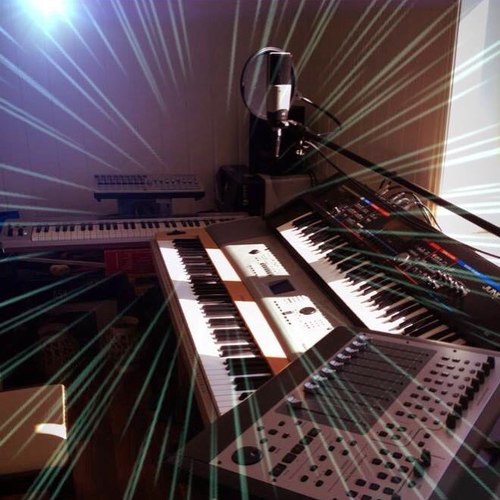
Seismal D is seen using the M-Audio Projectmix I/O Control Surface in photos taken by Hypnos Studio, featured on his Facebook page.


Genre Usage
Based on how artists on Equipboard use this gear, it is most commonly found in the following genres.
Used With
Based on how musicians on Equipboard use M-Audio Projectmix I/O Control Surface, it is most commonly used with the following gear.




Community setups
Show yours
More DAW Controllers

$133.00 - $240.00
in DAW Controllers Rank


$182.00 - $277.00
in DAW Controllers Rank


$53.00 - $119.99
in DAW Controllers Rank


$249.00 - $499.00
in DAW Controllers Rank


$80.00
in DAW Controllers Rank


$33.96 - $209.99
in DAW Controllers Rank


$285.00 - $419.00
in DAW Controllers Rank


$182.92 - $599.99
in DAW Controllers Rank


$1,045.00 - $1,399.99
in DAW Controllers Rank


$76.40 - $109.00
in DAW Controllers Rank


$57.00 - $1,299.99
in DAW Controllers Rank


in DAW Controllers Rank


$95.00
in DAW Controllers Rank


$99.00 - $229.00
in DAW Controllers Rank


$699.99 - $839.99
in DAW Controllers Rank


$169.00 - $209.99
in DAW Controllers Rank


$229.01 - $524.99
in DAW Controllers Rank


$1,295.00 - $1,495.00
in DAW Controllers Rank


$995.00 - $1,195.00
in DAW Controllers Rank


$79.95 - $109.00
in DAW Controllers Rank


$122.00 - $189.00
in DAW Controllers Rank


$129.00 - $349.99
in DAW Controllers Rank

$184.54
in DAW Controllers Rank


$575.64 - $799.99
in DAW Controllers Rank

$120.00
in DAW Controllers Rank


$48.00 - $70.90
in DAW Controllers Rank


$1,191.76
in DAW Controllers Rank


$635.00 - $999.99
in DAW Controllers Rank


$333.00 - $399.99
in DAW Controllers Rank

$995.00 - $1,195.00
in DAW Controllers Rank

$140.00
in DAW Controllers Rank


$544.00 - $699.99
in DAW Controllers Rank

$1,191.76
in DAW Controllers Rank


$199.00 - $409.00
in DAW Controllers Rank

$125.00 - $169.99
in DAW Controllers Rank

$377.98 - $699.00
in DAW Controllers Rank


$249.00 - $469.90
in DAW Controllers Rank


$249.00 - $1,399.99
in DAW Controllers Rank


$123.00 - $219.99
in DAW Controllers Rank
Similar


Gear Guides







Most Popular DAW Controllers
Most Popular Brands
-
Added to Equipboard on by
 sedjkpro
GearIQ 64
-


