

Pricing and availability




* Product prices and availability are updated by Equipboard every 24hrs and are subject to change. Equipboard may receive compensation for purchases made at participating retailers linked on this site. This compensation does not affect what products or prices are displayed, or the order of prices listed. For more information, please refer to our affiliate disclosure.
Description
Enhance your digital audio workstation setup with the Mackie Control HUI Control Surface Extender, a reliable and efficient addition to your MIDI controller lineup. Designed to expand the capabilities of your existing Mackie Control Universal system, this extender seamlessly integrates with your studio environment, providing you with eight additional motorized faders and rotary encoders for precise control over your mix. Whether you’re a seasoned producer or an enthusiastic hobbyist, this tool is engineered to offer a smooth workflow, allowing you to focus on the creative aspects of music production.
The Mackie Control HUI Control Surface Extender is compatible with a wide range of DAWs, ensuring that you have the flexibility to work with your preferred software. Its intuitive design and user-friendly interface make it easy to navigate through complex sessions, streamlining the production process. With the same professional build quality that Mackie is renowned for, this extender is built to withstand the demands of daily studio use.
Elevate your mix with tactile precision and enjoy the hands-on control that only a physical interface can provide. This extender is an ideal choice for those looking to expand their control surface without compromising on quality or functionality.
Key Features:
- Eight motorized, touch-sensitive faders
- Eight rotary encoders with LED rings for visual feedback
- Seamless integration with Mackie Control Universal systems
- Compatible with popular DAWs including Pro Tools, Logic, and Cubase
- Intuitive layout for efficient workflow
- Durable construction suitable for heavy studio use
Product specs
| Brand | Mackie |
| Model | Control HUI DAW Control Surface Extender |
| Year | 1998 - 2004 |
| Categories | Audio Mixers, Consoles and Summing Boxes |
| Electronics | Digital, Solid State |
| Format | Desktop Standalone |
FAQs
-
What is the primary function of the Mackie Control HUI Control Surface Extender?
-
The Mackie Control HUI Control Surface Extender is designed to expand the control capabilities of your existing Mackie Control system, allowing you to manage more channels simultaneously in your DAW.
-
Is the Mackie Control HUI Control Surface Extender compatible with all DAWs?
-
The Control Surface Extender uses the HUI protocol, making it compatible with most DAWs that support HUI, such as Pro Tools, Logic Pro, and Cubase.
-
How does the Mackie Control HUI Control Surface Extender connect to my setup?
-
The extender connects via MIDI to your existing Mackie Control unit, integrating seamlessly to provide additional fader and control functionality.
-
Can the Mackie Control HUI Control Surface Extender be used as a standalone unit?
-
No, the extender is designed to complement an existing Mackie Control setup and cannot function independently.
-
What are the physical dimensions of the Mackie Control HUI Control Surface Extender?
-
The Mackie Control HUI Control Surface Extender is a desktop unit, but specific dimensions should be checked in the product manual or on the manufacturer's website for precise measurements.
Videos

ring2hyc
Mackie Control + Extender x4
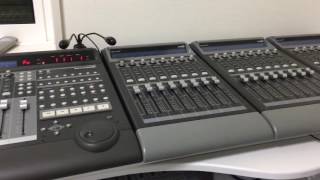
Mackie Control + Extender x4
ring2hyc
Reviews
Owner Insights
We analyzed real musician discussions from forums and Reddit to find what players love, question, and tweak about Mackie Control HUI Control Surface Extender.
Features and functionality
-
The Mackie Control HUI Extender requires HUI mode for DAWs like Ableton, making it nearly plug-and-play, though Pro Tools may need additional troubleshooting for full functionality.
Source -
The Mackie MCU's motorized faders automatically adjust to track settings, which users find essential for a tactile, studio-like experience.
Source
Build quality
-
Users describe the faders as "cheap and rattly," and the overall build quality as not great, suggesting a comparison with Euphonix Artist Series for superior quality.
Source
Software and compatibility
-
It's noted that flipping faders for sends is not possible in Pro Tools, which is a significant limitation compared to its functionality in Logic.
Source -
Mixcraft offers limited default support for control surfaces, but compatibility with Mackie Control Protocols allows integration with other DAWs like Ableton and Reason.
Source -
The older Mackie Control Universal is confirmed to work with Apple M1 on Ventura without needing additional drivers, just assigning MIDI input/output in Audio MIDI Setup.
Source
Comparisons
-
The Euphonix Artist Series, now owned by Avid, offers better build quality and performance compared to the MCU, which can be noticed in a side-by-side comparison.
Source -
The Behringer BCF2000 is noted for being a budget-friendly alternative to the Mackie MCU, offering basic fade/pan/mute functionalities with fewer features compared to the X-Touch.
Source
Value and pricing
Setup and maintenance
-
Initial setup can be challenging, but users report success with two extenders in Pro Tools after troubleshooting, despite documented issues with PT10.
Source -
Users suggest remapping every button as a general MIDI control surface as a workaround for compatibility issues with older Mackie MCU models on unsupported systems.
Source
User experience
-
Owners transitioning from mouse to control surfaces find real faders more intuitive, though bank switching with smaller rigs can be distracting.
Source -
Some find that control surfaces don't integrate well with all plugins, leading to a preference for in-the-box manipulation for speed and efficiency.
Source
Use cases and applications
-
Users appreciate the ability to mix and pan with their eyes closed using control surfaces like the BCF2000, enhancing their musical focus.
Source
Based on 0 Reviews and 0 Ratings
More Mackie DAW Controllers

$1,045.00 - $1,399.99
in DAW Controllers Rank


$635.00 - $999.99
in DAW Controllers Rank


$249.00 - $1,399.99
in DAW Controllers Rank


$999.99
in DAW Controllers Rank


$999.99
in DAW Controllers Rank

$1,089.99 - $1,399.99
in DAW Controllers Rank


$133.00 - $240.00
in DAW Controllers Rank


$182.00 - $277.00
in DAW Controllers Rank


$53.00 - $119.99
in DAW Controllers Rank


$249.00 - $499.00
in DAW Controllers Rank


$80.00
in DAW Controllers Rank


$33.96 - $209.99
in DAW Controllers Rank


$285.00 - $419.00
in DAW Controllers Rank


$182.92 - $599.99
in DAW Controllers Rank


$76.40 - $109.00
in DAW Controllers Rank


$57.00 - $1,299.99
in DAW Controllers Rank


in DAW Controllers Rank


$95.00
in DAW Controllers Rank


$99.00 - $229.00
in DAW Controllers Rank


$699.99 - $839.99
in DAW Controllers Rank


$169.00 - $209.99
in DAW Controllers Rank


$229.01 - $524.99
in DAW Controllers Rank


$1,295.00 - $1,495.00
in DAW Controllers Rank


$995.00 - $1,195.00
in DAW Controllers Rank


$79.95 - $109.00
in DAW Controllers Rank


$122.00 - $189.00
in DAW Controllers Rank


$129.00 - $349.99
in DAW Controllers Rank

$184.54
in DAW Controllers Rank


$575.64 - $799.99
in DAW Controllers Rank

$120.00
in DAW Controllers Rank


$48.00 - $70.90
in DAW Controllers Rank


$1,191.76
in DAW Controllers Rank


$333.00 - $399.99
in DAW Controllers Rank

$995.00 - $1,195.00
in DAW Controllers Rank

$140.00
in DAW Controllers Rank


Artist usage


Community setups


Similar


Gear Guides







Most Popular DAW Controllers
Most Popular Brands
-
Added to Equipboard on by
 equipboard
GearIQ 4934
-


