
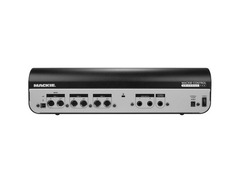

Pricing and availability
We compare 600+ stores and found this item at 6 stores. Prices updated .
Store
Reviews
Price




Price History
Based on price data from 2 merchants for "Mackie MCU Pro USB & MIDI Control Surface". Prices shown reflect NEW condition. Tracking began Apr 2, 2026.
* Product prices and availability are updated by Equipboard every 24hrs and are subject to change. Equipboard may receive compensation for purchases made at participating retailers linked on this site. This compensation does not affect what products or prices are displayed, or the order of prices listed. For more information, please refer to our affiliate disclosure.
Description
Dive into a world where your music production takes center stage with the Mackie MCU Pro USB & MIDI Control Surface. Tailored for the modern musician and producer, this control surface transcends the ordinary, offering tactile control and seamless integration with virtually all major DAWs. The MCU Pro isn't just about making music; it's about experiencing control and precision that breathes life into your creative endeavors.
At the heart of this device lies its unparalleled compatibility. Whether you're a Pro Tools aficionado, a Logic Pro X enthusiast, or an Ableton Live expert, the MCU Pro speaks your language fluently. Thanks to its sophisticated Mackie Control communication protocol, you're guaranteed nearly ten times the precision of standard MIDI mapping. This isn't just a control surface; it's the bridge between your musical ideas and their realization.
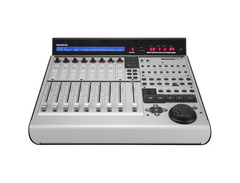
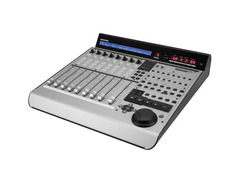
Crafted for those who refuse to compromise on quality, the MCU Pro features smooth, quiet 100 mm motorized faders, a comprehensive 55-character display, and a comfortable jog wheel, all designed to enhance your workflow. Its robust build and intuitive layout ensure that every session is an exploration of musical possibilities. Whether you're mixing, tweaking plug-ins, or navigating your tracks, the MCU Pro offers a tactile experience that keeps you focused on the art, not the process.
Key Features:
- Professional-grade control surface compatible with all major DAWs
- Sophisticated Mackie Control communication protocol for high-precision control
- Generous 55-character backlit LCD for real-time visual feedback
- 8 touch-sensitive motorized 100 mm Alps faders for precise adjustments
- 8 illuminated rotary encoders (V-Pots) for versatile control of your mix
- Dedicated transport, navigation, and jog/shuttle wheel for efficient workflow
- Includes Lexan overlays for DAW-specific control labeling
- Expandable with optional Extender Pro units for additional faders
Product specs
| Type | Control Surface |
| Faders | 9 x 100mm (Touch Sensitive, Motorized) |
| Transport Controls | Yes |
| Encoders/Pots | 8 x Rotary encoders |
| Soft Keys | 118 dedicated soft keys, 8 assignable soft keys |
| Computer Connectivity | USB |
| MIDI I/O | In/Out/USB |
| Other I/O | 2 x Footswitch |
| Height | 4.4" |
| Width | 16.5" |
| Depth | 16.9" |
| Weight | 16.8 lbs. |
FAQs
-
Is the Mackie MCU Pro compatible with major DAWs like Ableton Live and Pro Tools?
-
Yes, the Mackie MCU Pro is compatible with major DAWs, including Ableton Live and Pro Tools, thanks to its support for the Mackie Control Universal protocol.
-
What are the main connectivity options for the Mackie MCU Pro?
-
The Mackie MCU Pro offers USB connectivity for direct computer connection, as well as MIDI In/Out for integration with other MIDI gear.
-
How many motorized faders does the Mackie MCU Pro have?
-
The Mackie MCU Pro features nine 100mm motorized, touch-sensitive faders, including one for the master channel, allowing for precise control over your mix.
-
Does the Mackie MCU Pro have transport controls?
-
Yes, the Mackie MCU Pro includes dedicated transport controls for easy navigation and playback management within your DAW.
-
Can I use footswitches with the Mackie MCU Pro?
-
The Mackie MCU Pro supports two footswitches, providing additional control options for hands-free operation during recording or live performances.
-
How many rotary encoders are available on the Mackie MCU Pro?
-
The Mackie MCU Pro is equipped with eight rotary encoders, allowing for precise parameter adjustments and control over various functions in your DAW.
Videos

MackieTV
Using Mackie MCU Pro and MCU XT Pro with Cubase
Using Mackie MCU Pro and MCU XT Pro with Cubase
MackieTV
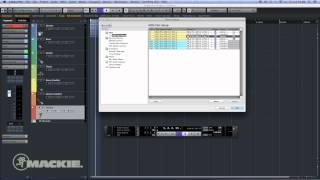
Mackie MCU Pro - Cubase Setup
MackieTV
MCU Pro Setup

Kyon Edwards
Mackie MCU Pro - Digital Performer 9 Setup
MackieTV
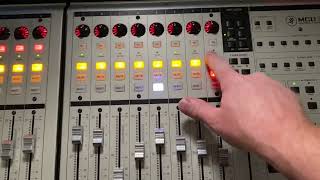
Mackie XT Pro with Mackie MCU Pro Demo

Ryan's Custom Shop and Gear Outlet
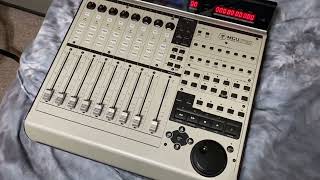
Mackie MCU Pro - Does it work?
Ryan's Custom Shop and Gear Outlet
Reviews
PROS
-
Excellent integration with multiple DAWs, enhancing workflow
-
Durable build quality with high-quality materials
-
Intuitive and smooth operation with Logic, Cubase, Nuendo, and Studio One
-
Motorized faders are smooth and quiet
-
Compact size and portability without sacrificing functionality
-
Versatile compatibility across various software and MIDI gear
-
Professional look elevates studio aesthetics
-
Reduces reliance on mouse for mixing and recording tasks
CONS
-
Display issues, including dimming over time and initial troubles with the electrical luminescent strip
-
Price point may be high for some budgets
-
Some latency observed on the LED screen displaying track activity
Owner Insights
We analyzed real musician discussions from forums and Reddit to find what players love, question, and tweak about Mackie MCU Pro USB & MIDI Control Surface.
Comparisons
-
The Euphonix Artist Series controllers are noted as being of higher quality and performance compared to the MCU Pro, especially when used with Logic.
Source -
Owners of both Mackie MCU Pro and Behringer X-Touch report similar issues with Logic Pro 11.2, highlighting a broader compatibility problem with display functions.
Source -
SSL UF8+UF1+UC1 mentioned as a more modern alternative with better integration, especially for those using SSL eq plugins.
Source
User experience
-
Owners report frustration with Logic's fragile controller assignment handling, urging regular backup of assignment files to avoid data loss.
Source -
Owners report the MCU Pro's large size as a downside, being bigger than necessary for its functionality.
Source -
MIDI latency is noted as a limitation for precise tactile control, impacting the overall user experience for real-time adjustments.
Source
Software and compatibility
-
The problem with deleted controller assignments in Logic Pro 11.2 is not limited to Mackie MCU Pro and affects any device using display-only assignments.
Source -
Logic Pro 11.2 caused the MCU Pro's numeric displays to malfunction; opening the Controller Assignments window deletes critical display-only assignments.
Source -
Some users experience issues with only 25% functionality in Logic 10+, despite trying all startup modes and reinstalling control surface preferences.
Source -
In Pro Tools, the MCU Pro has limited compatibility, notably unable to flip the faders for sends, affecting mixing workflows.
Source
Setup and maintenance
-
A temporary fix for Logic Pro issues involves adding a dummy sysex value F0 DE AD BE EF F7 to empty "Value Change" fields in controller assignments.
Source
Features and functionality
Value and pricing
Build quality
-
The faders are described as feeling cheap and rattly, detracting from the overall sturdiness of the unit.
Source
Based on 0 Reviews and 0 Ratings
Artist usage
Add artist

In a video by EarthQuakerDevices titled "A tour through the Death By Audio factory," Oliver Ackermann is seen using the Mackie MCU Pro USB & MIDI Control Surface at the 32:36 mark.


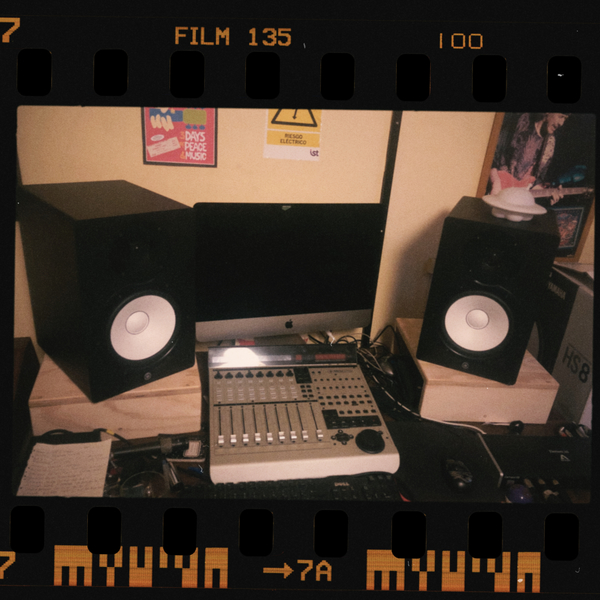
O'Donnell records these performances into Apple Logic (through a MOTU 828 into a MacIntosh computer) with a fairly sparse complement of controllers and peripherals: Mackie Control Surface, two 20" Apple Cinema displays, a Mackie Big Knob for monitoring, and Mackie 824 monitors.

Genre Usage
Based on how artists on Equipboard use this gear, it is most commonly found in the following genres.
Used With
Based on how musicians on Equipboard use Mackie MCU Pro USB & MIDI Control Surface, it is most commonly used with the following gear.




Community setups
Show yours
More Mackie DAW Controllers

$1,045.00 - $1,399.99
in DAW Controllers Rank


$635.00 - $999.99
in DAW Controllers Rank


$249.00 - $1,399.99
in DAW Controllers Rank


$999.99
in DAW Controllers Rank


$999.99
in DAW Controllers Rank


$133.00 - $240.00
in DAW Controllers Rank


$182.00 - $277.00
in DAW Controllers Rank


$53.00 - $119.99
in DAW Controllers Rank


$249.00 - $499.00
in DAW Controllers Rank


$80.00
in DAW Controllers Rank


$33.96 - $209.99
in DAW Controllers Rank


$285.00 - $419.00
in DAW Controllers Rank


$182.92 - $599.99
in DAW Controllers Rank


$76.40 - $109.00
in DAW Controllers Rank


$57.00 - $1,299.99
in DAW Controllers Rank


in DAW Controllers Rank


$95.00
in DAW Controllers Rank


$99.00 - $229.00
in DAW Controllers Rank


$699.99 - $839.99
in DAW Controllers Rank


$169.00 - $209.99
in DAW Controllers Rank


$229.01 - $524.99
in DAW Controllers Rank


$1,295.00 - $1,495.00
in DAW Controllers Rank


$995.00 - $1,195.00
in DAW Controllers Rank


$79.95 - $109.00
in DAW Controllers Rank


$122.00 - $189.00
in DAW Controllers Rank


$129.00 - $349.99
in DAW Controllers Rank

$184.54
in DAW Controllers Rank


$575.64 - $799.99
in DAW Controllers Rank

$120.00
in DAW Controllers Rank


$48.00 - $70.90
in DAW Controllers Rank


$1,191.76
in DAW Controllers Rank


$333.00 - $399.99
in DAW Controllers Rank

$995.00 - $1,195.00
in DAW Controllers Rank

$140.00
in DAW Controllers Rank


Accessories & Related Items


Similar


Gear Guides







Most Popular DAW Controllers
Most Popular Brands
-
Added to Equipboard on by
 asmickie
GearIQ 104
-


