

Pricing and availability




* Product prices and availability are updated by Equipboard every 24hrs and are subject to change. Equipboard may receive compensation for purchases made at participating retailers linked on this site. This compensation does not affect what products or prices are displayed, or the order of prices listed. For more information, please refer to our affiliate disclosure.
Description
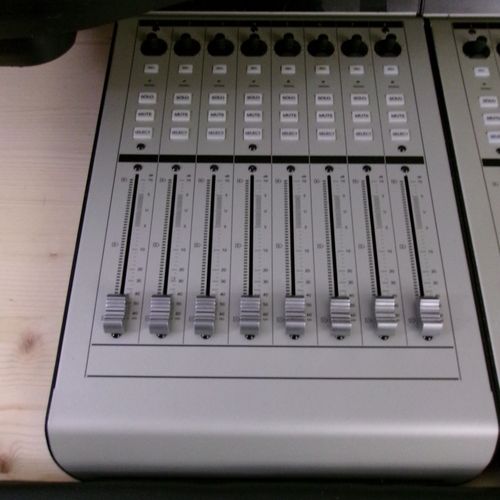
Expand your digital audio workstation's capabilities with the Mackie MCU XT Control Surface Extender, designed to seamlessly integrate into any studio setup. This 8-channel extender offers precision control and tactile feedback, making it an essential companion for musicians and producers looking to enhance their workflow. The motorized, touch-sensitive faders provide nuanced control over your mixes, while the LED displays ensure you stay on top of each channel's status at a glance. Perfect for those who already own the Mackie MCU Pro, this extender adds additional channels for a more comprehensive control experience.
The Mackie MCU XT is crafted to offer functionality without complication. Its plug-and-play operation means you can connect and start using it immediately with your DAW, and it supports major software like Logic Pro, Cubase, and Ableton Live. Built with a robust, user-friendly interface, it suits both seasoned professionals and those new to music production. Whether you're managing complex sessions or performing live, this control surface extender is engineered to help you achieve a new level of precision and efficiency.
Key Features:
- 8 touch-sensitive, motorized faders for dynamic mixing
- Seamless integration with Mackie MCU Pro for expanded control
- Clear and informative LED displays for each channel
- Supports major DAWs including Logic Pro, Cubase, and Ableton Live
- Plug-and-play setup ensures quick installation
- Ideal for expanding existing setups with additional channels
Product specs
| Brand | Mackie |
| Model | MCU XT DAW Control Surface Extender |
| Year | 2004 - 2008 |
| Made In | United States |
| Categories | Audio Mixers, Consoles and Summing Boxes |
| Electronics | Digital, Solid State |
| Format | Desktop Standalone |
FAQs
-
How does the Mackie MCU XT Control Surface Extender integrate with my existing DAW setup?
-
The Mackie MCU XT is designed to seamlessly integrate with most popular DAWs, expanding your control surface for more channels and hands-on mixing. It connects via MIDI and works best when paired with the Mackie MCU Pro for full functionality.
-
Can the Mackie MCU XT Control Surface Extender be used as a standalone unit?
-
No, the Mackie MCU XT is an extender unit and requires the Mackie MCU Pro or a similar main control surface to function properly, as it lacks transport controls and other standalone features.
-
What are the main features of the Mackie MCU XT Control Surface Extender?
-
The Mackie MCU XT features nine motorized faders, nine rotary encoders, and a range of buttons for channel control, allowing for precise adjustments and extended hands-on control within your DAW.
-
Is the Mackie MCU XT compatible with all DAWs?
-
The Mackie MCU XT is compatible with most major DAWs, such as Logic Pro, Pro Tools, Ableton Live, and Cubase, as long as it is used in conjunction with a main control unit like the Mackie MCU Pro.
-
Does the Mackie MCU XT Control Surface Extender require a specific power supply?
-
Yes, the Mackie MCU XT requires an external power supply to operate its motorized faders and LED displays, which is typically included with the unit.


Reviews
Owner Insights
We analyzed real musician discussions from forums and Reddit to find what players love, question, and tweak about Mackie MCU XT Control Surface Extender.
Build quality
-
Owners describe the faders as feeling cheap and rattly, with some noting that the overall construction isn't as robust as higher-end alternatives.
Source
Software and compatibility
-
Users report limited compatibility with Pro Tools, especially regarding the inability to flip faders to sends, which affects mixing workflows.
Source
Features and functionality
Comparisons
-
The Euphonix Artist Series is highlighted as a superior alternative in terms of quality and performance, especially for Pro Tools users.
Source
Based on 0 Reviews and 0 Ratings
Genre Usage
Based on how artists on Equipboard use this gear, it is most commonly found in the following genres.
Community setups
Show yours
More Mackie DAW Controllers

$1,045.00 - $1,399.99
in DAW Controllers Rank


$635.00 - $999.99
in DAW Controllers Rank


$249.00 - $1,399.99
in DAW Controllers Rank


$999.99
in DAW Controllers Rank


$999.99
in DAW Controllers Rank

$1,089.99 - $1,399.99
in DAW Controllers Rank


$133.00 - $240.00
in DAW Controllers Rank


$182.00 - $277.00
in DAW Controllers Rank


$53.00 - $119.99
in DAW Controllers Rank


$249.00 - $499.00
in DAW Controllers Rank


$80.00
in DAW Controllers Rank


$33.96 - $209.99
in DAW Controllers Rank


$285.00 - $419.00
in DAW Controllers Rank


$182.92 - $599.99
in DAW Controllers Rank


$76.40 - $109.00
in DAW Controllers Rank


$57.00 - $1,299.99
in DAW Controllers Rank


in DAW Controllers Rank


$95.00
in DAW Controllers Rank


$99.00 - $229.00
in DAW Controllers Rank


$699.99 - $839.99
in DAW Controllers Rank


$169.00 - $209.99
in DAW Controllers Rank


$229.01 - $524.99
in DAW Controllers Rank


$1,295.00 - $1,495.00
in DAW Controllers Rank


$995.00 - $1,195.00
in DAW Controllers Rank


$79.95 - $109.00
in DAW Controllers Rank


$122.00 - $189.00
in DAW Controllers Rank


$129.00 - $349.99
in DAW Controllers Rank

$184.54
in DAW Controllers Rank


$575.64 - $799.99
in DAW Controllers Rank

$120.00
in DAW Controllers Rank


$48.00 - $70.90
in DAW Controllers Rank


$1,191.76
in DAW Controllers Rank


$333.00 - $399.99
in DAW Controllers Rank

$995.00 - $1,195.00
in DAW Controllers Rank

$140.00
in DAW Controllers Rank


Artist usage


Similar


Gear Guides







Most Popular DAW Controllers
Most Popular Brands
-
Added to Equipboard on by
 equipboard
GearIQ 4934
-


