-s.webp?v=1784813313)
-xl.webp?v=1784813313)
Pricing and availability
We compare 600+ stores and found this item at 9 stores. Prices updated .
Store
Reviews
Price









Average Price: $211
Standard/Professional
$200
$501+
Price Tier
Budget
Standard
High-end
Price History
Based on price data from 5 merchants for "Nektar Panorama T4". Prices shown reflect NEW condition. Tracking began Apr 2, 2026.
* Product prices and availability are updated by Equipboard every 24hrs and are subject to change. Equipboard may receive compensation for purchases made at participating retailers linked on this site. This compensation does not affect what products or prices are displayed, or the order of prices listed. For more information, please refer to our affiliate disclosure.
Description
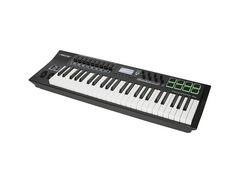
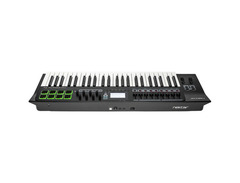
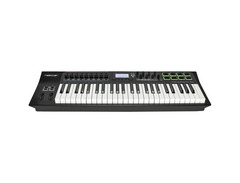
Unlock the full potential of your music production with the Nektar Panorama T4, a powerhouse 49-key USB MIDI controller that brings both finesse and functionality to your fingertips. Designed for musicians and producers alike, the Panorama T4 features a second-generation synth-action keybed with aftertouch for expressive playability, making it a dream for keyboardists who value touch sensitivity and nuanced performance. The sleek design includes eight velocity and pressure-sensitive LED pads, perfect for dynamic beat creation or triggering samples.
Navigate your digital audio workstation with ease thanks to the comprehensive integration with major DAWs like Cubase, Garageband, and Logic. The T4's custom LCD display provides real-time feedback and control over your plugins, ensuring your workflow remains seamless. With the Nektarine software, manage your instrument plugins effortlessly, allowing you to focus on creativity without being bogged down by technicalities.
For those who love tactile control, the Panorama T4 boasts nine 30mm faders, eight assignable encoders, and LED buttons, all fully programmable to suit your needs. The note repeat function for both keys and pads opens up a world of rhythmic possibilities, making it an invaluable tool for live performances or studio sessions.
Whether you're composing a new track or performing live, the Nektar Panorama T4 is your versatile partner, offering a perfect balance of intuitive control and expressive performance.
Key Features:
- 49-key second-generation synth-action keyboard with aftertouch
- 8 velocity- and pressure-sensitive LED pads
- 9 x 30mm faders, 8 encoders, and 8 assignable LED buttons
- Custom LCD display for real-time feedback
- DAW integration for Cubase, Garageband, Logic, and more
- Nektarine plugin control software included
- MIDI Out, USB-powered, footswitch, and expression pedal inputs
- Note and Pad Repeat functions for creative rhythm patterns
- Includes Bitwig 8-Track recording software
Product specs
| Type | Keyboard Controller |
| Number of Keys | 49 |
| Type of Keys | Synth-action |
| Velocity Sensitive | Yes |
| Aftertouch | Yes |
| Pads | 8 x back-lit performance pads |
| Other Controllers | Pitchbend, Mod Wheel |
| Encoders/Pots | 8 |
| Faders | 9 x 30mm |
| Dedicated Transport Control | Yes |
| Presets | 10 user configurable presets |
| Pedal Inputs | 1 x 1/4" TS (footswitch), 1 x 1/4" (expression) |
| MIDI I/O | Out/USB |
| USB | 1 x Type B |
| Computer Connectivity | USB |
| Software | Bitwig 8 Track (included) |
| Format | AU, VST, VST3 |
| OS Requirements - Mac | OS X 10.8 or later |
| OS Requirements - PC | Windows 7 SP1 or later |
| Power Supply | USB bus powered |
| Height | 3.14" |
| Width | 32.28" |
| Depth | 10.9" |
| Weight | 14.1 lbs. |
FAQs
-
What DAWs are compatible with the Nektar Panorama T4?
-
The Nektar Panorama T4 is compatible with major DAWs, including Ableton Live, Logic Pro, Cubase, and Bitwig, among others. It offers deep integration with these platforms, allowing for extensive control over software instruments and mixing.
-
Does the Nektar Panorama T4 support aftertouch?
-
Yes, the Nektar Panorama T4 features aftertouch, allowing for expressive performance capabilities by responding to the pressure applied to the keys after they are initially pressed.
-
How many pads does the Nektar Panorama T4 have, and are they velocity-sensitive?
-
The Nektar Panorama T4 includes 8 back-lit performance pads that are velocity-sensitive, enabling dynamic drumming and triggering of samples.
-
Is the Nektar Panorama T4 suitable for live performance?
-
The Nektar Panorama T4 is well-suited for live performance, featuring dedicated transport controls, 9 faders, and 8 encoders for real-time control over your DAW and virtual instruments.
-
What are the power requirements for the Nektar Panorama T4?
-
The Nektar Panorama T4 is USB bus-powered, meaning it draws power directly from your computer when connected, eliminating the need for an external power supply.
Videos

NektarTechnology
Nektar Panorama T4/T6 MIDI Controller Keyboards
Nektar Panorama T4/T6 MIDI Controller Keyboards
NektarTechnology
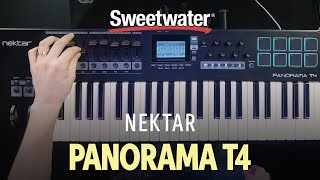
Nektar Panorama T4 Keyboard Controller Demo

Sweetwater
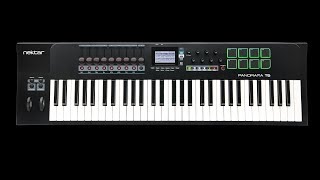
Nektar Panorama T4 / T6 series Review

PoohBear's Reason Channel
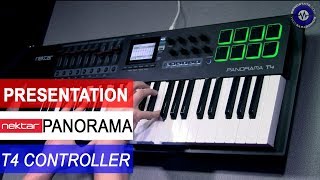
Presentation: Nektar Panorama T4 MIDI Controller

sonicstate
Nektar Panorama T4 - MIDI Controller Preview - Questions?
sonicstate
Nektar Panorama T4 Best Bitwig Controller Keyboard?

Mattias Holmgren
UNBOXING Nektar Panorama T4 (MIDI Controller 49 Keys)

ArtSonica
Nektar Panorama T4 / T6 MIDI Keyboard Controller - How do the Keys Feel?Keybed Review and Showcase

iNNovational
Nektar Panorama T4 T6 MIDI Keyboard Controller NEW Arpeggiator Feature Showcase Review
iNNovational
Reviews
PROS
-
Deep DAW integration enhances workflow across popular software like Reason, Reaper, and Cubase
-
Impressive build quality feels robust and durable
-
Semi-weighted keys offer a satisfying tactile experience
-
Faders and knobs are well-designed for precise control
-
Integrated Nektarine software allows advanced MIDI mapping and plugin management
-
Effective MIDI out options for controlling external hardware
-
Easy plug-and-play setup with USB MIDI input
-
Price point offers excellent value for feature set
-
Pads are enjoyable for drum pattern input and responsive to play
-
Strong integration with Logic Pro X and other major DAWs
CONS
-
Nektarine software has a steep learning curve for beginners
-
Buttons below the screen lack tactile feedback
-
Drum pads can feel stiff and cause finger fatigue
-
Navigation through menus can be slow
-
Keys produce noise on release, noticeable when keyboard is off
-
Build quality concerns; susceptible to damage from minor falls
-
Some units reported with defective faders or sliders
-
Visual design might be unappealing to some due to exposed key sides
Owner Insights
We analyzed real musician discussions from forums and Reddit to find what players love, question, and tweak about Nektar Panorama T4.
Features and functionality
Software and compatibility
-
Nektar's integration with Ableton is limited; it may not function fully as intended for those seeking deep DAW integration.
Source -
Nektarine, a software wrapper from Nektar, is questioned for its effectiveness within Ableton for organizing VSTs like hardware synth menus.
Source -
Integration with Reason isn't as comprehensive as expected on the P4, with users often resorting to quickmapping to the mod wheel.
Source
Comparisons
User experience
Critic Reviews
Based on 0 Reviews and 0 Ratings
Artist usage
Add artist
Genre Usage
Based on how artists on Equipboard use this gear, it is most commonly found in the following genres.
More Nektar MIDI Keyboard Controllers

$20.00 - $599.99
in MIDI Keyboard Controllers Rank


$80.00 - $109.99
in MIDI Keyboard Controllers Rank


$172.00 - $199.99
in MIDI Keyboard Controllers Rank

$5.00 - $499.99
in MIDI Keyboard Controllers Rank


$25.00 - $129.99
in MIDI Keyboard Controllers Rank


$5.00 - $299.99
in MIDI Keyboard Controllers Rank

$159.99 - $179.99


$30.00 - $189.99


$124.95 - $179.99


$89.60 - $99.99


$88.00 - $179.00

$10.00 - $319.99


$136.00 - $189.99

$10.00 - $289.99


$248.00 - $279.99
in MIDI Keyboard Controllers Rank
-m.webp?v=1784819051)
$85.00 - $149.50
in MIDI Keyboard Controllers Rank


.jpeg?v=1784831401)

$174.45 - $712.00
in MIDI Keyboard Controllers Rank


$135.00 - $678.00
in MIDI Keyboard Controllers Rank


$32.72 - $59.00
in MIDI Keyboard Controllers Rank


$46.41
in MIDI Keyboard Controllers Rank


-m.webp?v=1784818827)
$406.30 - $469.00
in MIDI Keyboard Controllers Rank


$76.07 - $89.00
in MIDI Keyboard Controllers Rank


Accessories & Related Items




-s.webp?v=1784818971)

-s.webp?v=1784818680)




Community setups


Similar


Gear Guides







Most Popular MIDI Keyboard Controllers
Most Popular Brands
-
Added to Equipboard on by
 kostasmaskalides
GearIQ 283
-


