

Pricing and availability
We compare 600+ stores and found this item at 4 stores. Prices updated .
Store
Reviews
Price




Price History
Based on price data from 2 merchants for "iCON Platform X+". Prices shown reflect NEW condition. Tracking began Apr 2, 2026.
* Product prices and availability are updated by Equipboard every 24hrs and are subject to change. Equipboard may receive compensation for purchases made at participating retailers linked on this site. This compensation does not affect what products or prices are displayed, or the order of prices listed. For more information, please refer to our affiliate disclosure.
Description
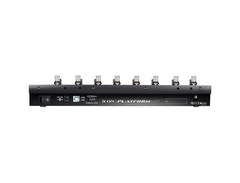
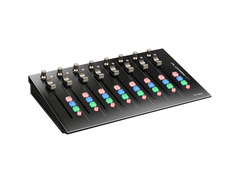
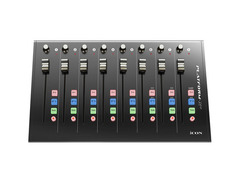
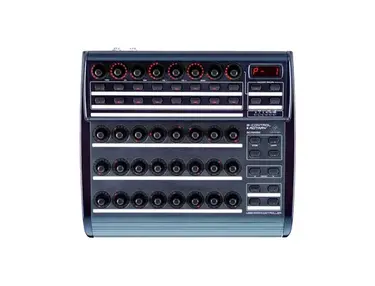
Elevate your studio setup with the iCON Platform X+, the essential DAW controller for musicians and producers seeking hands-on command over their digital audio workstations. Designed as an 8-channel expander for the Platform M+, the Platform X+ is ideal for those looking to seamlessly integrate additional channels into their workflow. With the capability to extend up to 32 channels using three units, this controller is perfect for both compact and expansive setups.
At the heart of the Platform X+ are eight touch-sensitive motorized faders that deliver precise 10-bit resolution, ensuring every mix adjustment is smooth and accurate. Accompanied by dual-function encoder knobs and illuminated channel buttons, including mute, solo, select, and record, this unit offers intuitive control at your fingertips. The Platform X+ is versatile in its compatibility, supporting Mackie control for popular DAWs like Cubase, Logic Pro, and Ableton Live, as well as Mackie HUI protocol for Pro Tools.
Additionally, the Platform X+ is equipped with iMap software, allowing for effortless MIDI mapping, and offers a class-compliant USB 2.0 connection for high-speed data transfer. With its robust metal casing, the Platform X+ is built to withstand the rigors of any studio environment. Plus, enjoy a suite of free software, including Harrison's analog-inspired plugins and Bitwig Studio 8-Track, to jumpstart your creative projects.
Key Features:
- 8 touch-sensitive motorized faders with 10-bit resolution
- Expandable to a 32-channel control surface with up to three units
- Compatible with Mackie control and Mackie HUI protocol for various DAWs
- Includes iMap software for easy MIDI function mapping
- Robust metal casing with USB 2.0 high-speed connectivity
- Free software bundle with Harrison, Tracktion, Dotec Audio plugins, and Bitwig Studio 8-Track
Product specs
| Brand | Icon |
| Model | Platform X+ 8-Channel DAW Control Surface Extender |
| Finish | Black |
| Year | 2010s |
| Categories | Audio Mixers, Consoles and Summing Boxes |
FAQs
-
How does the iCON Platform X+ integrate with popular DAW software?
-
The iCON Platform X+ is designed to seamlessly integrate with major DAWs like Ableton Live, Logic Pro, and Pro Tools, allowing for hands-on control and enhanced workflow efficiency.
-
Can the iCON Platform X+ be used as a standalone controller?
-
No, the iCON Platform X+ is an extender and requires a primary control surface like the Platform M+ to function effectively.
-
How many channels does the iCON Platform X+ support?
-
The iCON Platform X+ supports 8 channels, providing users with expanded control over their DAW projects.
-
Is the iCON Platform X+ compatible with both Windows and macOS?
-
Yes, the iCON Platform X+ is compatible with both Windows and macOS operating systems, ensuring broad usability across different computer setups.
-
What connectivity options does the iCON Platform X+ offer?
-
The iCON Platform X+ connects via USB, ensuring straightforward integration with your existing digital audio workstation setup.
Videos

林威廷
iCON Platform X MIDI Controller (帝米數位音樂)
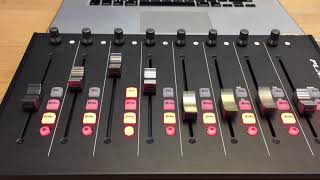
iCON Platform X MIDI Controller (帝米數位音樂)
林威廷
Reviews
PROS
-
Better organized buttons compared to other DAW controllers
-
Quiet operation without annoying click sounds
-
Compact design saves desk space
-
Good support experience
-
Compatible with multiple Platform modules for expandability
CONS
-
Hinges installed backwards, affecting flush mounting
-
Limited character display for track information
-
Fader control requires physical push to switch modes
-
Motorized faders have less resolution than manual adjustment
-
Jerky motorized fader motion, not smooth
-
Fader movement can be inconsistent, potentially moving in wrong direction initially
-
Rubber button key-caps easily fall off during use
Owner Insights
We analyzed real musician discussions from forums and Reddit to find what players love, question, and tweak about iCON Platform X+.
Features and functionality
Software and compatibility
User experience
-
Owners note that while the device is well-established, improper setup can mimic hardware issues, highlighting the importance of checking DAW settings.
Source
Based on 0 Reviews and 0 Ratings
Genre Usage
Based on how artists on Equipboard use this gear, it is most commonly found in the following genres.
More iCON Pro Audio DAW Controllers

$420.65
in DAW Controllers Rank


$210.23 - $382.49
in DAW Controllers Rank


$95.00
in DAW Controllers Rank

$160.00 - $236.15
in DAW Controllers Rank


$459.00 - $599.00
in DAW Controllers Rank
-m.webp?v=1783936859)
$246.00 - $299.00
in DAW Controllers Rank

$699.00 - $899.00
in DAW Controllers Rank

$899.00 - $1,099.00
in DAW Controllers Rank

$369.00 - $499.00
in DAW Controllers Rank


$133.00 - $240.00
in DAW Controllers Rank


$180.00 - $277.00
in DAW Controllers Rank


$52.00 - $119.99
in DAW Controllers Rank


$249.00 - $499.00
in DAW Controllers Rank


$72.00
in DAW Controllers Rank


$34.03 - $209.99
in DAW Controllers Rank


$285.00 - $419.00
in DAW Controllers Rank


$181.59 - $599.99
in DAW Controllers Rank


$1,045.00 - $1,399.99
in DAW Controllers Rank


$76.40 - $109.00
in DAW Controllers Rank


$57.00 - $1,299.99
in DAW Controllers Rank


$215.51
in DAW Controllers Rank


$74.00
in DAW Controllers Rank


$99.00 - $229.00
in DAW Controllers Rank


$699.99 - $839.99
in DAW Controllers Rank


$169.00 - $209.99
in DAW Controllers Rank


$228.04 - $524.99
in DAW Controllers Rank


$1,333.00 - $1,495.00
in DAW Controllers Rank


$995.00 - $1,195.00
in DAW Controllers Rank


$79.95 - $109.00
in DAW Controllers Rank


$122.00 - $189.00
in DAW Controllers Rank


$578.14 - $799.99
in DAW Controllers Rank

$232.50 - $349.99
in DAW Controllers Rank

$183.76
in DAW Controllers Rank


$110.00
in DAW Controllers Rank


$48.00 - $70.90
in DAW Controllers Rank

Artist usage


Community setups


Similar


Most Popular DAW Controllers
Most Popular Brands
-
Added to Equipboard on by
 dabug
dabugGearIQ 196
-


