

Pricing and availability
We compare 600+ stores and found this item at 5 stores. Prices updated .
Store
Reviews
Price





Price History
Based on price data from 1 merchant for "iCON Pro Audio V1-X". Prices shown reflect NEW condition. Tracking began Apr 7, 2026.
* Product prices and availability are updated by Equipboard every 24hrs and are subject to change. Equipboard may receive compensation for purchases made at participating retailers linked on this site. This compensation does not affect what products or prices are displayed, or the order of prices listed. For more information, please refer to our affiliate disclosure.
Description
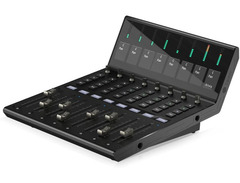
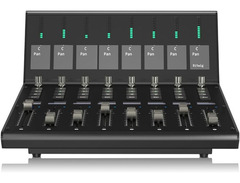
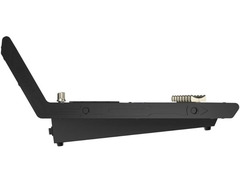
Unleash your creative potential with the iCON Pro Audio V1-X, the ultimate DAW controller designed to seamlessly expand your Icon V1-M setup. With its robust build and intuitive layout, the V1-X is your gateway to a streamlined and professional music production experience. This versatile unit adds 8 additional channels to your existing setup, featuring touch-sensitive motorized faders that deliver precise control and a smooth, tactile feel. Each channel is equipped with a level display and a vibrant 2" TFT screen for real-time parameter adjustments, ensuring you stay in command of your mix.
Designed for compatibility with a wide range of DAWs, from Ableton Live to Pro Tools, the V1-X supports both Mackie Control Universal and HUI protocols, making integration into your current workflow effortless. With encoders and illuminated buttons for recording, solo, mute, and channel selection, this controller provides a comprehensive suite of tools for any recording or mixing session. Plus, its sleek USB-C connectivity ensures fast and reliable performance.
Whether you're in a home studio or a professional setting, the iCON Pro Audio V1-X is engineered to amplify your creative endeavors. Expand your horizons with this feature-rich, cutting-edge DAW controller and experience a new level of musical expression.
Key Features:
- Expands Icon V1-M by 8 additional channels
- Up to 7 V1-X units can connect to one V1-M
- 8 touch-sensitive motorized faders with 12-bit resolution
- Level display per channel, 2" TFT display for parameters
- Encoder and illuminated buttons for each channel
- Supports major DAWs and protocols like Mackie Control Universal
- USB-C port for connectivity
- Includes USB-C cable and external power supply
Product specs
| Available since | December 2023 |
| USB | Yes |
| Bluetooth | No |
| 5-pole DIN MIDI | No |
| Ethernet | No |
| Fader | 8 |
| Rotary Encoders | 8 |
| Audio I/O | No |
| Transport Function | No |
| Footswitch connection | Yes |
| Foot Controller Connection | Yes |
| Bus-Powered | No |
| Jog | No |
| Joystick | No |
| Additional Features | n/a |
Videos

Icon Pro Audio
iCON Pro Audio V1-M DAW Controller and V1-X DAW Control Expander
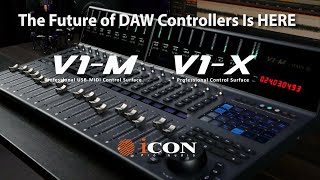
iCON Pro Audio V1-M DAW Controller and V1-X DAW Control Expander
Icon Pro Audio
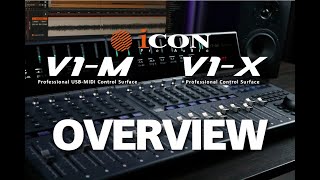
V1-M DAW Controller & V1-X DAW Control Expander Overview
Icon Pro Audio
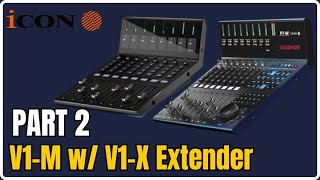
ICON V1-M & V1-X | DAW CONTROLLER | Set Up & Plugin Control PT 2

Home Recording Made Easy
V1-M DAW Controller & V1-X DAW Control Expander Basic Setup with Cubase Nuendo
Icon Pro Audio
V1-M DAW Controller & V1-X DAW Control Expander Basic Setup with Logic Pro X
Icon Pro Audio
V1-M DAW Controller & V1-X DAW Control Expander Basic Setup with Pro Tools
Icon Pro Audio
V1-M DAW Controller & V1-X DAW Control Expander Basic Setup with Ableton Live
Icon Pro Audio
Reviews
Owner Insights
We analyzed real musician discussions from forums and Reddit to find what players love, question, and tweak about iCON Pro Audio V1-X.
Features and functionality
Comparisons
Use cases and applications
-
The P1-X's buttons are customizable for specific tasks like QLab controls, with dials used for quickly scrolling through cues in theater settings.
Source -
Users can control Reaper plugin parameters via faders and encoders, although mapping them efficiently requires third-party software like CSI or ReaLearn.
Source
Software and compatibility
Critic Reviews
Based on 0 Reviews and 0 Ratings
Genre Usage
Based on how artists on Equipboard use this gear, it is most commonly found in the following genres.
More iCON Pro Audio DAW Controllers

$421.84
in DAW Controllers Rank


$200.00 - $382.49
in DAW Controllers Rank


$74.00
in DAW Controllers Rank

$142.79 - $163.00
in DAW Controllers Rank


$459.00 - $599.00
in DAW Controllers Rank
-m.webp?v=1784819643)
$245.00 - $299.00
in DAW Controllers Rank

$899.00 - $1,099.00
in DAW Controllers Rank

$371.00 - $499.00
in DAW Controllers Rank


$133.00 - $240.00
in DAW Controllers Rank


$180.00 - $277.00
in DAW Controllers Rank


$53.00 - $119.99
in DAW Controllers Rank


$249.00 - $499.00
in DAW Controllers Rank


$80.00
in DAW Controllers Rank


$33.96 - $209.99
in DAW Controllers Rank


$285.00 - $419.00
in DAW Controllers Rank


$182.68 - $599.99
in DAW Controllers Rank


$1,045.00 - $1,399.99
in DAW Controllers Rank


$76.40 - $109.00
in DAW Controllers Rank


$57.00 - $1,299.99
in DAW Controllers Rank


in DAW Controllers Rank


$95.00
in DAW Controllers Rank


$99.00 - $229.00
in DAW Controllers Rank


$699.99 - $839.99
in DAW Controllers Rank


$169.00 - $209.99
in DAW Controllers Rank


$228.68 - $524.99
in DAW Controllers Rank


$1,295.00 - $1,495.00
in DAW Controllers Rank


$995.00 - $1,195.00
in DAW Controllers Rank


$79.95 - $109.00
in DAW Controllers Rank


$122.00 - $189.00
in DAW Controllers Rank


$129.00 - $349.99
in DAW Controllers Rank

$184.54
in DAW Controllers Rank


$575.69 - $799.99
in DAW Controllers Rank

$120.00
in DAW Controllers Rank


$48.00 - $70.90
in DAW Controllers Rank

Artist usage


Community setups


Similar


Gear Guides







Most Popular DAW Controllers
Most Popular Brands
-
Added to Equipboard on by
 meb
mebGearIQ 2822
-



