

Pricing and availability
We compare 600+ stores and found this item at 3 stores. Prices updated .
Store
Reviews
Price




Price History
Based on price data from 1 merchant for "iCON Pro Audio Platform Nano". Prices shown reflect NEW condition. Tracking began Apr 25, 2026.
* Product prices and availability are updated by Equipboard every 24hrs and are subject to change. Equipboard may receive compensation for purchases made at participating retailers linked on this site. This compensation does not affect what products or prices are displayed, or the order of prices listed. For more information, please refer to our affiliate disclosure.
Description
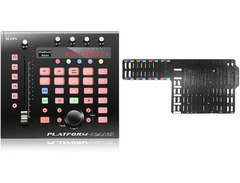
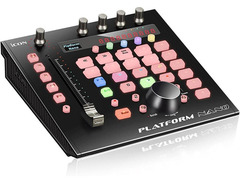
The iCON Pro Audio Platform Nano is your compact solution for a streamlined, yet dynamic, audio production experience. This USB 3.0 DAW controller effortlessly bridges the gap between power and portability, making it an essential tool for any musician or producer on the go. Its touch-sensitive motor fader, with an impressive 10-bit resolution, offers precise control over your tracks, ensuring every mix is as nuanced as you intend.
With four endless controllers each boasting dual functions, and backlit keys for essential commands like mute, solo, automation, and transport control, this controller is designed to keep you in the creative zone without distraction. The switchable banks accommodate both 8-channel and single-channel operations, adapting to your workflow needs seamlessly.
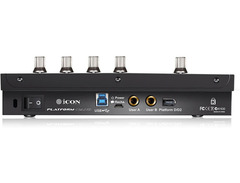
The Platform Nano’s robust metal housing not only promises durability but also includes ports for optional security features such as a Kensington lock. Additionally, with Bluetooth functionality and rechargeable battery options via the PN-1 module, you have the freedom to create without being tethered to your desk.
Compatible across various systems and DAWs, the Platform Nano supports Universal Mackie Control and HUI protocol, ensuring a smooth integration into your existing setup. Whether you're a Mac or Windows user, its class-compliant design offers plug-and-play simplicity.
Key Features:
- Touch-sensitive motor fader with 10-bit resolution
- 4 Endless controllers with dual functions
- Backlit keys for mute, solo, automation, and transport control
- Switchable banks for 8 channels or single channel
- Backlit LC display and 12-segment LED for SMPTE or MIDI beat clock
- USB 3.0 connectivity
- 2 Footswitch inputs (6.3 mm jack)
- Supports Universal Mackie Control and HUI protocol
- Class-compliant with Mac OS X, Windows 10, 8, 7, Vista, XP
- Bluetooth functionality and rechargeable battery via optional PN-1 module
- Robust metal housing with optional Kensington lock compatibility
- Includes iMapTM software for easy MIDI mapping
- Includes overlays for various DAWs including Cubase, Logic Pro X, Ableton Live, and more
Product specs
| Brand | Icon |
| Model | Platform Nano DAW Control Surface |
| Finish | Black |
| Year | 2010s |
| Categories | Audio Mixers, Consoles and Summing Boxes |
FAQs
-
What DAWs is the iCON Pro Audio Platform Nano compatible with?
-
The iCON Pro Audio Platform Nano is compatible with a wide range of DAWs, including Ableton Live, Pro Tools, Logic Pro, Cubase, and Bitwig Studio 8-Track. It supports both macOS and Windows operating systems, ensuring broad compatibility with various digital audio workstations.
-
Does the iCON Pro Audio Platform Nano have motorized faders?
-
Yes, the iCON Pro Audio Platform Nano features a touch-sensitive motorized fader, allowing for precise control and automation of your mixes within your DAW.
-
Can the iCON Pro Audio Platform Nano be expanded with additional modules?
-
Yes, the iCON Pro Audio Platform Nano can be expanded with the iCON Platform D3, which provides additional OLED displays for enhanced parameter tracking and control.
-
Is the iCON Pro Audio Platform Nano suitable for live performances?
-
The compact design and robust build quality of the iCON Pro Audio Platform Nano make it suitable for live performances, providing intuitive control over your DAW in a portable format.
-
What is included with the iCON Pro Audio Platform Nano purchase?
-
The iCON Pro Audio Platform Nano comes with a range of software, including Harrison 32C Vocal Intensity Processor, Tracktion DAW Essentials, Dotec Audio plug-ins, and Bitwig Studio 8-Track, offering a comprehensive toolkit for recording, mixing, and producing music.
Videos

Sound Service GmbH
ICON PRO AUDIO NAMM NEWS 2019 - Platform Nano
ICON PRO AUDIO NAMM NEWS 2019 - Platform Nano
Sound Service GmbH
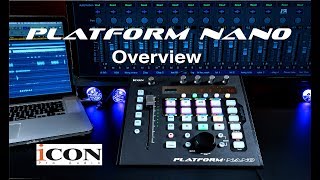
Icon Pro Audio Platform Nano Overview

Icon Pro Audio
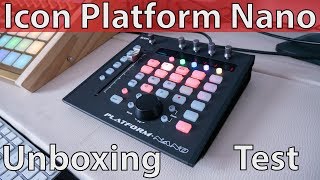
Icon Platform Nano Unboxing & Test

FUTUR Sample
NAMM 2019: Icon Pro Audio Platform Nano & Platform U22 | Muzyk FCM

Muzyk FCM
Reviews
PROS
-
Sleek design, compact and ergonomic
-
Good quality Alps fader, not noisy when calibrated
-
Small LCD screen is clear and readable
-
Improved rubber buttons avoid light bleed
-
Jog wheel and LED lights well-designed
-
Works out-of-the-box with several DAWs like Ableton
CONS
-
Banking and button toggling issues with Cubase
-
Poor touch sensitivity on the fader, prone to ghost touches
-
Emits a whining noise, varies with RGB color change
-
RGB lights on button banks too strong, distracting
-
Persistent chemical smell
-
Fader stutters at medium-high speed
-
V-Pots send incorrect MIDI messages, poor implementation
-
Awkward software implementation, limited MCU mode functionality
-
Device may become inoperable after failed firmware update
-
Inadequate customer support and documentation from Icon
Owner Insights
We analyzed real musician discussions from forums and Reddit to find what players love, question, and tweak about iCON Pro Audio Platform Nano.
Features and functionality
-
Users appreciate the customizable nature of the P1 Nano, especially the ability to edit programmed buttons to suit personal workflow preferences.
Source -
The modified MackieControl script introduces functionality like using the jog wheel for track scrolling and toggling group folding, increasing the controller's versatility.
Source
Software and compatibility
-
The integration script enhances the P1 Nano's capabilities with Ableton Live by allowing seamless track selection and control without banking, making it ideal for working on large projects.
Source -
Custom scripts allow the display to show track colors and names accurately, providing better visual feedback during sessions.
Source -
The iCON Platform Nano requires a strictly USB 2.0 port for firmware updates, and it may not be recognized on certain Macs without this setup.
Source -
The HUI protocol allows plug-in parameters to map to the four encoders, but the process can be cumbersome compared to using a mouse.
Source
Mods and upgrades
-
Adding a flat rubber band to the jog wheel improves its tactile feel, enhancing the user experience.
Source
Use cases and applications
-
The P1 Nano is highly recommended for those needing a compact transport and current track controller, especially when paired with custom scripts for enhanced functionality.
Source -
While intended for Pro Tools, users have had difficulties using the rotaries for plug-in controls due to limited HUI support and insufficient manual guidance.
Source
User experience
-
Some owners report persistent issues with audio dropout when interacting with the controller, leading to frustration due to lack of support and poor documentation.
Source -
Several users have experienced setup challenges, particularly with firmware updates, requiring switching between different computer systems to achieve functionality.
Source
Critic Reviews
Based on 0 Reviews and 0 Ratings
Artist usage
Add artist
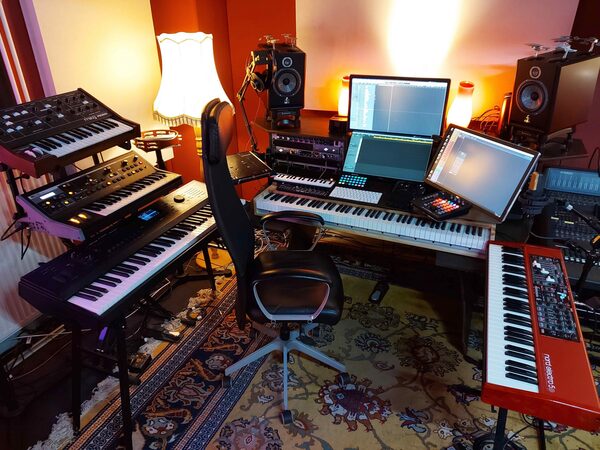
Genre Usage
Based on how artists on Equipboard use this gear, it is most commonly found in the following genres.
Used With
Based on how musicians on Equipboard use iCON Pro Audio Platform Nano, it is most commonly used with the following gear.
-s.webp?v=1783854244)


More iCON Pro Audio DAW Controllers

$420.65
in DAW Controllers Rank


$210.23 - $382.49
in DAW Controllers Rank


$94.00
in DAW Controllers Rank

$459.00 - $599.00
in DAW Controllers Rank
-m.webp?v=1783782906)
$244.00 - $299.00
in DAW Controllers Rank

$699.00 - $899.00
in DAW Controllers Rank

$899.00 - $1,099.00
in DAW Controllers Rank

$369.00 - $499.00
in DAW Controllers Rank


$133.00 - $240.00
in DAW Controllers Rank


$180.00 - $277.00
in DAW Controllers Rank


$52.00 - $119.99
in DAW Controllers Rank


$249.00 - $499.00
in DAW Controllers Rank


$72.00
in DAW Controllers Rank


$34.03 - $209.99
in DAW Controllers Rank


$285.00 - $419.00
in DAW Controllers Rank


$181.59 - $599.99
in DAW Controllers Rank


$1,045.00 - $1,399.99
in DAW Controllers Rank


$76.40 - $109.00
in DAW Controllers Rank


$57.00 - $1,299.99
in DAW Controllers Rank


$215.51
in DAW Controllers Rank


$74.00
in DAW Controllers Rank


$99.00 - $229.00
in DAW Controllers Rank


$699.99 - $839.99
in DAW Controllers Rank


$169.00 - $209.99
in DAW Controllers Rank


$228.04 - $524.99
in DAW Controllers Rank


$1,333.00 - $1,495.00
in DAW Controllers Rank


$995.00 - $1,195.00
in DAW Controllers Rank


$79.95 - $109.00
in DAW Controllers Rank


$122.00 - $189.00
in DAW Controllers Rank


$578.14 - $799.99
in DAW Controllers Rank

$232.50 - $349.99
in DAW Controllers Rank

$183.76
in DAW Controllers Rank


$110.00
in DAW Controllers Rank


$48.00 - $70.90
in DAW Controllers Rank

Community setups


Similar


Most Popular DAW Controllers
Most Popular Brands


