

Pricing and availability
We compare 600+ stores and found this item at 6 stores. Prices updated .
Store
Reviews
Price





Price History
Based on price data from 4 merchants for "Softube Console 1 Fader Mk III 10-channel Fader Control Surface". Prices shown reflect NEW condition. Tracking began Apr 2, 2026.
* Product prices and availability are updated by Equipboard every 24hrs and are subject to change. Equipboard may receive compensation for purchases made at participating retailers linked on this site. This compensation does not affect what products or prices are displayed, or the order of prices listed. For more information, please refer to our affiliate disclosure.
Description
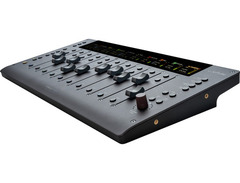
Transform your digital mixing experience with the Softube Console 1 Fader Mk III, a 10-channel fader control surface designed to enhance your Console 1-based workflow. Embrace the tactile sensation of the 100mm capacitive-touch faders that allow you to set levels, adjust pan, and automate tracks without touching a mouse. These faders are complemented by high-resolution screens that display customizable track information, ensuring you always know your mix status at a glance.
Console 1 Fader Mk III offers a true-to-life analog feel, with haptic feedback providing an intuitive and immersive mixing experience. The Core Mixing Suite included with the Fader Mk III enriches your productions with exquisite models of analog gear, such as the FET Compressor Mk II and Bus Processor effects, all organized into dedicated sections for a seamless workflow.
Adapt quickly to any mixing situation with the Parameter mode, enabling you to assign filters, drive, and compression thresholds to the faders on the fly. Need more faders? Simply daisy-chain up to four units using the dual USB-C ports, eliminating clutter and the need for additional hubs. With four compatibility modes, including Console 1, Pro Tools HUI, and UA Apollo Central, the Fader Mk III integrates smoothly into a variety of studio environments.
Key Features:
- 10 capacitive-touch 100mm faders for tactile control
- High-resolution screens for customizable track navigation
- Haptic feedback for real-world feel
- Parameter mode for flexible workflow customization
- Core Mixing Suite with Tape/Preamp, Compressor, and more
- Dual USB-C ports for daisy-chaining up to four units
- Supports four compatibility modes: Console 1, Pro Tools HUI, Generic MCU, Apollo Central
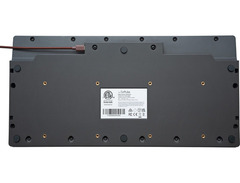
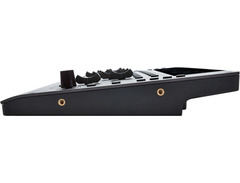
- Premium bead-blasted aluminum finish with VESA and 19-inch rackmounting options
Product specs
| Type | Mixing Control Surface |
| Screen | 10 x high-resolution screens |
| Faders | 10 x 100mm, Motorized |
| Computer Connectivity | USB |
| USB | 2 x USB-C |
| Software | Console 1 Core Mixing Suite |
| Power | USB bus powered |
| Height | 1.77" |
| Width | 17.1" |
| Depth | 8.66" |
| Weight | 4.6 lbs. |
FAQs
-
Are the faders on the Softube Console 1 Fader Mk III motorized?
-
Yes, the Softube Console 1 Fader Mk III features 10 motorized 100mm faders, allowing for precise control and automation during mixing sessions.
-
What type of connectivity does the Softube Console 1 Fader Mk III use?
-
The Softube Console 1 Fader Mk III connects to your computer via USB, featuring two USB-C ports for reliable and fast data transfer.
-
Is the Softube Console 1 Fader Mk III compatible with all DAWs?
-
The Softube Console 1 Fader Mk III is designed to integrate seamlessly with most major DAWs, offering enhanced control over mixing parameters through its dedicated software suite.
-
Does the Softube Console 1 Fader Mk III require an external power supply?
-
No, the Softube Console 1 Fader Mk III is USB bus powered, eliminating the need for an external power supply and simplifying setup.
-
What software comes with the Softube Console 1 Fader Mk III?
-
The Softube Console 1 Fader Mk III includes the Console 1 Core Mixing Suite, providing a comprehensive set of tools for mixing and control within your DAW.
Videos

Barry Johns Studio Talk
Softube Console One Fader MKIII
Softube Console One Fader MKIII
Barry Johns Studio Talk
Softube Console 1 FADER MK3 FIRST LOOK & REVIEW Pro Tools Setup

MixbusTv
Console 1 Fader Mk III Walkthrough – Softube

SoftubeStudios
Softube Console 1 Fader MK3 Review

Matty Harris | Mix and Master My Song
★ Softube Console 1 Fader Mk3 | It's a Spankin'... | Unboxing/Review ★

★ ZndBorn Mixed It ★
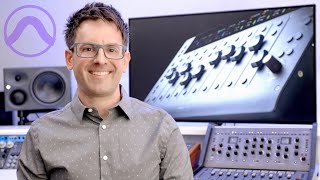
The Best Pro Tools Controller - Softube Console 1 Fader Mk III

Urban Sound Studio
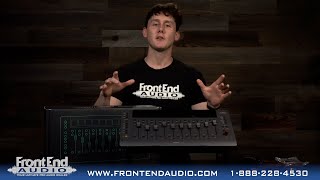
Softube Console 1 Fader MKIII Control Surface - Out Of The Box at Front End Audio

Front End Audio
Reviews
PROS
-
Simple and quick plug-and-play installation
-
Robust construction with impeccable finishing
-
Accurate, silent, and fast faders enhance mixing experience
-
Highly readable LEDs and screens
-
Compact design easily fits into various setups
-
Allows multiple fader movements simultaneously for dynamic mixing
CONS
-
Some functions still need optimization in Pro Tools HUI mode
-
Plastic construction, though well-made, may not appeal to everyone
-
Glitchy and unreliable integration with some Pro Tools systems
-
Frequent need to uninstall and reinstall software
-
Communication issues with Pro Tools, leading to workflow interruptions
Owner Insights
We analyzed real musician discussions from forums and Reddit to find what players love, question, and tweak about Softube Console 1 Fader Mk III 10-channel Fader Control Surface.
Features and functionality
-
The Console 1 Mk III allows loading Fabfilter, UAD, and Softube plugins seamlessly, enhancing workflow without a mouse during mixing.
Source -
Console 1 MK III allows users to mix without looking at a monitor, thanks to the information displayed on the device's screens, enhancing a screen-free mixing experience.
Source
User experience
-
Owners appreciate the tactile control, finding it beneficial for focusing during mixing by easily managing multiple tracks.
Source -
Some users report audible digital artifacts when moving volume faders quickly on the Console 1, suggesting a minor limitation in its DAW control implementation.
Source -
Some owners report that while Console 1 receives input from Logic, it fails to send back control signals, causing the Solo/Mute LEDs to not reflect the DAW status.
Source
Comparisons
-
Some users prefer the Nectar Panarama CS12 over the Icon Nano for better DAW integration and control of third-party plugins.
Source -
The Console 1 system is praised for its more generic interface, which offers tight integration with third-party plugins like UAD and FabFilter, unlike SSL's more limited plugin ecosystem.
Source
Software and compatibility
-
The system can feel clunky as it requires using Softube’s control screen rather than integrating directly with DAW's plugin interfaces.
Source -
Logic Pro users frequently experience recognition issues with Console 1 Mk III, particularly on Mac OS Sequoia 15.1, highlighting potential compatibility challenges.
Source -
A common workaround involves enabling the Console 1 On-Screen Display in Privacy & Security settings under Local Network to resolve connectivity problems with Logic Pro.
Source -
Console 1 operates effectively with Pro Tools and Luna, yet users notice sporadic issues with channel strip colors and numbers not displaying correctly.
Source -
M1 Ultra Mac users face ongoing issues with Console 1 Mk III, suggesting potential hardware-related compatibility concerns that might require further troubleshooting.
Source
Use cases and applications
-
Console 1 is highly valued in mixing scenarios, reducing digital distractions and enhancing tactile interaction with multiple faders.
Source -
Console 1 is noted for its effectiveness in a hybrid analog/digital setup, allowing users to focus more on listening rather than visual cues during mixing.
Source
Build quality
Based on 0 Reviews and 0 Ratings
Genre Usage
Based on how artists on Equipboard use this gear, it is most commonly found in the following genres.
More Softube DAW Controllers

$249.00 - $499.00
in DAW Controllers Rank


$377.73 - $699.00
in DAW Controllers Rank


$668.00 - $899.00
in DAW Controllers Rank

$1,048.14 - $1,099.00
in DAW Controllers Rank

$133.00 - $240.00
in DAW Controllers Rank


$182.00 - $277.00
in DAW Controllers Rank


$52.00 - $119.99
in DAW Controllers Rank


$80.00
in DAW Controllers Rank


$33.85 - $209.99
in DAW Controllers Rank


$285.00 - $419.00
in DAW Controllers Rank


$182.37 - $599.99
in DAW Controllers Rank


$1,045.00 - $1,399.99
in DAW Controllers Rank


$76.40 - $109.00
in DAW Controllers Rank


$57.00 - $1,299.99
in DAW Controllers Rank


in DAW Controllers Rank


$99.00 - $229.00
in DAW Controllers Rank


$699.99 - $839.99
in DAW Controllers Rank


$169.00 - $209.99
in DAW Controllers Rank


$228.86 - $524.99
in DAW Controllers Rank


$1,295.00 - $1,495.00
in DAW Controllers Rank


$995.00 - $1,195.00
in DAW Controllers Rank


$79.95 - $109.00
in DAW Controllers Rank


$122.00 - $189.00
in DAW Controllers Rank


$129.00 - $349.99
in DAW Controllers Rank

$184.42
in DAW Controllers Rank


$573.71 - $799.99
in DAW Controllers Rank

$125.00
in DAW Controllers Rank


$48.00 - $70.90
in DAW Controllers Rank


$1,191.76
in DAW Controllers Rank


$635.00 - $999.99
in DAW Controllers Rank


$333.00 - $399.99
in DAW Controllers Rank

$995.00 - $1,195.00
in DAW Controllers Rank

$249.00
in DAW Controllers Rank


$539.00 - $699.99
in DAW Controllers Rank

$1,191.76
in DAW Controllers Rank


$199.00 - $409.00
in DAW Controllers Rank

$125.00 - $169.99
in DAW Controllers Rank

$249.00 - $469.90
in DAW Controllers Rank


Accessories & Related Items


Artist usage


Community setups


Similar


Gear Guides





Most Popular DAW Controllers
Most Popular Brands
-
Added to Equipboard on by
 equipboard
GearIQ 4934
-


