

Pricing and availability
We compare 600+ stores and found this item at 6 stores. Prices updated .
Store
Reviews
Price






Price History
Based on price data from 5 merchants for "Waves C6 Multiband Compressor Plugin". Prices shown reflect NEW condition. Tracking began Apr 2, 2026.
* Product prices and availability are updated by Equipboard every 24hrs and are subject to change. Equipboard may receive compensation for purchases made at participating retailers linked on this site. This compensation does not affect what products or prices are displayed, or the order of prices listed. For more information, please refer to our affiliate disclosure.
Description
The Waves C6 Multiband Compressor Plugin is your go-to tool for dynamic sound shaping and precision control. Building on the legacy of the renowned C4 processor, the C6 introduces two additional floating bands, providing even greater flexibility for vocal and instrument enhancement. Equipped with a sidechain feature that allows for creative compression and dynamic equalization, it’s perfect for de-essing and de-popping both on stage and in the studio. The C6 excels at zeroing in on problematic frequencies, making it an indispensable tool whether you're handling live sound, studio mixing, or post-production work.
This plugin is particularly valued by top sound engineers for its ability to effortlessly manage complex audio dynamics. With its internal and external sidechain capabilities, the C6 lets you craft soundscapes with precision, reducing unwanted noise and enhancing clarity. Whether it's controlling crowd ambience in live settings or sculpting vocal tracks in the studio, the C6 is versatile enough to meet the demands of any audio environment.
Key Features:
- Four crossover bands plus two additional floating bands
- Internal/external sidechain per band
- Dynamic EQ, compression, and expansion
- Double precision bit resolution processing
- Up to 24-bit / 192 kHz resolution
- Individual band Listen mode
- Mono and stereo components
- Compatible with SoundGrid license for MultiRack and StudioRack environments
Bring the power of the Waves C6 Multiband Compressor to your audio projects and experience unparalleled sound shaping versatility.
Owner's manual
Waves C6 Multiband Compressor Plugin User ManualProduct specs
| Software Type | Compressor |
| Platform | Mac, PC |
| Upgrade/Full | Full |
| Download/Boxed | Download |
| Bit Depth | 64-bit |
| Format | AAX Native, AudioSuite, VST, AU, SoundGrid |
| Hardware Requirements - Mac | Intel Core i7 or higher (M1 support), 8GB RAM minimum |
| Hardware Requirements - PC | Intel Core i5 / AMD Quad-core or higher (AVX required), 8GB RAM minimum |
| OS Requirements - Mac | macOS 10.15.7 or later |
| OS Requirements - PC | Windows 10 or later (21H2), 64-bit |
FAQs
-
What are the main features of the Waves C6 Multiband Compressor Plugin?
-
The Waves C6 Multiband Compressor offers six bands of compression, including four crossover bands and two floating bands, providing precise control over your audio. It is ideal for dynamic EQ, de-essing, and multiband compression tasks.
-
Is the Waves C6 Multiband Compressor Plugin compatible with my DAW?
-
The Waves C6 is compatible with major DAWs that support AAX Native, AudioSuite, VST, AU, and SoundGrid formats, making it versatile for different production environments.
-
Can the Waves C6 Multiband Compressor be used for mastering?
-
Yes, the Waves C6 is suitable for mastering, offering detailed control over specific frequency ranges, which helps in achieving a polished and balanced final mix.
-
What are the system requirements for using the Waves C6 Multiband Compressor on a Mac?
-
To use the Waves C6 on a Mac, you need macOS 10.15.7 or later, an Intel Core i7 processor or higher (M1 support), and a minimum of 8GB RAM.
-
How does the Waves C6 Multiband Compressor differ from a standard compressor?
-
Unlike standard compressors, the Waves C6 allows for independent control over multiple frequency bands, making it effective for complex audio tasks like de-essing and dynamic EQ adjustments.
Videos

Andrei Martinez Agras
How to use Waves C6 Multiband Compressor (TUTORIAL)
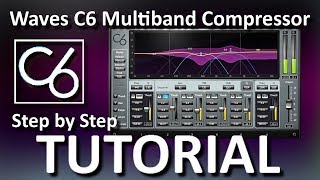
How to use Waves C6 Multiband Compressor (TUTORIAL)
Andrei Martinez Agras
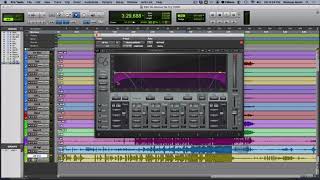
Waves C6 on Vocals - An Introduction

Eric Ferguson
Reviews
PROS
-
Highly effective for enhancing vocal tracks
-
Presets are thoughtfully crafted and useful
-
Functions as both a compressor and dynamic equalizer
-
Offers versatility in controlling specific frequency bands
-
Helps achieve a professional sound similar to industry standards
-
Considered a classic and essential tool by many users
-
Naturally and effectively enhances sound quality
-
Side-chain capabilities make it an indispensable tool for many producers
CONS
-
Requires understanding of multiband compression for optimal use
-
Needs a different approach compared to single-band compressors
Owner Insights
We analyzed real musician discussions from forums and Reddit to find what players love, question, and tweak about Waves C6 Multiband Compressor Plugin.
Use cases and applications
Features and functionality
-
The "pooch vocal" preset is highly regarded for enhancing male pop vocals, frequently used by professionals on every vocal track.
Source -
C6 is often paired with other multiband compressors; one method is boosting low-mids with another compressor, then using C6 to maintain balance.
Source -
The C6's floating bands allow for adjustable attack and release, providing precision control beyond typical multiband compressors.
Source -
The C6 includes two floating bands with Q controls that can be positioned anywhere in the frequency spectrum.
Source -
Unlike the Pro-Q3, the C6 allows for the setting of attack and release times on its dynamic EQ bands.
Source
4.5 out of 5
Based on 1 Review and 23 Ratings

Artist usage
Add artist

Acle lists the Waves C6 Multiband Compressor plugin in his kemper profile mixing example.


“For Daniel's vocal, I use the C6 [multiband compressor] and API 2500 [compressor]. The C6 is my go-to for every vocal. I reach for it before my channel EQs.”.


Used for Minaj's feature on Doja Cat's "Say So" remix, as stated by mix engineer Clint Gibbs in this July 2020 Sound on Sound interview.
"The Nicki Minaj remix happened very last minute. I got a text from her engineer, Aubry 'Big Juice' Delaine, saying, 'Here's a link for Nicki's vocals.' I opened it up and realised they were for 'Say So'. So I hit up the label and they confirmed that we were doing a remix. As I was mixing, I was getting updated versions of the vocals, verses, and so on. We did the mix, got it mastered, it was all approved, and the day before the remix was supposed to come out, someone wanted to change the beat underneath her vocals. All of a sudden there was an emergency!
"I got an email from Tyson Trax, saying: 'Here are the new beat stems for Nicki.' Among other things they contained some heavy 808s. I had an hour to mix in these new beat stems, because the remix was supposed to be released in Australia a few hours later. I pasted these new beats in just above the vocal VCA of the original session, and in Nicki Minaj's first verse I deactivated the clips from the original beat files for this section. But because the original did not have 808s, they killed my mix bus. I had to automate a new limiter during this part of the remix.
"I put Nicki's vocal at the bottom of the session, and just needed to pair them with the track. I added all plug‑ins on her vocals that you see in the session, but I did not need to do much, because the processed stems Big Juice sent me sounded great! The SoundToys Little Radiator adds a little warmth, and the Metric Halo Channel Strip boosts some top end while also cutting some low end. There are two Waves C6 plug‑ins dynamically suppressing 177Hz and 700Hz, with a -6dB range. There was some build-up in those frequencies that didn't work with the mix. On the inserts of the individual vocal tracks there also is a Waves Q8 doing two sharp 4-6 dB cuts at 10kHz and 11kHz, which was to tame some 's' harshness.
"One of the 808 audio tracks has the FabFilter Pro‑Q 2, with a high pass at 20Hz and a cut around 40Hz, and the Oeksound Soothe on a 'melodic bass control' setting. On the 808s aux bus and 808 parallel bus I have the FabFilter Saturn, Timeless, and the Waves F6. These 808 buses obviously were added for the remix. My approach with them was similar to that of the bass aux. The Saturn is only active on the parallel track, and is a bit dirtier on the 808 than on the bass. The F6 is side-chained to the vocal to suppress the mids of the 808 while Nicki is rapping. The Timeless also is only active on the parallel track, and adds a light chorus that spreads the 808 out slightly."


"I can't seem to live without the UAD finalizer, C6, LA2A and the Fatso. What are your most used plugins?"


Darude mentions gear he is using in this interview, and states, "I just got the Waves C6 multi-compressor and already love it because of the possibility to selectively duck only certain frequency ranges triggered by an external signal, like bass with the kick drum, or a synth with a vocal, for example."


Used on "A Lot", as mentioned by producer Maddmix in this March 2019 Sound on Sound interview and as visible in a downloadable photo of the "A Lot" Pro Tools session (available in this .zip file).
Although there are relatively few plug-ins on the drums and hardly any on the music, Maddox uses dozens on the vocals. 21 Savage's five vocal aux tracks, for example, all pass through a signal chain comprising Antares Auto-Tune, UAD 1176LN E, Waves Renaissance Vox, FabFilter Pro-DS, Waves C6, another Pro-DS, FabFilter Pro-Q2 and another C6, with only the latter one or two plug-ins dropping out on a couple of tracks.
All these tracks go the '21 Lead' aux (42), which has nine plug-ins, including compressors, de-essers, and four(!) more instances of Pro-Q2, as well as four sends. Both 21 Savage and J Cole's aux group vocal tracks then go to a vocal aux called 'MadVoxComp', and from there to the 'All Vocals' aux, each of which hosts two plug-ins; so in total, every 21 Savage vocal track passes through 19 to 21 insert plug-ins, as well as being sent to up to seven auxes. The situation with J Cole is even more elaborate, though complicated by the fact that some of the sends came with the vocal session that Maddox received from Cole's engineer.
"I guess my thought process behind my mixing is kind of messy!" laughs Maddox. "The thing is that I will start with adding compression and EQ on a vocal, and then if I hear something else that needs correcting, I will just add another compressor or EQ. I never go back and take plug-ins off or reset them, because I don't want to go back on what I already have, because I might mess it up. So I just keep going forward and adding plug-ins until I get the sound I want. That works for me. Some people like mixing with very few plug-ins, but I will mix with whatever I need to get what I want.
"The plug-ins I have on these inserts I use frequently. I guess you could call them my clean-up plug-ins. The 1176LN worked on 21's vocals in this session. I may also use the UAD Tube-Tech CL 1B or the Waves RCompressor. In this session the 1176 made 21's vocals really full and in your face. Next is the RVox, which is also is a good plug-in for bringing the vocals up front and making them really full. It is very subtle, but it makes a big difference. If I feel like the vocal does not sit up front enough I put that on, compress it a little bit, and it usually fixes the problem for me. The 1176 has a similar function, but I use it more for actual compression and the RVox more for tone and to make it sound bigger.
"Next is the Pro-DS, which as a de-esser obviously helps with the sibilance. Some vocals have more sibilance than others, and sometimes I use just one, but in this case I felt I needed two. I love using multiband compressors, and the C6 is here for some general compression, but there always are some frequencies that need adjusting, but that I don't want to take out with an EQ, because you need those frequencies. When I use a multiband, I find the frequency that bugs me, and set a threshold, so the frequency is only dipped when it needs to be dipped. If you look at my C6 plug-ins, they often address harsh frequencies that a de-esser can't take out. I'll have a really tight notch on the C6, and then just compress that frequency a couple of dB."
Of the '21 Lead' aux, Maddox says: "There are four instances of the Pro-Q2 on the signal chain, which is again an example of me working cumulatively. I now use the Pro-Q3 a lot, which is a dynamic EQ, which can do pretty much the same thing as the C6. Then insert 4 is the McDSP MC404 multiband compressor, which I use pretty often, and then I have the Eiosis Air EQ, the C6, the Kush Clariphonic EQ and the SSL G EQ. I use different EQs for different purposes. The Q2 has unlimited bands, so I use that to search and dip frequencies I don't like. I really like the high end on the Air, which opens up the vocal and makes it sound really good. I also often do some scooping in the lower mid-range with the Air, because it does a really good job of that. I use the Clariphonic mainly for the Clarity knob, which widens the vocal just by having that on. I really like that on vocals and use that in almost every session.
"The sends go to several aux effect tracks with delays and reverbs, but for this project they told me that they wanted the keep the vocals pretty dry, so I didn't use much reverb. Mostly just a small room reverb really subtly in the background to give it some space. The main reverbs that I have in my template are the Slate Digital VerbSuite Classics. They have great emulations of popular reverbs like the Bricasti and so on, that sound really good. I also use the UAD Lexicon 480 a lot. Those are my go-to reverbs. I occasionally use the Waves RVerb and TrueVerb. My main delays are the Soundtoys EchoBoy and the Waves H-Delay. For distortion I use the Soundtoys Decapitator and Devil-Loc, sometimes the Dada Life Sausage Fattener, which is fun, and the distortion pedal in the Waves GTR3 Stomps plug-in.
(...) Finally, both '21 Leads' and 'Leads' go to the 'Lead All' [40] and parallel 'MadVoxComp' [41] tracks, and the latter has the Waves CLA-76 and L1, both for more presence and volume."


5:50 into his "In The Studio" video, Reso opens the Waves C6 plugin.


In this video at 14:16 we can see Waves C6 Multiband Compressor Plugin

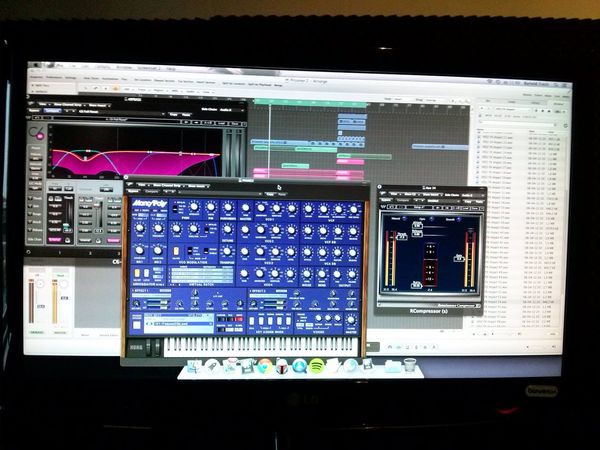
Disfunktion posted this photo on their Facebook fan page which shows them utilizing the Waves C6 Multiband Compressor Plugin with the caption: "Studio day!"


In a Facebook photo, Blinders is seen using the Waves C6 Multiband Compressor Plugin, highlighting its role in his production setup.

In this video at 0:21 we can see Waves C6 Multiband Compressor Plugin

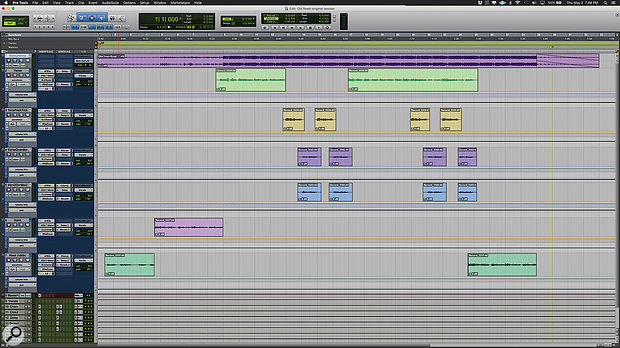
Used for Ray's vocals on "Old Town Road (Remix)", as stated by mix engineer Andrew "VoxGod" Bolooki in this August 2019 Sound on Sound interview. An image of the settings can be found here.
Billy Ray Cyrus' verse lead vocal provides an example of the mind-boggling complexity of Bolooki's vocal treatments. The audio is spread over five tracks (36-40), four of them with the same insert effects chain of Melodyne, FabFilter Pro-Q 3, FabFilter Pro-DS and Waves CLA-76. The fifth track replaces the Pro-DS with the Avid ModDelay 3, and adds a send to the 'rvb2' aux with the Soundtoys Effect Rack. All five audio tracks are routed to an aux group track (35), which has the Pro-Q 3, Waves C6 and RVox, UA Distressor and SSL Channel, plus a whopping seven sends to delay and reverb aux tracks, and another Distressor aux. The quarter- and eighth-note delay auxes themselves each have four insert plug-ins (Waves H-Delay, Pro-Q 3, MetaFlanger, and DVerb) and a send to the 'rvb1' reverb aux. That means that the verse vocal alone has a total of 38 plug-ins, spread over five audio tracks, one group aux track, and seven aux effects tracks!
Bolooki: "I spoke to a mixer a couple of years ago and asked him how he got things to sound so polished. And he said: 'You can't just throw on a plug-in, you have to take more control, and make sure you purposely put things in different places in different ways.' So, for example, in this song I added the DVerb to the delay auxes, to create a distant effect, so it's not obvious. There are many effects going on, but none of them are overpowering. They are all set back. Nothing gets in the way of the lyrics and the vocal performance. I could probably delete half these effects and it would have sounded the same, but people liked it the way it was, so I left them all.
"This was the first time I used the UAD Distressors and I ended up having two on Billy's vocals: one as part of his main vocal aux, and another set much more aggressively in a parallel and blended back into the same lead vocal aux. This made his vocals really kick ass, and helped make each word crystal-clear. I also ended up copying the Waves SSL strip from Nas' vocals on some of Billy's vocal tracks too, just for some tonal continuity. I have no problem stacking plug-ins on plug-ins. If it's better, it's better.
"Just to highlight some of the other plug-ins I used, there's an aux called 'VoxDoubler' with the Waves Greg Wells VoiceCentric. It definitely adds a bit more of a finished feel and works well mixed in parallel. I put the Waves C6 multiband compressor on almost every single vocal bus, using the 'Pooch Vocal' preset. This cleans up some of the mud. You can solo the side-chain bands and sweep around until you find the annoying frequency, and then just cut that out. If I need to play back something for someone really fast, this is my emergency plug-in to get it to sound better really quickly. Also, the Melodyne plug-in is greyed out, because I printed it. I also like using the Pro-DS, and always put it before the CL76 compressor, because I think it just makes the most sense to fix issues before you boost the whole track with a compressor."
Album Usage
The Waves C6 Multiband Compressor Plugin has been featured on the following albums:






Genre Usage
Based on how artists on Equipboard use this gear, it is most commonly found in the following genres.
Used With
Based on how musicians on Equipboard use Waves C6 Multiband Compressor Plugin, it is most commonly used with the following gear.

-s.webp?v=1783173639)
-s.webp?v=1783173681)


More Waves Compressor Plugins
-m.webp?v=1783173639)
$33.00 - $39.99
in Compressor Plugins Rank


-m.webp?v=1783173726)
$33.00 - $39.99
in Compressor Plugins Rank


$33.00 - $39.99
in Compressor Plugins Rank


$38.00 - $39.99
in Compressor Plugins Rank


$33.00 - $34.99
in Compressor Plugins Rank


$33.00 - $99.00
in Compressor Plugins Rank


$33.00 - $34.99
in Compressor Plugins Rank

.jpg?v=1783082401)


$33.00 - $39.99
in Compressor Plugins Rank


$33.00 - $34.99
in Compressor Plugins Rank


$33.00 - $39.99
in Compressor Plugins Rank


-m.webp?v=1783173687)
$33.00 - $39.99
in Compressor Plugins Rank


-m.webp?v=1783173736)
$34.99 - $39.99
in Compressor Plugins Rank


$33.00 - $34.99
in Compressor Plugins Rank


$33.00 - $34.99
in Compressor Plugins Rank


$33.00 - $34.99
in Compressor Plugins Rank


$29.99
in Compressor Plugins Rank

$33.00 - $39.99
in Compressor Plugins Rank


$33.00 - $82.50
in Compressor Plugins Rank


$33.00 - $34.99
in Compressor Plugins Rank


$39.99 - $149.00
in Compressor Plugins Rank


$29.00 - $29.99
in Compressor Plugins Rank


$29.99 - $34.99
in Compressor Plugins Rank


$33.00 - $35.99


$39.99 - $199.00


$144.00 - $199.00
in Compressor Plugins Rank


$134.00 - $149.00
in Compressor Plugins Rank

$144.00 - $199.00
in Compressor Plugins Rank

-m.webp?v=1783173632)
$141.00 - $149.00
in Compressor Plugins Rank


$45.00 - $49.00
in Compressor Plugins Rank
.jpeg?v=1783065967)


$39.00 - $1,549.00
in Compressor Plugins Rank


$49.00 - $149.00
in Compressor Plugins Rank


$26.00 - $49.00
in Compressor Plugins Rank


Accessories & Related Items


-s.webp?v=1783173737)


-s.webp?v=1783173726)

-s.webp?v=1783173736)


-s.webp?v=1783144077)


Community setups


Similar


Gear Guides








Most Popular Compressor Plugins
Most Popular Brands
-
Added to Equipboard on by
 equipboard
Gear IQ 4934
-