

Pricing and availability




* Product prices and availability are updated by Equipboard every 24hrs and are subject to change. Equipboard may receive compensation for purchases made at participating retailers linked on this site. This compensation does not affect what products or prices are displayed, or the order of prices listed. For more information, please refer to our affiliate disclosure.
Description
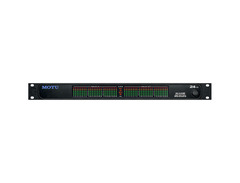
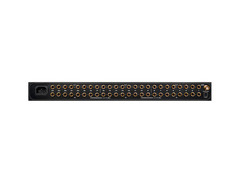
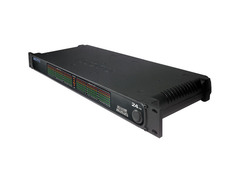
Step into the world of seamless studio integration with the MOTU 24 I/O audio interface, a powerhouse designed for musicians and producers who want to eliminate the clutter of mixers and streamline their Digital Audio Workstation (DAW) setups. The MOTU 24 I/O offers 24 high-quality, 24-bit/96kHz analog inputs and outputs, all within a sleek, single rack space. This interface is perfect for connecting multiple external hardware and sound modules simultaneously, making it an essential tool for any expansive studio environment.
What sets the MOTU 24 I/O apart is its advanced CueMix DSP, which provides real-time, near-zero latency monitoring, freeing up your computer's CPU for other tasks. Whether you're mixing multiple channels or crafting unique stereo mixes, CueMix DSP ensures flexibility and precision. Furthermore, the interface's PCI-424 card, compatible with both legacy and contemporary MOTU interfaces, allows you to expand your setup effortlessly.
For those who prefer hands-on control, the MOTU 24 I/O's CueMix FX software can be operated from your iPad, offering wireless command over mixing and effects processing. Plus, with the industry-standard word clock sync, the 24 I/O ensures smooth synchronization with your digital audio studio, either as a master clock or as a slave device.
Designed for both Mac and Windows platforms, the MOTU 24 I/O comes with AudioDesk recording software, providing a full-featured digital workstation for creative and technical audio endeavors.
Key Features:
- 24 analog inputs/outputs with 24-bit, 96kHz converters
- Includes PCI-424 card for cross-platform compatibility
- Real-time CueMix DSP for near-zero latency monitoring
- Word clock sync I/O for seamless studio integration
- Compatible with both legacy and new MOTU interfaces
- AudioDesk software for comprehensive audio editing and mixing
FAQs
-
How many inputs and outputs can the MOTU 24 I/O handle?
-
The MOTU 24 I/O provides 24 analog inputs and 24 analog outputs, and you can expand this by connecting up to four units to a PCI-424 audio card, allowing for a total of 96 inputs and outputs.
-
Is the MOTU 24 I/O compatible with both Mac and Windows systems?
-
Yes, the MOTU 24 I/O is compatible with both Mac OS X and Windows, offering multi-channel 24-bit I/O for all leading audio software on these platforms.
-
Can the MOTU 24 I/O synchronize with external devices?
-
Yes, the MOTU 24 I/O can synchronize with external devices using word clock or resolve directly to SMPTE time code with fast lock-up and sub-frame accuracy.
-
Can I use the MOTU 24 I/O with other MOTU interfaces?
-
Yes, the MOTU 24 I/O is 100% compatible with all MOTU AudioWire interfaces, allowing you to mix and match up to four interfaces to meet your specific I/O needs.
Videos

Human Error Synth Repair
MOTU 24 i/o - Catastrophic failure after wrong voltage - Live
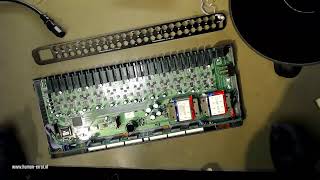
MOTU 24 i/o - Catastrophic failure after wrong voltage - Live
Human Error Synth Repair
Reviews
Owner Insights
We analyzed real musician discussions from forums and Reddit to find what players love, question, and tweak about MOTU 24 I/O.
Software and compatibility
-
The MOTU 24 I/O comes with its own ASIO driver, eliminating the need for ASIO4ALL, which is typically used for sound cards with only WDM drivers.
Source -
Installing the latest drivers from MOTU's website is recommended for optimal performance with Pro Tools on a PC setup.
Source -
Using the MOTU 24 I/O with Pro Tools on a PC doesn't require ASIO4ALL, as the interface's native drivers are fully compatible.
Source
User experience
-
Some users report that after initial setup and driver installation, ongoing performance with Pro Tools 11 is stable after a period of tweaking.
Source -
Owners report using the MOTU 24ai and 828es together over AVB with a single Ethernet cable, describing the integration as smooth and reliable.
Source
Features and functionality
Setup and maintenance
-
AVB networking requires a compatible network switch, and configuring AVB clock sources can be complex, with users advising careful documentation review.
Source
Critic Reviews
3.5 out of 5
Based on 1 Review and 3 Ratings

1277
Great with outboard
It does the thing pretty good. There are things that do the thing better. Some much better.
But this lets me have a lot of in and out for my outboard. A 2408mkiii and two of these and I have 56 AD/DA channels. Lot's of in and out. And still room to expand - up to 96 channels. That's an amount that sounds like a good amount to me. And that makes me like it.
Artist usage
Add artist

"My audio interface is provided by a MOTU 24I/O, and I have a 16-fader Mackie Logic Control and the Samson C-control, which is just a monitor controller and talkback. The Mackie is fantastic for orchestral mixing, when you need to move lots of faders at once. If I had more space, I'd have more of these, because they're brilliant. My master clock is a Rosendahl Nanosyncs, which makes a huge difference for digital playback. I used to have a Yamaha 02R, and it made it sound like a desk five times the price, because the clocking got so much better, all the jitter was gone, and imaging was razor-sharp."


In this article from MusicRadar, Darude says he uses several MOTU products, including the Motu 24i/o.


MOTU 24i is shown in a chart depicting Yasunori's studio circa 2002.


Bola mentions that he uses the Motu as his interface:
"I’m using MOTU’s 24IO interface with everything wired directly into channel inputs, so if I want a particular synth, I just pick the input and there it is ready to go."

.jpg)
A couple are visible in this January 22, 2018 Instagram post.


Babydaddy constructs his drum loops in Native Instruments' Battery, in Logic. Diving into a description of the tools of his trade he manages, while continuing to raise his voice, to come up with a fairly comprehensive list (see box). "I have no interest in Pro Tools," he says. "I like gear that's ready to go and that's accessible. Logic is what I started on, and I have used it for a long time. When you use Pro Tools you're kind of stuck in that world, but with Logic you have so many options. For instance, I can use the soundcard that I want: we had the MOTU 828 Mk2 in our studio, and we also used the MOTU 24 I/O during the recordings. We set Logic to 44.1/24-bit; I'm not sure whether 24-bit gives me a better sound, but I thought that since we had the ability, we might as well do it."
Album Usage
The MOTU 24 I/O has been featured on the following albums:

Genre Usage
Based on how artists on Equipboard use this gear, it is most commonly found in the following genres.
Used With
Based on how musicians on Equipboard use MOTU 24 I/O, it is most commonly used with the following gear.

-s.webp?v=1784890872)


-s.webp?v=1784890973)


More MOTU Audio Interfaces

$130.00 - $819.00
in Audio Interfaces Rank


$40.00 - $695.00
in Audio Interfaces Rank


$40.00 - $695.00
in Audio Interfaces Rank


$199.95 - $569.99
in Audio Interfaces Rank


$261.50 - $279.95
in Audio Interfaces Rank


$40.00 - $695.00
in Audio Interfaces Rank


$1,095.00
in Audio Interfaces Rank


$599.00 - $1,064.07


$199.95 - $569.99


$499.61 - $849.00


$1,390.00 - $2,589.00


$395.00 - $499.00

$373.00 - $649.00


.png?v=1784755332)


$820.00 - $1,495.00


$995.00 - $1,456.54


$1,095.00 - $1,124.00


$1,499.00 - $1,629.00


$729.00 - $1,101.00


-m.webp?v=1784819172)


$995.00 - $1,145.00


Accessories & Related Items

Community setups


Similar


Gear Guides







.webp)
Most Popular Audio Interfaces
Most Popular Brands


