
Pricing and availability
We compare 600+ stores and found this item at 10 stores. Prices updated .
Store
Reviews
Price









Average Price: $237
Standard/Professional
$150
$501+
Price Tier
Budget
Standard
High-end
Price History
Based on price data from 7 merchants for "MOTU M2 Audio Interface". Prices shown reflect NEW condition. Tracking began Apr 2, 2026.
* Product prices and availability are updated by Equipboard every 24hrs and are subject to change. Equipboard may receive compensation for purchases made at participating retailers linked on this site. This compensation does not affect what products or prices are displayed, or the order of prices listed. For more information, please refer to our affiliate disclosure.
Description
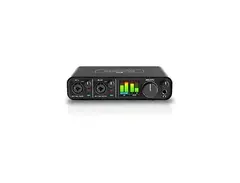
The MOTU M2 Audio Interface is your passport to pro-level recording without breaking the bank. Engineered with ESS Sabre32 Ultra DAC technology, this 2-in/2-out USB-C interface delivers pristine audio fidelity, boasting a dynamic range of 120 dB. Whether you're on a Mac, Windows, or iOS platform, the M2 ensures ultra-low latency, minimizing delays to a mere 2.5 ms with its optimized USB drivers.
For musicians and podcasters alike, the M2's loopback functionality is a game-changer, allowing you to effortlessly blend audio from your computer with live inputs for seamless recording or streaming. The full-color LCD screen offers precise metering to ensure perfect levels during your sessions. Compact and bus-powered through USB-C, the M2 is not just powerful, but also highly portable.
The interface includes two premium mic preamps with individual gain control and 48V phantom power, alongside hardware monitoring for zero-latency playback. With bundled software like MOTU Performer Lite and Ableton Live Lite, plus over 6 GB of loops and samples, you have everything you need to start creating right out of the box.
Key Features:
- 2-in/2-out USB-C audio interface
- ESS Sabre32 Ultra DAC technology for superior audio quality
- Ultra-low latency with 2.5 ms round-trip at 96 kHz/32 buffer
- Full-color LCD metering for inputs/outputs
- 2 mic/line/hi-Z inputs with independent gain and phantom power
- Zero-latency hardware monitoring
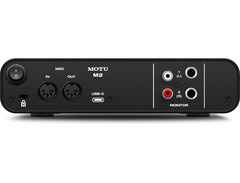
- MIDI in/out and loopback functionality for streaming/podcasting
- USB bus-powered with a rugged metal chassis
- Includes MOTU Performer Lite, Ableton Live Lite, and 6+ GB of loops and samples
Owner's manual
MOTU M2 Audio Interface User ManualProduct specs
| Computer Connectivity | USB 2.0 |
| Form Factor | Desktop, Portable |
| Simultaneous I/O | 2 x 2 |
| Number of Preamps | 2 |
| Phantom Power | Yes |
| A/D Resolution | 24-bit/192kHz (32 sample buffer) |
| Analog Inputs | 2 x XLR-1/4" combo (mic/line/Hi-Z) |
| Analog Outputs | 2 x 1/4" TRS (DC coupled), 1 x Dual RCA Stereo |
| Headphones | 1 x 1/4" |
| MIDI I/O | In/Out/USB |
| USB | 1 x USB-C |
| Software | MOTU Performer Lite, Ableton Live Lite, Bundled Loops/Sounds |
| OS Requirements - Mac | OS X 10.13 or later |
| OS Requirements - PC | Windows 10 or later |
| Bus Powered | Yes |
| Power Supply | USB bus powered |
| Height | 1.75" |
| Width | 7.5" |
| Depth | 4.25" |
| Weight | 1.35 lbs. |
FAQs
-
What are the main connectivity options for the MOTU M2 Audio Interface?
-
The MOTU M2 features USB-C connectivity and includes 2 x XLR-1/4" combo inputs, 2 x 1/4" TRS outputs, 1 x Dual RCA Stereo output, and MIDI In/Out, making it versatile for various recording setups.
-
Is the MOTU M2 compatible with popular DAWs like Ableton Live and Pro Tools?
-
Yes, the MOTU M2 is compatible with most major DAWs, including Ableton Live and Pro Tools. It also comes bundled with MOTU Performer Lite and Ableton Live Lite for immediate music production.
-
Does the MOTU M2 Audio Interface require an external power supply?
-
No, the MOTU M2 is bus-powered via USB, eliminating the need for an external power supply, making it highly portable and convenient for mobile recording setups.
-
How does the MOTU M2 handle low-latency performance?
-
The MOTU M2 offers ultra-low latency performance, particularly when using the optional driver for Mac, ensuring smooth recording and playback experiences with minimal delay.
-
Does the MOTU M2 Audio Interface support phantom power for condenser microphones?
-
Yes, the MOTU M2 provides phantom power, allowing you to use condenser microphones that require external power for optimal performance.
Videos

Sanjay C
MOTU M2 vs Focusrite Scarlett 2i2
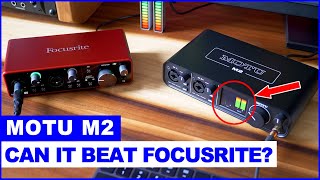
MOTU M2 vs Focusrite Scarlett 2i2
Sanjay C
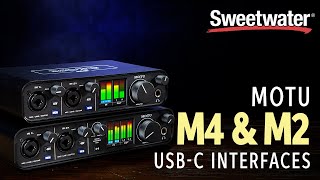
MOTU M4 & M2 USB-C Audio Interfaces Overview

Sweetwater
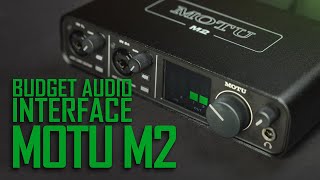
MOTU M2 USB Audio Interface

Curtis Judd
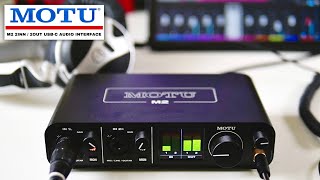
MOTU M2 USB-C Audio Interface Long Term Short Review

TechieViewVideo
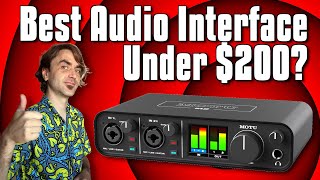
Motu M2 - Is This The Best Audio Interface Under $200?

Dash Glitch

The Motu M2 Audio Interface Is Amazing So Buy It

Nouvraught
Reviews
PROS
-
Exceptional low latency, ideal for live collaboration apps like JamKazam
-
Simple registration and firmware update process, excellent customer service
-
High-quality preamps, clean sound up to high gain levels
-
Sturdy build quality, durable for long-term use
-
Versatile, works well with low impedance headphones
-
Clean and loud monitor and headphones outputs
-
Features a helpful small LED screen for monitoring
-
Easy to use, essentially plug and play with firmware updated
-
Can enhance the sound of instruments, even through effects chains
CONS
-
Initial registration can be tricky with used units
-
Some users report driver issues and popping noises
-
Tech support response can be slow and unhelpful
-
Requires additional gear like a Fethead for certain microphones
Owner Insights
We analyzed real musician discussions from forums and Reddit to find what players love, question, and tweak about MOTU M2 Audio Interface.
Features and functionality
-
The MOTU M2's on/off switch and LCD screen enhance usability by allowing easy monitoring of input/output levels.
Source -
The MOTU M2 is noted for providing precise stereo imaging and detail, especially when used with higher-impedance headphones up to 250 ohms.
Source -
The M2's quarter-inch outputs are balanced and DC-coupled, suitable for connecting to studio speakers or PAs, offering flexibility in studio setups.
Source
Build quality
-
Some users experience volume knob imbalance and button issues over time, despite the interface's generally praised construction.
Source
Comparisons
-
The MOTU M2 shares the same ESS Sabre32 Ultra DAC as higher-end models like the MOTU Ultralite MK5, ensuring pristine sound quality across the board.
Source -
The HX Stomp's built-in interface struggles with higher-impedance headphones and lacks the low-latency performance and monitoring controls of the MOTU M2.
Source
Software and compatibility
User experience
-
The headphone amp handles high-impedance headphones effectively, maintaining balance and clarity across various headphone models.
Source -
Users transitioning from the HX Stomp to the MOTU M2 notice significantly improved headphone clarity and stereo imaging, highlighting its design for studio work.
Source -
Users confirm the M2 requires powered monitors for optimal performance, emphasizing the importance of matching the interface with appropriate speaker types.
Source
Use cases and applications
Setup and maintenance
-
When using RCA outputs, ensure TRS connectors are disconnected to avoid distortion; balanced ¼” provides better noise rejection for long cable runs with EM/RF interference.
Source -
For users connecting both monitors and headphone amps, it's recommended to use the headphone jack for headphones and ¼” outputs for monitors to simplify setup.
Source
Critic Reviews
5.0 out of 5
Based on 1 Review and 4 Ratings

Artist usage
Add artist

Genre Usage
Based on how artists on Equipboard use this gear, it is most commonly found in the following genres.
Used With
Based on how musicians on Equipboard use MOTU M2 Audio Interface, it is most commonly used with the following gear.


-s.webp?v=1784153209)


-s.webp?v=1783936839)

Community setups
Show yours

More MOTU Audio Interfaces

$130.00 - $819.00
in Audio Interfaces Rank


$45.00 - $695.00
in Audio Interfaces Rank


$45.00 - $695.00
in Audio Interfaces Rank


$199.95 - $569.99
in Audio Interfaces Rank


$261.50 - $279.95
in Audio Interfaces Rank


$45.00 - $695.00
in Audio Interfaces Rank


$1,095.00


$599.00 - $1,281.65


$500.70 - $849.00


$850.00 - $2,589.00


$395.00 - $499.00

$373.00 - $649.00


.png?v=1784107687)


$820.00 - $1,495.00


$995.00 - $1,459.72

$1,095.00 - $1,124.00


$1,499.00 - $1,629.00


$680.00 - $1,101.00


-m.webp?v=1783782439)


$995.00 - $1,145.00


Accessories & Related Items



-s.webp?v=1784155162)





Similar


Gear Guides







Most Popular Audio Interfaces
Most Popular Brands
-
Added to Equipboard on by
 zachary_brooks
GearIQ 107
-


