

Pricing and availability
We compare 600+ stores and found this item at 11 stores. Prices updated .
Store
Reviews
Price









Price History
Based on price data from 7 merchants for "PreSonus FaderPort Production Controller". Prices shown reflect NEW condition. Tracking began Apr 2, 2026.
* Product prices and availability are updated by Equipboard every 24hrs and are subject to change. Equipboard may receive compensation for purchases made at participating retailers linked on this site. This compensation does not affect what products or prices are displayed, or the order of prices listed. For more information, please refer to our affiliate disclosure.
Description
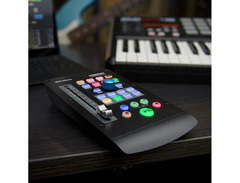
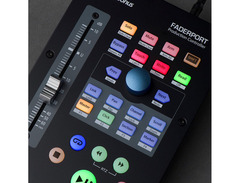
Unleash the full potential of your music production with the PreSonus FaderPort Production Controller. This 1-channel powerhouse is designed to elevate your DAW experience, offering an intuitive, tactile interface that minimizes reliance on your keyboard and mouse. With its touch-sensitive, 100mm motorized fader, you'll enjoy precise control over your mixes, bringing an organic feel to your digital workflow. Seamlessly compatible with popular DAWs like Studio One, Logic Pro X, Cubase, and more, thanks to Mackie Control Universal and HUI emulation, the FaderPort is your key to a streamlined production process.
Dive into complex sessions with confidence using the Session Navigator, which allows you to manage tracks, adjust automation, and navigate your timeline with ease. Whether you're writing automation or panning across your mix, the FaderPort's 360-degree encoder and comprehensive transport controls offer the flexibility and efficiency that modern producers demand. Plus, the included Studio Magic plug-in suite adds a treasure trove of professional-grade tools to enhance your creative palette.
Compact and USB-powered, the FaderPort fits neatly into any setup, making it an ideal companion for both studio and mobile productions. Whether you're recording at home or mixing on the go, this versatile controller is designed to adapt to your workflow, keeping your creativity flowing without interruption.
Key Features:
- Touch-sensitive, 100mm motorized fader for precise level control
- 360-degree push-button encoder for versatile DAW interaction
- Seamless compatibility with Studio One, Logic Pro X, Cubase, Live, and more
- Mackie Control Universal and HUI emulation for integration with various DAWs
- Session Navigator for efficient management of complex sessions
- Complete transport controls including record, mute, solo, and more
- USB-powered for easy connectivity with Mac, Windows, and iPad
- Includes Studio One Artist and Studio Magic plug-in suite for added value
Product specs
| Type | Transport Production Controller |
| Faders | 1 x 100mm motorized fader |
| Transport Controls | Yes |
| Encoders/Pots | Push-button Rotary Encoder |
| Soft Keys | 8 x function keys |
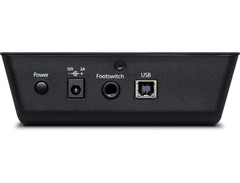
| Computer Connectivity | USB |
| USB | 1 x Type B |
| Other I/O | 1 x 1/4" (footswitch) |
| Software | Studio One Artist |
| Format | Mackie HUI (Pro Tools), Mackie Control Universal (Logic Pro X, Cubase, Ableton Live, Studio One) |
| Hardware Requirements - Mac | Intel Core 2 Duo or higher |
| Hardware Requirements - PC | Intel Core 2 Duo / AMD Athlon X2 or higher |
| OS Requirements - Mac | macOS 10.13 or later |
| OS Requirements - PC | Windows 10 or later |
| Power | 12V DC power supply |
| Height | 1.8" |
| Width | 5.5" |
| Depth | 9" |
| Weight | 1.5 lbs. |
FAQs
-
Is the PreSonus FaderPort Production Controller compatible with Ableton Live?
-
Yes, the PreSonus FaderPort is compatible with Ableton Live through Mackie Control Universal emulation, allowing seamless integration and control.
-
What type of fader does the PreSonus FaderPort have?
-
The PreSonus FaderPort features a single touch-sensitive, 100 mm motorized fader, ideal for precise automation and mixing tasks.
-
Does the PreSonus FaderPort require an external power supply?
-
Yes, the PreSonus FaderPort requires a 12V DC power supply, which is included with the unit.
-
Can I use the PreSonus FaderPort with Pro Tools?
-
Yes, the PreSonus FaderPort is compatible with Pro Tools using Mackie HUI emulation, providing essential control over your DAW.
-
Does the PreSonus FaderPort come with any software?
-
The PreSonus FaderPort includes a free perpetual license for Studio One Pro 7 upon registration, offering a complete DAW experience.
-
What operating systems are required to use the PreSonus FaderPort?
-
The PreSonus FaderPort requires macOS 10.13 or later for Mac and Windows 10 or later for PC, ensuring broad compatibility with modern systems.
-
How does the Session Navigator feature enhance workflow on the PreSonus FaderPort?
-
The Session Navigator on the PreSonus FaderPort allows quick and intuitive control over your DAW, streamlining tasks like track navigation, zooming, and section looping.
Videos

Sweetwater
PreSonus Faderport Control Surface Review
PreSonus Faderport Control Surface Review
Sweetwater
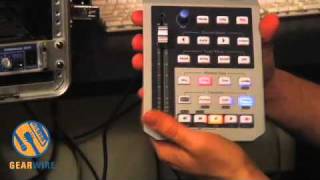
PreSonus FaderPort: An Overview Of A Handy Controller

gearwire
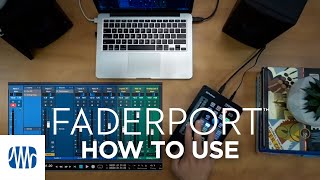
PreSonus—How to use the FaderPort

PreSonus Audio Electronics
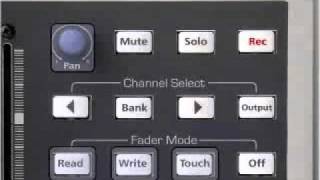
PreSonus FaderPort USB DAW Controller

Parts Express
Reviews
Owner Insights
We analyzed real musician discussions from forums and Reddit to find what players love, question, and tweak about PreSonus FaderPort Production Controller.
Features and functionality
-
The FaderPort's motorized fader is primarily effective for volume and pan automation in DAWs like Logic and Pro Tools.
Source -
The rotary encoder on the FaderPort is often deemed nonessential by users who focus more on the fader and transport controls.
Source -
The FaderPort excels in automation, especially when using Pro Tools' "trim automation" setting, allowing precise fader adjustments near zero.
Source
User experience
-
Owners appreciate the single-fader model for its simplicity and space-saving design, especially in studios with limited desk space.
Source -
Many users only utilize the fader for mixing, often in "trim" mode, largely ignoring other controls like transport buttons.
Source -
Some owners find themselves reverting to mouse controls despite owning the FaderPort, particularly when using complex DAW setups like Behringer X Touch with extenders.
Source -
Some users report the FaderPort suddenly stopping connection, requiring troubleshooting like driver reinstallation, though this seems to be an isolated issue.
Source
Software and compatibility
-
It integrates smoothly with other interfaces like the Apollo Twin, without causing conflicts in sessions.
Source -
V-Control Pro can enhance FaderPort's usability, adding features beyond its standard functions.
Source -
The FaderPort is perfectly mapped to Studio One out of the box, offering seamless integration compared to third-party controllers that may require manual configuration.
Source -
Auto-mapping of plugins in Studio One with the FaderPort is a significant time saver, enhancing workflow efficiency.
Source
Comparisons
-
Some prefer the Avid Artist Mix over the FaderPort 8 due to better integration with Pro Tools, and similar pricing when bought used.
Source -
The Behringer X Touch offers more controls and a dedicated Studio One mode, but the FaderPort's seamless integration with Studio One makes it a strong contender.
Source
Use cases and applications
Critic Reviews
Based on 0 Reviews and 0 Ratings
Artist usage
Add artist
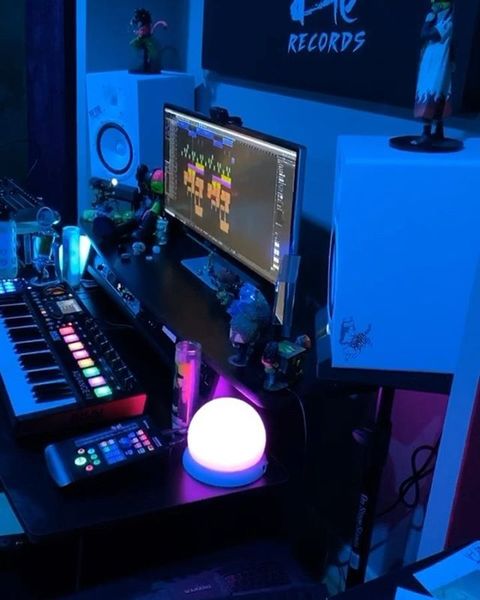
Genre Usage
Based on how artists on Equipboard use this gear, it is most commonly found in the following genres.
More PreSonus DAW Controllers

$33.96 - $209.99
in DAW Controllers Rank


$699.99 - $839.99
in DAW Controllers Rank


$169.00 - $209.99
in DAW Controllers Rank


$229.01 - $524.99
in DAW Controllers Rank


$199.99 - $249.99
in DAW Controllers Rank

$133.00 - $240.00
in DAW Controllers Rank


$182.00 - $277.00
in DAW Controllers Rank


$53.00 - $119.99
in DAW Controllers Rank


$249.00 - $499.00
in DAW Controllers Rank


$80.00
in DAW Controllers Rank


$285.00 - $419.00
in DAW Controllers Rank


$182.92 - $599.99
in DAW Controllers Rank


$1,045.00 - $1,399.99
in DAW Controllers Rank


$76.40 - $109.00
in DAW Controllers Rank


$57.00 - $1,299.99
in DAW Controllers Rank


in DAW Controllers Rank


$95.00
in DAW Controllers Rank


$99.00 - $229.00
in DAW Controllers Rank


$1,295.00 - $1,495.00
in DAW Controllers Rank


$995.00 - $1,195.00
in DAW Controllers Rank


$79.95 - $109.00
in DAW Controllers Rank


$122.00 - $189.00
in DAW Controllers Rank


$129.00 - $349.99
in DAW Controllers Rank

$184.54
in DAW Controllers Rank


$575.64 - $799.99
in DAW Controllers Rank

$120.00
in DAW Controllers Rank


$48.00 - $70.90
in DAW Controllers Rank


$1,191.76
in DAW Controllers Rank


$635.00 - $999.99
in DAW Controllers Rank


$333.00 - $399.99
in DAW Controllers Rank

$995.00 - $1,195.00
in DAW Controllers Rank

$140.00
in DAW Controllers Rank


$544.00 - $699.99
in DAW Controllers Rank

$1,191.76
in DAW Controllers Rank


$199.00 - $409.00
in DAW Controllers Rank

$125.00 - $169.99
in DAW Controllers Rank

$377.98 - $699.00
in DAW Controllers Rank


$249.00 - $469.90
in DAW Controllers Rank


$249.00 - $1,399.99
in DAW Controllers Rank


Accessories & Related Items


Community setups


Similar


Gear Guides







Most Popular DAW Controllers
Most Popular Brands
-
Added to Equipboard on by
 kazmir
GearIQ 376
-


